Free Cornell Notes Template (Word, PDF & Google Docs)
A Cornell notes template splits a page into three zones: a cue column on the left (about 30% of the width) for questions and key terms, a notes area on the right (about 70%) for what you record in class, and a summary strip across the bottom (about a fifth of the page) for a two-to-four-sentence recap.
Written by Allen, AFFiNE content team. Reviewed by Vincent Chen, CEO of AFFiNE, on November 5, 2026. The method description follows Walter Pauk's How to Study in College and the Cornell University Learning Strategies Center. Menu paths for Word, Google Docs, and OneNote were checked against Microsoft and Google help pages in September 2026, and the GoodNotes and Notability steps against their help centers in November 2026. Every template file below was generated for this guide and re-opened after export to confirm the page size, the one-page layout, and the 30/70 split. The biology example is fictional; its science was checked against OpenStax Biology 2e. AFFiNE makes one of the apps covered here, so we have a commercial interest in it; every download works without AFFiNE. See AFFiNE's editorial policy.
Download the Free Cornell Notes Template
All files are free, need no sign-up, and use the same layout: a header for name, class, date, and topic; a 2.25-inch (55 mm) cue column; and a 2-inch (50 mm) summary strip.
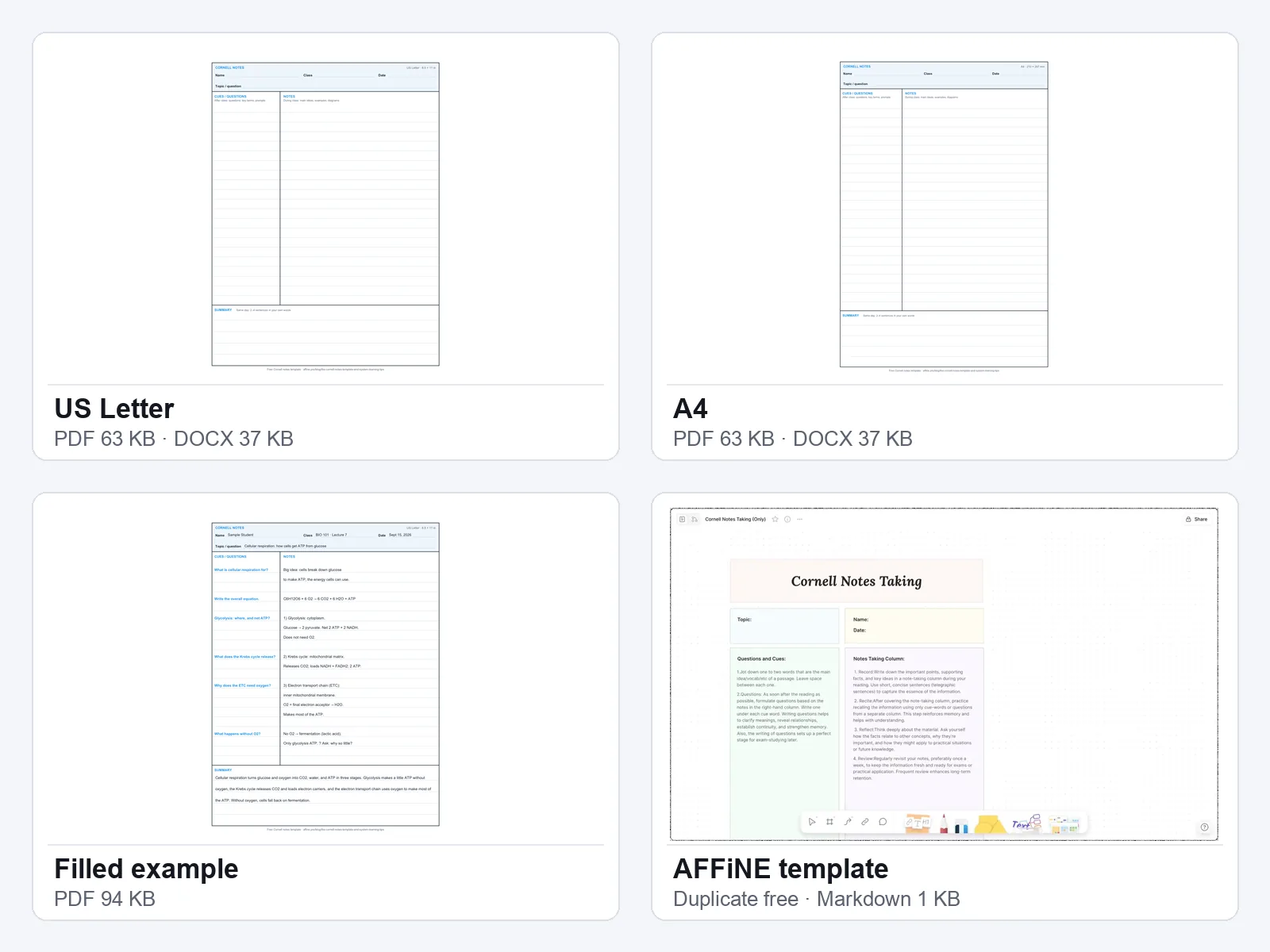
- Cornell notes template for Word, US Letter (DOCX, 37 KB): Editable table. The cue and notes rows grow as you type, so a long lecture flows onto a second page instead of being cut off.
- Cornell notes template for Word, A4 (DOCX, 37 KB): The same file sized for A4 paper.
- Printable Cornell notes PDF, US Letter (63 KB): Blank, with ruled lines across both columns so cues line up with the notes beside them.
- Printable Cornell notes PDF, A4 (63 KB): The same sheet for A4 printers. This is also the file to import into GoodNotes or Notability.
- Filled Cornell notes example (PDF, 94 KB): A completed page from a fictional BIO 101 lecture on cellular respiration, the example used throughout this guide.
- Cornell notes template in Markdown (MD, 1 KB): For AFFiNE, Obsidian, Notion, or any app that imports Markdown. Includes a review checklist.
Google Docs: we couldn't find a Cornell notes template in Google's own Docs template gallery, so the quickest route is the Word file. Download the DOCX, upload it to Google Drive, and double-click it. It opens in Google Docs, where you can type into the table and edit it with others in real time.
Printing: print at 100% ("Actual size"). If your printer uses the other paper size, download the matching file instead of letting the printer scale the page.
What a Cornell Notes Template Includes
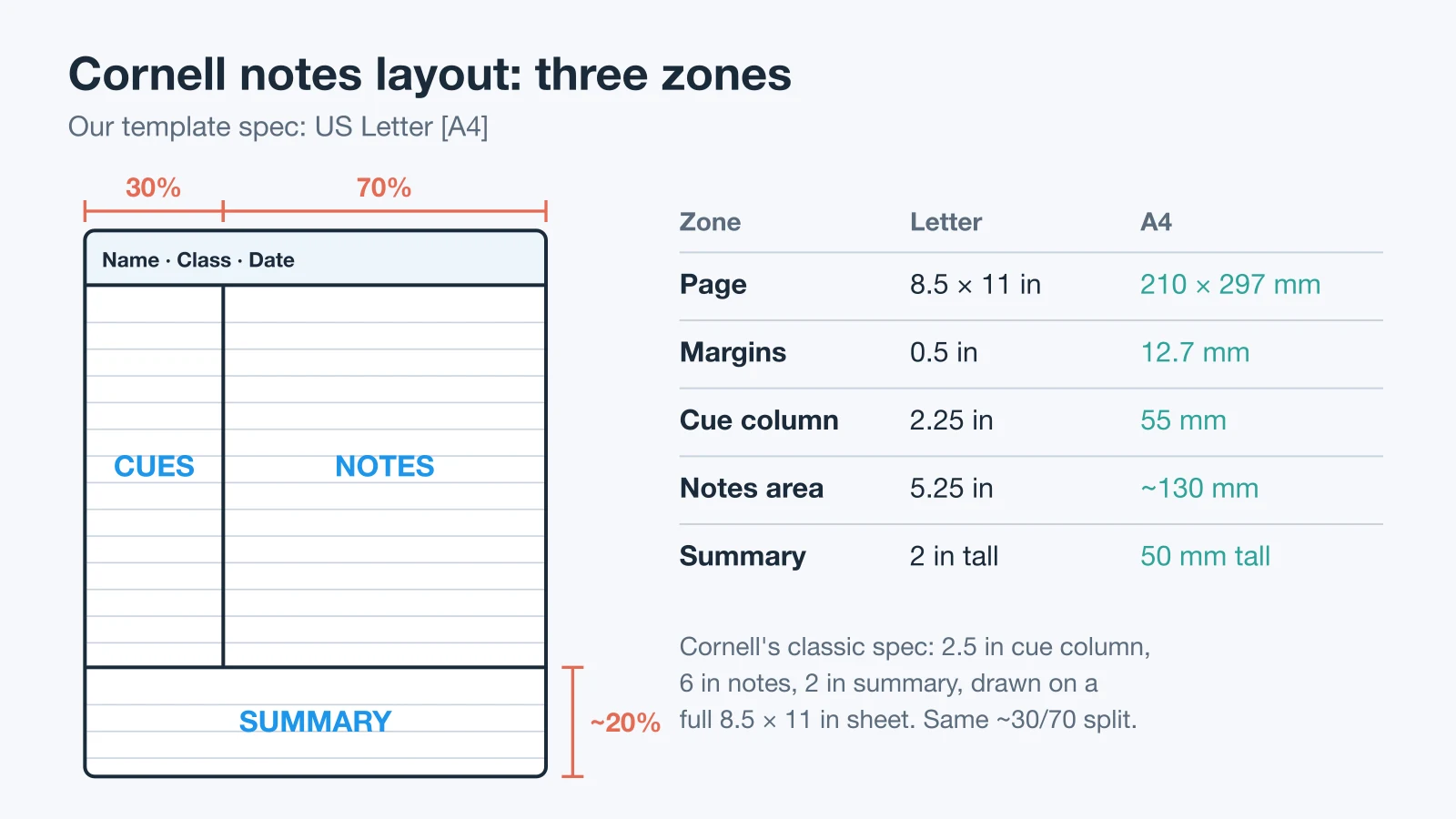
Every Cornell page has the same three working zones plus a header. Each zone has one job, and each is filled at a different time.
| Zone | Letter | A4 | Fill it |
|---|---|---|---|
| Header | 0.95 in | 24 mm | Before class |
| Cues | 2.25 in | 55 mm | After class |
| Notes | 5.25 in | ~130 mm | In class |
| Summary | 2 in tall | 50 mm tall | Same day |
These are the measurements of the templates on this page, with 0.5-inch (12.7 mm) margins. The classic version, in the Cornell Learning Strategies Center handout adapted from Pauk's book, draws the lines on a full 8.5 × 11 inch sheet: a 2½-inch cue column, a 6-inch notes column, and a 2-inch summary. Both keep the same shape: roughly 30% cues, 70% notes, and a summary about a fifth of the page tall.
Letter vs A4. US Letter is 8.5 × 11 in (215.9 × 279.4 mm). A4 is 210 × 297 mm: 5.9 mm narrower and 17.6 mm taller. The A4 files keep the same 30/70 split and use the extra height for two more ruled lines. Printing a Letter PDF on A4 with "fit to page" shrinks everything to about 97%, which is why each size has its own file.
- Header: name, class, date, and the lecture topic. Many teachers, and every AVID classroom, also ask for an "essential question" here: the one thing you should be able to answer after class.
- Notes area: main ideas, examples, formulas, diagrams, and anything you did not understand, marked with a
?. Write in short lines, not full sentences, and leave a blank line between ideas. - Cue column: questions a test could ask, key terms, and prompts. Fill it after class, not during. Each cue should be answerable from the notes beside it.
- Summary: two to four sentences, in your own words and from memory. If you can't write it, you have found the part to review.
Writing Good Cues
Cues don't have to be questions, but each one has to be something you can answer with the notes covered. A bare keyword usually fails that test: you read "Glycolysis", recognize it, and move on without recalling anything. Turn it into a prompt that asks for an answer:
| Cue type | Example | Works best for |
|---|---|---|
| Question | "Glycolysis: where, and net ATP?" | Concepts, causes, processes |
| Term to define | "Define: substrate-level phosphorylation" | Vocabulary, definitions |
| Task prompt | "Draw the 3 stages in order" | Diagrams, sequences |
| Problem cue | "Solve: 2x + 6 = 14" | Math, worked methods |
If a cue can be answered with "yes" or "no", or by recognizing a word, rewrite it.
Here is the Reduce step on a real page. The raw lecture lines on the left have no cues to test yourself on. On the right, each block has become a question with a short answer beside it, and the summary ties them together:
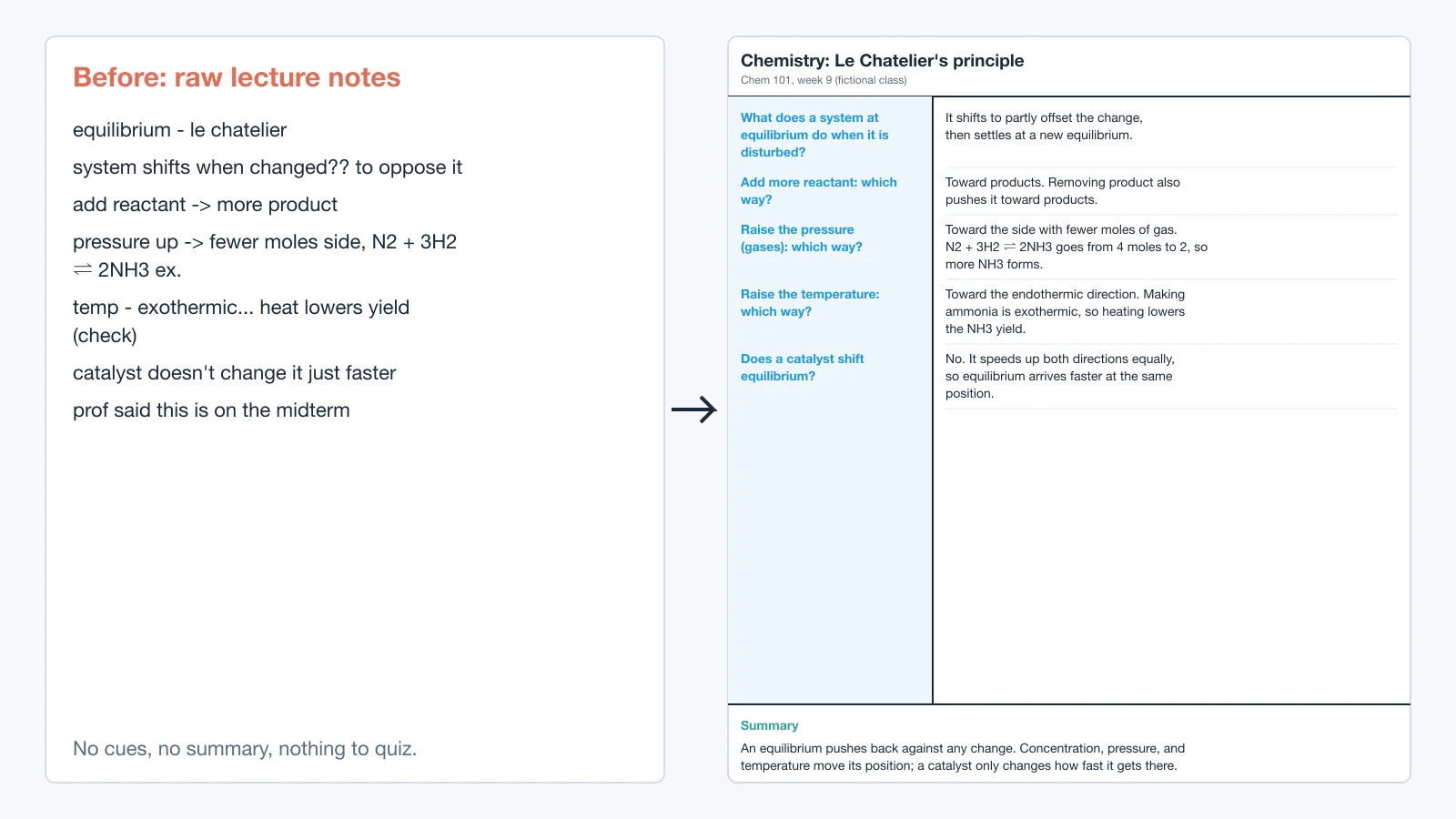
Cornell Notes Example: A Filled Biology Page
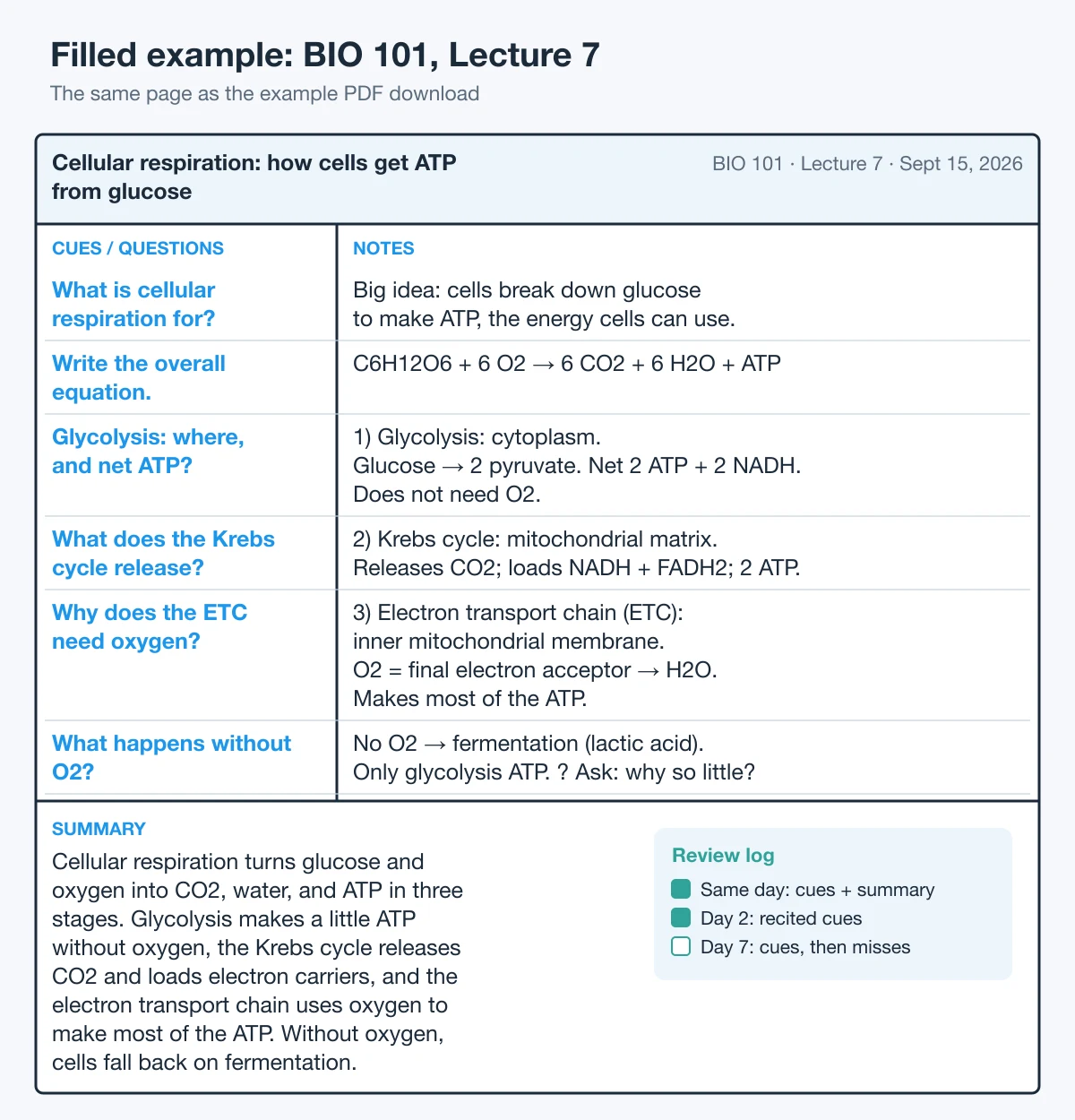
This is the page in the filled example PDF. The course is fictional (BIO 101, Lecture 7, on cellular respiration), and the science matches the cellular respiration chapter of OpenStax Biology 2e.
Notice how the zones work together:
- The notes are compressed. "Glucose → 2 pyruvate. Net 2 ATP + 2 NADH." is one line, not a paragraph. Numbered stages (1, 2, 3) keep the process in order.
- Every cue is a question the notes answer. "Glycolysis: where, and net ATP?" sits beside the line that answers it, so covering the notes turns the page into a quiz.
- The confusing part is flagged, not skipped. "? Ask: why so little?" is a reminder to ask about fermentation's low ATP yield before the next class.
- The summary connects the stages. It was written from memory the same evening:
Cellular respiration turns glucose and oxygen into CO2, water, and ATP in three stages. Glycolysis makes a little ATP without oxygen, the Krebs cycle releases CO2 and loads electron carriers, and the electron transport chain uses oxygen to make most of the ATP. Without oxygen, cells fall back on fermentation.
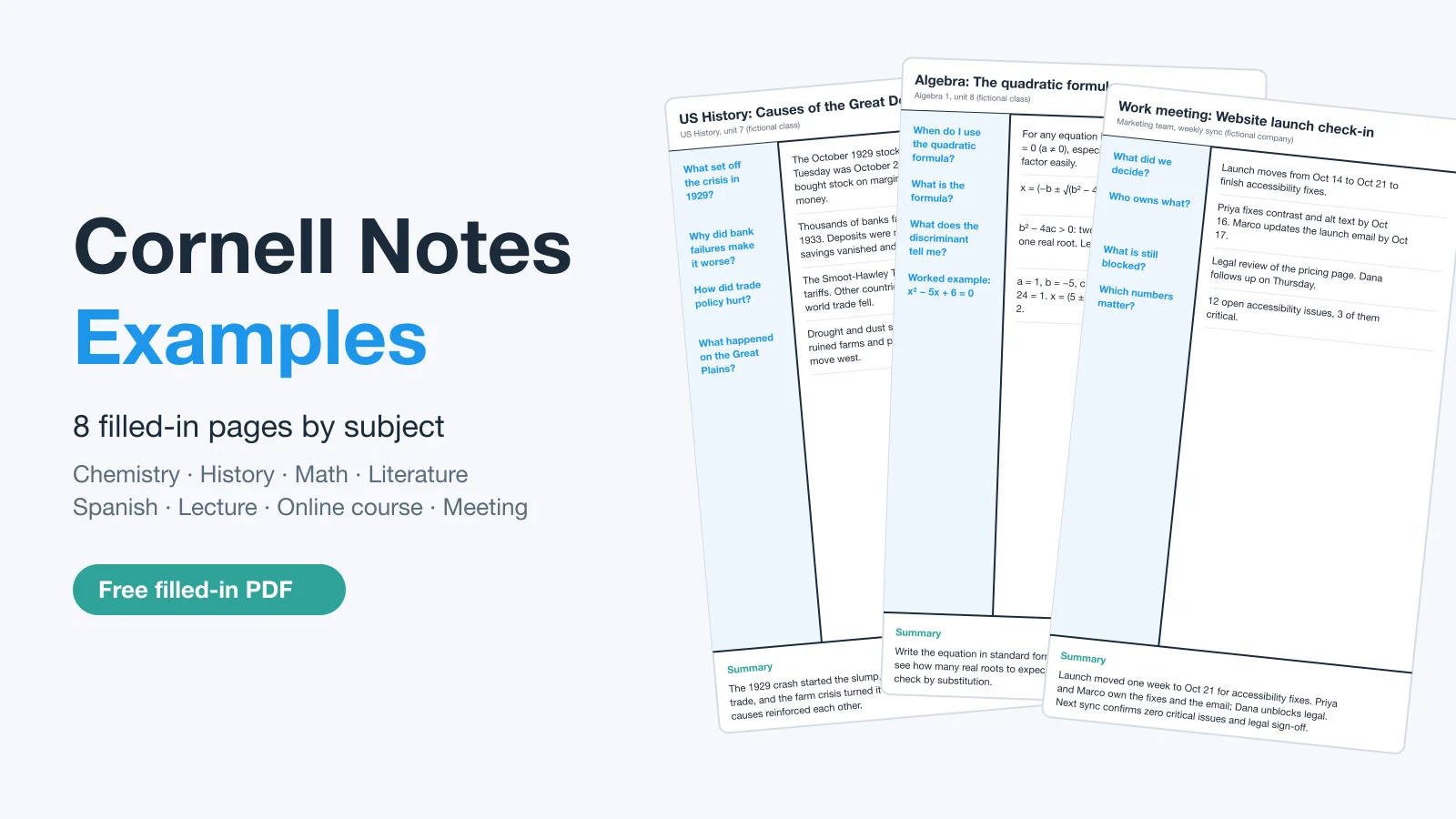
For filled pages in history, math, literature, Spanish, and more, see these Cornell notes examples.
How to Use a Cornell Notes Template: The 5R Method in 24 Hours
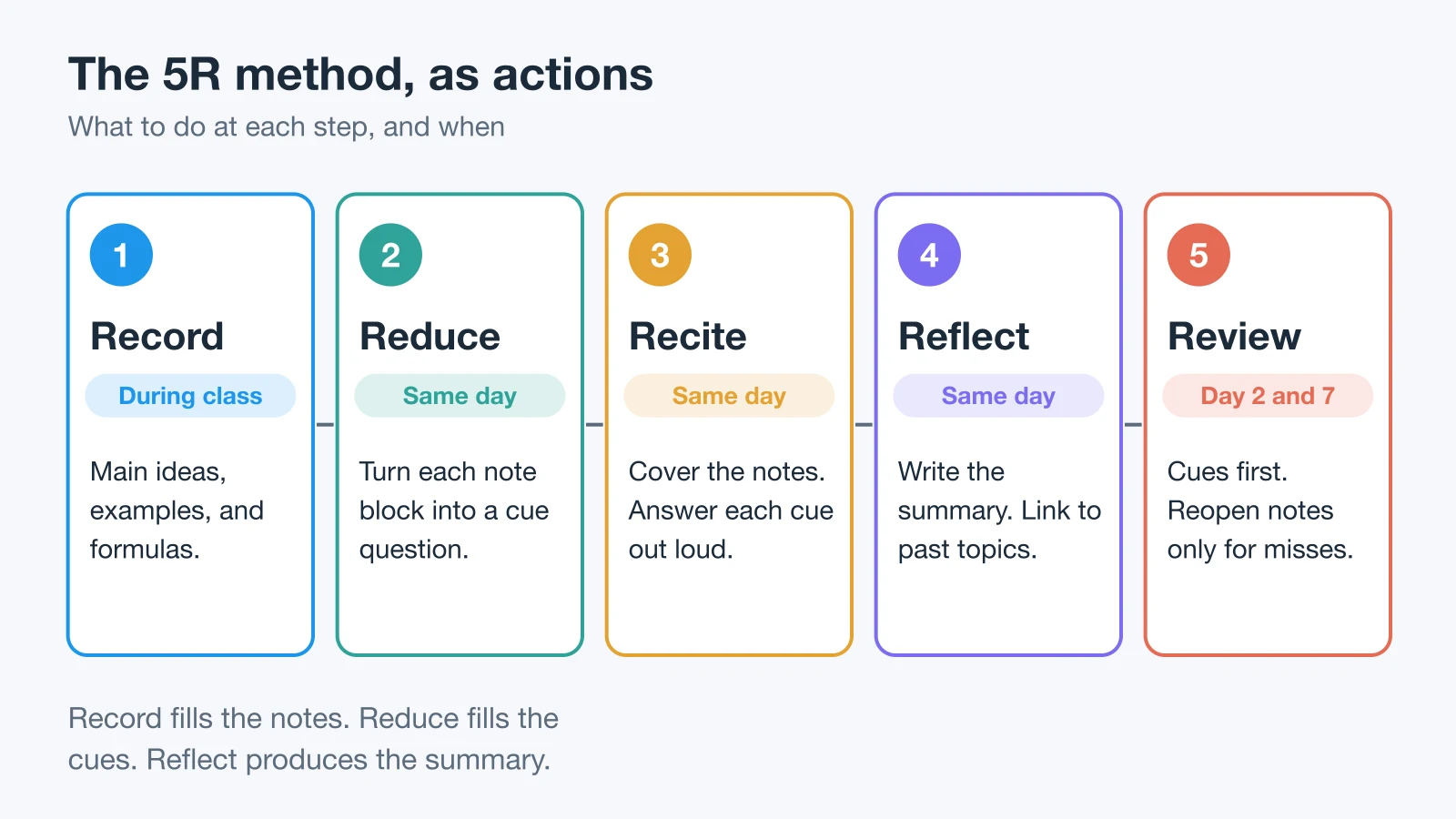
Walter Pauk devised the system in the 1950s while he was a teaching assistant at Cornell University, and later taught it in How to Study in College (first published by Houghton Mifflin in 1962; the 11th edition, with Ross J. Q. Owens, is published by Wadsworth Cengage). The steps are usually taught as the 5 Rs. Cornell's handout calls the second step "Questions" rather than "Reduce", but the job is the same.
Before class, fill in the header (name, class, date, topic) and leave the cue column empty. Then work through the five steps, finishing the page within 24 hours while you can still fill gaps from memory:
| Step | When | What you do |
|---|---|---|
| 1. Record | In class | Write main ideas, examples, formulas, and diagrams in short lines in the notes area. Mark gaps with ? instead of stopping to work them out. |
| 2. Reduce | Within an hour | Fix the gaps (a classmate, the slides, the textbook), then turn each block of notes into a cue beside it. |
| 3. Recite | Same evening | Cover the notes area, answer each cue out loud in your own words, then uncover to check. Star every cue you miss. |
| 4. Reflect | Same evening | Ask how the lecture connects to earlier ones and the reading. Write the summary from memory. |
| 5. Review | Day 2, day 7, before the exam | Answer every cue cold. Start with the starred cues and reopen the full notes only where you still get stuck. |
Cornell's handout suggests at least ten minutes every week reviewing all your previous notes. The exact intervals are a starting point, not a rule: what matters is that each review is a short self-test spread out over time, not one long reread.
Recite and Review are where most of the learning happens. In the Dunlosky et al. (2013) review of ten study techniques, practice testing and distributed practice were the only two rated "high utility". Covering the notes and answering from the cues is a form of practice testing, and returning to the cues on later days is distributed practice. The same review rated summarization on its own as low utility, which is why the summary here is written from memory as a recall check, not copied from the notes.
AVID Cornell Notes: The Five Phases
If your school uses AVID, your teacher will call this "focused note-taking". AVID's five-phase process uses the same Cornell page but names the steps differently:
| AVID phase | Where it goes on the template | Matching R |
|---|---|---|
| 1. Taking notes | Essential question in the header, notes in the notes area | Record |
| 2. Processing notes | Underline, circle, and chunk the notes; cross out what doesn't matter | Reduce |
| 3. Connecting thinking | Questions in the cue column, links to earlier lessons | Reduce, Reflect |
| 4. Summarizing and reflecting | Summary strip, answering the essential question | Reflect |
| 5. Applying learning | Use the notes for a quiz, essay, or project | Recite, Review |
The templates on this page work for AVID as they are: write the essential question on the topic line, and if your teacher grades a reflection, add one line under the summary.
Adapting the Template by Subject
The layout stays the same across subjects. What changes is what goes into each zone.
| Subject | Cue | Notes | Summary |
|---|---|---|---|
| Math | "When do I use it?" | Worked example | Method in words |
| Science | "What happens if…?" | Process steps, diagram | The process in one pass |
| History | "Why did it start?" | Causes, dates, people | Cause and effect |
| Language | "Which tense?" | Rule, examples | When to use each |
| Programming | Error message or function name | Code snippet, why it works | When to reach for it |
| Meetings | "Who owns this?" | Decisions, owners | Outcome, next steps |
For math and science, leave room in the notes area for a sketch: the PDF on paper or a tablet, or Edgeless mode in AFFiNE, handles diagrams better than a Word table. 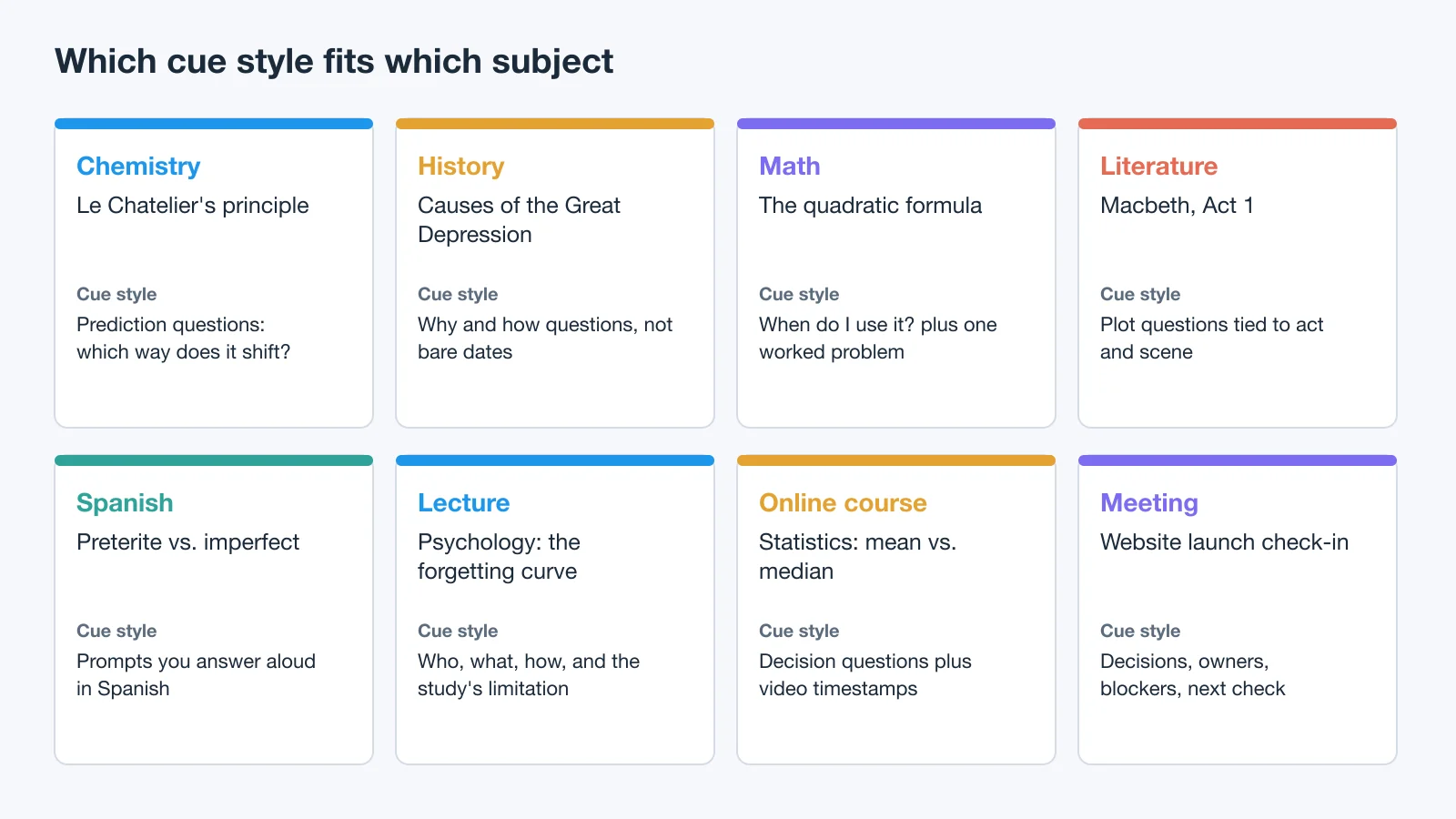
For eight complete pages filled in this way, see our Cornell notes examples by subject.
Cornell Notes in a Paper Notebook
You don't need pre-printed paper. Rule the lines yourself, or print the PDF and keep the sheets in a binder.
- Letter-size or A4 notebook: draw a vertical line 2½ inches (about 63 mm) from the left edge and a horizontal line 2 inches (about 50 mm) above the bottom. That is the classic Cornell layout.
- A5 notebook (148 × 210 mm): keep the proportions, not the inches. A cue column of about 40 mm and a summary strip of about 40 mm leave a notes area of roughly 100 mm.
- Ruling: college rule (9/32 inch, about 7 mm) fits more lines and suits most adults. Wide rule (11/32 inch, about 9 mm) is easier for large handwriting and younger students.
- Speed tip: rule one master page, then lay it under each new sheet as a guide. To fill an A5 binder, print the A4 PDF at 71%, the A4-to-A5 ratio (148 ÷ 210).
Pre-printed Cornell notebooks save the ruling but cost more and lock you into one cue width. Try the printable PDF for a week before you buy one.
Microsoft Word Cornell Notes Template
The easiest option is the Word DOCX above: open it in Word, and type in the cue and notes cells. The rows expand as you type.
You can also search Word's online templates: go to File → New, type "Cornell notes" in the search box, and press Enter. What appears depends on your Word version and region. We couldn't confirm an official Microsoft Cornell notes template in September 2026, so check the layout of anything you find against the three zones above.
To build your own in Word:
- Set the margins to 0.5 inch under Layout → Margins → Custom Margins.
- Insert a table with two columns and three rows.
- Set the left column to about 30% of the width (2.25 inches on Letter paper).
- Merge the bottom row's cells to make the summary strip, and set its height to about 2 inches.
- Save it with File → Save As → Word Template (.dotx) so every lecture starts from a clean copy.
Google Docs Cornell Notes Template
We couldn't find a Cornell notes template in Google's own Docs template gallery, so there are two ways to get one:
- Use the DOCX (fastest). Download the Word file above, upload it to Google Drive, and double-click it. It opens in Google Docs with the table in place. Keep that file blank and use File → Make a copy for each lecture.
- Build one. Choose Insert → Table with two columns and three rows, and drag the column divider to about 30%. For the summary strip, highlight the bottom row, right-click, and choose Merge cells.
Google Docs is the best choice for shared notes: a study group can fill one page together, use comments to flag unclear notes, and check version history. On a phone, the table gets cramped, so keep cues short.
OneNote Cornell Notes Template
OneNote for Windows has page templates under Insert → Page Templates, but Microsoft describes the built-in ones as page backgrounds, planners, and to-do lists. We found no official Cornell layout among them. You can build one in a few minutes:
- Draw a vertical line about 30% from the left edge and a horizontal line above the bottom fifth of the page (Draw tab), or insert a two-column table.
- Add "Cues", "Notes", and "Summary" labels.
- In OneNote for Windows, save the empty page as your own page template so each lecture starts from it. OneNote for the web can't create page templates, and OneNote for Mac doesn't support them, so on those apps copy a blank Cornell page instead.
OneNote is strongest for handwritten notes on a tablet: formulas, diagrams, and annotated slides. The weak point is Recite. Handwritten pages are easy to reread and easy to skip testing yourself on, so write your cues as real questions.
GoodNotes and Notability Cornell Notes Template
Both iPad apps can use the printable PDF above as paper:
- GoodNotes: save the PDF to Files. In the template library, choose + Import Template, pick the PDF, select Paper, and put it in a custom group. Every new page in a notebook can then start as a blank Cornell sheet.
- Notability: press and hold + New, then choose Import and pick the PDF. Duplicate the blank page before each lecture so the original stays clean.
Handwritten pages in these apps are pictures of ink, not text you can rearrange, so the same advice as OneNote applies: make the cues real questions, and cover the notes area with your hand or a sticky note when you recite.
AFFiNE Cornell Notes Template for Digital Study Systems
In AFFiNE, every doc has a Page mode and an Edgeless mode: a document view and an infinite whiteboard canvas. That means Cornell notes can hold typed text and freehand diagrams in the same doc.
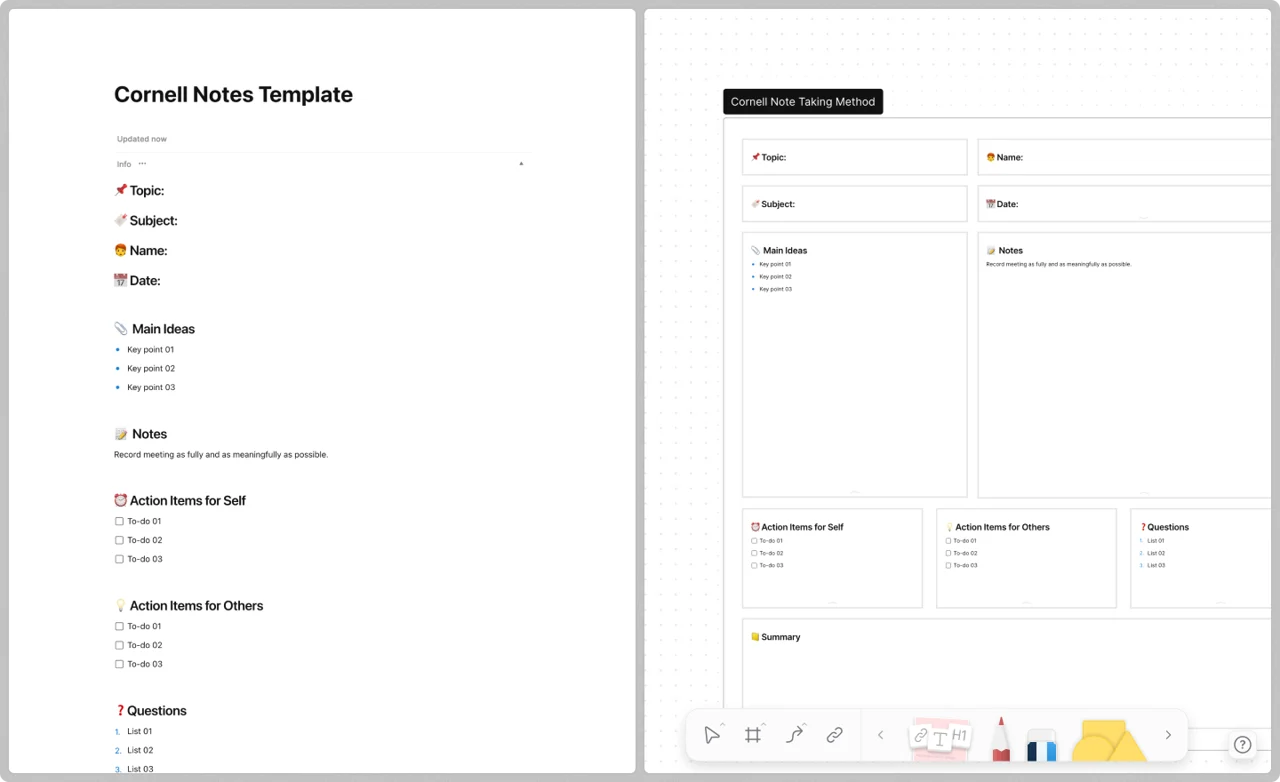
The same Cornell template in Page mode (left) and Edgeless mode (right). Screenshot from an earlier version of AFFiNE.
You have three ways to start:
- Use the template. The AFFiNE Cornell Notes Template gives you the cue, notes, and summary layout ready to duplicate. The digital Cornell notes template gallery has variations, including a visual Cornell template for complex concepts and a screen-first digital Cornell method.
- Import the Markdown file. Bring the Markdown version in as a new doc. Once the layout looks right, mark the doc as a template so each new lecture starts from it.
- Switch to Edgeless mode for diagrams. Sketch the process (such as the three stages of cellular respiration) beside the notes, then return to Page mode to recite from the cues. For a long lecture, an AI mind map of the lecture can draft that structure for you to check.
AFFiNE is a good fit if you want your Cornell pages to link to readings, assignments, and earlier lectures. The desktop and mobile apps work offline, and local workspaces are free. If you only need a printed sheet, the PDF is simpler. For a wider comparison of study tools, see the best apps for the Cornell method and our list of free note-taking apps.
Does the Cornell Method Work? What the Research Says
The method is widely taught, but direct research on the Cornell format is thin, and the studies that exist are small with mixed results:
| Study | Who | Result | Caveat |
|---|---|---|---|
| Quintus et al., 2012 | 32 high school students | No difference on 3 unit tests | One elective class |
| Ahmad, 2019 | 123 EFL students | Beat control; tied REAP | Intact classes |
| Yıldırım, 2026 | 134 trainee teachers | Tied at post-test; one edge later | Small groups |
In the Yıldırım study, the only significant difference on the retention test four weeks later was Cornell versus writing notes as full sentences. In the Ahmad study, the Cornell group scored higher on critical reading than the control group, but no higher than a group using a different structured method (REAP).
Paper or digital? The research is mixed here too. In Mueller and Oppenheimer (2014), students who typed lecture notes took more verbatim notes and did worse on conceptual questions than students who wrote by hand. But when Morehead, Dunlosky, and Rawson (2019) replicated the study, test performance did not consistently differ, and the authors called it premature to declare either one better. Choose the format by how you will review: paper or a tablet for handwriting and diagrams, Google Docs for group notes, AFFiNE for pages that link to each other.
The honest reading: no study shows the page layout alone raises grades, so treat claims that Cornell notes "improve scores by X%" with caution. What is well supported is the review behavior the template builds in, self-testing and spaced review, as summarized in the Dunlosky et al. review above. The benefit comes from doing the Reduce, Recite, and Review steps, and the template makes those steps hard to skip.
Common Mistakes to Avoid
- Writing cues during the lecture. Class time is for recording. Cues written later force you to reprocess the notes, which is the point.
- Copying slides word for word. If the slides are shared, note only what the lecturer adds: examples, emphasis, and explanations. Whichever format you use, compressed notes in your own words are what the method depends on.
- Using bare keywords as cues. "Glycolysis" is hard to test yourself on. "Glycolysis: where, and net ATP?" is easy. See Writing Good Cues.
- Skipping the summary. The summary is the fastest way to find what you don't understand yet.
- Rereading instead of reciting. Rereading feels productive. Covering the notes and answering from the cues is what actually shows you what you know.
- Waiting until exam week. A page finished within 24 hours takes minutes to review. A week-old page often needs to be relearned.
Sources
- Walter Pauk and Ross J. Q. Owens, How to Study in College, 11th ed., Wadsworth Cengage (first edition: Houghton Mifflin, 1962).
- Cornell University Learning Strategies Center, The Cornell Note-taking System and its printable handout.
- Cornellians, the story behind Cornell Notes (on Pauk developing the system in the 1950s).
- AVID, The Five Phases of the Focused Note-Taking Process.
- Dunlosky, J., et al. (2013). Improving students' learning with effective learning techniques. Psychological Science in the Public Interest, 14(1). doi:10.1177/1529100612453266
- Mueller, P. A., & Oppenheimer, D. M. (2014). The pen is mightier than the keyboard. Psychological Science, 25(6). doi:10.1177/0956797614524581
- Morehead, K., Dunlosky, J., & Rawson, K. A. (2019). How much mightier is the pen than the keyboard for note-taking? Educational Psychology Review, 31. doi:10.1007/s10648-019-09468-2
- Quintus, L., et al. (2012). The impact of the Cornell note-taking method on students' performance in a high school family and consumer sciences class. Journal of Family & Consumer Sciences Education, 30(1). Article
- Ahmad, S. Z. (2019). Impact of Cornell notes vs. REAP on EFL secondary school students' critical reading skills. International Education Studies, 12(10). doi:10.5539/ies.v12n10p60
- Yıldırım, M. (2026). The effects of note-taking methods on lasting learning. Frontiers in Psychology, 16. doi:10.3389/fpsyg.2025.1697151
- OpenStax, Biology 2e, chapter 7: Cellular Respiration (science in the example page).
- Help pages checked in September 2026: Microsoft Word create a document, Microsoft OneNote page templates, Google Docs Office files and tables. Checked in November 2026: GoodNotes custom templates, Notability importing files.
Frequently Asked Questions
What is the Cornell notes format?
The Cornell notes format divides a page into a cue column on the left (about 30% of the width), a notes area on the right (about 70%), and a summary strip across the bottom. You take notes during class, write cue questions afterward, and summarize the page in your own words the same day.
Is there a Cornell notes template on Google Docs?
We couldn't find one in Google's own Docs template gallery. The fastest option is to download a Cornell notes DOCX, upload it to Google Drive, and double-click it to open it in Google Docs with the table in place. You can also build one with a two-column table and a merged bottom row.
Is there a Cornell notes template in Word?
We couldn't confirm an official Microsoft Cornell notes template in September 2026. You can search online templates under File → New, or download the free Word template on this page, which comes in US Letter and A4 sizes with a 30/70 cue-to-notes split.
How wide should the cue column be in Cornell notes?
The classic Cornell layout uses a 2½-inch cue column and a 6-inch notes column on 8.5 × 11 inch paper, with a 2-inch summary at the bottom. With 0.5-inch margins, a 2.25-inch cue column (55 mm on A4) keeps the same 30/70 split. On an A5 notebook, use about 40 mm.
What are the 5 R's of Cornell notes?
The 5 R's are Record, Reduce, Recite, Reflect, and Review. Record notes during class, reduce them to cue questions, recite answers with the notes covered, reflect on how the material connects and write a summary, and review the cues on later days.
Do cues in Cornell notes have to be questions?
No. A cue can be a question, a term to define, a task such as "draw the cycle", or a practice problem. What matters is that you can answer it with the notes covered. Bare keywords are the weakest cues because you can recognize them without recalling anything.
What are the disadvantages of Cornell notes?
The method takes more time than plain notes, because the cues and summary are written after class. Very fast lectures leave little room to keep the layout tidy, and a fixed paper page can run out of space for diagrams. Recording first and adding cues later, or using a digital page that grows, solves most of this.
What is an AVID Cornell notes template?
It is a Cornell page with an essential question at the top, used with AVID's five-phase focused note-taking process: taking notes, processing them, connecting thinking, summarizing and reflecting, and applying the learning. Any template on this page works: write the essential question on the topic line and add a reflection line under the summary if your teacher asks for one.
Can ChatGPT make Cornell notes?
An AI assistant can draft cue questions and a summary from notes you give it, which is useful for checking your work. But writing the cues and the summary yourself is part of how the method helps you learn, so use AI output as a comparison, not a replacement, and check it against your course materials.
Can I use Cornell notes for work meetings?
Yes. Use the notes area for decisions and context, the cue column for follow-up questions and owners, and the summary for the meeting outcome. The same review habit applies: read the cues again before the next meeting.