
10 Free Weekly Schedule Templates for Any Week (2026)
Updated October 26, 2026. Written by the AFFiNE team. Every template below is a free AFFiNE template, so we are not neutral; the descriptions come from the templates as published in our gallery, and the planning advice comes from how our own team plans its week.
A weekly schedule template is a reusable layout that places your commitments, tasks and free time across the seven days of a week, usually as a grid of days and time blocks or a set of day columns. It shows your real capacity before Monday starts, so you can protect priority work, leave buffer time and review what actually happened.
Below are 10 free weekly schedule templates, each built in AFFiNE. Open one, click Use this template to copy it into your workspace, then edit it on the whiteboard or export it to PDF or PNG to print. Not sure where to start? Pick the Weekly Schedule & To-Do List template if you plan work tasks, or the Minimal template if busy planners usually make you give up.
Quick picker: which weekly schedule template fits you?
| # | Template | Best for | Layout | Print-friendly |
|---|---|---|---|---|
| 1 | Weekly Schedule & To-Do List | Work weeks, task-heavy roles | Calendar grid, priority matrix, Kanban and table task views | Yes |
| 2 | Minimal weekly schedule | Beginners, people who abandon planners | Goals, must-dos, four tasks per day (Sun–Sat) | Yes, neutral colors |
| 3 | Bullet journal weekly schedule | Creative planners, habit builders | Time blocks, task lists, habit tracker | Yes |
| 4 | Weekly schedule & tracker | Goal-driven professionals | Time blocks plus progress tracking | Yes |
| 5 | Aesthetic weekly schedule | Personal planning you want to enjoy | Color-coded blocks, one section per day | Yes |
| 6 | Study Assignment Tracker Weekly Planner | Students | Assignments, deadlines, study blocks | Yes |
| 7 | Weekly fitness schedule | Training plans | Workouts, rest days, goals | Yes |
| 8 | Weekly meal schedule | Households, meal prep | Four meals a day plus a grocery list | Yes |
| 9 | Mindfulness weekly schedule | Stress management, self-care | Blocks for meditation, breathwork, reflection | Yes |
| 10 | Dopamine aesthetic weekly schedule | Visual thinkers, ADHD-friendly planning | Bright color-coded blocks, motivational cues | Best on screen |
Want a different look? The weekly schedule template gallery also has pastel, black and pink, marshmallow, vintage and motivational designs.
The 10 weekly schedule templates
1. Weekly Schedule & To-Do List Template (Visual Planner)

This is the most complete template on the list. It opens in Edgeless mode (AFFiNE's whiteboard) with three areas: a brain-dump space, a priority matrix and a weekly calendar grid. Tasks also live in a database, so you can view them as a table to track deadlines or as a Kanban board (To do, In progress, Done).
Best for: knowledge workers, managers and anyone whose week is mostly tasks rather than appointments.
How to use it: brain-dump on Sunday, drag the important items into the priority matrix, then drag them into calendar days. If Tuesday falls apart, drag the block to Wednesday instead of rewriting it.
Open the Weekly Schedule & To-Do List template
2. Minimal weekly schedule template

It has a Goals box for two or three outcomes, an Important to-dos box for things that cannot slip, and one column per day from Sunday to Saturday, each with four checkboxes you can rename. Its neutral colors stay readable when you export it to PDF or PNG.
Best for: people who give up on complex planners, and students or freelancers who want one clean sheet.
Tip: keep each day to three to five tasks. If a day needs more, one of those tasks is probably too big and should be split.
Open the Minimal weekly schedule template
3. Bullet journal weekly schedule template

A bullet-journal-style weekly spread with time blocks, task lists, priority markers and a habit tracker. It feels like a paper bullet journal, except you can move items instead of rewriting them.
Best for: people who like the bullet journal method and want habits and tasks on the same page.
Open the Bullet journal weekly schedule template
4. Weekly schedule & tracker template

It pairs weekly time blocks with task lists and a progress tracking section. Use the tracker at the end of the week to see what got done, what slipped and which days were overloaded.
Best for: professionals working toward weekly targets, and anyone who wants a review built into the page.
Open the Weekly schedule & tracker template
5. Aesthetic weekly schedule template

A minimalist week layout with color-coded time blocks and a separate section for each day. Give each category (work, study, personal, rest) its own color so you can see the balance of your week at a glance.
Best for: personal planning where you want the page to look good enough to keep using.
Open the Aesthetic weekly schedule template
6. Study Assignment Tracker Weekly Planner

It lists the week's assignments, projects and deadlines next to your study time, so you see what is due and when you will work on it in one view.
Best for: high school and university students juggling several courses.
Tip: schedule study blocks before the due date, not on it. A work session two days before every deadline prevents most late nights.
Open the Study Assignment Tracker Weekly Planner
7. Weekly fitness schedule template

Plan strength, cardio, mobility and rest days across the week, with room to log completed sessions and goals.
Best for: anyone following a training plan who wants workouts in the same place as the rest of their week, not in a separate app.
Open the Weekly fitness schedule template
8. Weekly meal schedule template

Breakfast, lunch, dinner and snacks for each day, plus a grocery list. Plan meals during your weekly review so busy evenings get quick meals and lighter days get the cooking.
Best for: families, meal preppers and anyone trying to order less takeout.
Open the Weekly meal schedule template
9. Mindfulness weekly schedule template

A calm week layout with time blocks reserved for meditation, breathwork, reflection and self-care. It treats recovery as an appointment instead of something you do "if there's time."
Best for: people building a self-care habit, or anyone whose week has no white space left.
Open the Mindfulness weekly schedule template
10. Dopamine aesthetic weekly schedule template

Bright colors, bold blocks and motivational cues. Strong contrast makes the plan easier to scan and harder to ignore, which helps if plain grids feel boring. If that sounds like you, also read our comparison of daily vs weekly planners for ADHD.
Best for: visual thinkers and anyone who needs a plan that grabs their attention.
Open the Dopamine aesthetic weekly schedule template
How to make a weekly schedule in 7 steps
- Book a 20-minute planning slot. Pick Friday afternoon or Sunday evening and keep the same slot every week.
- Brain-dump everything. Write down every task, deadline, appointment and errand. Sticky notes on an AFFiNE whiteboard work well. If the list is messy, AFFiNE AI can group it by project; check the result before you rely on it.
- Place fixed commitments first. Meetings, classes, shifts, school runs and workouts go in before anything else.
- Choose your top three outcomes. Ask what would make this week a success, and put those outcomes into the earliest open focus blocks.
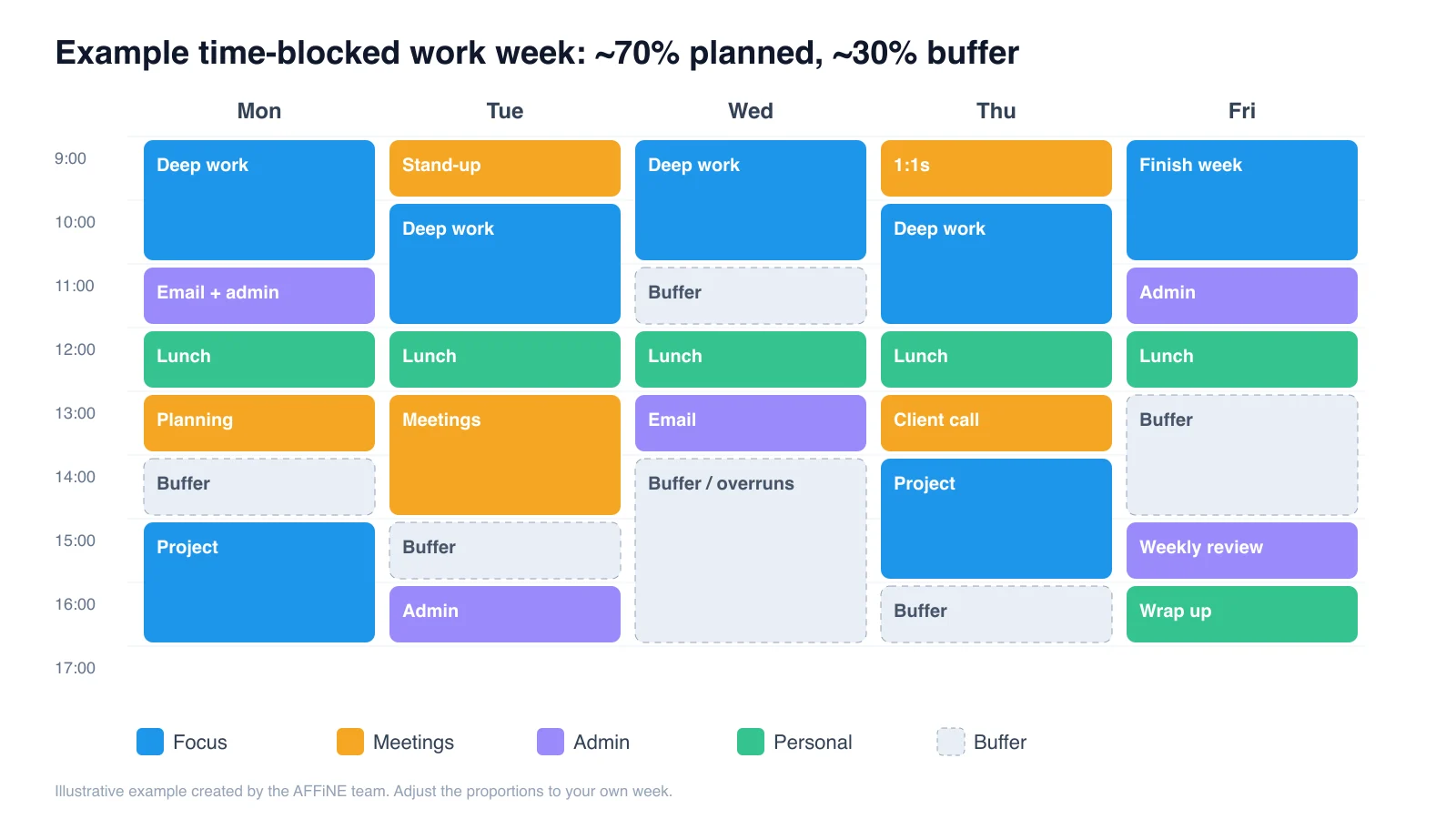
- Plan about 70% of your time. Leave the rest open for overruns, surprises and rest. A week that is fully booked on Monday is usually broken by Wednesday.
- Batch small tasks. Group email, admin and errands into one or two blocks a day so they don't break up your focus time.
- Review and roll over. At the end of the week, mark what got done, move unfinished items forward on purpose and delete anything that no longer matters.
To go further with fixed blocks, see our time blocking guide and template.
What to include in a weekly schedule
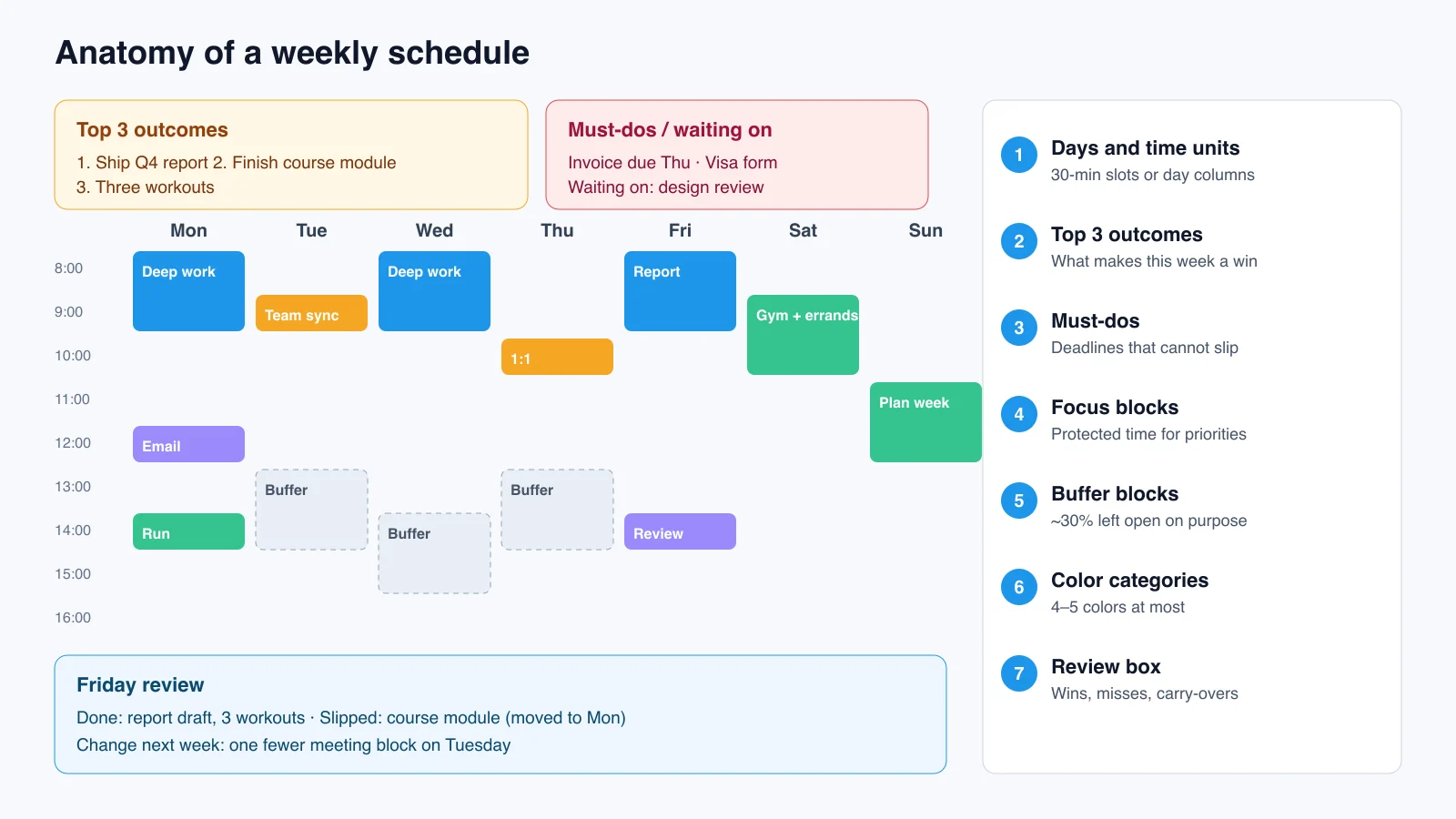
- Days and time units. Use 30-minute slots for meeting-heavy weeks and day columns for task-based weeks.
- Fixed commitments. Anything with a set time.
- Top three weekly outcomes. They stop the plan from turning into a long to-do list.
- Focus blocks and buffer blocks. Put the buffer in the plan, not just in your head.
- Color categories. Four or five at most, or the colors stop meaning anything.
- A must-do or "waiting on" area. Deadlines and items that depend on other people.
- A review box. Wins, misses and what to carry over.
Weekly schedule vs. weekly planner vs. to-do list
| Weekly schedule | Weekly planner | To-do list | |
|---|---|---|---|
| Answers | When will I do it? | What matters this week? | What needs doing? |
| Structure | Days × time blocks | Goals, days and notes | A list |
| Best for | Meeting- or shift-heavy weeks | Balancing goals and tasks | Task-based work |
| Templates here | #1, #4, #5 | #2, #3 | #1 (database view) |
Most people end up combining all three. AFFiNE keeps them in one workspace, so you don't have to keep a calendar, a notebook and a task app in sync. For more planner layouts, see our weekly planner templates; for staff rosters, see the weekly work schedule templates or compare employee scheduling apps.
Paper, Excel, Google Sheets, Notion or AFFiNE?
| Tool | Strengths | Limits | Choose it if |
|---|---|---|---|
| Printed PDF | No screen, quick to fill in | Hard to move items, no sharing | You plan by hand |
| Excel | Formulas and hour totals | Rigid grid, awkward on a phone | You need to calculate hours or payroll |
| Google Sheets | Free, real-time sharing | Grid layout, limited visual planning | A team edits one roster |
| Notion | Databases and a large template library | Cloud-based, no built-in freeform whiteboard | Your team already works in Notion |
| AFFiNE | Docs, whiteboard and database in one place; local-first, open source and self-hostable; exports to PDF and PNG | No built-in payroll or labor-hour calculations; smaller third-party template market | You want to plan visually and keep control of your data |
AFFiNE is local-first, so your schedule can stay on your own device, and teams can self-host it. The code is public on GitHub, so anyone can check how it handles data.
How we plan our week at AFFiNE: the Journal habit
Templates set up the week. On our team, the thing that keeps the week connected is AFFiNE's Journal.
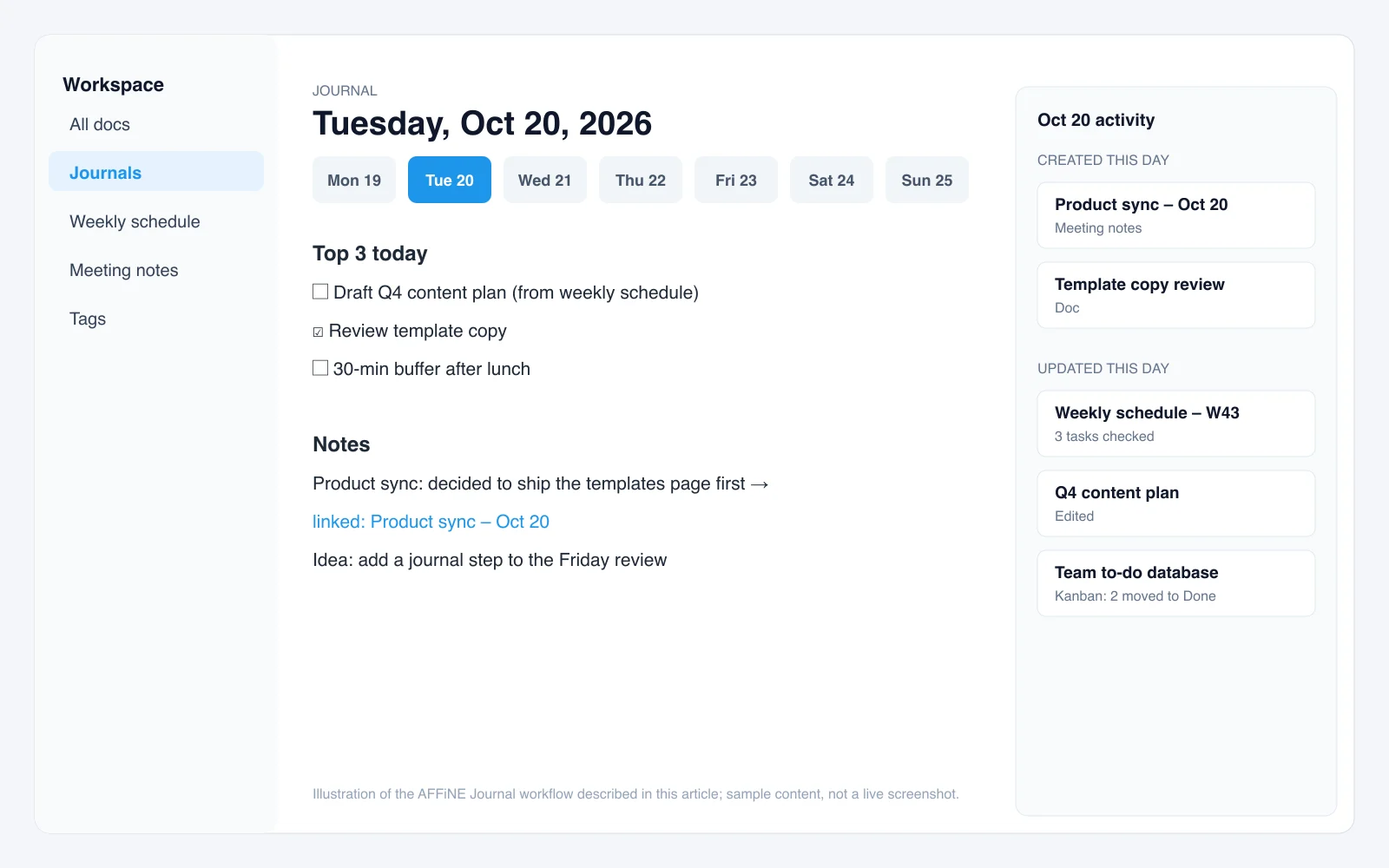
Every workday starts with that day's Journal page. Click Journals in the sidebar and AFFiNE opens a page named after today's date, with the current week shown as a row of dates across the top. We keep it short: the day's top three tasks pulled from the weekly schedule, plus quick notes as the day goes on.
The useful part is what the Journal collects for you. Each day also shows the docs that were created or updated on that date. When we open last Tuesday, we don't just see what we wrote in the journal. We also see the meeting notes from that day's product sync, the doc we were drafting and the to-do list we were updating. So the Journal becomes a timeline of the week: notes, meetings and tasks in one place, with no extra filing.
That changes how our Friday review works. Instead of trying to remember what happened, we click through the five dates of the week. For each day we can see:
- What we planned (the top three in the journal entry)
- What actually happened (the meeting notes and docs from that day)
- What moved (tasks checked off or moved to Done)
Anything unfinished goes into next week's schedule. Decisions from meetings are already linked, so nothing gets lost between "we agreed on this" and "who's doing it."
What we learned: the Journal only works if it stays light. When we tried to log every detail, people stopped opening it by Wednesday. Three tasks and a few notes a day was enough, because AFFiNE gathers the rest.
To try it, copy one of the templates above and open today's Journal next to it. Link the weekly schedule from your first entry, and by next Friday your review will already be done.
Weekly schedule template FAQ
How do I make a simple weekly schedule?
Write down your fixed commitments, choose your top three outcomes for the week and place both into a seven-day layout. Leave about 30% of your time unplanned as buffer. Review the week every Friday or Sunday and move unfinished tasks forward.
What is the best free weekly schedule template?
It depends on how you work. For task-heavy work weeks, a template with a to-do database, such as the Weekly Schedule & To-Do List template, works best. If you're new to planning, a minimal template with a few tasks per day is easier to stick with.
Can I print these weekly schedule templates?
Yes. Open any template in AFFiNE and export the board as a PDF or PNG, then print it. The minimal and aesthetic templates print most cleanly.
How many hours should I schedule in a week?
A practical starting point is to plan about 70% of your available hours and leave the rest as buffer for overruns, interruptions and rest. Adjust the ratio after a few weekly reviews.
What is the 1-3-5 rule?
The 1-3-5 rule caps each day at one big task, three medium tasks and five small tasks. It pairs well with the Minimal and To-Do List templates.
Should my week start on Sunday or Monday?
Start on whichever day you plan. If you plan on Sunday evening, a Sunday-start template like the Minimal template puts your planning day first.
How do I keep track of what happened during the week?
Keep a short daily log. In AFFiNE, the Journal shows each day's entry together with the docs created or updated that day, such as meeting notes and task lists, so your weekly review starts from a record instead of memory.
Start planning your week
Pick one template, use it for two full weeks and change only one thing at each review. Consistency matters more than the perfect layout.
Copy the Weekly Schedule & To-Do List template into AFFiNE for free
