Business Requirements Document (BRD) Template

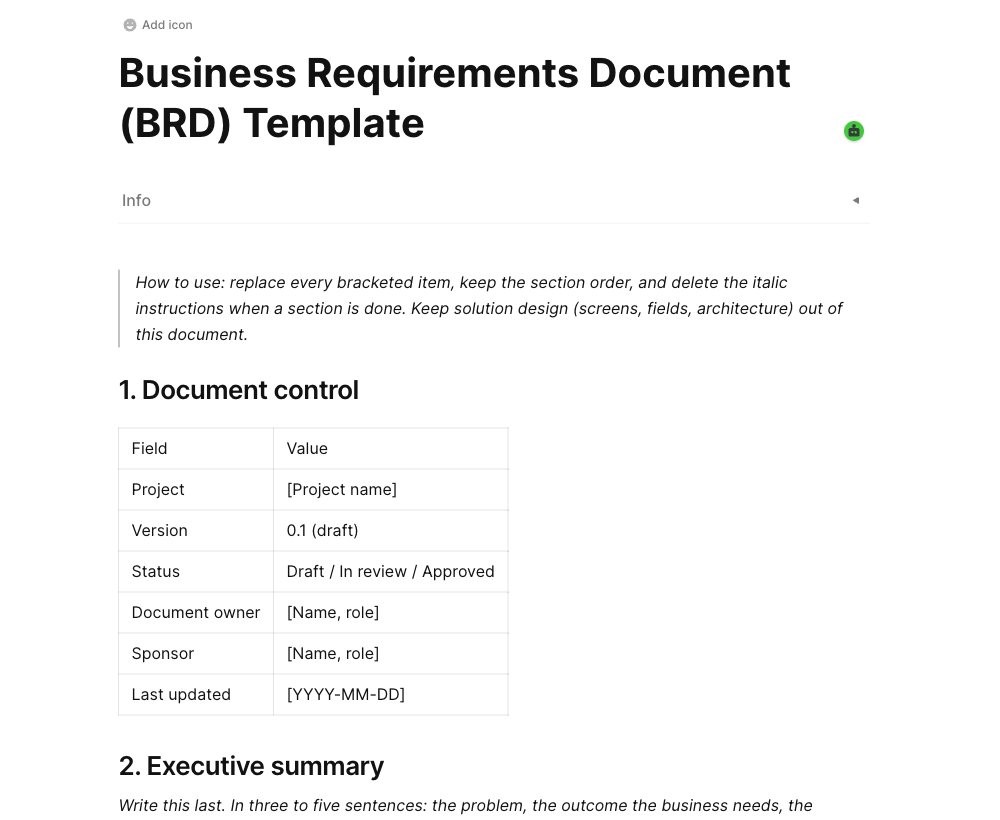
A free business requirements document (BRD) template with document control, measurable objectives, in and out of scope lists, stakeholders, a MoSCoW-prioritized requirements database, risks, open questions, and a sign-off table. Example rows show the expected level of detail.

Business requirements document template in AFFiNE showing document control, business objectives, and a MoSCoW-prioritized requirements table

What this BRD template is for

A business requirements document (BRD) records why a project exists and what the business needs from it before anyone designs a solution. This template gives every project the same sections in the same order, so sponsors can compare and approve them quickly and delivery teams know exactly what has been agreed.

What is inside

  • Document control: version, status, owner, sponsor, and last updated date.

  • Problem and objectives: the current state, what it costs, and two to four objectives with a baseline, target, and date.

  • Scope: explicit in-scope and out-of-scope lists.

  • Stakeholders: who is affected, who decides, and who is consulted.

  • Business requirements database: one testable statement per row with an ID, MoSCoW priority, source, acceptance measure, and status. Switch to a kanban view to group by priority.

  • Assumptions, constraints, risks, and open questions, each with an owner.

  • Review checklist, sign-off table, and change log.

How to use the template

  1. Duplicate the template into your workspace and rename it after your project.

  2. Fill in the problem, objectives, and scope first, and get the sponsor to read the out-of-scope list.

  3. Interview each stakeholder group and add their needs to the requirements database, one row per need, with the source.

  4. Give every row an acceptance measure. Rewrite anything that says fast, easy, or user-friendly without a number.

  5. Work through the review checklist, then record approvals in the sign-off table. Log later changes in the change log.

  6. Delete the blue instruction callouts once each section is complete.

Tips

  • Keep screens, fields, and architecture out of the BRD. Those belong in a PRD or functional specification that cites the BRD requirement IDs.

  • Keep Must Have work to a share of the effort the team is confident it can deliver. DSDM suggests typically no more than 60%.

  • Link the PRD, meeting notes, and process maps to this page instead of pasting them in.

For a full walkthrough with a worked example and BRD vs PRD comparison, read our guide to the business requirements document template.

Get more things done, your creativity isn't monotone