Freelance Client Assignment Tracker

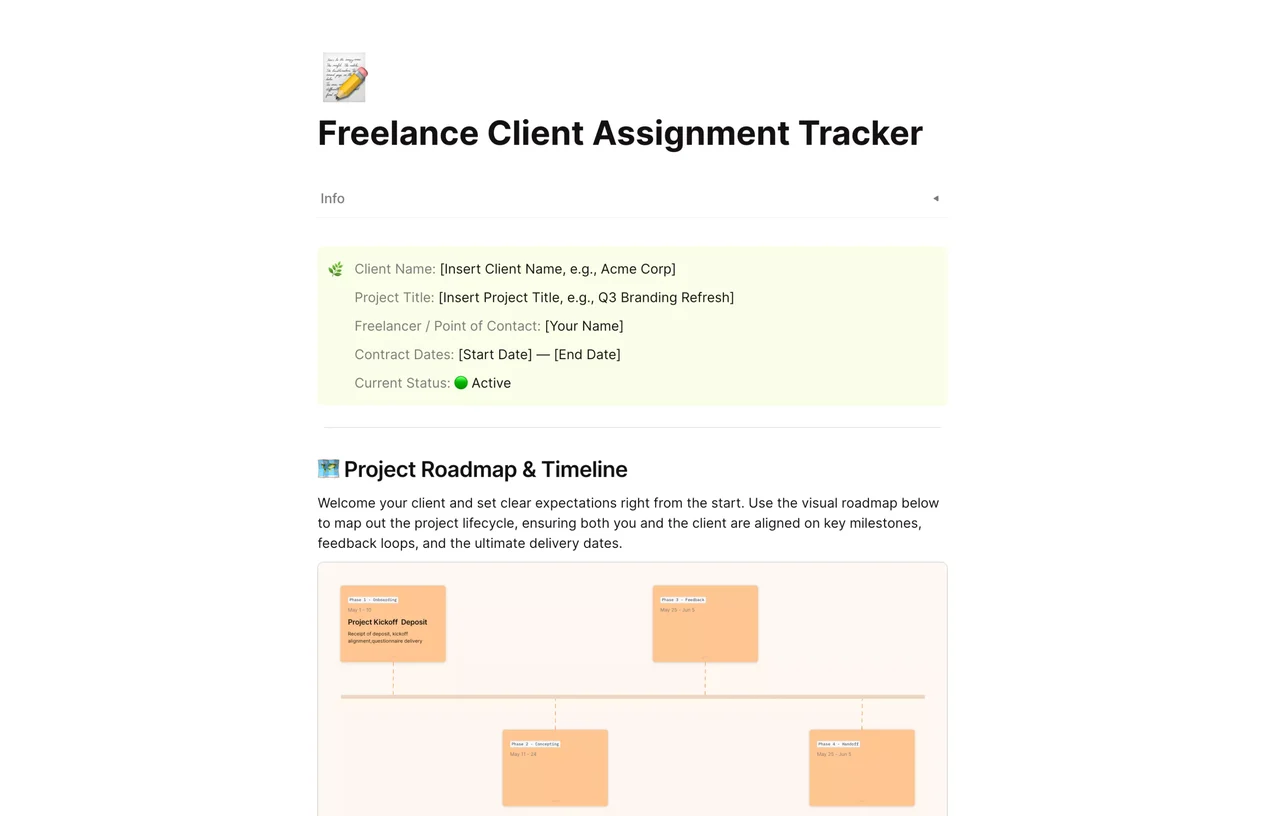
A one-page freelance client tracker for AFFiNE with client info, contract dates, project status, and a visual roadmap of phases from kickoff to delivery.

AFFiNE page with client info fields and a project roadmap timeline showing phase cards from kickoff and deposit onward

A freelance client tracker is a single page where you record each client's project details, contract dates, milestones, and current status so nothing slips between emails. This AFFiNE template gives you a client info block, a visual project roadmap with phases from kickoff to delivery, and room for notes you can share with the client or keep private.

What's included in this template

  • Info block with fields for client name, project title, freelancer or point of contact, contract start and end dates, and current status.
  • Project Roadmap & Timeline: a visual timeline with phase cards (for example, a kickoff and deposit phase followed by later production, feedback, and delivery phases) that you can rename and re-date.
  • A short welcome paragraph you can adapt to set expectations with the client about milestones, feedback loops, and delivery dates.
  • Editable text areas below the roadmap for briefs, meeting notes, and payment reminders.

Who it's for

  • Freelance designers, writers, and developers who run several client projects at once and want one page per client.
  • Consultants who share a project overview with a client at kickoff.
  • Solo agencies that need a lightweight alternative to a full CRM or spreadsheet.
  • Anyone who wants contract dates and deposit milestones visible next to the work itself.

How to use this freelance client tracker in AFFiNE

  1. Duplicate the template. Click Use this template to copy it into your AFFiNE workspace, then make one copy per client.
  2. Fill in the info block. Replace the placeholder client name, project title, contact, and contract dates, and set the status.
  3. Edit the roadmap phases. Rename each phase card, adjust its dates, and add or remove cards to match your scope of work.
  4. Log updates as you go. Add dated notes under the roadmap for feedback rounds, scope changes, and invoices sent.
  5. Share or export the page. Use AFFiNE sharing to show the client the roadmap, or export the page to PDF or Markdown for your records.

Tips for tracking freelance clients

Agree on milestones and payment points before work starts, and write them into the roadmap so both sides see the same dates. Keep one status per client (for example Active, Waiting on client, Invoiced, Closed) and review all client pages once a week. If you also need agreements, pair this tracker with the freelance service contract templates hub. For a wider view of your workload, read our guide to project management for freelancers.

Frequently asked questions

What should a freelance client tracker include?

At minimum: client name and contact, project title, contract dates, milestones with due dates, current status, and notes on feedback and payments. This template covers those fields and leaves space to add more.

Can I use this template instead of a CRM?

For a small number of clients, yes. It works well as a per-project overview, but it does not send automated follow-ups or emails the way dedicated CRM software does.

How do I track multiple clients with one template?

Duplicate the page once per client and keep the copies in one folder or collection in your workspace. You can link each client page from a simple index page.

Is this freelance client tracker free?

Yes. The template is free to use in AFFiNE, and you can export your copy to PDF, Markdown, or HTML.

More options are in the assignment tracker templates collection, including the visual creative assignment tracker.
Get more things done, your creativity isn't monotone