The Generative AI Zettelkasten

Free AFFiNE whiteboard template that maps generative AI as linked Zettelkasten notes: transformers, LLMs, training methods, diffusion and multimodal models.

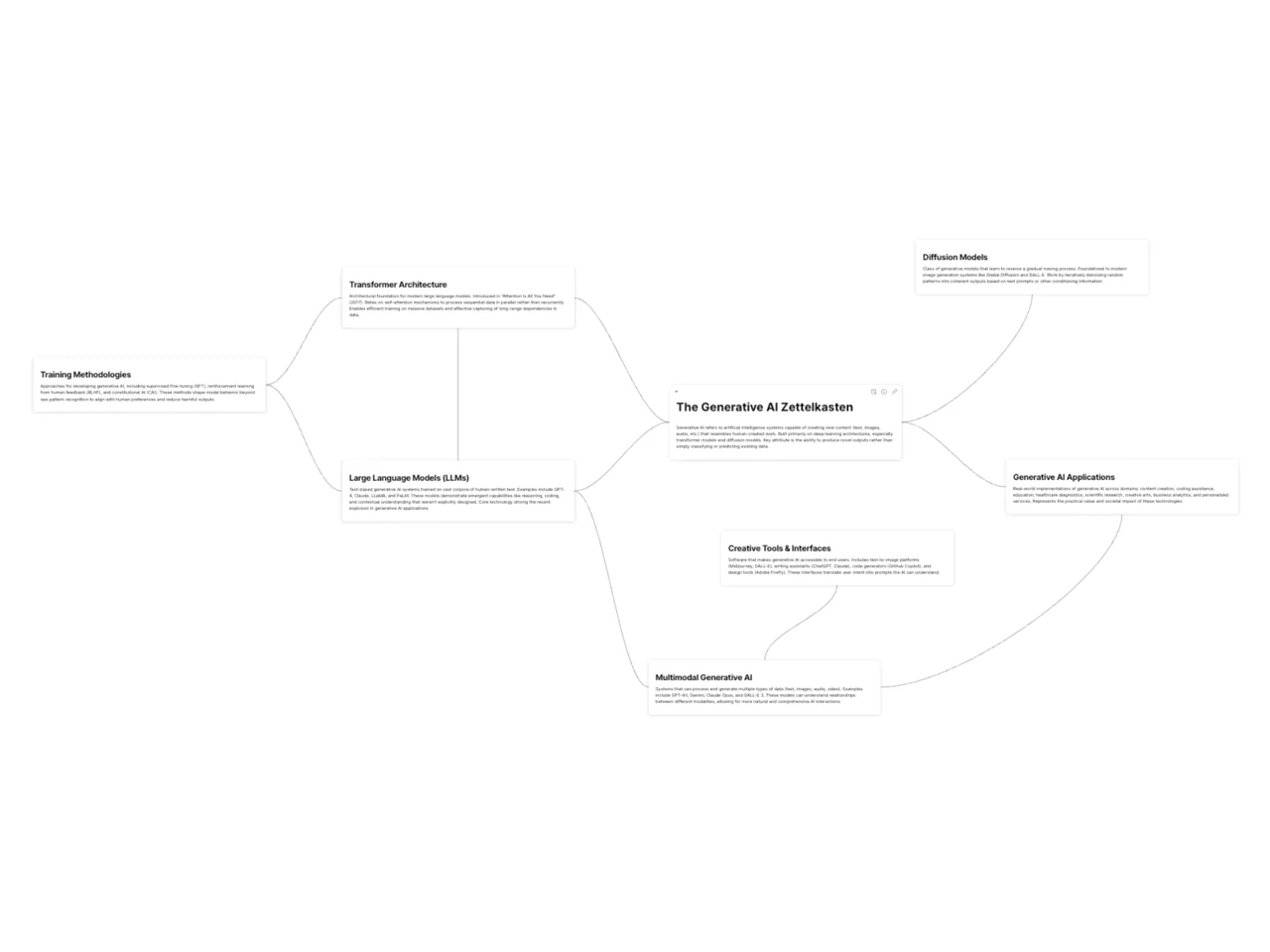
Edgeless board with a central Generative AI Zettelkasten note linked to notes on transformers, LLMs, diffusion and training

A generative AI Zettelkasten is a set of short, linked notes that explains how generative AI works, with one idea per note and explicit connections between related concepts. This AFFiNE template is an edgeless whiteboard with a central "The Generative AI Zettelkasten" note connected to seven starter notes: Transformer Architecture, Large Language Models (LLMs), Training Methodologies, Diffusion Models, Multimodal Generative AI, Creative Tools & Interfaces, and Generative AI Applications. You can extend the map with your own notes as you read papers, test tools, or take courses.

What's included in this template

  • A hub note that defines generative AI and links out to every topic note.
  • Transformer Architecture: a note on the architecture behind modern language models, including a reference to the "Attention Is All You Need" paper.
  • Large Language Models (LLMs): a note on text-based models trained on large text corpora.
  • Training Methodologies: supervised fine-tuning, reinforcement learning from human feedback (RLHF), and constitutional AI.
  • Diffusion Models: the model class behind many image generators.
  • Multimodal Generative AI: models that handle text, images, audio, and video.
  • Creative Tools & Interfaces and Generative AI Applications: notes on how people use these models in practice.
  • Connector lines between notes, so you can see how each concept relates to the others.

Who it's for

  • Students and self-learners who want a structured map of AI concepts instead of a pile of bookmarks.
  • Writers and researchers who need to keep track of AI terms, papers, and examples for future articles.
  • Product and engineering teams that want a shared glossary of generative AI concepts.
  • Anyone already using a digital Zettelkasten who wants a ready-made topic cluster about AI.

How to use this generative AI Zettelkasten in AFFiNE

  1. Duplicate the template. Click Use this template to copy the whiteboard into your AFFiNE workspace.
  2. Read the starter notes. Check each definition and edit anything that does not match your understanding or your sources.
  3. Add one idea per note. When you learn something new, create a new note card and write it in your own words, with the source next to it.
  4. Connect the new note. Draw a connector to at least one existing note and label why the two ideas are related.
  5. Review and prune. Once a week, merge duplicate notes, split notes that hold more than one idea, and update facts that have changed.
  6. Export when needed. Export the board to PDF or PNG if you want to share the map outside AFFiNE.

Tips for using AI with a Zettelkasten

AI chat tools can summarize a paper or suggest links, but there is a trade-off: if the AI writes your notes, you skip the thinking that makes the method useful. Use AI output as a source, not as the note. Rewrite each idea yourself, check facts against the original paper or documentation, and note which model or tool produced a claim. For the general method, read our guide to the Zettelkasten method and these Zettelkasten tips.

Frequently asked questions

What is a Zettelkasten?

A Zettelkasten ("slip box" in German) is a note-taking method where you write short, single-idea notes and link them to each other instead of filing them in folders. It is associated with the sociologist Niklas Luhmann.

Can I use AI to write my Zettelkasten notes?

You can use AI to draft summaries or suggest connections, but you should rewrite each note in your own words and verify it. Copying AI output directly fills the system with notes you have not understood.

Is this template only about generative AI?

The starter notes cover generative AI topics, but the structure is a hub note with linked topic notes. You can replace the content to map any subject.

Does this template work as a document or a whiteboard?

It opens as an edgeless whiteboard in AFFiNE, so notes sit on a canvas with connectors between them. You can still open any note and write longer text inside it.

More options are in the Zettelkasten template collection, including the academic research Zettelkasten.
Get more things done, your creativity isn't monotone
