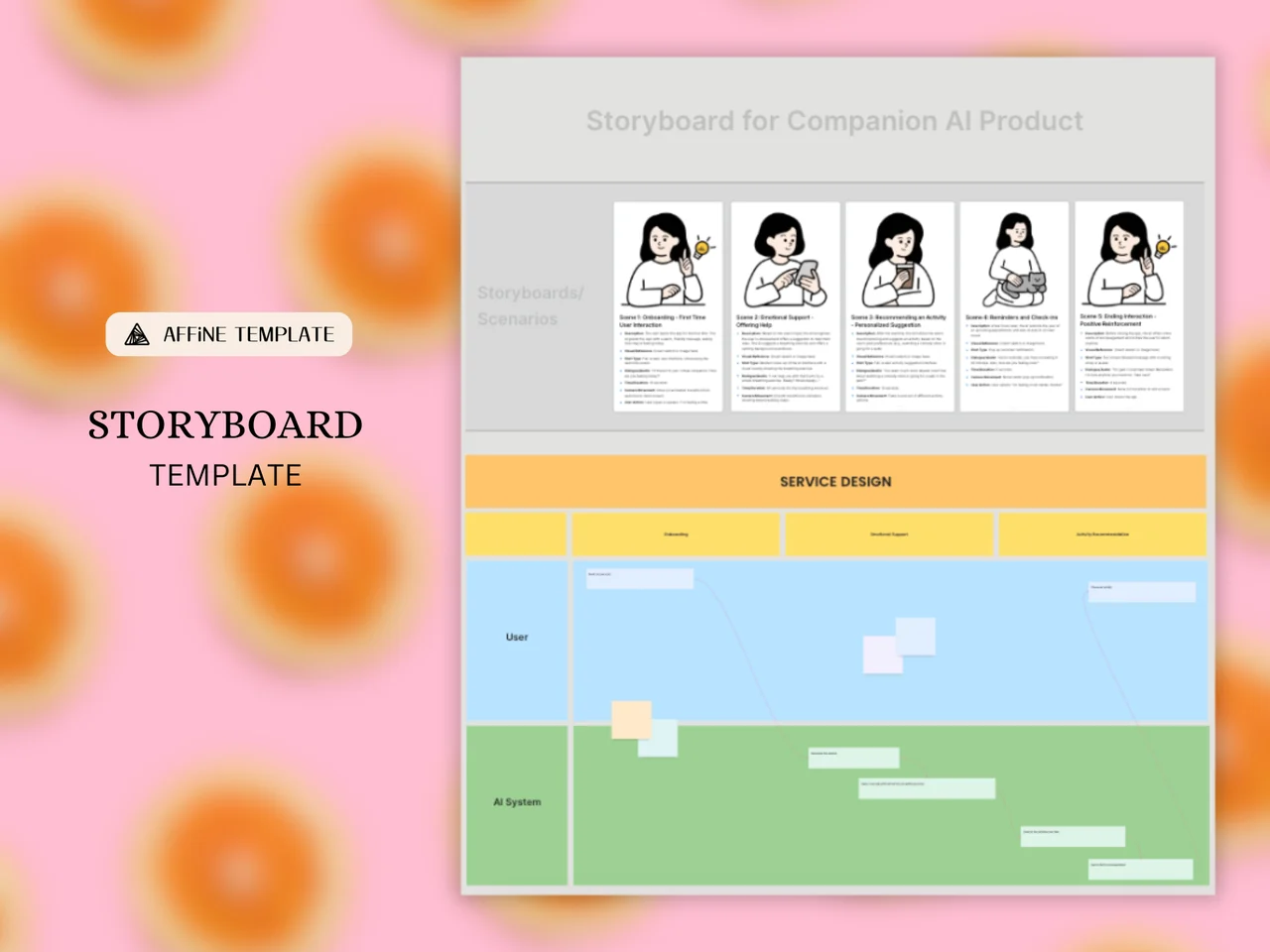
A storyboard template is a pre-formatted layout of panels arranged in sequence, where each panel holds one scene with a picture and short notes, so you can plan a video, animation, or product experience before you produce it. This AFFiNE template opens on the whiteboard with a worked example titled "Storyboard for Companion AI Product": a row of five illustrated scene cards plus a service design board underneath that maps what the user and the AI system do in each stage.
What's included in this template
- A title area for the project name
- A "Storyboards / Scenarios" row with five scene cards, each with an illustration, a scene title (for example, Onboarding, Emotional Support, Reminders and Check-ins), and bullet notes describing the scene
- A "Service Design" board with stage columns (such as Onboarding, Emotional Support, and Activity Recommendation)
- Two swimlanes, User and AI System, with sticky notes and connectors to show what happens in each lane
- An editable canvas where you can add more panels, images, or notes
This is a digital whiteboard template for AFFiNE, not a Word or PDF download. To print it, take a screenshot of the board or select a frame and use Copy as Image in the AFFiNE desktop app.
When to use a storyboard template
- Product and UX design. Walk through how a user experiences a feature, scene by scene, as in the sample.
- Video and film pre-production. Plan shots, framing, and dialogue before filming.
- Animation and explainer videos. Break a script into key frames and timing.
- Classroom and presentation projects. Help students or teams outline a story visually before they build it.
How to use this storyboard template in AFFiNE
- Duplicate the template. Click Use this template to copy the board into your workspace.
- Write the outline. Replace the title and list the main scenes or stages of your story.
- Fill the scene cards. Swap each illustration for your own sketch, photo, or image, and update the title and notes.
- Map the experience. Rename the service design stages and lanes, then add sticky notes for what each actor does.
- Add production notes. Record dialogue, camera angles, sound, or timing next to the relevant panel.
- Review and share. Invite collaborators to your workspace, or export the board as HTML, Markdown or a Snapshot file.
Tips for a clear storyboard
- Keep one main action per panel; split busy scenes into two panels.
- Rough sketches are fine. The goal is communicating the idea, not finished art.
- Number panels so feedback can point to a specific frame.
Frequently asked questions
What should be included in a storyboard?
Each panel usually has a visual of the scene, a short description of the action, and notes on dialogue, sound, or camera movement. A title and scene numbers make it easier to review.
What is the difference between a storyline and a storyboard?
A storyline is the written summary of what happens in a story. A storyboard turns that storyline into a sequence of visual panels so you can plan pacing and presentation.
Can I print this storyboard template?
Yes. Edit the board in AFFiNE, then take a screenshot or use Copy as Image in the AFFiNE desktop app, and print the image at the size you need. For blank sheets to draw on by hand, use our printable storyboard templates.
How many panels should a storyboard have?
There is no fixed number. Use one panel per key moment or shot; the sample uses five scenes, and you can copy cards to add more.
For more ideas, read how to storyboard action scenes, browse digital storyboard templates for Google Slides and Docs, or plan production with the video planner.