
AI-Powered Project Planning: How to Turn Brainstorming Sessions Into Clear, Actionable Workflows
Written by Allen, AFFiNE content team. Last updated October 26, 2026. How we put this together: the steps below follow a planning routine our team uses after brainstorming sessions. The statistics link to their original publishers, and we label vendor research and forecasts as such. Prompts are written for any general AI assistant, including the AI built into AFFiNE.
AI-powered project planning means using an AI assistant to turn raw brainstorming output into themes, scored priorities, owned tasks, and a staged workflow, while people make the final calls. The AI does the slow sorting and rewriting. Your team keeps the judgment.
Every team knows the scene. Sticky notes cover the wall, the whiteboard is full of arrows, and forty ideas all feel urgent for about ten minutes. Then everyone drifts back to their desks.
The problem isn't a shortage of ideas. It's what happens afterward. Raw brainstorming output is messy, and almost nobody has spare hours to sort it, rank it, and turn it into real tasks. So it sits there, going stale.
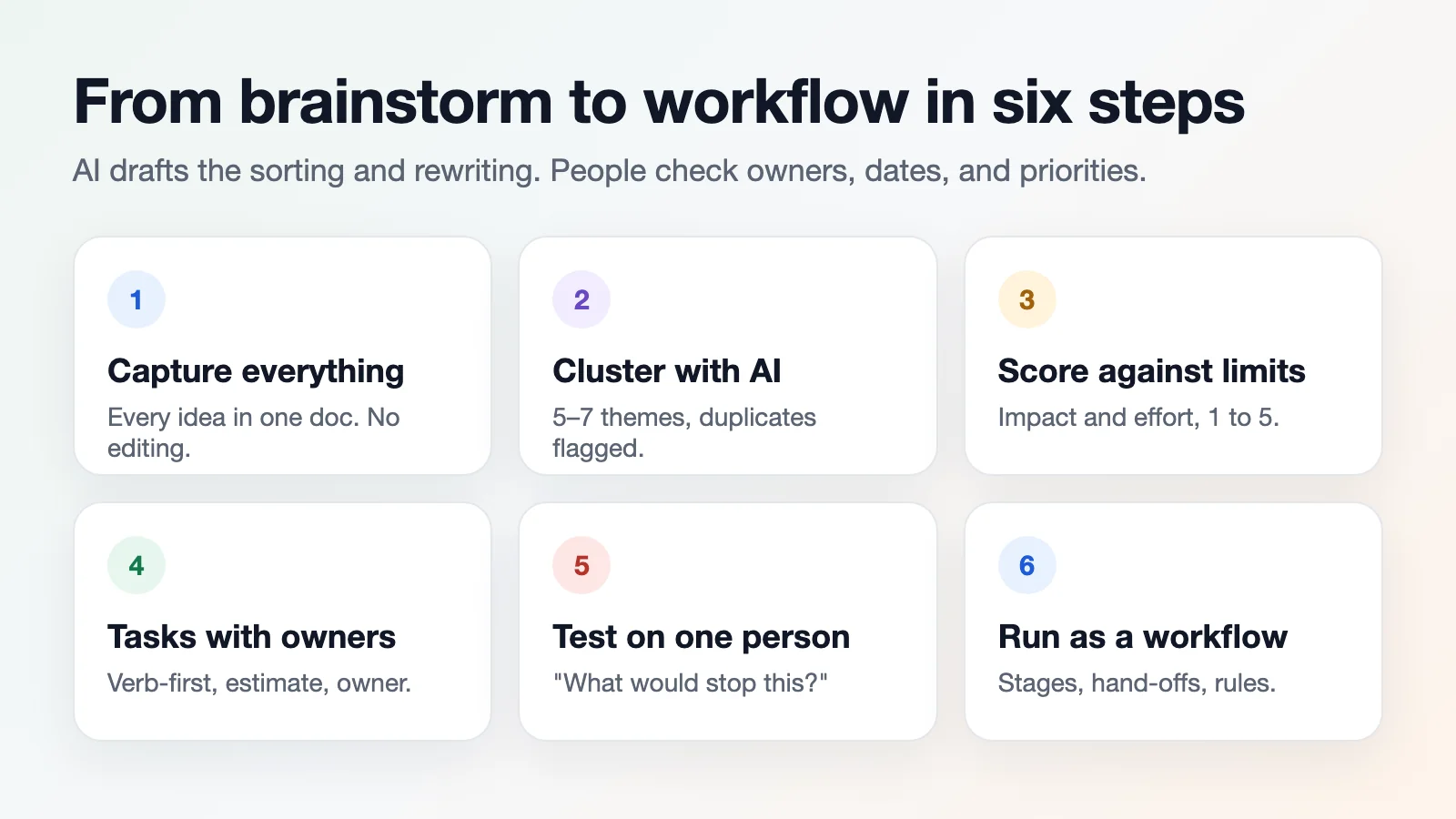
Key takeaways
- Capture first, judge later. A rough pile of notes gives AI more to work with than a polished summary.
- Use AI for the middle of the process. Clustering, de-duplicating, and rewriting vague notes as actions is where it saves the most time.
- Score against real limits. Give the AI your budget, headcount, and deadline, then argue with its scores.
- People own the plan. Check every owner, estimate, and dependency by hand, and test the plan on one person before it goes live.
- A workflow beats a list. Stages, hand-offs, and simple rules keep the plan moving after the meeting.
What AI does well in project planning
AI is at its best in the dull middle of the process. It groups similar ideas, flags duplicates, and rewrites fuzzy notes into concrete actions. "Improve onboarding" becomes "rewrite the welcome email, record a two-minute product tour, add a setup checklist."
It isn't a crystal ball, though. It works from patterns, not from knowing your team. Treat its output as a strong first draft, and make the final call yourself.
| Planning job | Good fit for AI? | Who should decide |
|---|---|---|
| Grouping notes into themes | Yes | AI drafts, team reviews |
| Spotting duplicate ideas | Yes | AI drafts, team reviews |
| Rewriting vague notes as actions | Yes | AI drafts, owner confirms |
| Scoring impact and effort | Partly, needs your limits | Team decides |
| Choosing owners and dates | No, it can't see calendars or workloads | Project lead decides |
| Saying no to an idea | No | Team decides |
What the numbers say about AI in project management
Gartner expects AI to run 80% of project management tasks by 2030. That's a bold forecast made in 2019, and forecasts are cheap. The prediction is still widely repeated in 2026 research on AI in project management.
Here's something firmer. Atlassian ran a 45-day controlled study, published in March 2026, and found that Jira users who adopted its Rovo AI cut their lead time to start work by 35%. It's vendor research, so read it with a raised eyebrow. Still, the direction is clear, as this comparison of AI project management copilots shows.
Graduate programs are paying attention too. North Carolina State University's engineering management program describes AI already handling cost forecasting, smart scheduling, and status dashboards in its overview of the future of project management with AI.
Step 1: Capture everything, judge nothing
Record the session, or have someone type notes live. Dump every idea into a single document, even the odd ones. Don't edit yet.
Why? Editing while capturing kills momentum. A rough pile gives AI more to work with than a polished summary does. If your team brainstorms on a whiteboard, put the board and the notes in the same place so nothing gets retyped. Our guide to brainstorming templates and techniques covers formats that make capture easier.
Step 2: Let AI cluster and label the ideas
Paste the raw notes into your AI assistant and ask it to sort them into themes. A few prompts that work well:
- "Group these notes into five to seven themes and give each a short title."
- "List any ideas that overlap."
- "Which notes are too vague to act on? Rewrite them as specific actions."
This takes a minute. Doing it by hand takes an hour. Then read the themes yourself: if one idea landed in the wrong group, move it now, before scoring.
Step 3: Score ideas against real limits
Now add reality. Tell the AI your budget, headcount, and deadline, then ask it to rate each theme for impact and effort on a simple 1-to-5 scale.
Look at the scores, then argue with them. If something rated low feels important to you, ask why the tool disagrees. That back-and-forth is where the real thinking happens.
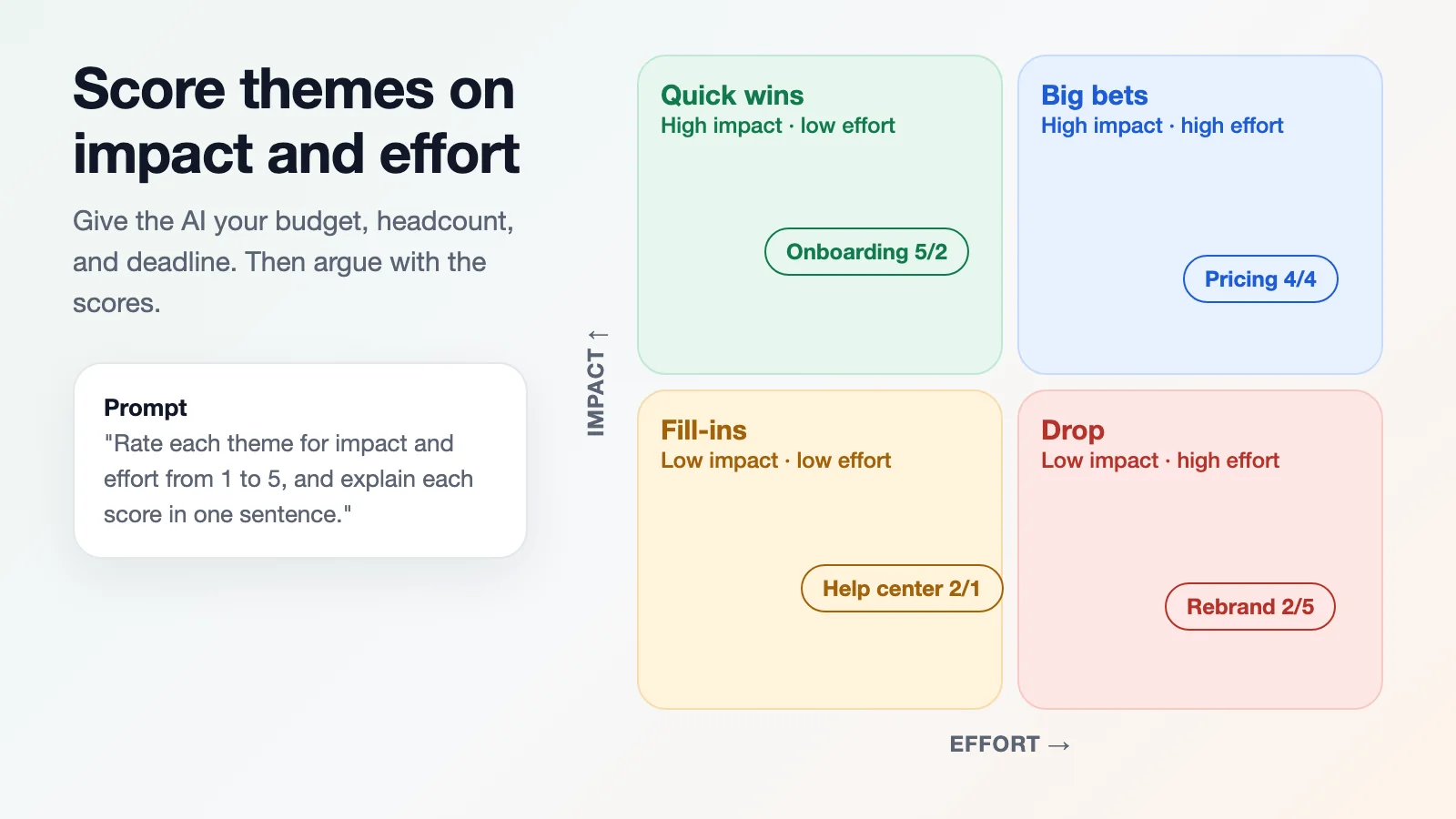
A useful prompt: "Our budget is $15,000, we have three people for six weeks, and launch is March 1. Rate each theme for impact and effort from 1 to 5, and explain each score in one sentence." The one-sentence reasons make the scores easy to challenge.
Step 4: Turn themes into tasks with owners
Pick the top three or four themes. For each one, ask for tasks that start with a verb, plus a rough time estimate, a dependency, and a suggested owner. "Draft pricing page" beats "pricing."
Then check every owner by name. The tool doesn't know Maria is on holiday next week. AI is also good at pulling tasks out of meeting notes, as our guide on getting action items from meeting notes with AI explains, but a person still has to confirm who does what.
Step 5: Test the plan on a real person
Before the plan goes live, run it past one human. A short 1 on 1 chat with a trusted colleague, or even an outsider, exposes gaps fast. HeyChatrix is one place to do it: it's an app for private one-on-one video chats, so you can talk an idea through without booking a room or inviting ten people.
Fresh eyes catch what you stopped seeing days ago. Ask just one question: "What would stop this from working?"
Why automated kickoffs pay off
The time saved by removing manual project administration adds up quickly across a quarter. Imagine an agency where an employee attends four ideation meetings each week. Spending forty-five minutes after every call organising notes, clarifying action items, and drafting tickets takes three hours of that person's week. Multiply that across a department of twenty people, and you are spending sixty productive hours a week on pure coordination.
That's an illustration, not a measurement, but the arithmetic is easy to redo with your own numbers: meetings per week × minutes of follow-up × people.
Step 6: Build a workflow, not just a list
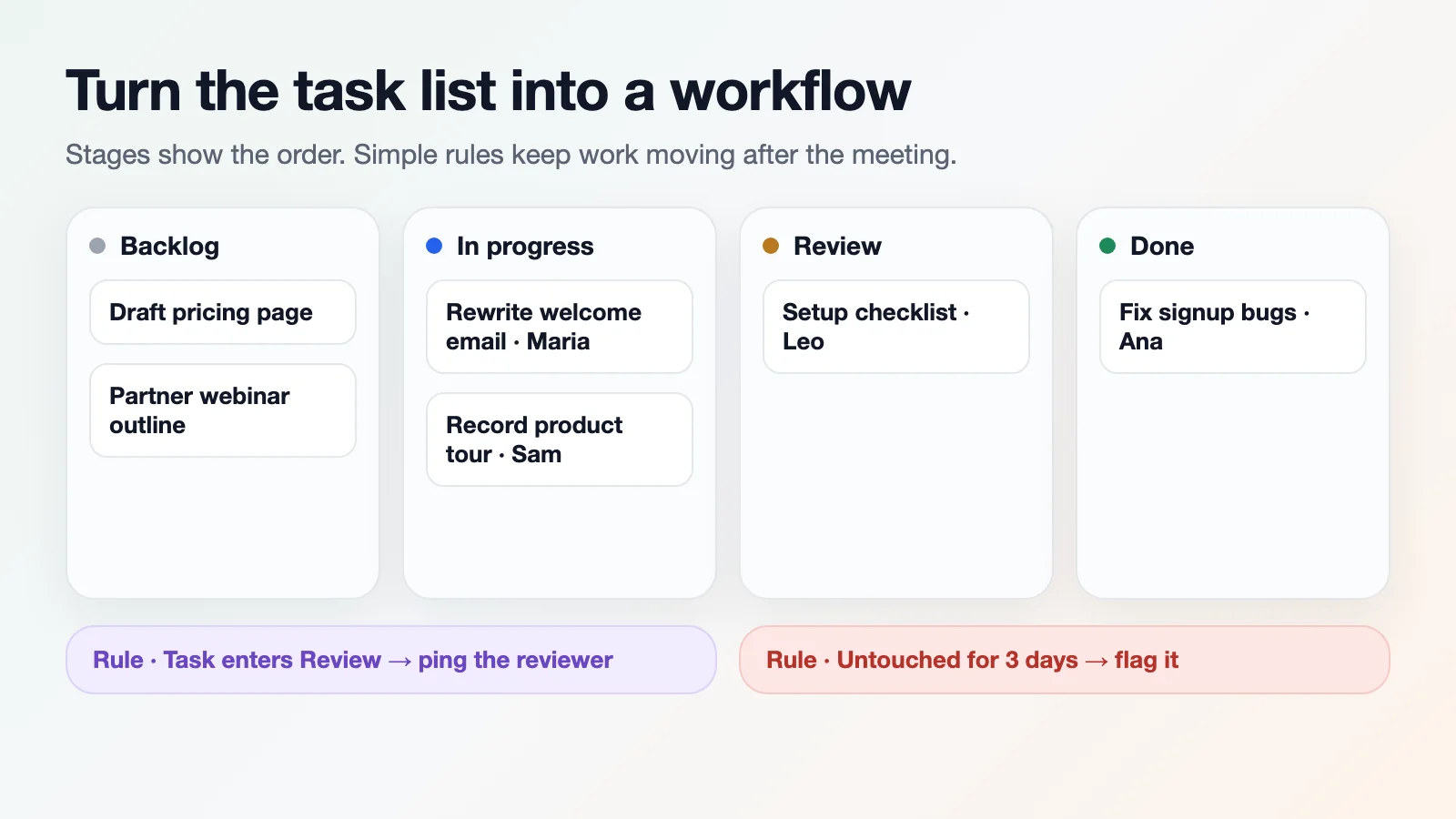
A list tells you what to do. A workflow tells you the order, who hands off to whom, and what triggers the next step. Ask AI to map your tasks into stages: backlog, in progress, review, done.
Then add simple rules. When a task reaches review, the reviewer gets a ping. When it sits untouched for three days, it gets flagged. A kanban board is the simplest way to see those stages; our roundup of free kanban board software compares options.
Mistakes that waste the gains
A few traps show up again and again:
- Feeding the AI vague notes and expecting sharp plans
- Accepting time estimates without a sanity check
- Skipping the human review
- Creating forty tasks when ten would do
Skills matter too. Only about 20% of project professionals say they have extensive or good practical AI skills, according to AI task management statistics drawn from PMI's Pulse of the Profession 2025 survey. Practice beats a subscription.
Keep the plan alive
A plan left alone quietly dies. Spend fifteen minutes each week updating statuses, then ask AI to summarize progress, risks, and blocked items.
A 2025 study of US workers by the Federal Reserve Bank of St. Louis found generative AI saved users 5.4% of their work hours on average, and a third of daily users saved four or more hours a week. Frequency of use, not mere access, is what pays off. The figures are collected in the same AI task management statistics roundup.
How to run this workflow in AFFiNE
You can run all six steps in one AFFiNE workspace instead of moving between a whiteboard, a chat window, and a task tool:
- Capture the brainstorm on an edgeless whiteboard or in a doc, side by side with the meeting notes.
- Cluster and score with AFFiNE AI by selecting the notes and using the prompts from steps 2 and 3. You can also turn the themes into a mind map.
- Assign tasks in a database with owner, estimate, and status columns, then switch it to a kanban view for the workflow stages.
- Review weekly by asking AFFiNE AI to summarize the board's progress and blocked items.
To start faster, copy the agile project planning sprints timeline board template or the kanban boards template.
Frequently asked questions
What is AI-powered project planning?
AI-powered project planning is the use of an AI assistant to organize brainstorming notes into themes, score them for impact and effort, break the best ones into tasks with owners, and map those tasks into a workflow. The AI drafts each step; the team reviews and decides.
Can AI replace a project manager?
No. AI handles sorting, rewriting, and summarizing well, but it does not know your team's workloads, holidays, politics, or priorities. Gartner's forecast that AI will run 80% of project management tasks by 2030 still leaves people responsible for decisions, trade-offs, and accountability.
What should I paste into an AI assistant after a brainstorm?
Paste the raw notes, unedited, plus your constraints: budget, headcount, deadline, and any must-have goals. Raw notes keep the details the AI needs to group ideas, and the constraints let it score themes against your real limits instead of in a vacuum.
How do I stop AI from producing an unrealistic plan?
Ask for short reasons behind every score and estimate, challenge the ones that feel wrong, and check every owner and date by hand. Keep the plan small, around ten tasks rather than forty, and test it on one person who wasn't in the room before it goes live.
How long does AI-assisted planning take after a brainstorming session?
Clustering and labeling the notes takes a minute or two. Scoring, task breakdown, and the human review usually fit in a 30 to 60 minute working session, compared with several hours of manual sorting, depending on how many ideas the session produced.
Start small this week
Pick your next brainstorm and run just steps 1 and 2: capture everything, then let AI cluster it. If the themes save you an hour, add scoring and tasks the week after.
AI provides the connective tissue between raw creative ideas and the practical reality of shipping work. It turns unfocused chatter into clean, trackable workflows that keep everyone aligned. Hand the administrative friction to the tools, keep the decisions with your team, and your best ideas will actually make it out of the meeting room.

