Concept Maps: Examples, Key Elements, and How to Make One
What Is a Concept Map?
A concept map is a diagram that explains relationships between ideas. It places concepts in boxes or circles and connects them with labeled lines. Read a concept, its linking phrase, and the next concept together to form a meaningful statement: “Test coverage informs sign-off.” Cross-links connect ideas across different branches.
Use one when you need to explain how a subject works, examine an assumption, or connect evidence to a decision. This guide includes a complete project example, a blank worksheet, and a relationship table you can reuse on paper or in a whiteboard.
What Makes a Good Concept Map?
This guide follows the relationship-based approach described by Joseph Novak and Alberto Cañas in the IHMC concept mapping report. In that approach, the connections carry meaning; arranging related words around a title is only a starting point.
| Element | What it does | Example in our project map |
|---|---|---|
| Focus question | Sets the boundary of the explanation | What does this release need before it can ship? |
| Concept | Names an idea in a short label | Validation |
| Linking phrase | Explains the relationship between concepts | includes |
| Proposition | Combines concepts and a link into a statement | Validation includes test coverage. |
| Hierarchy | Organizes broad ideas and their more specific parts | Validation above test coverage and risk review |
| Cross-link | Connects concepts in different branches | Acceptance criteria guide test coverage. |
The sentence test: read each connection aloud in the arrow’s direction. “Validation includes test coverage” explains a relationship. “Validation is related to test coverage” leaves most of the explanation to the reader.
Keep labels concise, but do not replace a precise phrase with a vague word just to make a box smaller. “Acceptance criteria” tells the reader more than “requirements.”
A Complete Concept Map Example
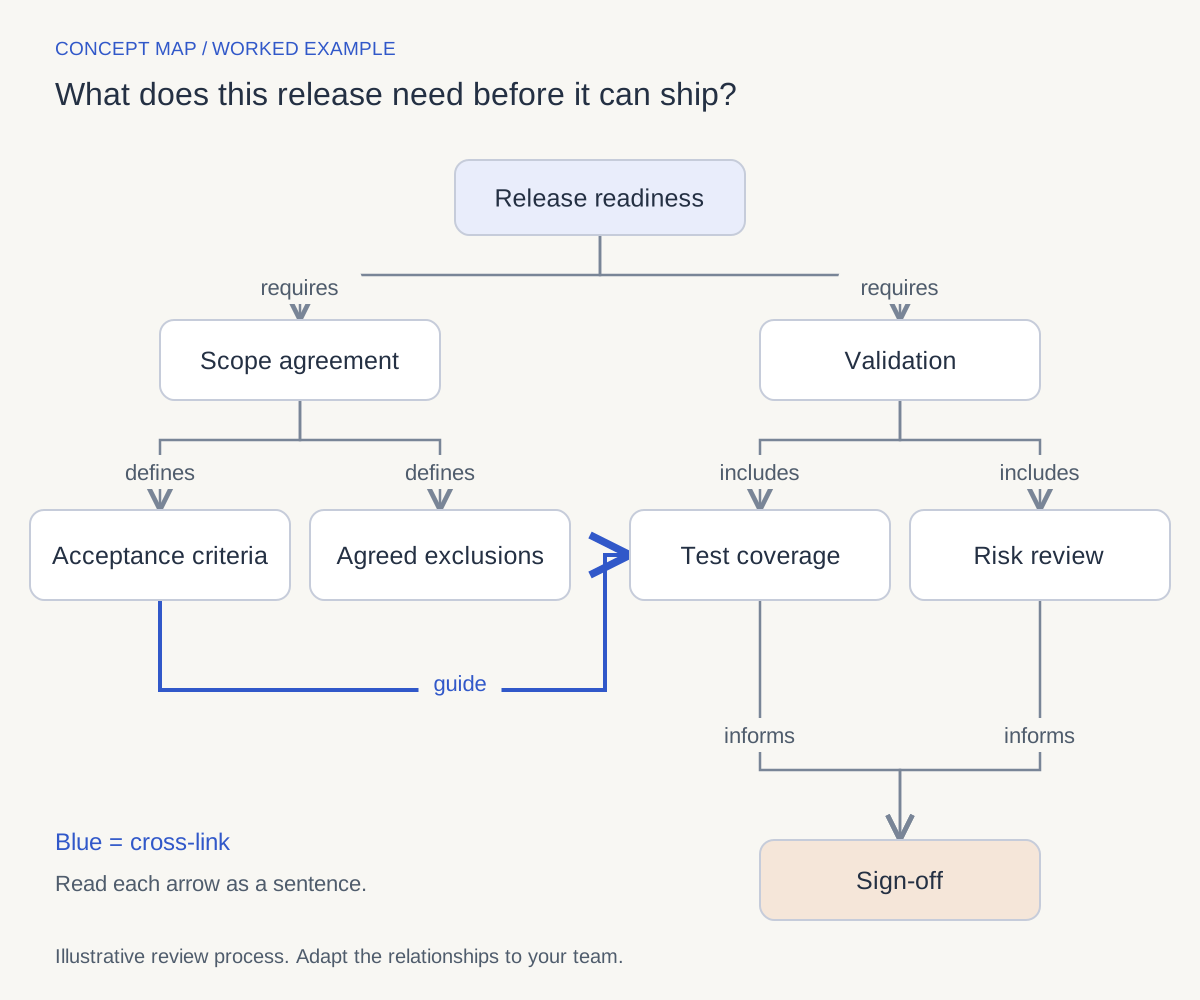
Focus question: What does this release need before it can ship?
Imagine a team preparing a small website release. The following eight concepts and nine relationships describe a proposed review process. This is an illustrative teaching example, not a customer case study or a universal release policy.

Open the full-size concept map.
| From | Relationship | To |
|---|---|---|
| Release readiness | requires | Scope agreement |
| Release readiness | requires | Validation |
| Scope agreement | defines | Acceptance criteria |
| Scope agreement | defines | Agreed exclusions |
| Validation | includes | Test coverage |
| Validation | includes | Risk review |
| Acceptance criteria | guide | Test coverage |
| Test coverage | informs | Sign-off |
| Risk review | informs | Sign-off |
The cross-link is the useful discovery: a change to the acceptance criteria should prompt the team to revisit what its tests cover. Without that connection, scope and testing could look like unrelated activities.
The map also shows its own limits. It does not assign owners, calculate a delivery date, or prove that the release is safe. Those require additional evidence and decisions. Attach the agreed criteria, test results, and risk notes before using this map in a real review.
Concept Map vs. Mind Map
A concept map explains relationships; a mind map organizes associations around a topic. A flowchart answers a third question: what happens next? These are useful defaults rather than rigid rules about what a drawing tool can do.
| Format | Main question | Typical structure | Same-project example |
|---|---|---|---|
| Concept map | How do these ideas relate? | Labeled connections, often with hierarchy and cross-links | Acceptance criteria guide test coverage. |
| Mind map | What belongs with this topic? | Branches around a central idea | Website release → design, copy, testing |
| Flowchart | What happens next, and under what condition? | Ordered steps and decision branches | Run tests → pass? → approve or fix |
Choose a mind map to collect initial ideas. Choose a concept map to explain their relationships. Choose a flowchart when the order of actions or a decision path is the main thing someone needs to follow. For worked mind maps, see these mind map examples for projects and study.
How to Create a Concept Map
Use the release example above as a model, then replace its concepts with your own. For a longer walkthrough, see our step-by-step concept map guide.
- Write one focus question. “What does this release need before it can ship?” is more useful than “Our project.” A good question gives you a reason to include or leave out a concept.
- Collect the concepts before drawing. Start with a manageable set. Our example uses eight: release readiness, scope agreement, validation, acceptance criteria, agreed exclusions, test coverage, risk review, and sign-off. Set unrelated ideas aside.
- Arrange broad ideas above details. Put release readiness at the top, scope and validation beneath it, and their supporting concepts below. Do not treat vertical position as a sequence of tasks.
- Label the connections. Write a specific relationship on each line: requires, defines, includes, guides, or informs. Check the direction by reading the entire proposition aloud.
- Look across branches. Ask what the scope branch changes about validation. In this example, acceptance criteria guide test coverage. Add a cross-link only when it contributes a meaningful statement.
- Revise against evidence. Ask a teammate to explain the map without your help. Fix ambiguous wording, attach supporting notes, and remove connections that neither of you can justify.

A useful revision: replace “Scope causes quality” with a narrower, testable connection such as “Acceptance criteria guide test coverage.” The revised map does not pretend that scope alone determines the quality of a release.
Four Common Types of Concept Maps
You may encounter the labels spider, hierarchy, flow, and system map in tools and template libraries. Treat them as layout choices, not four universally agreed scientific categories. Educational resources also use “concept map” at different levels of breadth; this guide uses labeled propositions as its defining feature.
- Spider or radial layout: useful for gathering ideas around a topic. Add explicit relationship labels before using it to explain those ideas.
- Hierarchical layout: useful when broad concepts contain or organize more specific ones, as in our release example.
- Flow-oriented layout: useful when explaining process relationships. If the main purpose is step order and decisions, call it a flowchart.
- Network or system layout: useful when several clusters influence one another. Include a legend if different line styles have different meanings.
Choose the arrangement that makes the relationships readable. You do not need to force the subject into a named template.
Why Concept Maps Help
Concept mapping makes your understanding inspectable. Missing concepts, vague links, and contradictory statements become things you can point to and revise. A finished drawing is less useful if you cannot explain its connections.
For studying, the UNC Learning Center recommends creating a map from memory, checking it against course materials, and explaining or recreating it. That provides a practical study routine: retrieve, compare, correct. It does not mean every diagram improves recall or that visual presentation alone guarantees learning.
For teams, the benefit is similarly concrete: the map gives people a shared set of statements to challenge. “What evidence supports this link?” is easier to discuss than a general request to “align on the project.”
Concept Map Examples by Field
Use the same sentence test in other subjects. The examples below are small starting structures to adapt, not completed research findings.
Education and Study
For an essay-planning exercise, start with “How will this essay support its argument?” Map argument → is supported by → evidence, evidence → comes from → sources, and counterarguments → challenge → argument. Then add a source or quotation to each relevant claim.
When you map course content rather than your writing process, check the relationships against the assigned reading. For a basic refresher, see what a concept map is.
Business and Product Planning
Ask “What do we need to learn before choosing this feature?” Map customer interviews → reveal → reported problems, reported problems → inform → feature hypotheses, and experiments → test → feature hypotheses. A reported problem does not by itself prove that a particular feature will solve it.
Engineering and Systems Work
For an illustrative web application, map web client → sends requests to → API, API → reads from → database, and API → writes events to → event log. Verify each connection against the actual architecture. Keep assumptions visually distinct from observed dependencies.
Nursing and Healthcare
Nursing education also uses concept maps to organize care reasoning. For that specialist use, see our nursing concept map examples. Use instructor-approved sources and de-identified examples; this general diagramming guide does not provide clinical instructions.
Using Templates Without Losing Quality
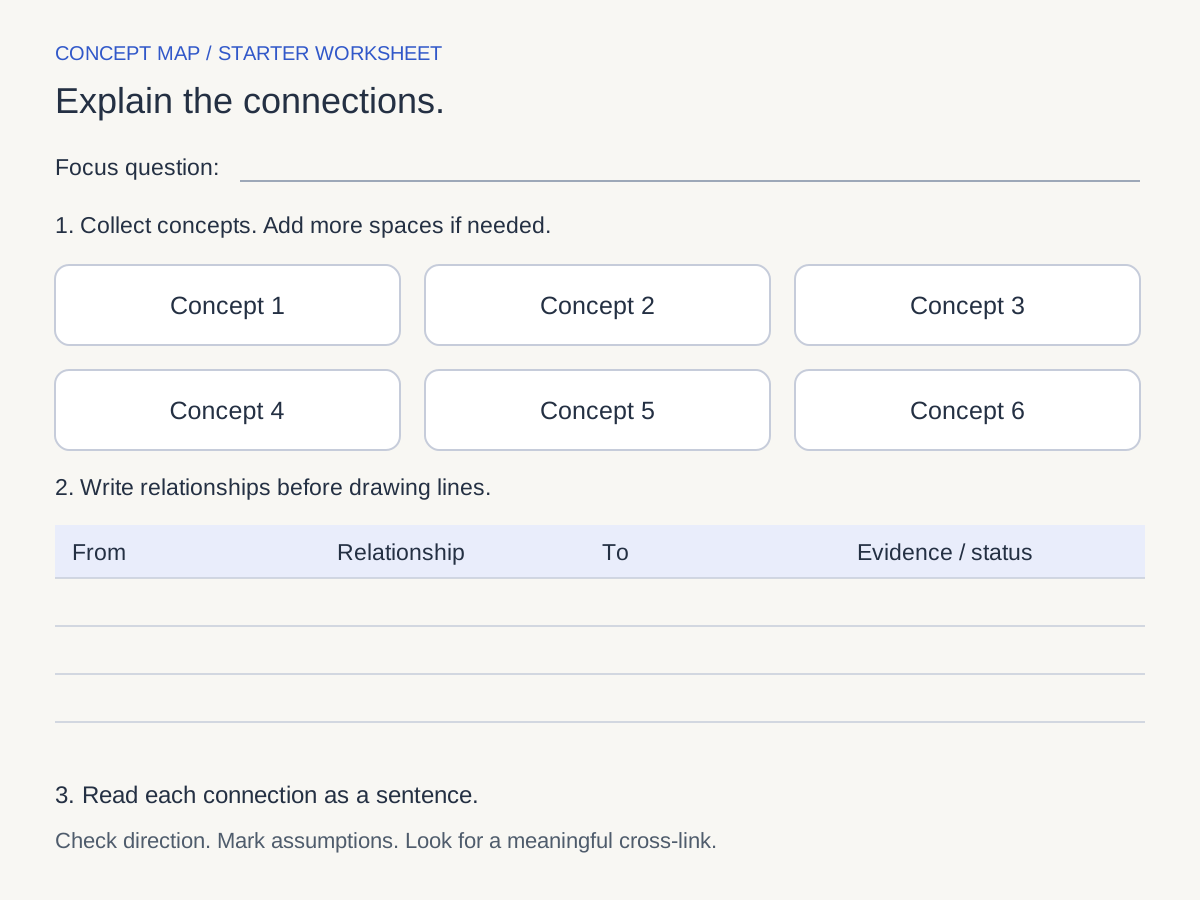
Start with these free, static worksheets and text files. No account is needed to download them. They are not one-click AFFiNE templates, and the CSV does not automatically create a diagram.
| Resource | What you get | How to use it |
|---|---|---|
| Blank worksheet (SVG) | A focus question area, concept spaces, and a relationship table | Open in a browser to print, or edit in a compatible vector editor |
| Blank relationship table (CSV) | From, Relationship, To, Evidence, and Status columns | Fill it in with a spreadsheet editor before drawing |
| Completed release example (CSV) | All nine relationships from the worked example | Compare it with the diagram or replace the sample concepts |
| Copyable starter (Markdown) | A focus question, blank relationship table, and review checklist | Copy the text into your notes and adapt it |
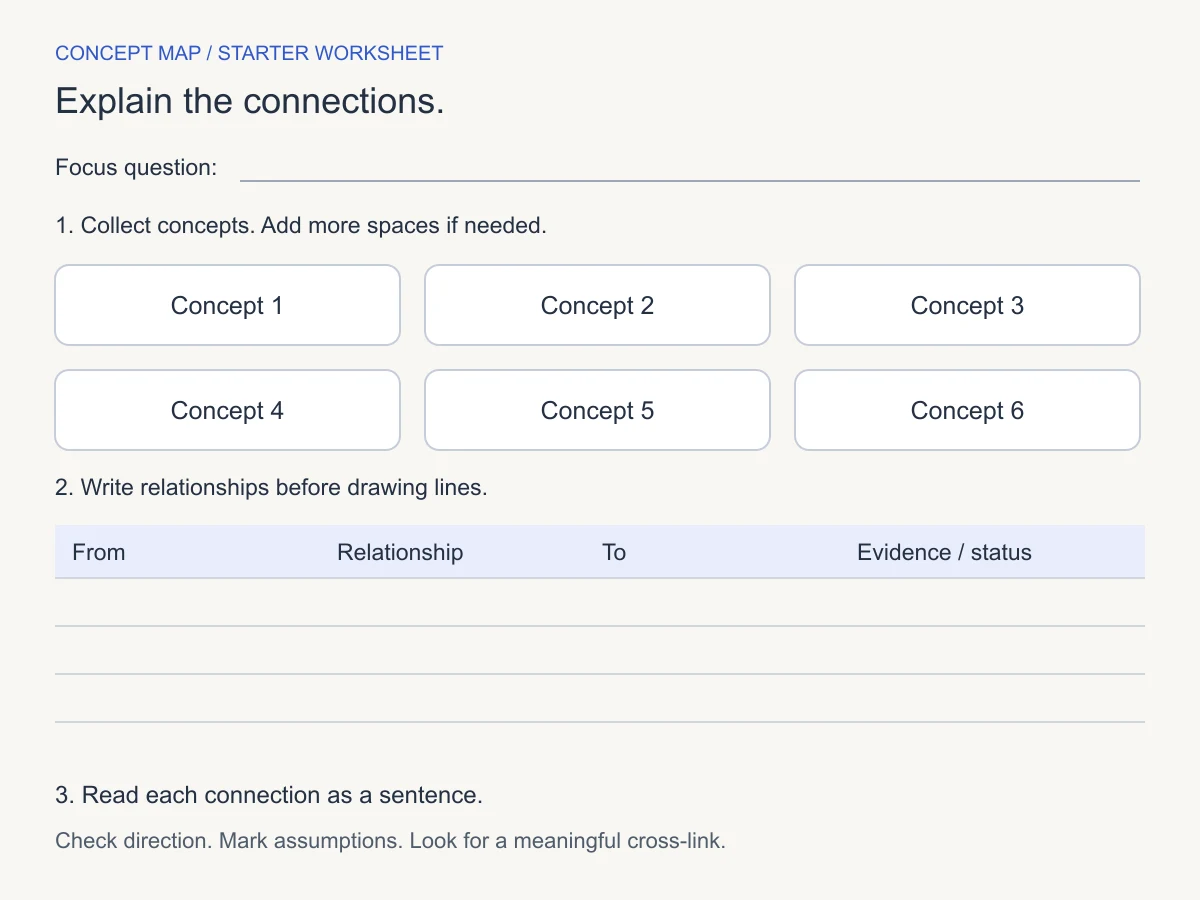
Replace the placeholders before choosing colors. If the template gives you six spaces but your question needs eight concepts, add two. For other starting layouts, browse our concept map templates and examples.
Choosing a Concept Map Tool
Paper works for a first draft. A digital canvas helps when you need to move concepts, revise connections, or keep source notes nearby. Before choosing a tool, check whether you can:
- Put readable text on connections and create links across branches.
- Move concepts without making the diagram difficult to follow.
- Keep evidence and unresolved questions beside the map.
- Save the work in a form you can reopen, and verify any sharing or export options you need.
For a broader comparison, see free concept map makers compared. The workflow below focuses on manually building a small map in AFFiNE.
Build a Labeled Connection in AFFiNE
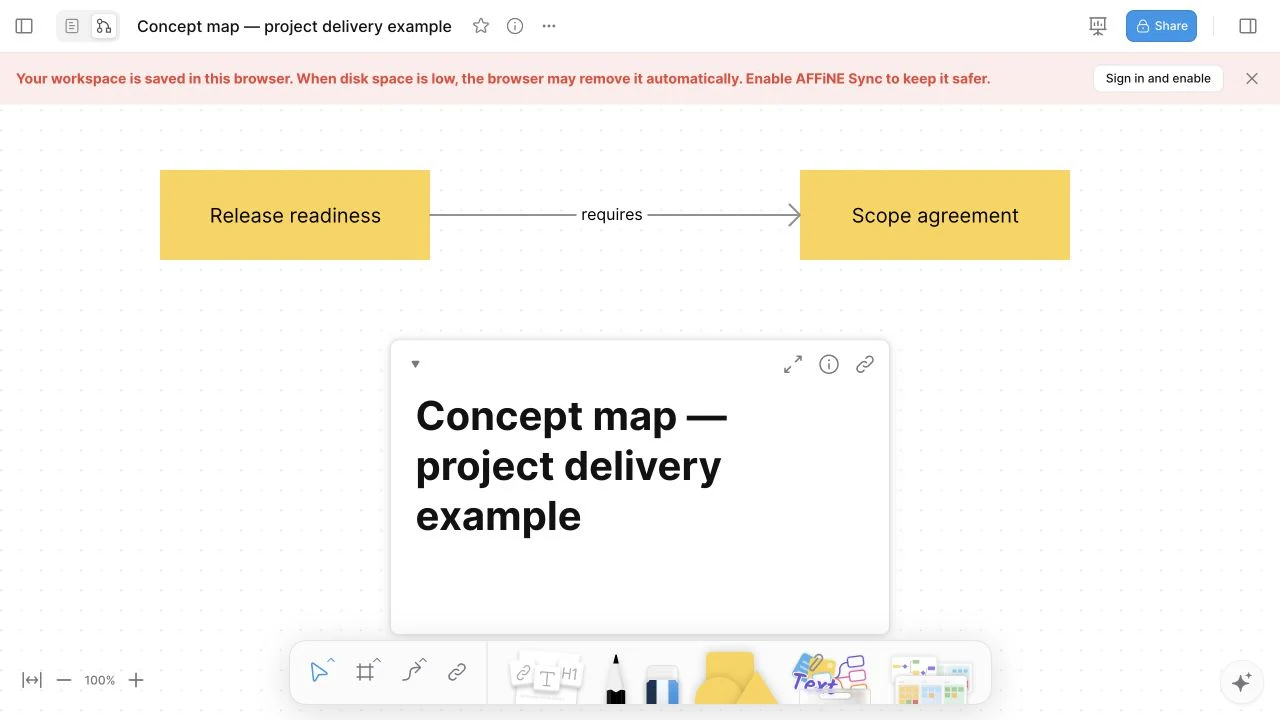
In an AFFiNE Web check on October 7, 2026, we created a document in a local browser workspace, switched to Edgeless, added two rectangular shapes, and labeled the connector between them. Here is the actual result:
For the full workflow, templates and FAQs, see the AFFiNE concept map maker.
- Create a document and give it a descriptive title.
- Switch to Edgeless using the document’s canvas control.
- Choose a rectangle in the shapes tool and drag on the canvas to draw it. Double-click the shape to enter “Release readiness.”
- Draw a second shape and label it “Scope agreement.”
- Choose the connector tool and drag from the first shape to the second.
- Double-click the connector and type “requires.” Read the result as a sentence, then continue with the relationships in the example table.
The full eight-concept diagram above is an editorial illustration, not an AFFiNE export. This check verified manual shapes and a labeled connector, not automatic map generation, file import, export formats, multiplayer editing, or cloud persistence. Confirm the save and sharing setup in your workspace before relying on it for a team session.
Open AFFiNE and build your first labeled connection, or explore the Edgeless whiteboard first. Keep the example table beside you as you draw.
Collaborative Concept Mapping Best Practices
Give one person responsibility for keeping the focus question and terminology consistent. Ask contributors to bring evidence for proposed connections rather than adding boxes without context.
Review disputed links separately: is the statement a fact, a working assumption, or an open question? Write that status in a nearby note or the worksheet’s Status column. For the release example, the team should agree on its approval process before presenting “risk review informs sign-off” as an established rule.
After a decision, record what changed, who checked it, and when the map should be reviewed again. A map of an evolving project needs an owner just as its supporting document does.
Common Mistakes to Avoid
| Problem | Why it weakens the map | Repair |
|---|---|---|
| Unlabeled connections | Readers must invent the relationship | Add a phrase and read the proposition aloud |
| Repeating “is related to” | The diagram says little beyond association | State the specific dependency, membership, or influence |
| Unsupported causal arrows | A drawing can make a guess look established | Qualify the statement and add evidence or an assumption note |
| A box for every detail | The focus question disappears in clutter | Move supporting details into notes or a separate map |
| Cross-links added for decoration | More lines create work without adding meaning | Keep only links you can explain |
| Tiny text and crossing labels | Readers cannot follow the map | Reposition nodes, simplify, and check it at its reading size |
Conclusion
Before calling a concept map finished, check these six things:
- It answers one clear focus question.
- Each concept earns its place in the explanation.
- Each labeled connection reads as a meaningful sentence.
- The layout makes broad ideas and supporting details easy to find.
- Cross-links add insight, and uncertain relationships are marked.
- Another person can explain the map without you narrating it.
Begin with the blank relationship table, write a few clear propositions, and draw only the connections you can explain.
Frequently Asked Questions About Concept Maps
What are the main parts of a concept map?
A concept map contains concepts and labeled connections that form meaningful statements, called propositions. A focus question defines its scope. Hierarchy organizes broad and specific ideas, while cross-links connect different branches when there is a useful relationship to explain.
What is the difference between a concept map and a mind map?
A mind map typically branches outward from one topic to organize associations. A concept map makes the relationships explicit with linking phrases and can connect different branches. Choose based on whether you need to collect ideas or explain how they fit together.
What is the easiest way to start a concept map?
Write one question, list a small set of relevant concepts, and draft a few concept–relationship–concept sentences. Draw those connections before adding more ideas. The relationship table in this guide provides a starting structure without requiring a particular app.
Does a concept map need arrows?
It needs connections whose meaning and reading direction are clear. Arrows are useful for directional statements such as “test coverage informs sign-off.” A line without an arrow can work when the relationship is unambiguous. Check that the linking phrase still reads correctly.
Can concept maps be used for nursing?
Yes, they are used in nursing education to organize care reasoning. Use de-identified information and verify relationships against instructor-approved or clinical sources. A map is a learning and communication aid, not a substitute for clinical judgment or current protocols.
Which tool is best for concept mapping?
Choose a tool that supports readable relationship labels, flexible connections, and the save or sharing workflow you need. Paper may be enough for a quick exercise. AFFiNE supports manual shapes and labeled connectors in Edgeless, with documents and a canvas in the same workspace.