Free Concept Map Templates: Blank & Editable (2026)
What changed (Nov 14, 2026): Rebuilt the page around five free blank concept map templates made by AFFiNE (hierarchical, spider, flowchart-style, cycle and nursing) plus a filled water cycle example, downloadable as PNG, printable PDF (US Letter and A4) and editable PowerPoint. Removed the two AFFiNE templates that were not available in the template gallery, pointed every third-party entry to a specific template page, removed HubSpot (its template page now redirects), added concept map format guidance from Novak and Cañas, FAQs, sources and a disclosure, and retitled the guide.
Short answer: Download one of the five free blank concept map templates below. Each one comes as a PNG image, in a printable PDF (US Letter and A4) and in an editable PowerPoint (.pptx) file, a format Google Slides and Keynote can also open. Pick the hierarchical template for most class topics, the spider template (8 branches) for brainstorming around one idea, the flowchart-style template for processes, the cycle template for anything that repeats, and the nursing template for care plans. If you would rather edit online, the second half of this page lists specific concept map templates from Canva, Lucid, Creately, Venngage, Miro and ClickUp.
Updated November 14, 2026. Disclosure: AFFiNE publishes this blog and makes a docs-and-whiteboard app. The five blank templates and the water cycle example were made by us and are free to download, print, change and share without signing up. The third-party templates were opened on November 13 and 14, 2026; some need a free account, and some layouts in their libraries are paid.
Free concept map templates to download
Free downloads (no sign-up):
- All templates, printable PDF, US Letter: five blank templates and a filled-in example, one per page
- All templates, printable PDF, A4: the same six pages sized for A4 paper
- All templates, editable PowerPoint (.pptx): every box, arrow and label is a separate shape you can type in, move or delete
| Template | Best for | Image | |
|---|---|---|---|
| Hierarchical concept map | Class topics and reading notes, from general to specific | PNG | PDF page 1 |
| Spider concept map (concept web) | One central idea with up to 8 branches | PNG | PDF page 2 |
| Flowchart-style concept map | Processes, procedures and cause and effect | PNG | PDF page 3 |
| Cycle (system) concept map | Life cycles, feedback loops and repeating processes | PNG | PDF page 4 |
| Nursing concept map | Care plans: diagnoses, supporting data, interventions and outcomes | PNG | PDF page 5 |
| Water cycle example (filled in) | Seeing what a finished map looks like | PNG | PDF page 6 |
Every template has the same parts: a line for the topic or focus question, boxes for concepts, a dashed placeholder on each line for the linking words, and a dashed cross-link where two branches connect. The PowerPoint file keeps all of these as shapes. The PNG and PDF versions are for printing or for typing on top in another app.
Blank concept map templates by layout
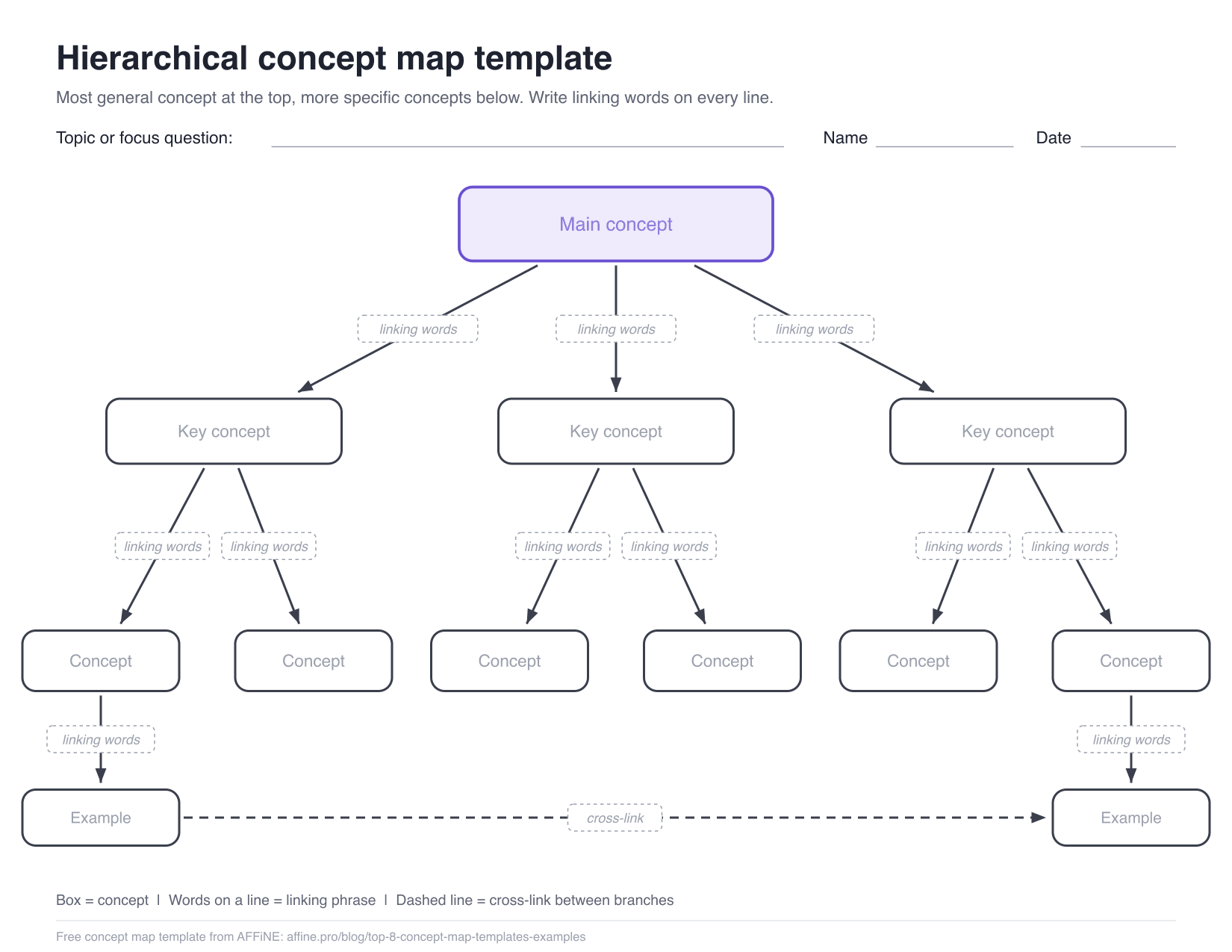
Hierarchical concept map template
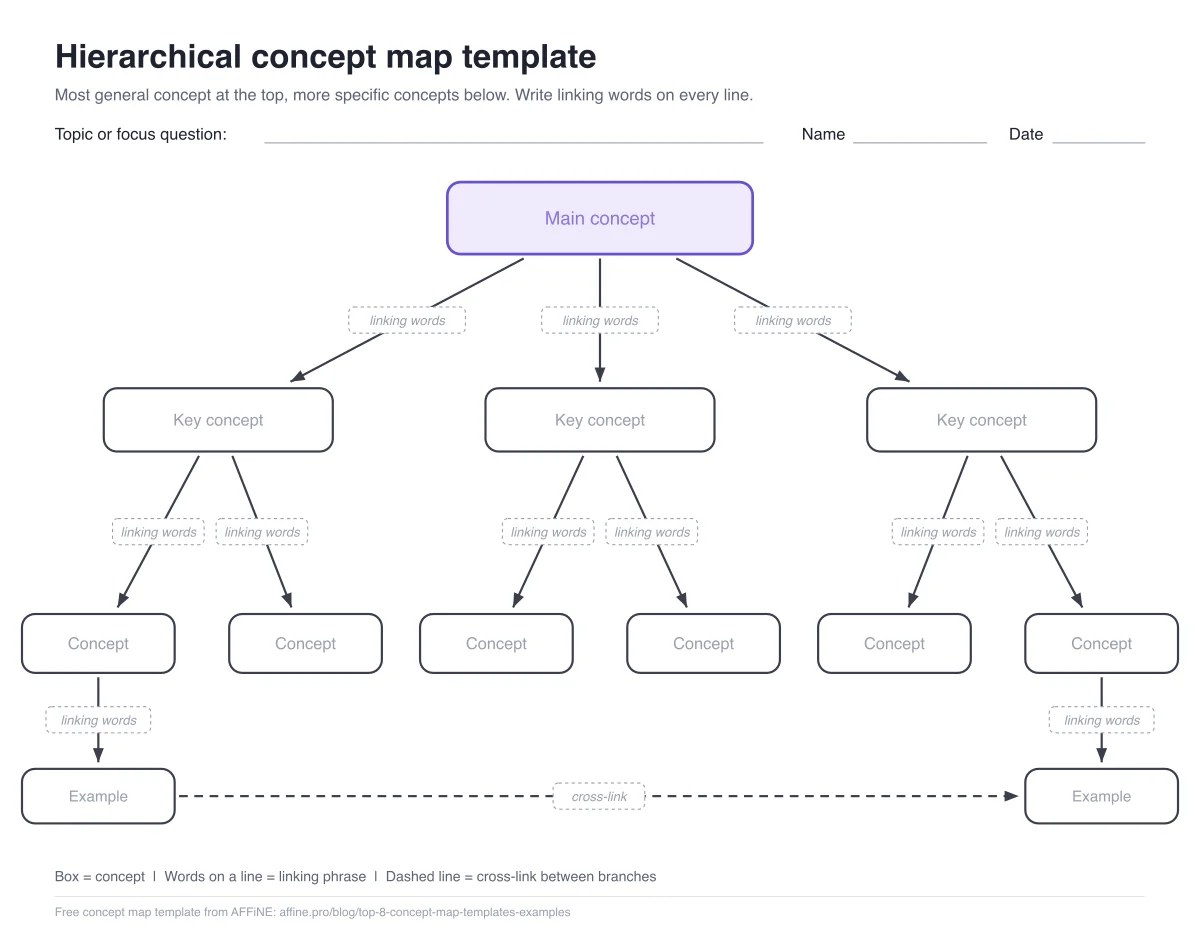
This is the classic layout described by Joseph Novak and Alberto Cañas of IHMC: the most general concept sits at the top and more specific concepts sit below it. The template has one main concept, three key concepts, six supporting concepts and two example boxes.
Use it for a chapter, a lecture or an essay plan. Write the focus question first, put the broadest idea in the purple box, and fill the boxes downward. The dashed line at the bottom is a cross-link: use it when a concept in one branch affects a concept in another.
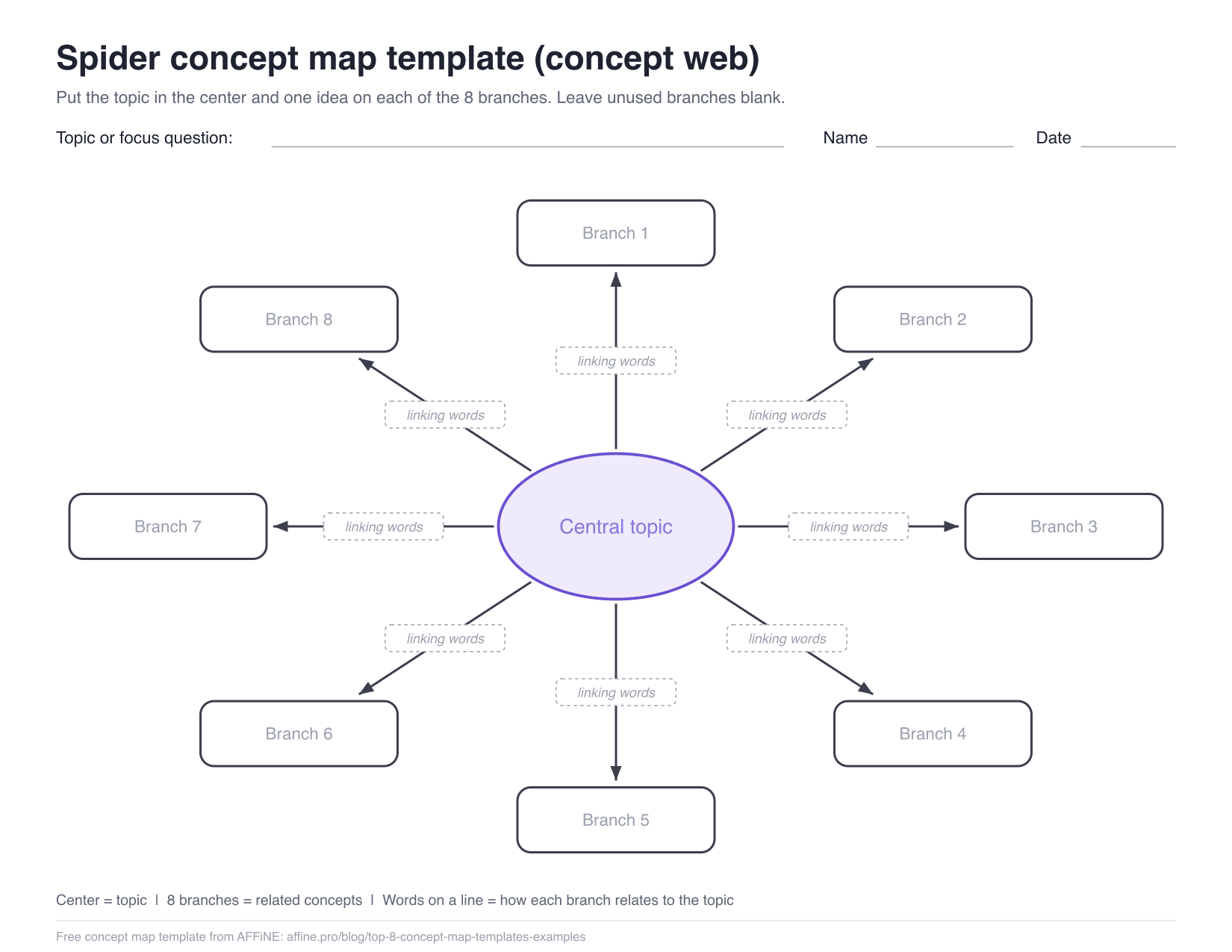
Spider concept map template (concept web)
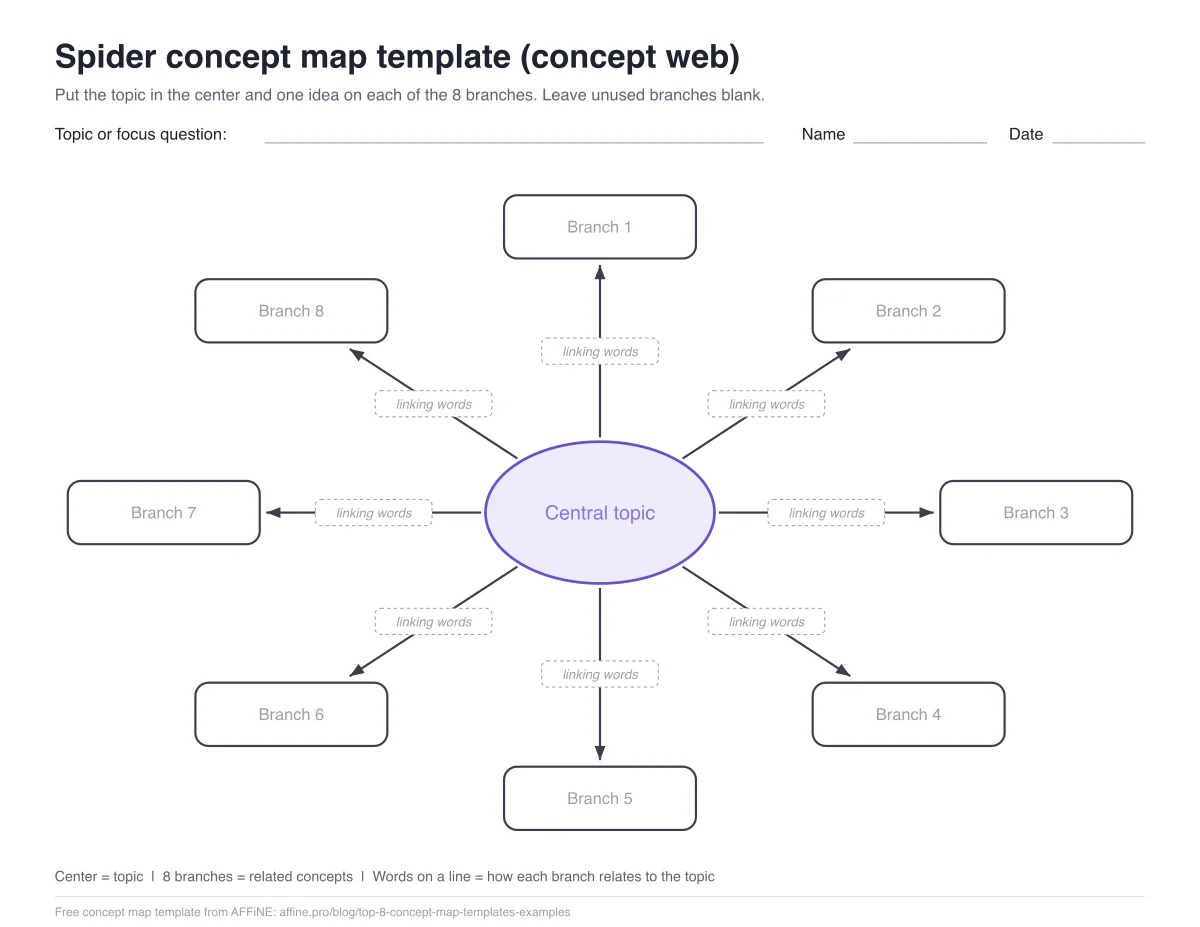
A spider map, also called a concept web, puts one topic in the center and related ideas around it. This template has 8 branches, which is enough for most brainstorming sessions and vocabulary webs. Leave branches empty if you need fewer.
A spider map is flatter than a true concept map, so it is easy to stop at single words. Keep the linking words on every arrow ("causes", "is part of", "is measured by") and it will still read as a set of statements rather than a list.
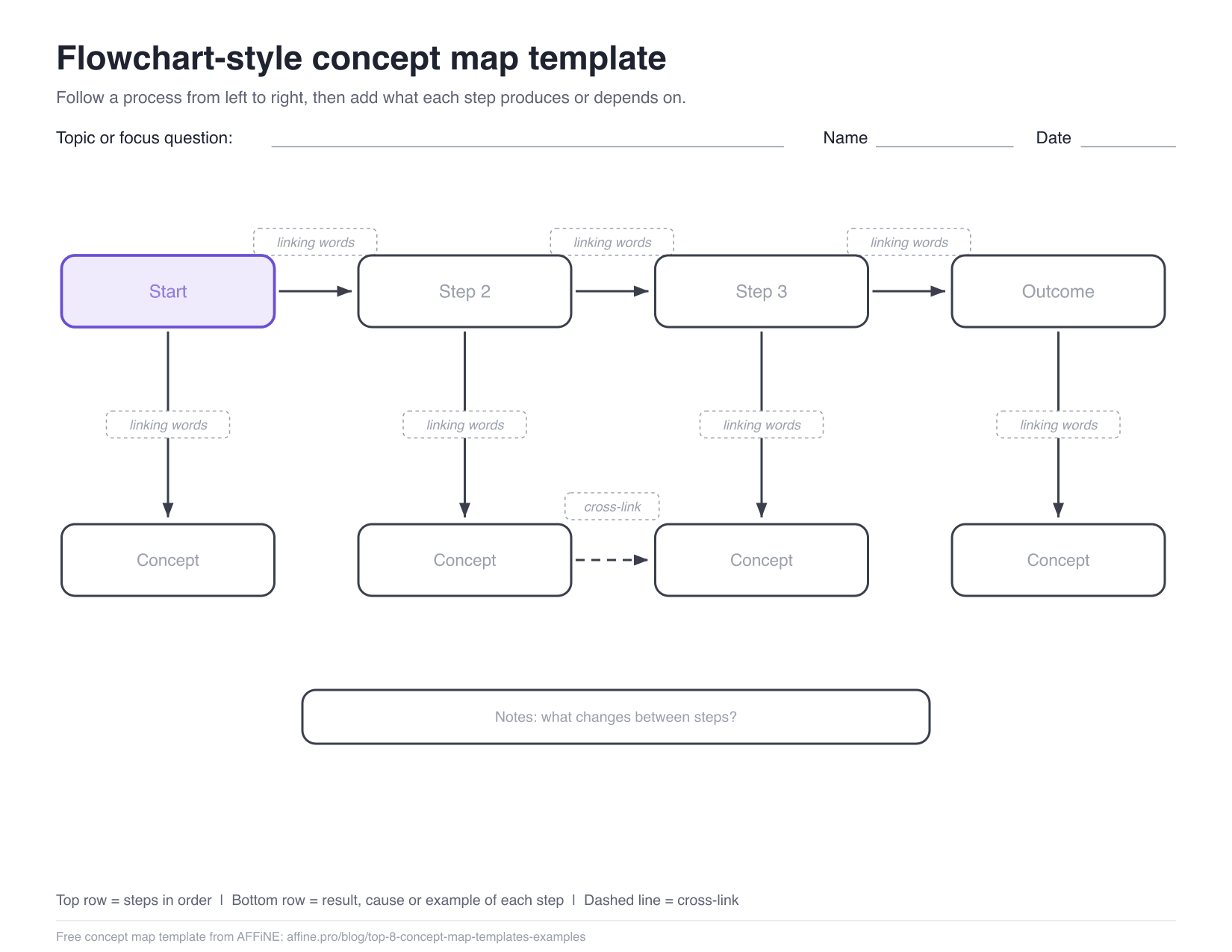
Flowchart-style concept map template
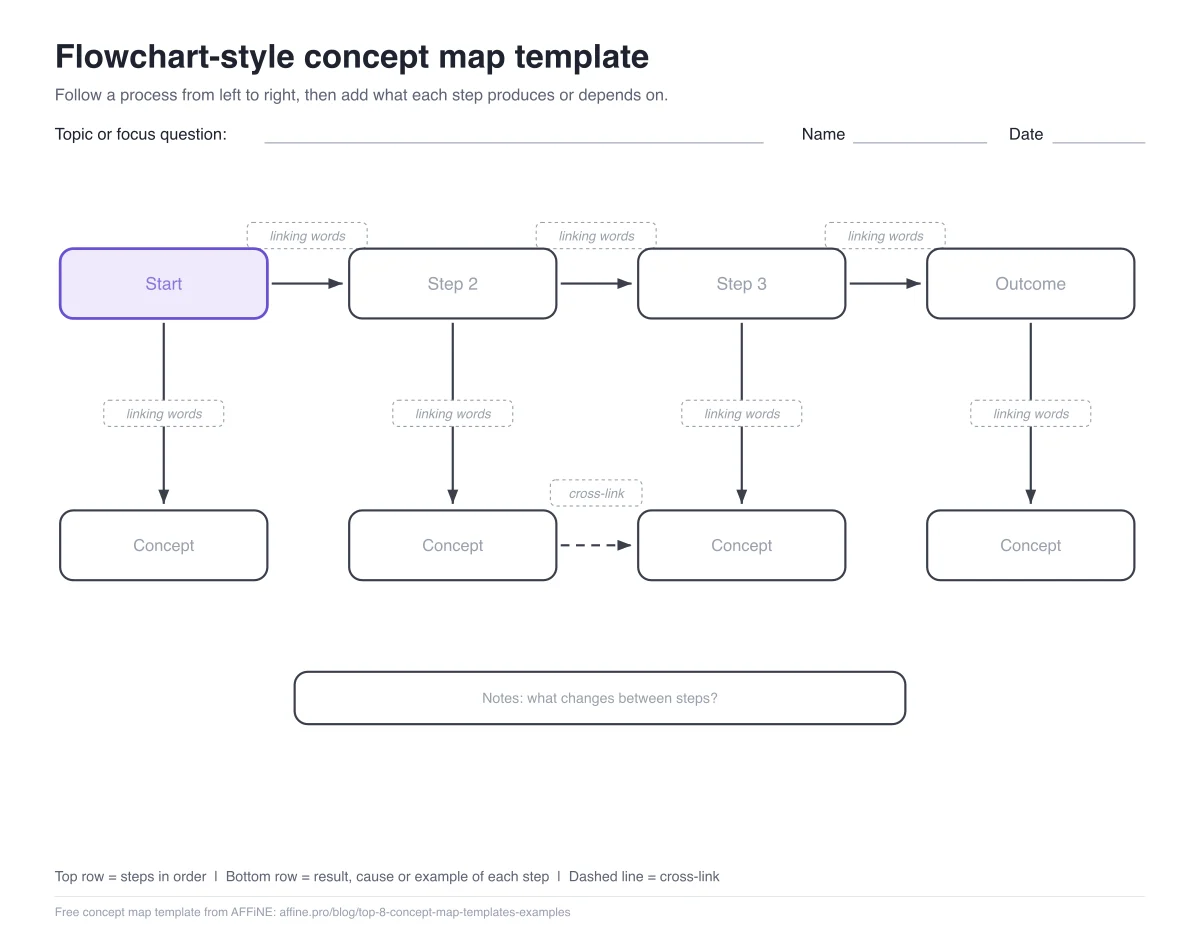
Use this layout when the order matters: a lab procedure, a historical sequence, a sales process or how a bill becomes law. The top row holds the steps from left to right. The box under each step holds what that step produces, needs or causes.
The difference from a plain flowchart is the linking words. "Step 2 requires a signed form" says more than an arrow alone. If you only need boxes and arrows, our free online flowchart maker comparison covers tools built for that.
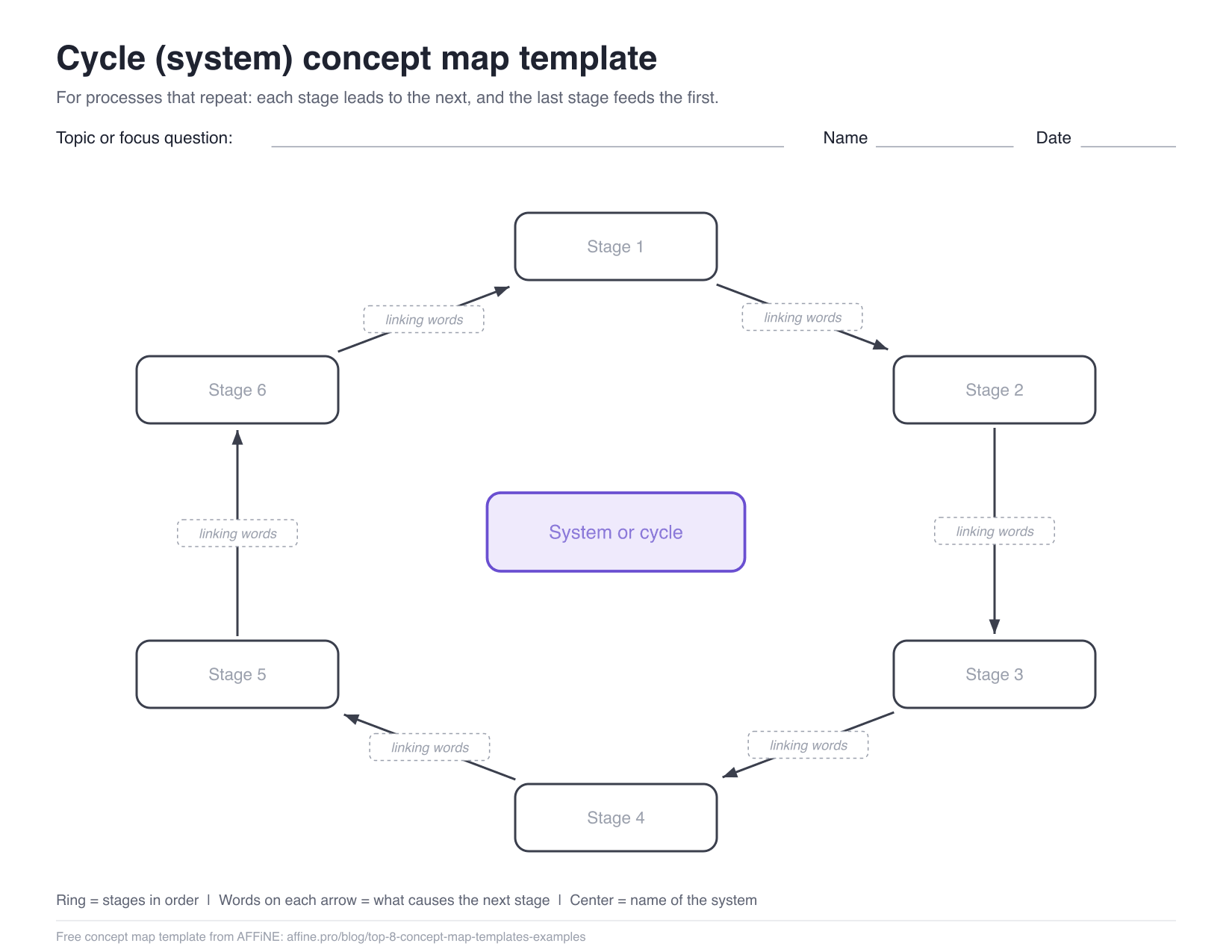
Cycle (system) concept map template
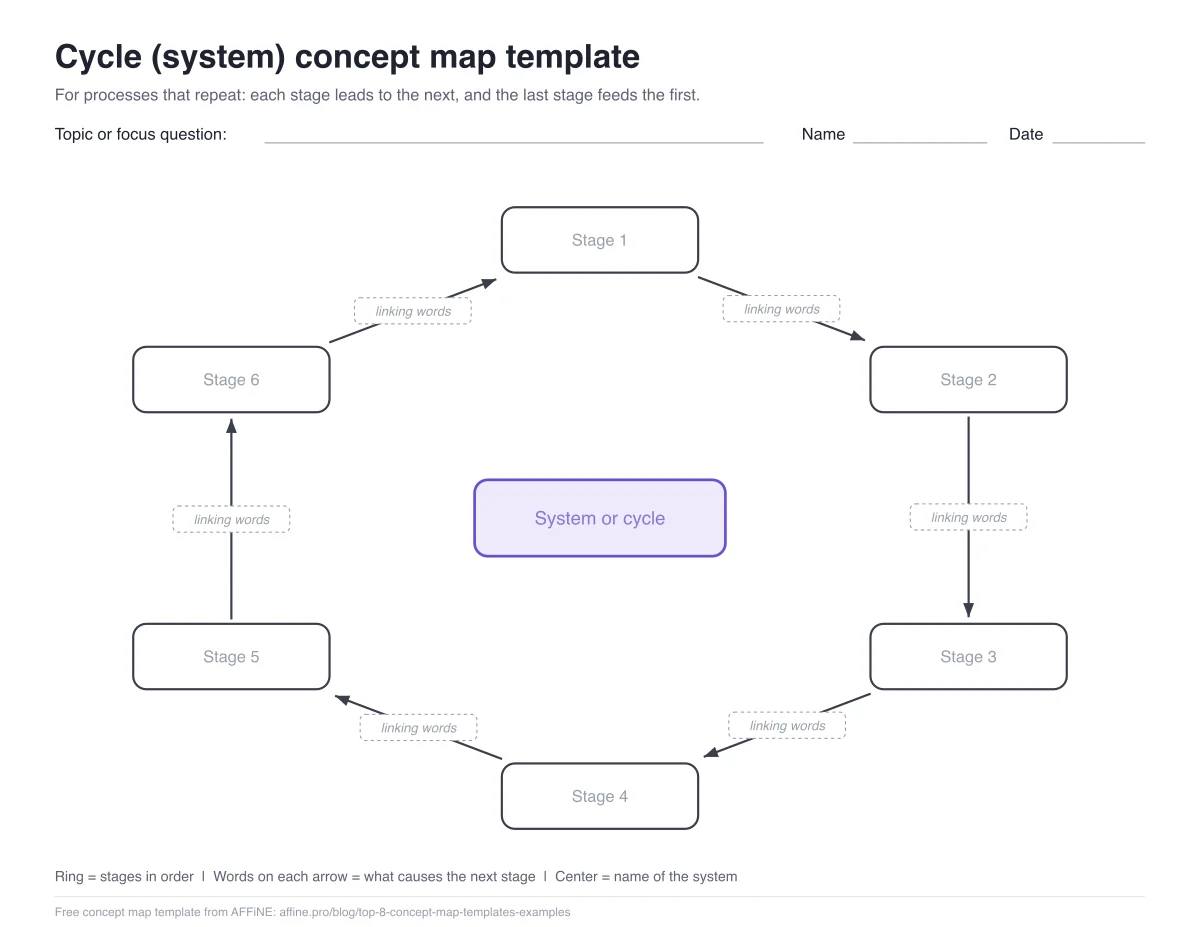
A cycle map shows a process with no real start or end, where the last stage feeds the first. It fits the water, carbon and nitrogen cycles, the cell cycle, product life cycles and feedback loops in a business. Name the system in the center and write what moves each stage to the next on the arrows.
Concept map templates for students
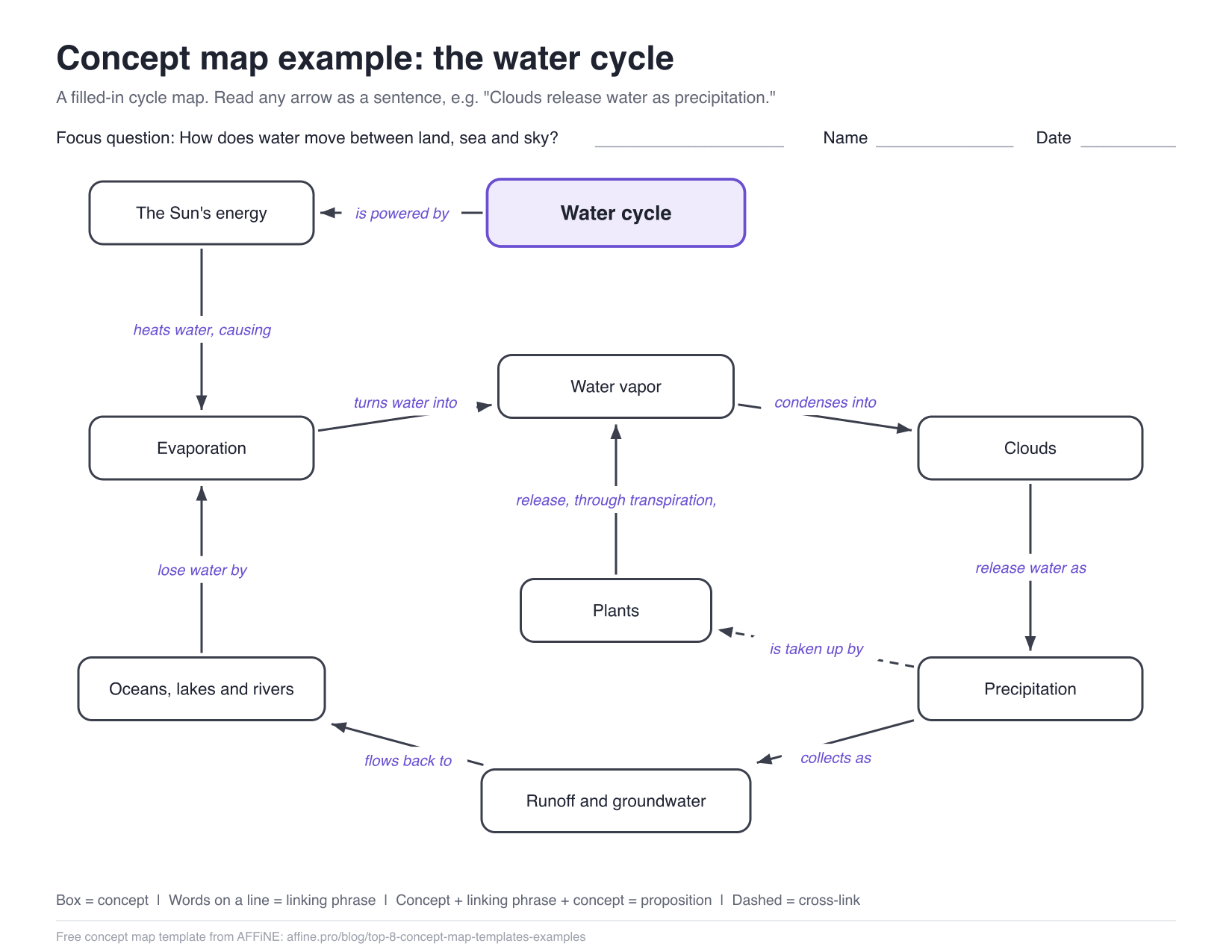
Most school assignments ask for a hierarchical map with labeled links, so start with the hierarchical template above. To see what a finished one looks like, here is the water cycle filled in on the cycle layout.
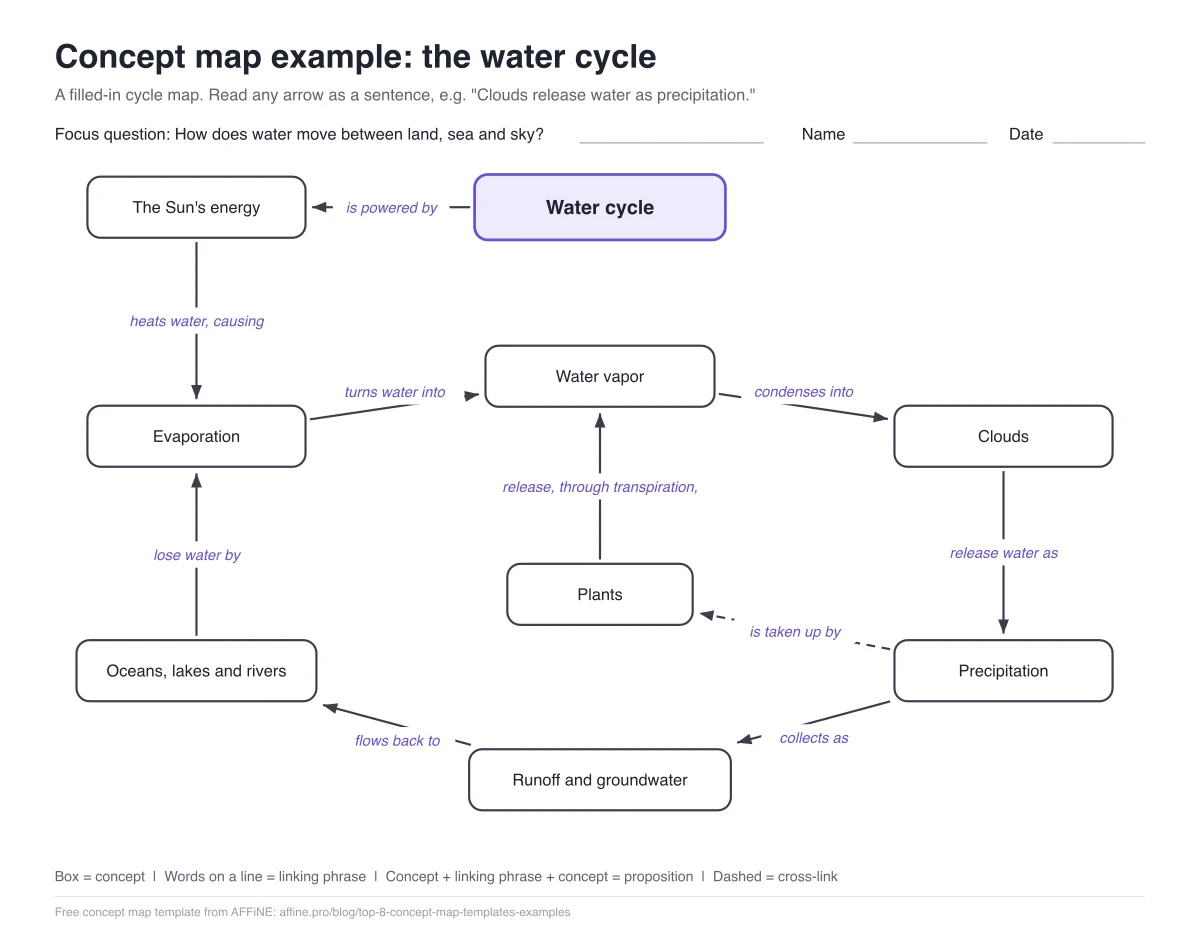
Read any arrow as a sentence: "Water vapor condenses into clouds." "Clouds release water as precipitation." The dashed line from precipitation to plants is a cross-link between the main loop and the side branch. For more filled-in examples with explanations, see our guide to concept maps, with examples and key elements.
If you want a colorful, ready-made science template to edit online:
- Venngage, Plants Biology Concept Map Template: a plant life cycle layout that opens in Venngage's online editor. More layouts are in its concept map template category.
- Canva, concept map templates: a large library of designed layouts, including educational ones, that you edit in Canva with a free account.
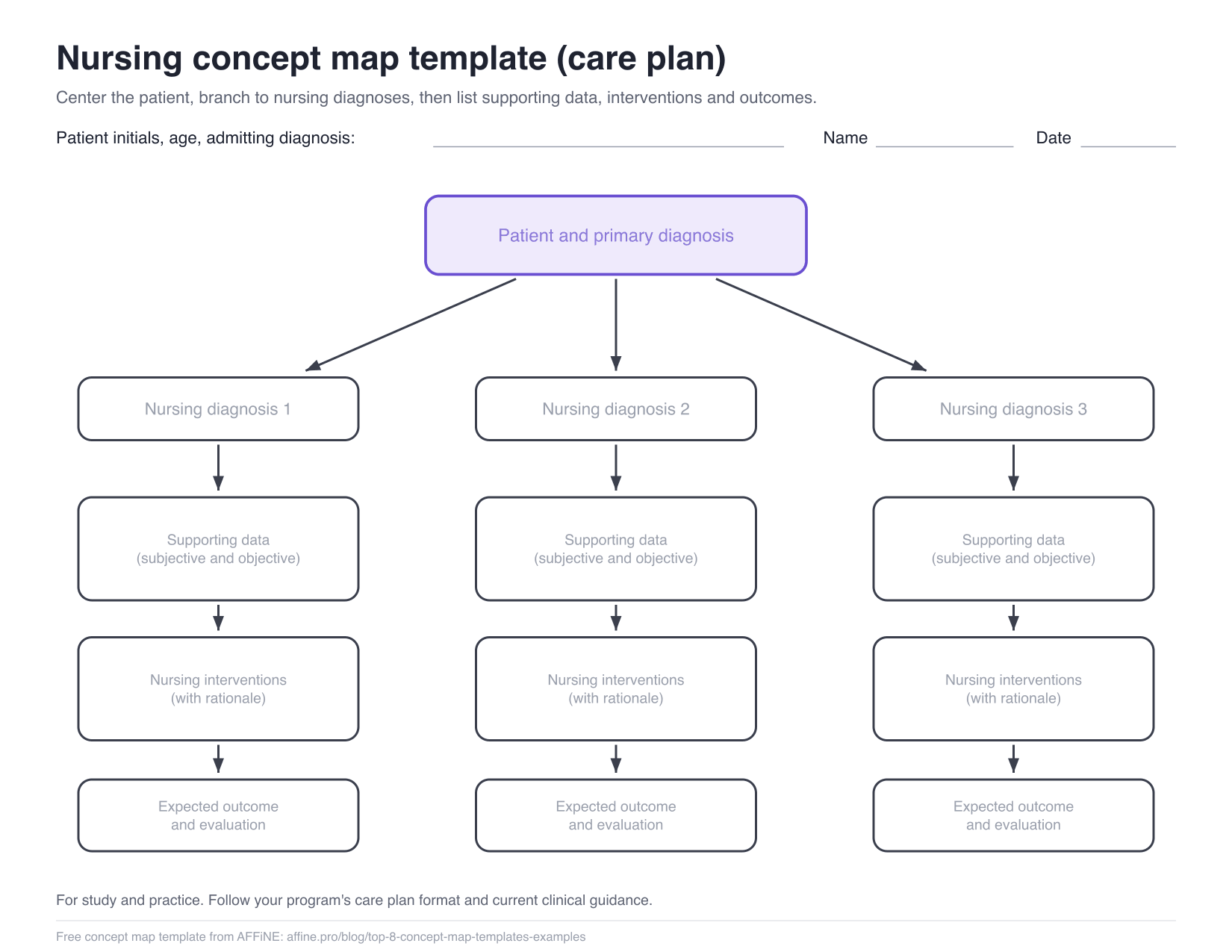
Nursing concept map template
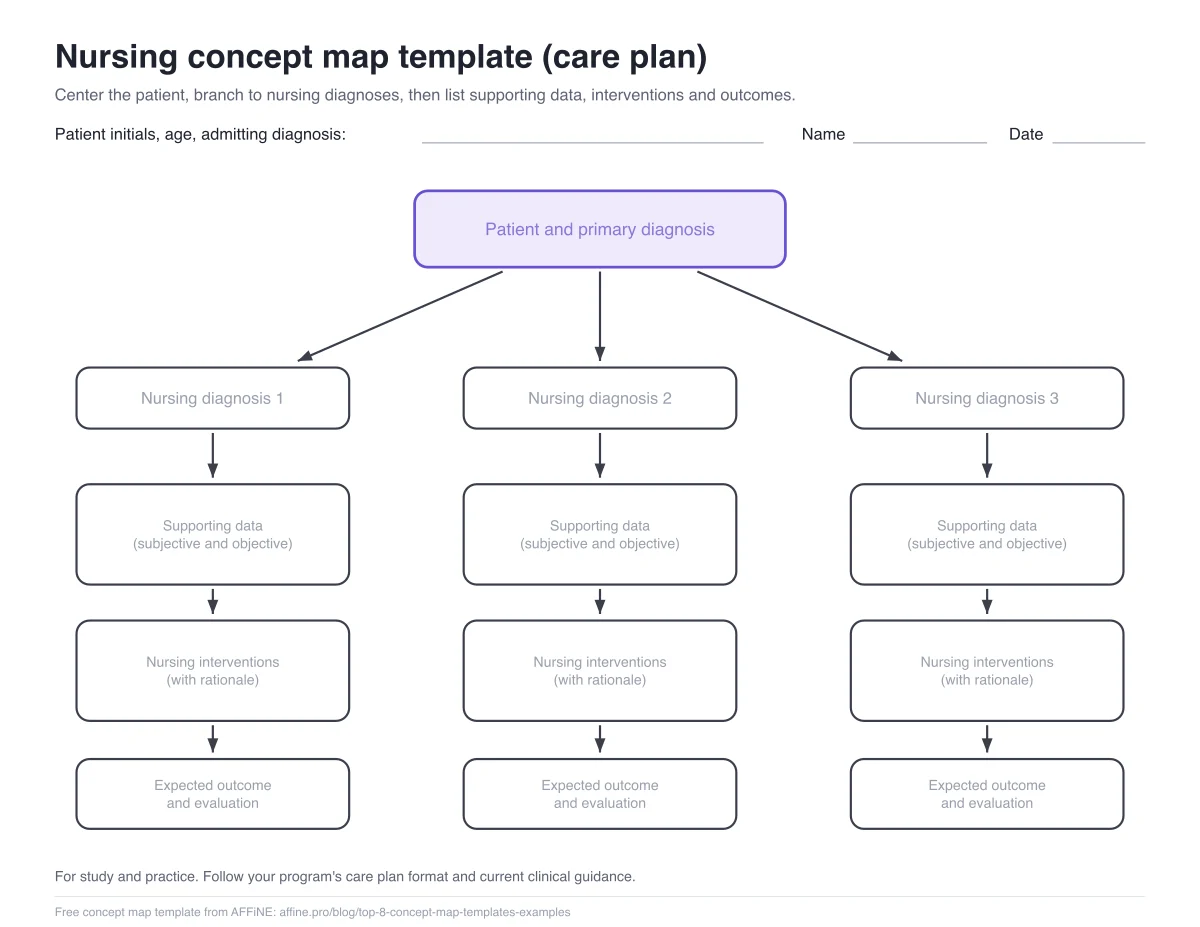
Nursing concept maps put the patient in the center and work outward: nursing diagnoses, the subjective and objective data that support each one, the interventions with their rationale, and the expected outcome. This template gives you three diagnosis columns. Nursing programs use different care plan formats, so check the headings your instructor expects before you fill it in. The template is a study aid, not clinical guidance.
For worked examples, see our nursing concept map examples. Creately also has a guide with editable nursing concept map templates for diagnosis and care planning.
Concept map templates for business and team planning
For product ideas, research synthesis or onboarding, the flowchart-style and hierarchical templates work well on paper or in a slide deck. If your team already works in a whiteboard tool, these templates open directly in it:
- Miro, Concept Map Template: a basic layout that you add to a Miro board with "Use template". Miro also has a concept map template collection.
- ClickUp, Concept Map template: a ready-to-use ClickUp whiteboard. The "Get free template" button goes to ClickUp's sign-up page, so you need a ClickUp account.
- Lucid, concept map templates and examples: starts with a blank concept map template, followed by subject examples. Lucid's own concept map template page opens it in Lucidspark and says it is available on all Lucid plan types.
Editable concept map templates from other tools
| Source | Template to start with | What you need |
|---|---|---|
| Canva | Concept map template library | A Canva account (Canva has a free plan) |
| Lucid | Blank concept map template | A Lucid account |
| Creately | Simple Concept Map Template | Creately's online editor; some other templates in its concept map library are marked Premium |
| Venngage | Plants Biology Concept Map | Venngage's online editor |
| Miro | Concept Map Template | A Miro account |
| ClickUp | Concept Map template | A ClickUp account |
Creately's library page says you can export a finished map as PDF, PNG, JPEG or SVG. We did not compare free-plan limits here; our free concept map maker comparison covers plan limits and labeled links tool by tool.
An earlier version of this article listed HubSpot's concept map template. On November 14, 2026 that page redirected to HubSpot's general project management template library, so we removed it.
Concept map format: what a template should include
A concept map is not just boxes and arrows. In "The Theory Underlying Concept Maps and How to Construct and Use Them", Novak and Cañas describe these parts:
- Concepts: short labels, usually one to three words, in boxes or circles.
- Linking words or phrases: words on the line that say how two concepts relate, such as "requires", "is a type of" or "leads to".
- Propositions: two concepts plus their linking phrase, read as a sentence. "Clouds release water as precipitation" is one proposition.
- Hierarchy: the most general concepts at the top, more specific ones below.
- Cross-links: links between concepts in different parts of the map.
- A focus question: the question the map answers. It keeps the map on topic.
A template without places for linking words is closer to a mind map. That is why every template on this page has a placeholder on each line.
How to fill in a blank concept map template
- Write the focus question on the top line, for example "How does water move between land, sea and sky?"
- List your concepts on scrap paper. Novak and Cañas suggest that 15 to 25 concepts are usually enough, and call this list a "parking lot".
- Rank them from most general to most specific.
- Place them on the template, starting with the main concept.
- Label every line with a verb or short phrase. Avoid "related to"; it says nothing.
- Add cross-links where a concept in one branch affects one in another.
- Read the map aloud as sentences and fix any link that does not make sense.
Concept map vs mind map template
A mind map template branches out from one center, and the branches usually carry no words. A concept map template expects labeled links and allows cross-links, so it shows how ideas relate, not only that they belong together. The spider template above sits between the two. For mind map layouts, see our mind map examples.
Making a concept map in AFFiNE
AFFiNE does not have a concept map template in its template gallery yet, and it cannot open the PowerPoint file. You can still use these templates with it: drag the PNG onto an Edgeless canvas as a reference, or redraw the layout with shapes and connectors, which can carry text labels. Your notes for each concept can sit in docs in the same workspace. The AFFiNE concept map maker page shows the full workflow. Our free concept map maker guide walks through the steps and compares AFFiNE with CmapTools, draw.io, Canva, Miro and others.
How we made and checked these templates
- Our templates: drawn from one layout file, so the PNG, PDF and PowerPoint versions match. The PNG files are 1650×1275 pixels; the PDFs have one template per page with margins for printing. We checked the PowerPoint file in the macOS Quick Look preview to confirm that the shapes, arrows and labels come through. We did not test it in every version of PowerPoint, Google Slides or Keynote.
- Third-party templates: we opened each linked page on November 13 and 14, 2026 and linked to the template itself, not the company's homepage. We did not test paid plans. Template libraries change often, so a layout may move or become paid.
- Facts about concept maps: from Novak and Cañas's paper published by IHMC, listed under Sources.
Frequently asked questions
Is there a free blank concept map template?
Yes. All five templates on this page are free, blank and need no sign-up: hierarchical, spider (8 branches), flowchart-style, cycle and nursing. Download them as PNG images, a printable PDF in US Letter or A4, or an editable PowerPoint file.
How do I make a concept map in Word?
Open the PowerPoint template, fill in the boxes and linking words, then select the whole map, copy it and paste it into Word. You can also insert one of the PNG templates in Word and type on it with text boxes. Word's own shapes work for small maps but are slow to rearrange.
Is there a concept map template for Google Docs?
Upload the PowerPoint file to Google Drive and open it in Google Slides, where every shape stays editable. When the map is finished, copy it into Google Docs, or download the slide as an image and insert it. For a very small map you can also draw one in Google Docs with Insert > Drawing.
Can I print a concept map template?
Yes. The PDF has one template per page in landscape. Use the US Letter file in North America and the A4 file elsewhere. The boxes are left blank so you can write in them by hand.
What is the format of a concept map?
Concepts in boxes, connected by lines with linking words, arranged from general at the top to specific at the bottom, with a few cross-links between branches. Each concept, linking phrase and concept together should read as a sentence. A focus question at the top says what the map is about.
What is the difference between a concept map template and a mind map template?
A mind map template has one center and unlabeled branches. A concept map template has places for linking words on every line and allows links between branches. Use a concept map when the relationships between ideas matter, for example in science, nursing and exam revision.
Sources
Checked November 13 and 14, 2026:
- Joseph D. Novak and Alberto J. Cañas, IHMC: The Theory Underlying Concept Maps and How to Construct and Use Them
- Canva: Concept map templates
- Lucid: Concept map templates and examples, Concept map template
- Creately: Free concept map templates, Simple Concept Map Template, Nursing concept map templates
- Venngage: Concept mind map templates, Plants Biology Concept Map Template
- Miro: Concept Map Template, Concept map templates
- ClickUp: Concept Map template