Confluence Alternatives: 7 Open-Source and Self-Hosted Options for 2026
Compare 7 open-source and self-hosted Confluence alternatives by license, permissions, Confluence import, and paid tiers, with the Data Center end-of-life dates.

A Confluence alternative is a team wiki or documentation tool you can move your Confluence spaces into. In 2026 the question is urgent for one group in particular: teams on Confluence Data Center. Atlassian has set March 28, 2029 as the end of life for Confluence Data Center, after which instances become read-only. If you want to keep running your wiki on your own servers, you need a different product.
This guide is for the person who has to plan that move. It compares seven open-source and self-hostable Confluence alternatives (AFFiNE, Docmost, Outline, XWiki, BookStack, Wiki.js, and MediaWiki) on the things that decide a migration: license, permissions, sign-in, how Confluence content gets in, and what it takes to run the server. It ends with a five-step plan for moving one space before you move all of them.
At a glance
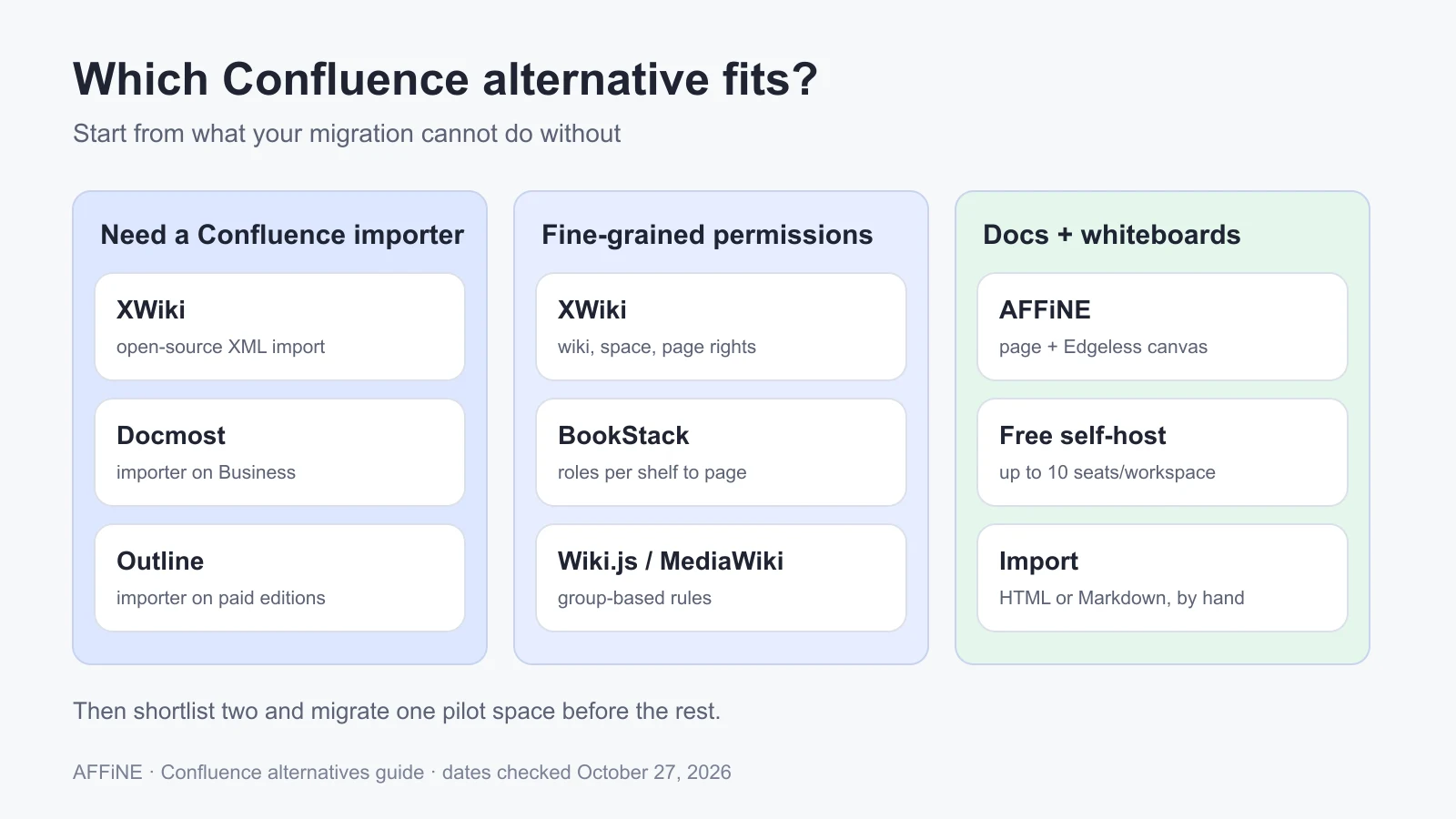
- Need a Confluence importer on your own server: XWiki (open-source Confluence XML import), Docmost Business, or Outline Business and Enterprise.
- Structured docs with fine-grained permissions: BookStack or XWiki.
- Modern real-time editing for a team wiki: Docmost or Outline.
- Docs plus whiteboards in one workspace: AFFiNE, if you can rebuild content by hand or through HTML and Markdown.
- Deadline to plan around: existing Data Center customers can buy new licenses and expansions until March 30, 2028. Instances turn read-only on March 28, 2029.
Published by AFFiNE, which makes one of the tools compared here. Product facts were checked against each vendor's official pages and documentation on October 27, 2026. We did not deploy or benchmark these tools for this article. Prices are as listed when checked and change often.
Why teams are looking for a Confluence alternative in 2026
Confluence is still a capable product, and many teams will simply move to Confluence Cloud. The search for alternatives comes from three specific pressures.
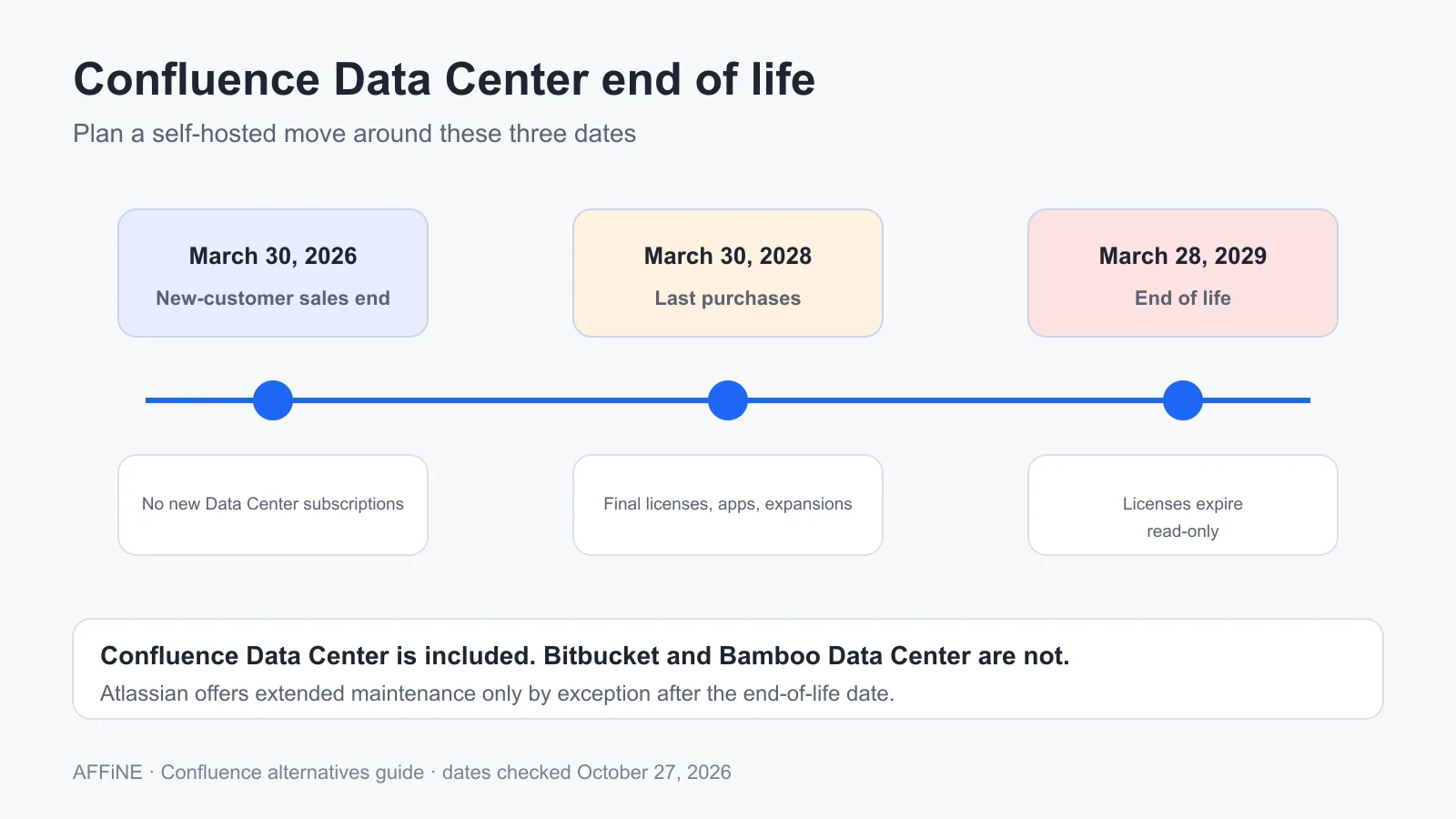
The Data Center end of life. Atlassian announced the sunset of its Data Center products in September 2025. According to Atlassian's Data Center end-of-life page, the schedule is:
| Date | What changes |
|---|---|
| March 30, 2026 | New customers can no longer buy Data Center subscriptions or Marketplace apps |
| March 30, 2028 | Last day for existing customers to buy new Data Center licenses, apps, and license expansions |
| March 28, 2029, 23:59 PST | End of life. Confluence Data Center licenses and their Marketplace apps expire and the product becomes read-only |
Atlassian says it will offer extended maintenance "by exception" to some customers after that date, and that Bitbucket and Bamboo Data Center are not affected. Confluence Server already reached end of support on February 15, 2024, so Data Center is the last self-managed Confluence edition.
Data residency and control. Some organizations cannot put their internal documentation on a vendor's multi-tenant cloud, whatever the certifications. For them, "cloud only" is not an option, so they need software they can run themselves.
Cost per seat. Confluence Cloud listed Standard at $5.78 and Premium at $11.16 per user per month on the US pricing page when we checked, before any volume or annual-billing changes. For a few hundred people, that becomes a large annual bill, especially for staff who mostly read. Many self-hosted wikis charge nothing for the core software, although their importers and sign-in options often sit on a paid tier.
If none of these apply to you, Confluence Cloud may be the least disruptive choice. Moving a large wiki is expensive, and the tools below do not replicate Jira integration, Confluence macros, or Marketplace apps.
Confluence alternatives compared
This table covers what matters for a self-hosted move. "Paid" means the vendor lists the feature on a paid tier or license. Licenses are as stated by each project on October 27, 2026.
| Tool | License | Self-host path | Confluence import | Permissions | Sign-in options | Real-time co-editing | Paid tier notes |
|---|---|---|---|---|---|---|---|
| AFFiNE | MIT editor; backend under the AFFiNE Enterprise Edition license | Official Docker Compose | No dedicated importer; experimental HTML and Markdown import | Workspace roles and per-document access | Google, GitHub, OIDC | Yes | Self-host free for up to 10 seats per workspace; Team is $10 per seat per month billed annually |
| Docmost | AGPL-3.0 core plus enterprise license | Docker Compose (Docmost, PostgreSQL, Redis) | Business tier | Spaces and groups; page-level permissions on Business | Email and password; SSO and LDAP on Business | Yes | Business $6 per seat per month billed annually, 10-seat minimum |
| Outline | BSL 1.1 | Docker Compose with PostgreSQL and Redis | HTML space export; Cloud, Business, and Enterprise editions | Collections, groups, guests | SSO or OIDC providers, passkeys, email magic link; no native password login | Yes | Confluence importer is not in the free self-hosted edition |
| XWiki | LGPL-2.1 | Java application with a database; Docker Official Image on Docker Hub | Open-source Confluence XML and CSV import extensions; paid migration toolkit | Fine-grained rights on wikis, spaces, and pages | Local accounts; LDAP, OIDC, and more through extensions or paid apps | Yes | XWiki SAS sells support plans with migration tools and pro apps |
| BookStack | MIT | PHP 8.2+ with MySQL or MariaDB; community Docker images | No official importer | Role and permission system per shelf, book, chapter, and page | Email and password, OIDC, LDAP, and more | No | No paid tier |
| Wiki.js | AGPL-3.0 | Docker or Node.js; stable line is 2.x | No official importer; community scripts convert HTML exports | Groups with page rules | Local, LDAP, OIDC, OAuth2, and many providers | No | 3.0 is a beta not meant for production |
| MediaWiki | GPL-2.0-or-later | PHP 8.3+ with MariaDB or MySQL | No official importer | Group-based rights; not designed for per-page read restrictions | Local accounts; LDAP and SSO through extensions | No (VisualEditor for single-user editing) | No paid tier |
Tool-by-tool notes
AFFiNE
Best for: teams that want docs and whiteboards in one workspace and are willing to rebuild their Confluence structure rather than import it page for page. Each AFFiNE document has a page mode and an Edgeless canvas, so a process write-up and its diagram live together. Database blocks offer table and Kanban views.
Self-host notes: the documented route is Docker Compose, running AFFiNE with PostgreSQL and Redis. The requirements page recommends at least 4 CPU cores and 2 GB of RAM. Sign-in supports Google, GitHub, and OIDC providers through the OAuth settings, and MFA can be enforced at your identity provider. AFFiNE also has desktop apps for Windows, macOS, and Linux.
Limits: AFFiNE has no Confluence importer. Export a space as HTML, convert it to Markdown if needed, and test the experimental HTML or Markdown import on a sample first. AFFiNE has no Jira integration comparable to Confluence's and does not reproduce macros or Marketplace apps. It has no automated user provisioning from a directory, and no built-in activity history for compliance reviews is documented. Self-host is free for up to 10 seats per workspace; beyond that you need the Team plan or an Installable License. The backend is not MIT-licensed, so read the license file if licensing is a requirement. Our AFFiNE vs Confluence comparison covers these gaps in more detail.
Docmost
Best for: teams that want the closest thing to a modern, self-hosted Confluence, with spaces, real-time editing, and a vendor-supported Confluence importer.
Self-host notes: the installation guide uses three containers: Docmost, PostgreSQL, and Redis. The Community edition includes spaces, real-time collaboration, and full-text search.
Limits: according to the pricing page, the Confluence importer, SSO and LDAP, page-level granular permissions, and AI come with Business, at $6 per seat per month billed annually with a 10-seat minimum. If your migration depends on the importer and page-level restrictions, budget for Business from the start.
Outline
Best for: fast, well-designed documentation for teams that already use Google Workspace, Microsoft Entra, Slack, or an OIDC provider.
Self-host notes: the Docker guide runs Outline with PostgreSQL and Redis. Outline's Confluence importer processes an HTML space export. It keeps text formatting, lists, notices, and images, while multi-column layouts and some macros do not survive. Large exports may need a higher FILE_STORAGE_WORKSPACE_IMPORT_MAX_SIZE and enough server memory to unzip them.
Limits: the importer is listed for Cloud, Business, and Enterprise editions, not the free self-hosted edition. Outline is licensed under BSL 1.1, which is not an OSI open-source license. It does not support native email and password sign-in, so plan for SSO, OIDC, passkeys, or SMTP for magic links.
XWiki
Best for: large organizations that need deep permissions, structured data, and the most complete open-source Confluence import path.
Self-host notes: XWiki is a Java application that runs with a relational database. On October 27, 2026 the download page listed 17.10.14 as the long-term support release and 18.4.7 as the release recommended for new production installs. The LGPL-2.1 Confluence extensions parse Confluence XML and CSV packages and Confluence page syntax.
Limits: XWiki is powerful but heavier to run and administer than the Node.js wikis. Some migration helpers, such as a full Confluence migration toolkit and certain sign-in integrations, are part of XWiki SAS's paid plans rather than the core download. Expect to spend time on configuration and on cleaning up converted macros.
BookStack
Best for: structured documentation that many people read and fewer people edit, organized into shelves, books, chapters, and pages.
Self-host notes: BookStack is MIT-licensed and needs PHP 8.2+ with MySQL or MariaDB. Community Docker images exist. It includes page revisions, a full role and permission system, and sign-in through OIDC, LDAP, and other options.
Limits: there is no official Confluence importer, so plan to convert HTML exports with scripts or by hand. Its rigid hierarchy is a strength for manuals but can feel restrictive for teams used to deep Confluence page trees. There is no real-time co-editing.
Wiki.js
Best for: engineering teams that want a Markdown wiki with many sign-in options and Git-backed storage.
Self-host notes: the requirements call for at least 1 GB of RAM and recommend 2 CPU cores. The stable release is the 2.x line.
Limits: there is no official Confluence importer. Community tools convert HTML exports into files that Wiki.js can import, but one team's published write-up describes missing navigation and Confluence page chrome left in the content. The 3.0 release is still a beta not meant for production, so a new install today means a future major upgrade.
MediaWiki
Best for: very large, mostly open wikis where many people edit and history matters more than access control.
Self-host notes: the current release requires PHP 8.3+ and usually runs with MariaDB or MySQL. Thousands of extensions add features.
Limits: MediaWiki was built for open collaboration. Its own documentation warns that it was not designed to support per-page access restrictions, which matters for internal wikis with HR or finance content. Without extensions, the editing experience is also further from Confluence than the other tools here.
What actually breaks when you leave Confluence
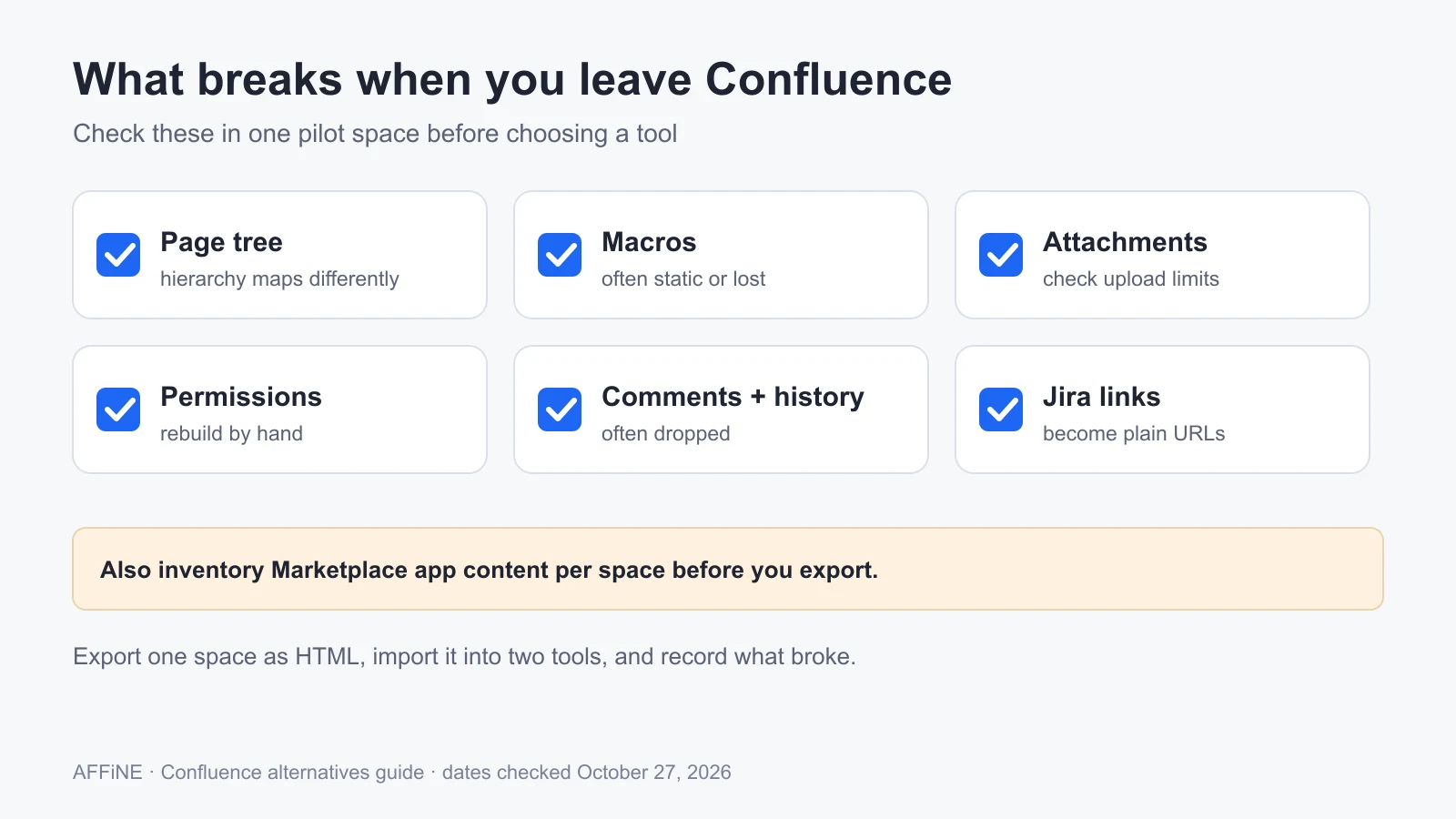
Feature tables hide where migrations fail. Confluence spaces depend on more than pages. Check each of these in your own content before you choose a tool.
| What you have in Confluence | What usually happens after export | What to check |
|---|---|---|
| Page tree and space structure | HTML and XML exports keep the hierarchy, but importers map it differently | Does the tree land as nested pages, collections, or books? |
| Macros (Jira issues, page properties, includes, status) | Most macros become static text or disappear | List your most-used macros and decide which ones you can drop |
| Attachments and images | Usually come across if the export includes them | Large attachment sets may exceed upload limits |
| Page restrictions and space permissions | Not carried over by HTML exports | Rebuild permissions by hand and test with real roles |
| Comments, likes, and page history | Often dropped | Decide whether you need history or only the current version |
| Jira links | Become plain URLs | Keep a list of pages that teams use with Jira every day |
| Marketplace app content | Depends on the app; often lost | Inventory apps per space before you export |
Confluence Data Center can export content as single pages in Word or PDF, multiple pages in HTML or PDF, and a space backup in XML. Confluence Cloud has a similar space export. HTML is the format most third-party importers accept. XML is mainly meant for importing into another Confluence site, though XWiki can read it.
How to migrate one Confluence space first
Move one space end to end before you commit to a tool. In our planning estimate, these five steps take two to three weeks for a small team; your timing will depend on how many macros and permission rules the space uses.
Inventory your spaces and pick a pilot
List every space with its owner, page count, last-edited date, and the macros and apps it uses. Archive what nobody has touched in a year. Choose one active, medium-sized space with typical content as the pilot.
Shortlist two tools against your must-haves
Write down the three things you cannot give up, such as page-level restrictions, OIDC sign-in, or a working importer. Remove any tool that puts a must-have on a tier you will not buy, then pick two.
Export the pilot space and import it into both tools
Export the space as HTML (and XML if you are testing XWiki). Import it with each tool's documented importer, or convert it to Markdown where no importer exists. Record what broke: hierarchy, tables, macros, images, and internal links.
Rebuild permissions and test with real roles
Recreate the space's groups and restrictions. Sign in as a reader, an editor, and an administrator, and confirm each one sees and changes only what they should. Connect your identity provider if the tier you plan to buy supports it.
Run the space for two weeks, then decide
Ask the space's regular users to work only in the new tool. Test a backup and a restore on a separate server. Then compare the two tools on what broke, hours spent, and yearly cost, and plan the remaining spaces well before March 30, 2028 if you may need to extend Data Center while you migrate.
Who should not choose AFFiNE
We make AFFiNE, so here is where it is the wrong pick:
- You need a one-click Confluence migration. AFFiNE has no Confluence importer. Docmost Business, Outline Business, or XWiki will move content with far less manual work.
- Your wiki is tightly linked to Jira. AFFiNE has no native Jira integration comparable to Confluence's.
- You need automated user provisioning or detailed access history for audits. Choose a tool that documents those controls, or stay on Confluence Cloud with Atlassian Guard.
- You have thousands of mostly read-only users on one self-hosted workspace. AFFiNE self-host is free only for up to 10 seats per workspace, so price the Team plan or an Installable License first.
AFFiNE fits better when a team wants to replace Confluence and a separate whiteboard tool at the same time, and is willing to rebuild a smaller, cleaner knowledge base. If your team is also comparing Notion, see our guides to self-hosted Notion alternatives, open-source Notion alternatives, and Notion alternatives in general.
Frequently asked questions
Is Confluence Data Center being discontinued?
Yes. Atlassian ended sales of new Data Center subscriptions to new customers on March 30, 2026. Existing customers can buy new licenses and expansions until March 30, 2028. On March 28, 2029, Confluence Data Center licenses expire and the product becomes read-only, except where Atlassian grants extended maintenance by exception.
What is the best open source Confluence alternative?
It depends on your migration. XWiki has the most complete open-source Confluence import path and fine-grained permissions. BookStack is MIT-licensed and easy to run for structured docs. Docmost has an AGPL core with a modern editor, but its Confluence importer is a Business feature.
What is the best self-hosted Confluence alternative?
For teams that want a vendor-supported importer and real-time editing, Docmost Business or Outline Business are the closest fit. For teams that want open-source software with deep permissions, XWiki or BookStack. For docs and whiteboards together, AFFiNE, accepting that you will rebuild content rather than import it.
Can I import Confluence pages into another wiki?
Yes, usually from a Confluence HTML space export. Outline and Docmost offer Confluence importers on paid tiers, and XWiki reads Confluence XML packages. Expect macros, page restrictions, comments, and Jira links to need manual work after import.
Is there a free Confluence alternative?
Several self-hosted wikis are free to run, including BookStack, Wiki.js, MediaWiki, XWiki, and the Docmost Community edition. AFFiNE self-host is free for up to 10 seats per workspace. Free tiers often exclude importers or SSO, so check what your migration needs.
How long does a Confluence migration take?
As a planning estimate, allow two to three weeks for one medium space, including testing. A full migration depends on the number of spaces, macros, and permission rules. Start early enough to finish before March 30, 2028, the last date to extend Data Center licenses.
Sources and editorial notes
- Atlassian, Data Center end of life, Ascend to the cloud announcement, Farewell to Server, Confluence pricing, and Export content to Word, PDF, HTML and XML. Accessed October 27, 2026.
- AFFiNE, Self-host documentation, Requirements, OAuth 2.0, and Installable License. Accessed October 27, 2026.
- Docmost, Installation and Pricing. Accessed October 27, 2026.
- Outline, Docker hosting, Confluence importer, and license. Accessed October 27, 2026.
- XWiki, Download, License, Confluence extensions, and XWiki SAS pricing. Accessed October 27, 2026.
- BookStack, homepage and Installation. Wiki.js, Requirements. MediaWiki, Installation requirements and Preventing access. Accessed October 27, 2026.
How this guide was prepared: the AFFiNE team wrote this article in October 2026 from vendor documentation, pricing pages, and public discussions of Confluence migrations. Every license, price, and tier statement links to the vendor page it came from. No tool was deployed or benchmarked for it, and the migration timings are planning estimates, not measurements. Prices and tiers change, so confirm them before you buy. AI tools assisted with research and drafting, and the AFFiNE team reviewed and edited the content.