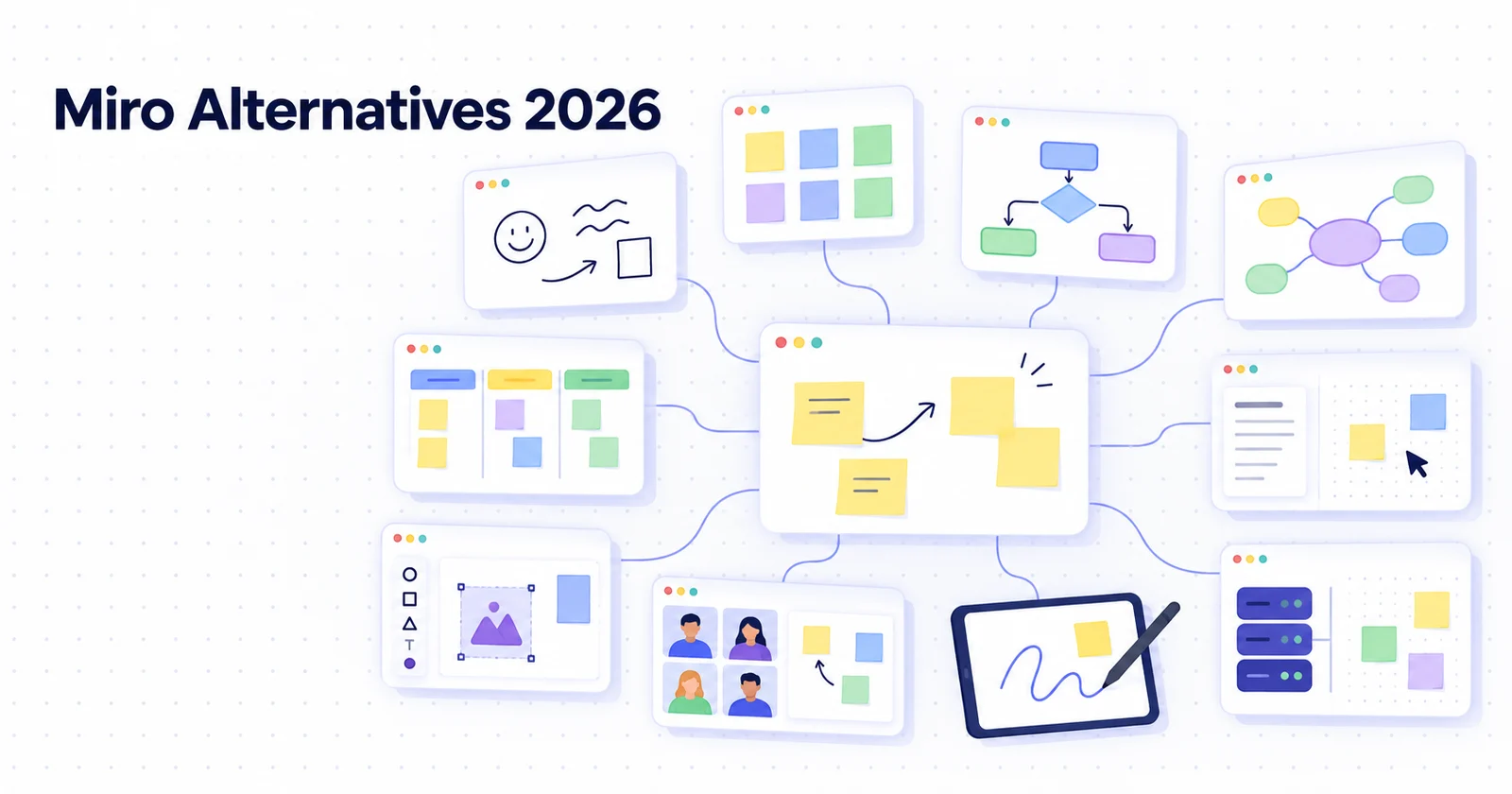
Open-Source, Self-Hosted Miro Alternatives (2026)
Short answer: if you want a Miro-style board that your team can edit together on your own server, start with AFFiNE (docs and whiteboard in one workspace, free self-hosting for up to 10 seats per workspace), WBO (a single Docker container with live multi-user drawing), or Nextcloud Whiteboard (if you already run Nextcloud). Excalidraw is the most popular open-source whiteboard, but its official self-hosted image does not include sharing or live collaboration. draw.io and Penpot are excellent self-hosted canvases for diagrams and design, but they are not facilitation boards.
The question that matters most when you self-host is not "which tool has the most shapes?" It is "does live collaboration still work when I run it, and what extra service do I have to deploy?" Most lists skip that. This guide answers it for each tool, then covers licensing traps, cost, and how to move boards out of Miro.
How we checked: licences, Docker images, collaboration requirements, and maintenance status were read from each project's official documentation, LICENSE file, README, and GitHub repository on October 26-27, 2026. We did not run load tests, so treat concurrency limits as something to pilot. AFFiNE is made by the team that publishes this blog; its limits are stated as plainly as everyone else's.
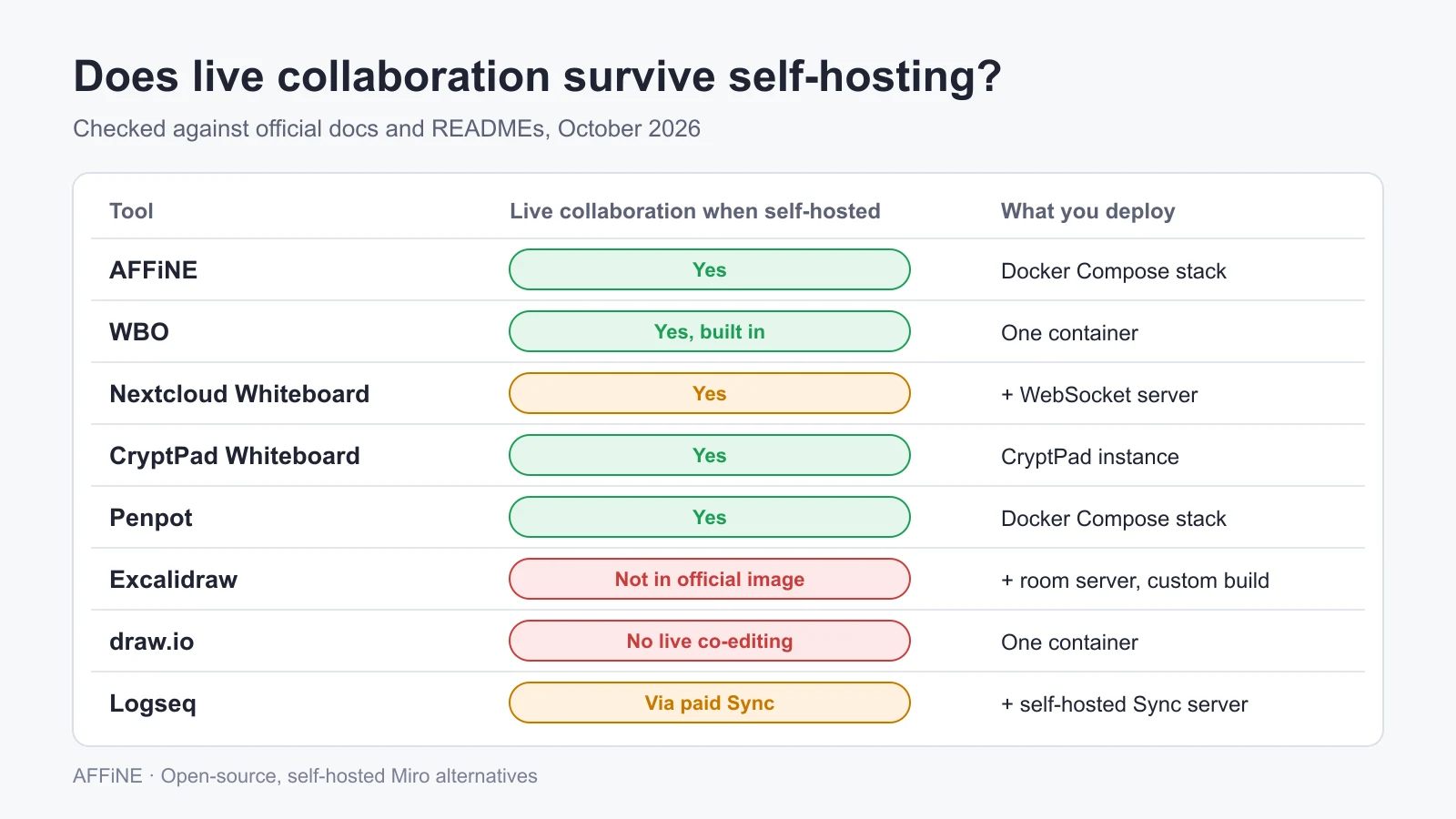
Quick comparison
| Tool | Licence | Live collaboration when self-hosted | What you deploy | Best for |
|---|---|---|---|---|
| AFFiNE | MIT client and editor; backend under the AFFiNE EE licence | Yes | Official Docker Compose stack | Teams that want docs and boards together |
| WBO | AGPL-3.0 | Yes, built in | One Docker container | Quick shared sketching and teaching |
| Nextcloud Whiteboard | AGPL-3.0-or-later | Yes, with its WebSocket server | Nextcloud app + collaboration server | Teams already on Nextcloud |
| Excalidraw | MIT | Not in the official image | Client image; collaboration needs a separate room server and a custom build | Fast hand-drawn diagrams |
| CryptPad Whiteboard | AGPL-3.0 | Yes, inside CryptPad | CryptPad instance | Encrypted, privacy-first sharing |
| draw.io (diagrams.net) | Apache-2.0 (Docker packaging GPL-3.0) | No real-time co-editing in the self-hosted version | One Docker container | Flowcharts and architecture diagrams |
| Penpot | MPL-2.0 | Yes, inside Penpot | Docker Compose stack | Design and prototyping on an infinite canvas |
| Logseq | AGPL-3.0 | Through paid Logseq Sync, which can be self-hosted | Desktop app, optional sync server | Personal research with visual pages |
Not on the list: tldraw is source-available, not open source (more below). Obsidian Canvas is proprietary and local-only. AppFlowy has no whiteboard; its feature request was closed as not planned.
What to check before you pick a self-hosted Miro alternative
Miro bundles four things that open-source tools usually split apart. Decide which ones you actually need:
- Live co-editing on your own server. Cursors, presence, and simultaneous edits. This is where self-hosted setups most often fall short.
- Workshop features. Sticky notes, frames, templates, mind maps, and a presentation or "follow me" mode for facilitators.
- Access control. Accounts, SSO (for example OIDC), guest links, and read-only boards. A board anyone with the URL can edit is fine for a classroom and wrong for a product roadmap.
- Where the board lives afterwards. Can a board sit next to the written decision, notes, and tasks it produced, or is it a standalone file?
If you only need item 1, a lightweight board like WBO is enough. If you need all four, look at AFFiNE or a suite you already run (Nextcloud, CryptPad).
1. AFFiNE: docs and whiteboard in one self-hosted workspace
AFFiNE puts documents and an infinite whiteboard (Edgeless mode) on the same blocks, so a page you write can be opened as a board and back. On the canvas you can place rich text, sticky notes, shapes, connectors, embedded web pages, linked pages, and database views, group work into frames, and present frames as slides. That makes it the closest open-source match to "Miro plus a doc tool" rather than a pure drawing surface.
Self-hosting: the official Docker Compose install runs the full stack, including real-time collaboration and PostgreSQL storage you operate. Self-hosting is free for up to 10 seats per workspace; the Team plan adds seats at $10 per seat per month billed annually, and offline licences are available through sales. See self-hosting AFFiNE and AFFiNE for enterprises for SSO via OIDC and storage options.
Licence: the editor and most client code are MIT. The server backend (packages/backend) uses the source-available AFFiNE EE licence, so it is not "open source" in the OSI sense end to end. Desktop local workspaces work offline without any server.
Watch out for: the 10-seat free limit per workspace (the most common complaint in self-hosting threads), and AI features, which are optional and need your own provider keys on a self-hosted server. There is no native Miro importer.
Choose it if: your team wants the board and the written outcome of the workshop in one place, on infrastructure you control.
2. WBO: the simplest self-hosted board with live drawing
WBO (whitebophir) is an AGPL-3.0 collaborative whiteboard that many people can draw on at once. Connected users see each other's edits in real time with no extra service, and the server saves each board as an SVG file. The project is actively maintained (last commit in October 2026).
Self-hosting: one command, from the README: docker run -it --publish 5001:80 --volume "$(pwd)/wbo-boards:/opt/app/server-data" lovasoa/wbo:latest.
Access control: optional JWT authentication passed as a ?token= URL parameter, with global or per-board roles, moderators, and read-only boards. With JWT turned off, anyone who has the board URL can edit it, so put it behind your own authentication or enable tokens before sharing internally.
Watch out for: a basic drawing tool set. There are no templates, sticky-note workflows, or documents around the board.
Choose it if: you need a shared sketch surface for a class, a call, or an incident review, running in five minutes.
3. Nextcloud Whiteboard: Excalidraw with collaboration, inside Nextcloud
Nextcloud Whiteboard is the official whiteboard app for Nextcloud, built on Excalidraw and licensed AGPL-3.0-or-later. Boards are files in Nextcloud, so they inherit your existing users, groups, sharing, and storage.
Self-hosting: basic drawing works with the app alone. Live collaboration needs the separate WebSocket server (Docker image ghcr.io/nextcloud-releases/whiteboard:stable), which shares a JWT secret with Nextcloud and must be reachable from users' browsers. Board recording additionally needs Chromium and ffmpeg on that server.
Choose it if: you already run Nextcloud. It solves Excalidraw's self-hosted collaboration gap without you maintaining a custom build.
4. Excalidraw: the favourite, with a self-hosting catch
Excalidraw is the most-starred open-source whiteboard (MIT, about 135,000 GitHub stars in October 2026) and the fastest way to draw hand-drawn style diagrams. The hosted excalidraw.com supports share links and live collaboration.
The catch: the official Docker image is the client only, and its documentation says plainly that self-hosting "doesn't support sharing or collaboration features." The separate excalidraw-room collaboration server exists, but its last commit was in July 2024, and pointing the client at your own room server means building the image yourself. If you want Excalidraw with collaboration on your own server, Nextcloud Whiteboard is the maintained route.
Hosted option: Excalidraw+ has a free plan, and Plus costs $6 per user per month (pricing).
Choose it if: you mostly sketch alone or in short sessions, or you are happy to maintain a custom collaborative build. See our Excalidraw alternatives guide for adjacent tools.
5. CryptPad Whiteboard: encrypted by default
CryptPad is an AGPL-3.0, end-to-end encrypted office suite, and one of its apps is a whiteboard based on FabricJS. Because content is encrypted in the browser, the server operator cannot read boards.
Watch out for: the whiteboard is a straightforward drawing app (brush, shapes, text, and images), not a workshop canvas with templates and frames.
Choose it if: confidentiality is the main requirement, for example legal, HR, or journalism teams, and you already use or are willing to run CryptPad.
6. draw.io (diagrams.net): self-hosted diagrams, not workshops
draw.io is an Apache-2.0 diagramming and whiteboarding app with an official Docker image. It is the top self-hosted pick on AlternativeTo and the right tool for flowcharts, network maps, and architecture diagrams.
The catch: its README states that draw.io "does not support real-time collaborative editing in this version." People can take turns on a file stored in your chosen storage, but not co-edit live like in Miro.
Choose it if: your "Miro" use is mostly structured diagrams that one person edits at a time.
7. Penpot: an open-source infinite canvas for design teams
Penpot is an MPL-2.0 design and prototyping platform built for team collaboration, self-hosted with the official Docker Compose setup. Self-hosting communities often suggest it as a Miro substitute because of its shared infinite canvas.
Watch out for: it is a design tool first. It works for wireframes and design reviews; for retros and brainstorming it feels heavier than a whiteboard.
Choose it if: your boards are mostly UI flows and wireframes, and you also want an open-source Figma alternative.
8. Logseq: visual pages for personal research
Logseq is an AGPL-3.0 outliner. In the new DB version, whiteboards are pages in your graph. Real-time collaboration comes through Logseq Sync, which the DB-version docs describe as a paid feature that can also be self-hosted via a custom Sync Server URL.
Choose it if: you are one researcher (or a very small group) linking notes and visual maps. It is not a facilitation tool.
Licensing traps: "open source" is not one thing
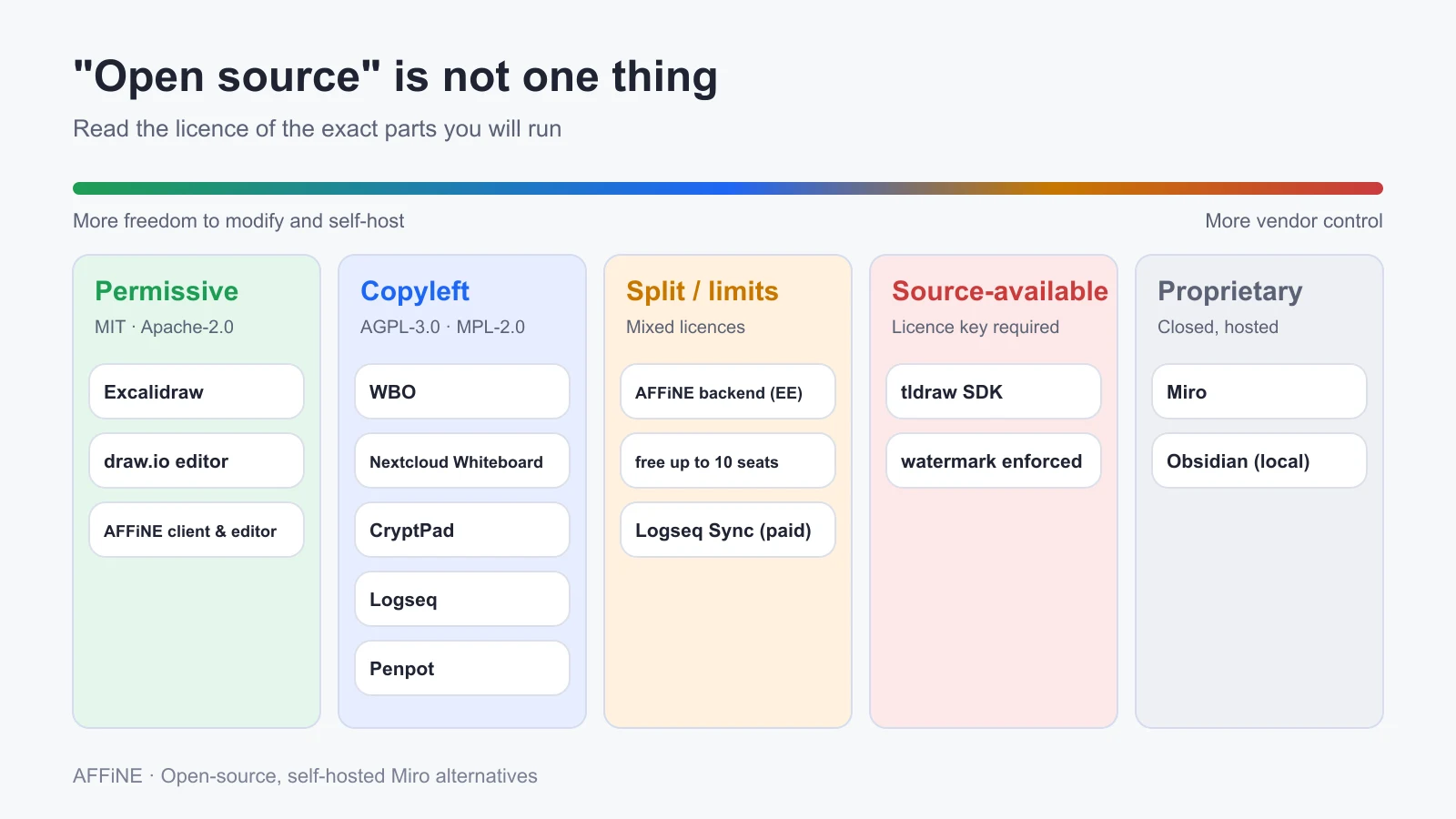
Before you standardise on a tool, read the licence of the exact parts you will run:
- Permissive (MIT, Apache-2.0): Excalidraw, draw.io's editor, AFFiNE's client and editor. You can modify and embed freely.
- Copyleft (AGPL-3.0, MPL-2.0): WBO, Nextcloud Whiteboard, CryptPad, Logseq, Penpot. Free to self-host; if you modify and offer an AGPL tool over a network, you must share those changes.
- Split licences and seat limits: AFFiNE's backend is under its EE licence, with free self-hosting up to 10 seats per workspace. Logseq Sync is a paid feature.
- Source-available, not open source: tldraw. Its code is public, but production use needs a licence key (trial, commercial, or hobby), the key check may not be removed, and the software shows a watermark. It is a great SDK for building your own canvas, but it should not be counted as an open-source Miro alternative.
- Maintenance: check commit activity before you deploy. Lorien, for example, had no commits for more than a year as of October 2026, and Excalidraw's separate collaboration server has not changed since July 2024.
What Miro costs for a 10-person team
Miro's Free plan keeps only your three most recent boards editable. Starter is $8 per member per month and Business is $20, both billed yearly. For 10 people that is about $960 a year on Starter or $2,400 a year on Business, before Enterprise features.
Self-hosting is not free either: you pay for a server, backups, upgrades, and someone's time. Size the server during a pilot with your real board count and team size. For most small teams the honest gain is less about licence fees and more about owning the data and not hitting board limits.
How to move boards from Miro to an open-source tool
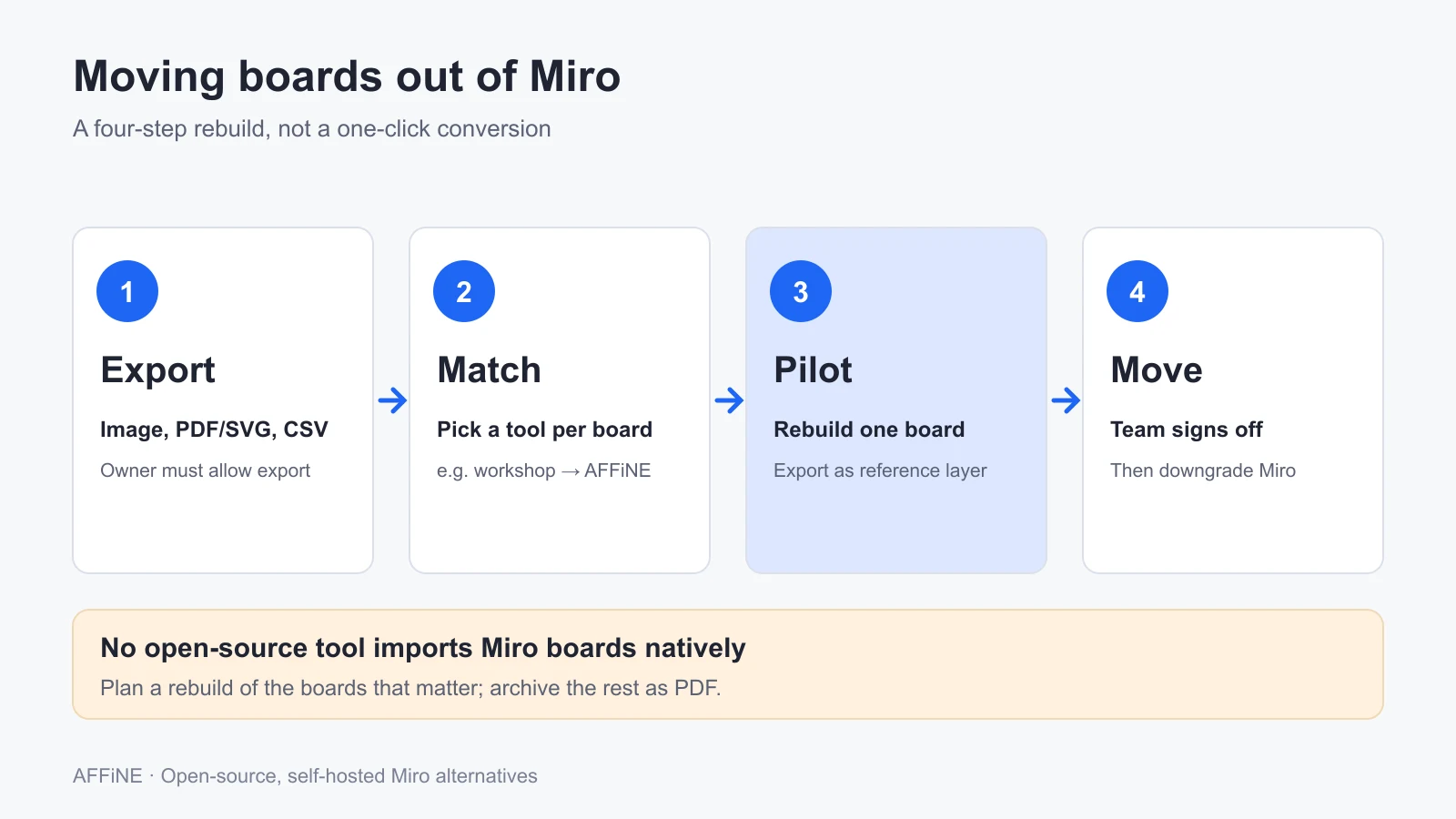
None of the tools above imports Miro boards natively, so treat migration as a short rebuild project:
- Export what you need. Miro's export options are image (JPG), vector PDF or SVG, and CSV for cards and tables. Free plans export small images only, and collaborators can export only if the board owner enables it. Export the boards you will keep and archive the rest as PDF.
- Match each board to a tool. Workshop boards with decisions go to AFFiNE; quick sketches to WBO or Excalidraw; diagrams to draw.io; UI flows to Penpot.
- Rebuild one representative board as a pilot. Paste the exported image as a reference layer, recreate the sticky notes or diagram on top, and import CSV rows into a table or database where the tool supports it. Check links, images, permissions, and live editing with the people who actually use the board.
- Move the team, then cancel. Keep the original Miro boards and exports until the team signs off, then downgrade or cancel.
Which one should you choose?
- A team that runs workshops and needs the notes afterwards: AFFiNE.
- A teacher or a team that needs a shared sketch in five minutes: WBO. Teachers who need more than a quick sketch can compare these whiteboards for teachers.
- You already run Nextcloud: Nextcloud Whiteboard.
- Confidential content: CryptPad.
- Mostly diagrams: draw.io, or Excalidraw for solo sketching.
- Mostly UI design: Penpot.
If you are comparing hosted tools as well, see our online whiteboard tools roundup, the broader list of Miro alternatives, Miro alternatives for personal use, and our checklist on online whiteboard security. If you are replacing a project tool as well, see our list of open source ClickUp alternatives.
FAQ
Is there an open-source version of Miro?
No. Miro is proprietary and is offered only as a hosted service. The closest open-source options are AFFiNE (docs plus whiteboard), WBO and Nextcloud Whiteboard (live shared drawing), and Excalidraw (sketching).
Can I self-host Excalidraw with live collaboration?
Not with the official Docker image, which its documentation says does not support sharing or collaboration. You can build the client against the separate excalidraw-room server, which has not been updated since July 2024, or use Nextcloud Whiteboard, which is built on Excalidraw and ships a maintained collaboration server.
Is tldraw open source?
No. tldraw's code is public, but its licence requires a licence key for production use and enforces a watermark. It is source-available, not open source.
What is the best free self-hosted whiteboard for more than 10 users?
WBO and Nextcloud Whiteboard have no seat limits. AFFiNE self-hosting is free for up to 10 seats per workspace, after which the Team plan applies.
Can I import Miro boards into AFFiNE or other open-source tools?
Not natively. Export boards from Miro as PDF, SVG, image, or CSV, then rebuild the important ones. Use the export as a reference layer and move card data through CSV where the target tool supports tables.
Which tool is closest to Miro for workshops?
AFFiNE, because it combines sticky notes, frames, templates, mind maps, and presentation of frames with the documents that capture the outcome. Pilot it with a real workshop before moving every board.
Sources
- AFFiNE: GitHub repository and LICENSE, self-hosting docs, pricing. Checked October 27, 2026.
- WBO: GitHub repository and README. Nextcloud Whiteboard: GitHub repository and README. Checked October 27, 2026.
- Excalidraw: GitHub repository, Docker Hub image, excalidraw-room, Excalidraw+ pricing. Checked October 27, 2026.
- CryptPad: whiteboard documentation, GitHub repository. draw.io: GitHub repository, Docker image. Penpot: Docker install guide, GitHub repository. Logseq: DB-version documentation. Checked October 27, 2026.
- tldraw: licence. AppFlowy: whiteboard feature request. Checked October 27, 2026.
- Miro: pricing, how to export your board. Checked October 27, 2026.
Disclosure: AFFiNE publishes this blog and makes AFFiNE. We have no commercial relationship with the other projects listed.
Evaluating AFFiNE for a team?
Self-host free up to 10 seats; Team $10/seat/month billed annually; offline Installable License via sales.