HIPAA Compliant AI Virtual Receptionist for Medical Practices: 2026 Guide
Patients still call after hours. This guide covers what makes an AI virtual receptionist legally usable in a medical practice, what to verify before you sign and what it costs in 2026.
Quick answer
A HIPAA compliant AI receptionist is one whose vendor signs a Business Associate Agreement covering the exact service you enable. It should also encrypt call recordings and transcripts, limit access by staff role and escalate clinical questions to a person. The narrow conduit exception does not cover a service that records, transcribes or stores patient information.
Patients still call. They call to book, to reschedule, to ask whether a plan is accepted and to check what time the office closes. Front desks cannot answer every ring during a busy clinic day, and nobody is answering at 9pm.
An AI receptionist can cover those calls. Whether it can do so legally depends on how the vendor handles protected health information, which is the part most buying guides skip.
Why patient calls still go unanswered
Front desks are busiest at exactly the moments the phone rings most: mid-morning check-ins, lunchtime reschedules, end-of-day callbacks. A caller trying to book a first appointment rarely leaves a voicemail.
Online scheduling helps, but it does not replace the phone. Callers still need help choosing a visit type, sorting out a booking that failed or asking something the booking form does not cover.
What is an AI virtual receptionist for medical practices?
It is software that answers calls in conversational language and handles a defined set of front-desk tasks. Depending on setup, it can answer routine questions about hours, locations and accepted plans, route calls to billing or records lines, book or reschedule approved visit types and create call summaries for staff follow-up.
It is not a clinician. It should not give medical advice or assess symptoms, and it should hand off clinical questions, unclear requests and any request for a person straight to staff.
Unlike a menu-based phone tree, it responds to spoken requests rather than keypresses. Its accuracy still depends entirely on its approved source material, its scheduling connections and its handoff rules.
How an AI virtual receptionist works, step by step
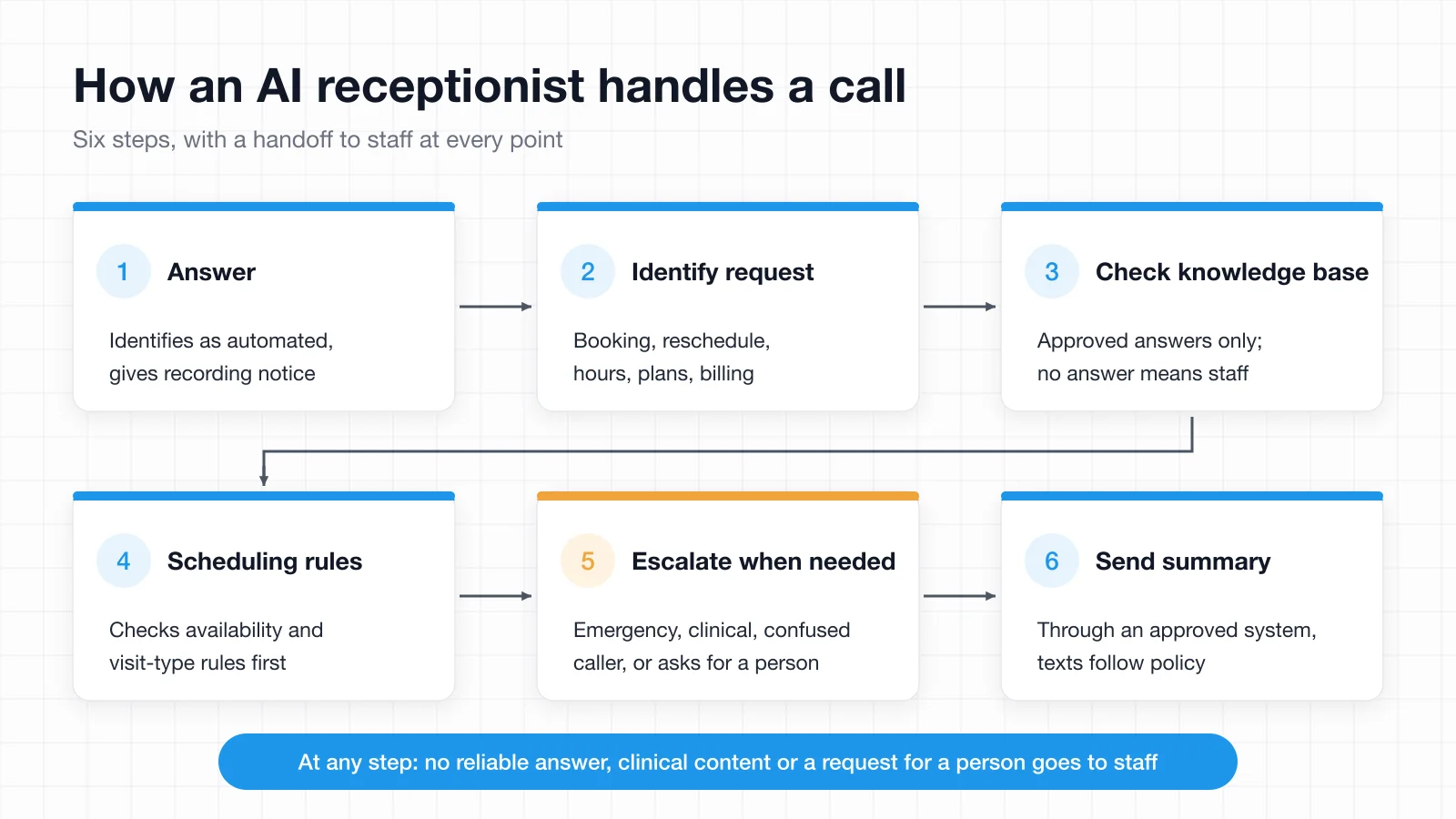
- The assistant answers and identifies itself as an automated system, with any required recording notice.
- It identifies the request, such as booking, rescheduling or asking about office hours.
- It pulls an approved answer from the knowledge base. If no reliable answer exists, it routes the caller to staff.
- For supported scheduling tasks, it checks availability and applies visit-type rules before confirming a change.
- It follows escalation rules for possible emergencies, clinical questions, caller confusion or a request for a person.
- It sends any needed summary through an approved system, with text confirmations following the practice's privacy and communication policies.
AI vs. human vs. hybrid receptionist: what's right for your practice
| Option | Best for | Coverage | Typical limitation |
|---|---|---|---|
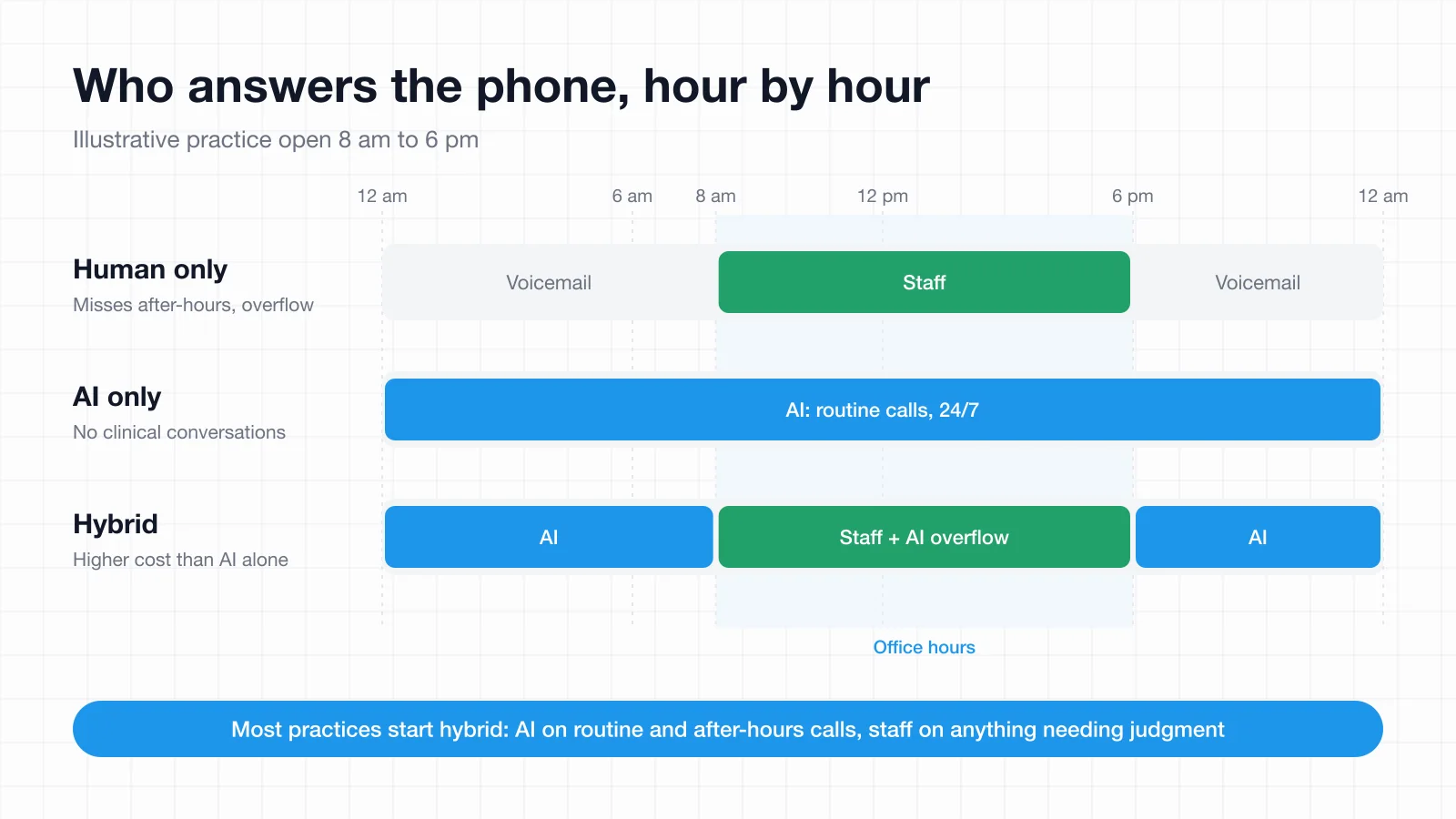
| Human receptionist only | Low call volume, one location | Business hours | Misses after-hours and overflow calls |
| AI receptionist only | 24/7 coverage on a fixed budget | 24/7 | Cannot handle clinical conversations |
| Hybrid (AI plus human) | Most small and midsize practices | 24/7, with staff escalation | Higher cost than AI alone |
Most practices land on hybrid. The AI takes routine and after-hours calls while staff stay on in-office patients and anything needing judgment, which is a more realistic starting point than replacing the front desk.
Some tools are built around that model. Central, for example, is an AI answering service that hands off to a live receptionist when the AI gets stuck or a caller asks for a person, provided one is available, with live receptionists offered at additional cost.
Is an AI virtual receptionist for medical practices HIPAA compliant?
This is the question to settle before anything else, and a signed agreement alone does not establish compliance. Work through this with your privacy or security lead.
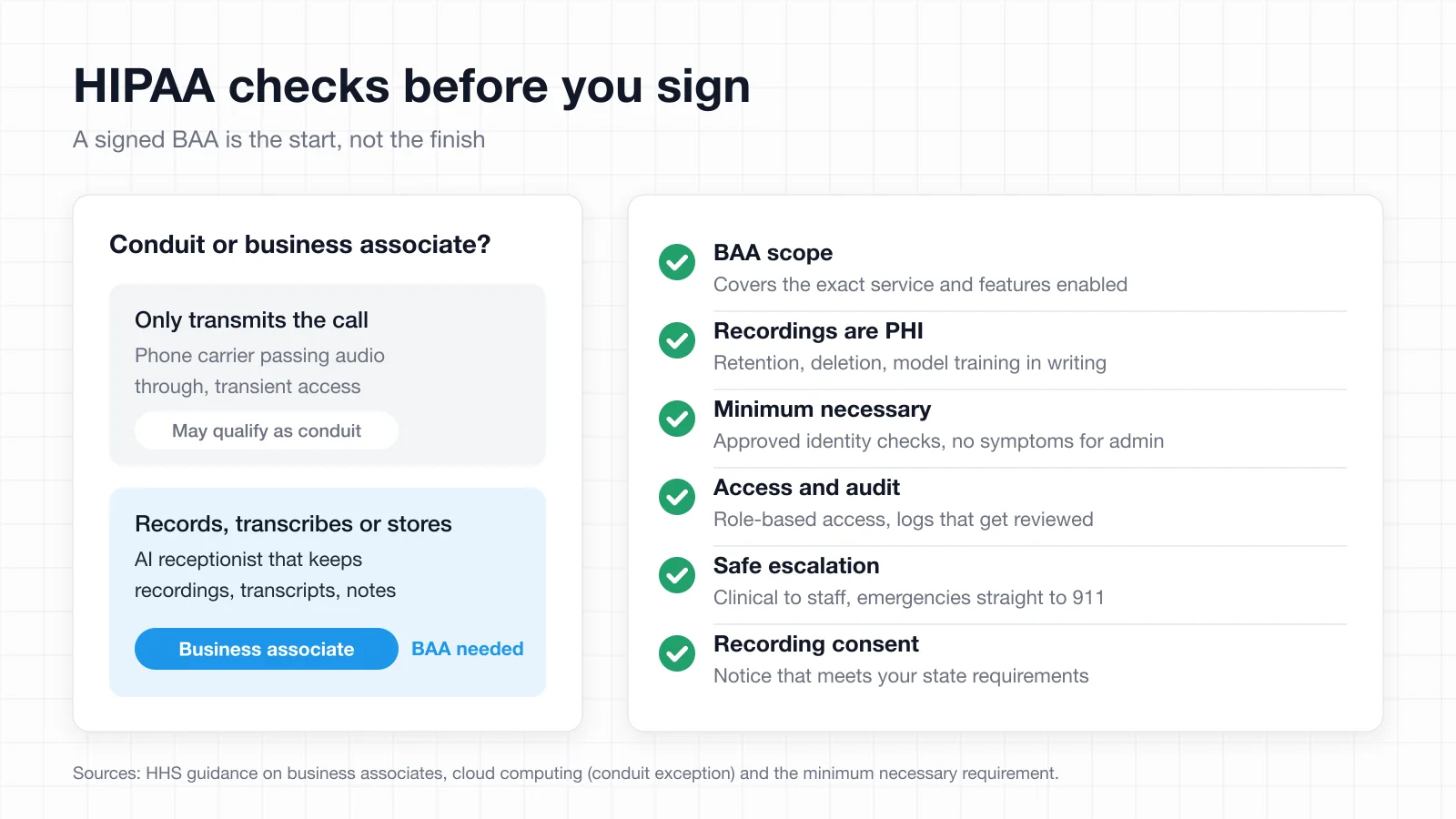
- Confirm business associate responsibilities. A vendor that creates, receives, maintains or transmits PHI on your behalf generally needs a BAA, as HHS explains in its business associate guidance. Confirm the agreement covers the specific service and the specific features you plan to enable.
- Understand the narrow conduit exception. A carrier that only transmits calls may qualify as a conduit. HHS describes the exception as limited to transmission-only services with transient access, and says a provider that stores PHI is a business associate even if it never views the data (HHS cloud computing guidance). Do not assume that exception stretches to an AI service that processes, records, transcribes or stores patient information.
- Protect recordings and transcripts. When they contain identifiable health information, treat them as PHI. Get storage, retention, deletion and any use of call data for model training in writing, along with applicable recording-consent requirements.
- Limit information collection. Use practice-approved identity checks and ask only for what the task needs. Apply the Minimum Necessary standard, and avoid collecting symptoms for routine administrative requests.
- Check access controls and audit logs. Limit access by staff role, then verify how access to patient information is recorded and reviewed.
- Set safe escalation rules. Route clinical questions to qualified staff. For possible emergencies, use a clinician-approved message directing callers to 911 without making them wait for a transfer.
The same questions apply to any AI tool that touches patient conversations. Our guide to AI scribe HIPAA compliance covers the documentation side in more depth.
Key features to look for
- Approved knowledge sources. You should be able to choose which pages and documents the assistant uses, remove outdated material and retest answers after every update.
- Booking versus booking links. Direct calendar booking and "we texted you a link" are different products. Confirm which visit types and calendars are supported.
- Reliable transfers. Look for routing to the correct staff line, a clean handoff and a fallback when nobody picks up.
- Privacy controls. Check transcript access, audit logs, retention settings and BAA coverage for the proposed setup.
- Scheduling-system integration. Test booking, rescheduling and cancellation against your actual EHR or practice management system rather than trusting a general integration claim.
How much does an AI medical receptionist cost in 2026?
Published pricing varies widely in this category, and headline rates rarely reflect what a practice actually pays. Charges typically land as per-minute rates, bundled usage or a receptionist add-on to a phone system.
Compare quotes against your own call volume and average call length, not the advertised monthly fee. Ask specifically about setup charges, overage rates, text messages, integrations and whether BAA coverage requires a different plan from the one being quoted.
How to set up an AI virtual receptionist without disrupting your front desk
The knowledge base is the project, not the phone system. Gather current policies in one place first: hours by location, holiday closures, accepted plans, visit types, new-patient eligibility, cancellation rules and the records-release process.
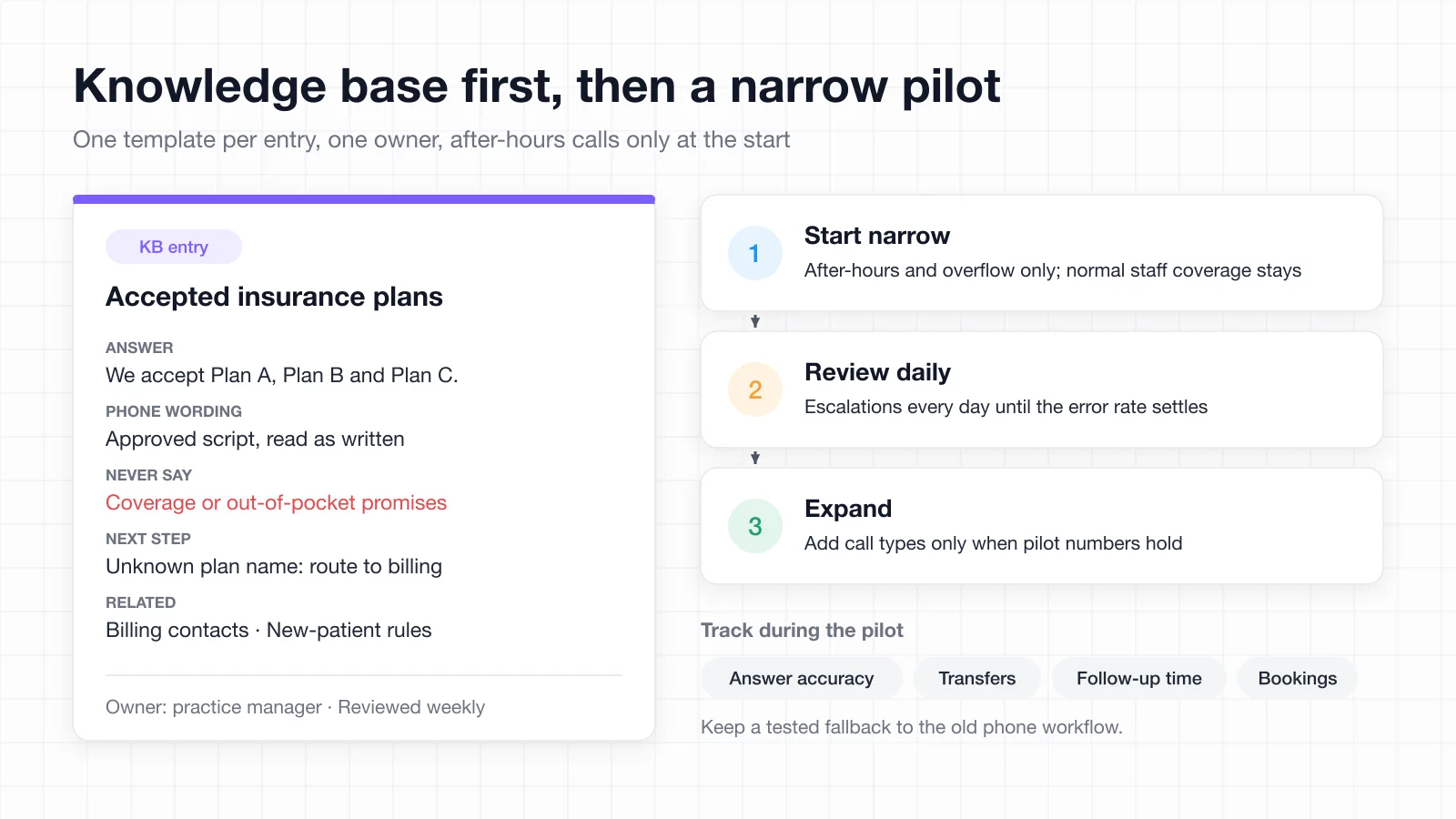
Use one template per entry, each with a concise answer, approved phone wording, prohibited claims, next steps and related entries. An insurance entry lists accepted plans, routes unfamiliar plan names to billing and forbids any promise about coverage or out-of-pocket cost. The same structure and ownership discipline that makes a team knowledge base usable applies here, with higher stakes attached.
Name one owner who approves changes. Review frequently used entries weekly for the first month, then monthly, and update closures or insurance changes the day they change.
A shared workspace makes that routine easier to keep. In AFFiNE, for example, each entry can be a doc built from the same template, with a database view that lists owner, last review date and status so stale entries stand out. Keep patient details out of these source documents: the knowledge base should hold policies and approved wording, not PHI. If your practice already writes procedures, the SOP template is a useful starting structure for the escalation and fallback steps.
Then start narrow. Route only after-hours and overflow calls at first, keep normal staff coverage and define who picks up follow-up tasks when the office is closed. Review escalations daily until the error rate settles, track sampled answer accuracy, successful transfers, follow-up response times and completed bookings, and keep a tested way to fall back to the old phone workflow.
FAQ
Is an AI receptionist safe for patient information?
It can be, when the vendor signs a BAA covering the features you are using and encrypts call data in transit and at rest. It should also limit access by staff role and give you control over transcript retention and deletion.
Does a vendor need a BAA if it only answers the phone?
Almost certainly yes. The conduit exception is narrow and applies to services that merely transmit, so once a vendor records, transcribes or stores patient information, it is handling PHI on your behalf.
Can an AI receptionist handle an emergency call?
No. It should be configured to deliver a clinician-approved message directing the caller to 911 immediately, without holding them for a transfer.
Will patients know they are talking to AI?
They should. Configure the assistant to identify itself as automated at the start of the call, along with any recording notice your state requires.
Does it work with my EHR or scheduling system?
That depends entirely on the vendor. Test booking, rescheduling and cancellation on your own system during a trial rather than relying on a general integration claim.
What should I measure during a pilot?
Measure sampled answer accuracy, successful transfer rate, follow-up response time and correctly completed bookings. Track wrong or awkward answers back to the knowledge base entry that caused them.