Best Planners: Paper and Digital Options Compared
Disclosure: AFFiNE publishes this article, and AFFiNE is one of the tools it covers. How we review products
The best planner is the one that makes your next decision easier. A weekly paper planner can help you see a crowded week at a glance; a daily planner gives you more room to work through it. A digital workspace is useful when tasks need notes, files, and frequent rearranging.
Start with what you need to see: appointments, actions, or project context. Then choose the layout. Below are five options for different routines, followed by a way to test your choice before committing to a year of pages.
Best planners at a glance
| Planner | Choose it for | Format | Main tradeoff |
|---|---|---|---|
| Hobonichi Techo Weeks | A portable overview of the week | Dated horizontal week plus facing memo page | Limited space for a detailed daily schedule |
| Papier Undated Daily Planner | Room for daily priorities, starting whenever you like | Undated monthly and daily pages | You enter the dates; a full daily book takes more space |
| Class Tracker Ultimate Student Planner | Classes, assignments, and deadlines | Academic planning with weekly and monthly pages | School-oriented sections may be unnecessary for work |
| Happy Planner disc-bound range | Rearranging pages and adding sections | Paper planners in multiple sizes and layouts | Check insert compatibility and total accessory cost |
| AFFiNE | Keeping plans beside project notes and a whiteboard | Editable digital documents and canvas | You build the planning routine; keep timed alerts in your calendar |
How we compared them: We checked official product and help pages on October 10, 2026, looking at layout, date flexibility, portability, and room for supporting information. These are use-case recommendations, not a hands-on durability test or a customer-review ranking. AFFiNE publishes this guide and is included as a digital option. Prices, available editions, and shipping vary; follow the product links to check your region before buying.
Choose a layout before choosing a brand
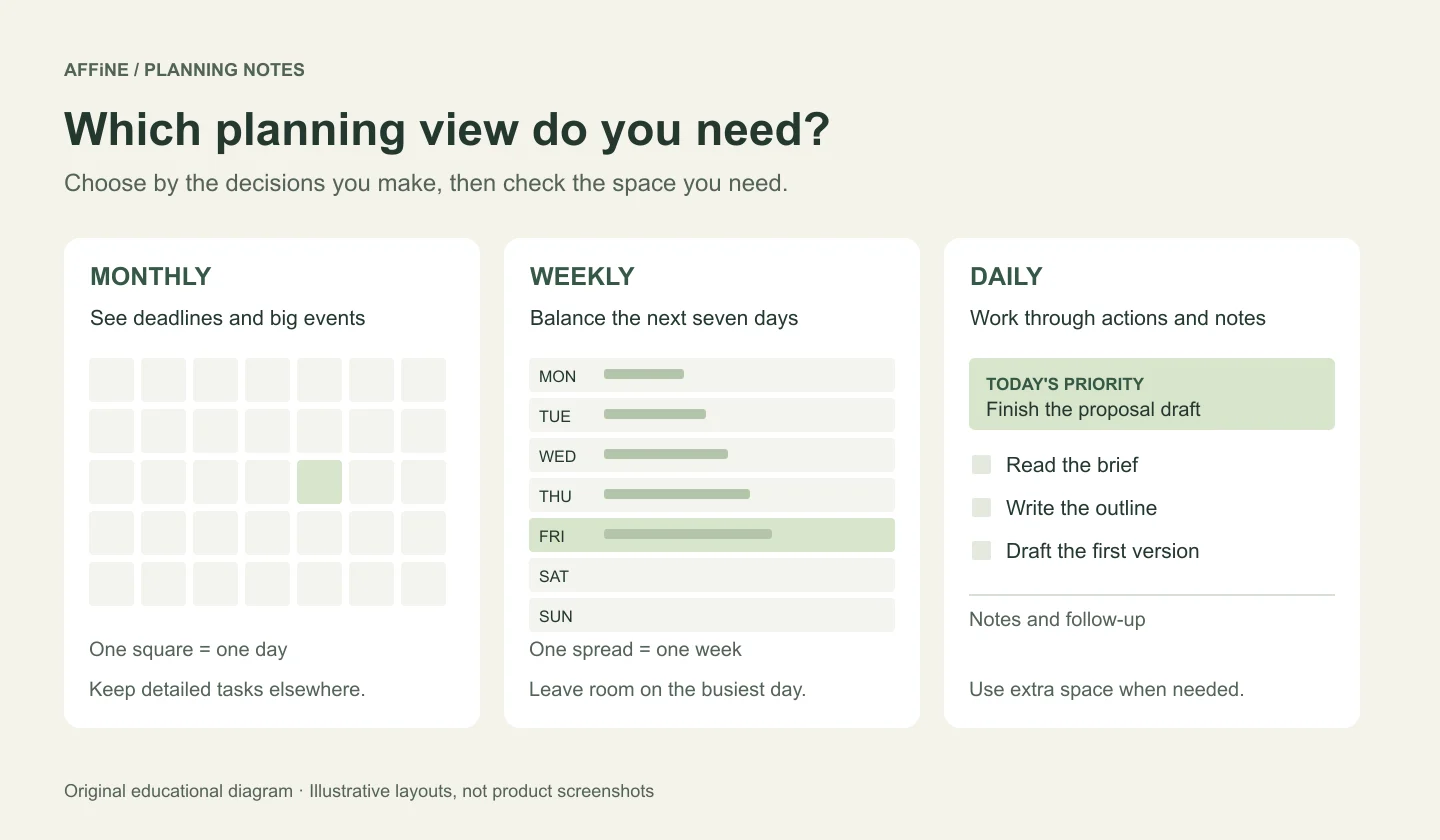
Try writing yesterday's actual schedule into a sample page. Include the meeting that ran late, the errand you forgot, and the task you moved. If it cannot hold a normal day without tiny handwriting or extra sticky notes, the layout needs changing.
| Layout | Useful when | Check before choosing |
|---|---|---|
| Monthly | You mainly need deadlines, trips, or major events | Can you put detailed tasks somewhere else? |
| Weekly horizontal | You want appointments and a short task list for each day | Is there enough room on your busiest day? |
| Weekly vertical or hourly | Your day depends on time blocks | Do the printed hours cover your actual routine? |
| Daily | You need space for actions, notes, and follow-up | Will you carry the book and review earlier pages? |
| Digital document and canvas | You plan around projects with changing details | Can you find today's priorities without browsing several pages? |
Dated or undated? A dated planner is convenient for booking ahead. Check its start month, year, and weekend space. An undated planner lets you start midyear or skip unused days, but future appointments need clearly marked dates. Neither format fixes an overloaded schedule.
Paper or digital? Paper puts a fixed view in front of you without opening an app. Digital planning makes it easier to revise text and keep project information together. A hybrid can work well: use a calendar for appointments and alerts, and one planner for priorities and notes. Avoid maintaining two competing lists of the same tasks.
Five planner options and their tradeoffs
Hobonichi Techo Weeks: for a compact weekly overview
Hobonichi describes the Weeks as a slim planner with a horizontal week on the left and a grid memo page on the right. That split suits a routine where each day needs a few entries and the rest of your thinking belongs in a shared notes area.
Use the dated side for commitments and the facing page for a weekly task list. If you regularly fill a page with meeting notes, you may need a separate notebook or a daily format. Check the edition's language and start month; the Hobonichi type guide also distinguishes weekly books from its page-per-day models.
Papier Undated Daily Planner: for detailed days without a fixed start date
Papier's Undated Daily Planner includes 12 undated month views, 365 daily pages with space for tasks and priorities, and gridded notes pages. It is a reasonable option if a weekly box is too small or you prefer to use pages only when needed.
The practical tradeoff is upkeep: write dates consistently and use the month views to find future commitments. Check the exact book type at checkout. Papier also sells a Productivity Planner covering 16 weeks; that is a different interior, even when the cover design looks similar.
Class Tracker Ultimate Student Planner: for an academic schedule
Class Tracker's planner guide describes weekly pages, class schedules, monthly planning, goals, and notes. These sections make it a useful shortlist option when assignments and classes need to sit together.
Before choosing an edition, compare its date range with your semester and summer commitments. Put both the submission date and the next study session in your plan: knowing that an essay is due Friday does not reserve time to write it. If you want to build that structure digitally, see our academic planner guide.
Happy Planner: for rearranging a paper system
The Happy Planner disc-bound range is designed around customization, with options such as vertical, horizontal, and dashboard layouts. It is worth considering when you want to change sections instead of being limited to a bound notebook's sequence.
Choose the interior before choosing stickers or a cover. Check the planner size and compatible inserts together, then total the cost of the book and accessories you actually need. Extra sections help only if you consult them; begin with a weekly view and notes, and add a tracker when it solves a specific problem.
AFFiNE: for planning alongside project notes
AFFiNE is a document and whiteboard workspace that you can use for planning. The useful distinction is context: a task can sit beside the brief, notes, or visual outline that explains what to do next. The getting-started guide shows how to create a document, use checkboxes, and work with notes on an Edgeless canvas.
Start with the Weekly Schedule & To-Do List template, then keep three areas easy to find: this week's priorities, the next actions, and supporting notes. Use a separate calendar for commitments that need timed alerts. A planning document is not, by itself, an automatic scheduling system.
Choose AFFiNE if you want to revise plans and develop ideas in the same workspace. Choose paper if opening a device makes your planning routine harder to maintain. For a comparison focused on scheduling software, use the daily planner app guide.
A worked example: turn a deadline into a usable week
Suppose you need to send a proposal by Friday at noon. Writing “proposal” in five daily boxes does not explain where to begin. Split the outcome into actions and give each one a place in the week.
| Day | Planned action | Evidence of progress |
|---|---|---|
| Monday | Collect the client's requirements and list open questions | A brief with the gaps marked |
| Tuesday | Draft the outline and first version | A draft someone can read |
| Wednesday | Ask for feedback and confirm missing details | Comments and answers recorded |
| Thursday | Revise the proposal and check attachments | A version ready to send |
| Friday | Send before noon, then record follow-up | Sent proposal and next follow-up date |
In a weekly paper planner, put the Friday deadline on the dated side and the action list beside it. In a daily planner, write the day's next action and leave room for notes. In AFFiNE, keep the checklist and brief together, then place the send deadline in your calendar if you need an alert.
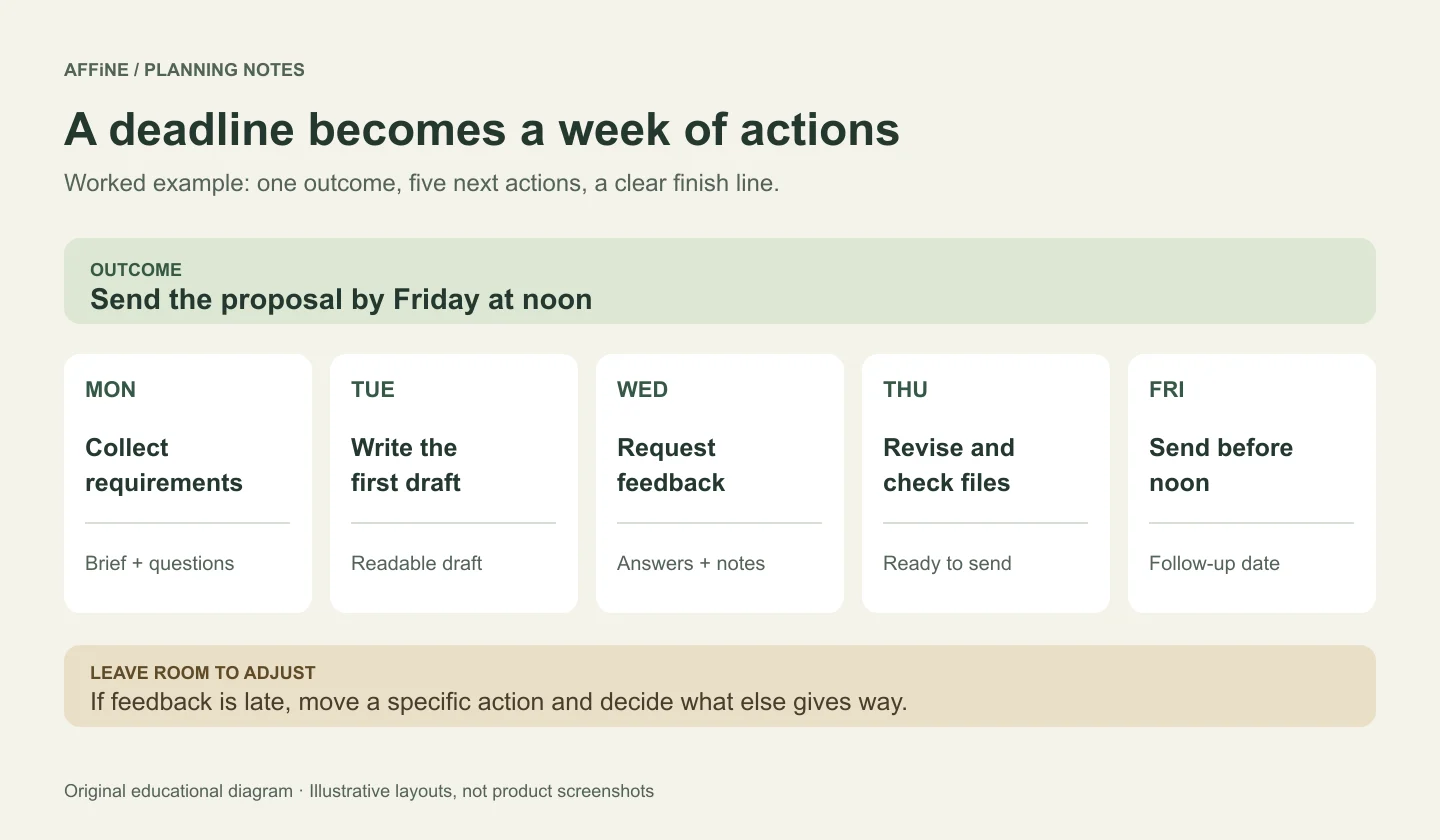
Leave some unscheduled time for a delayed reply or a revision. If Wednesday's feedback arrives late, move a specific action and decide what else gives way. Carrying every unfinished item forward without making that decision hides the workload.
How to test a planner for one week
You can run this trial on a sheet of paper, in an existing notebook, or in a digital document before buying anything.
1. Add fixed commitments
Write down the appointments and deadlines you cannot move. Include travel time where it affects the day.
2. Choose three weekly outcomes
List three things you want to finish by the end of the week. Give each outcome a clear finish line, such as sending a proposal or submitting an assignment.
3. Place the next actions
Break each outcome into actions and put the first action on a realistic day. Leave some space for interruptions and changes.
4. Check the plan each day
Review what changed, mark completed actions, and deliberately move or remove unfinished work. Keep supporting notes where you can find them.
5. Review the fit after seven days
Look for cramped pages, missed commitments, duplicated tasks, and unused sections. Change the layout that caused friction before adding more features.
At the end of the trial, ask whether you could find today's priorities quickly, see the next deadline, and move a task without losing it. If the answers are mostly yes, keep the system simple. If they are no, change one thing—page size, time view, or where you keep notes—and try again. Our weekly planner template guide can help you develop that weekly view.
What to check before you buy
Page space and portability: Compare the open spread as well as the closed book. A planner that fits your bag may still leave too little space to write. Look for photographs of the interior and consider how the binding sits on your desk.
Date range: Check the first and last usable months. A two-year monthly planner can help with distant events, but small monthly boxes will not hold a detailed daily task list. Pair it with a separate action list if you need both horizons.
Total cost: Include shipping, a cover if needed, replacement inserts, and any companion app or service you intend to use. Avoid comparing a temporary sale price with another product's full-year cost.
Maintenance: Choose a planner you can update on an ordinary busy day. Decorations, habit trackers, and extra sections are optional. The essential loop is to capture commitments, choose actions, and review what changed.
Frequently asked questions
What is the best planner for beginners?
A simple weekly layout with a small notes area is a useful starting point. It shows the next few days without requiring a full page of entries every day. Try it for a week and switch to a daily view only if you consistently need more space.
Is a daily or weekly planner better?
A weekly planner helps you balance commitments across several days. A daily planner gives you more room for detailed tasks and notes. Choose based on how much you actually write, and check that the busiest day fits comfortably.
Should I choose a dated or undated planner?
Choose dated pages if you regularly book appointments ahead and want dates already printed. Choose undated pages if you start midyear or plan intermittently. With either format, check the start month and keep future commitments clearly dated.
Can I use paper and digital planners together?
Yes. Give each tool a clear job: a calendar for appointments and alerts, and a planner for priorities, actions, and notes. Decide where the authoritative task list lives so that you do not have to reconcile two versions every day.
Can AFFiNE be used as a planner?
Yes. You can use documents, checkboxes, and an Edgeless canvas to organize plans and supporting notes. Start with a weekly template and keep the structure small. Use your calendar for commitments that need timed alerts.
Do I need an expensive planner to stay organized?
No. A notebook or a simple digital document is enough to test a planning routine. Pay for a specific benefit you will use, such as more writing space, a suitable binding, or editable project context. Price alone does not tell you whether a planner fits your week.