Wiki vs Knowledge Base: Differences and When to Use Each
Wiki vs knowledge base: who writes and reads each, how structure, governance, and search differ, when to use one or both, and how to run both in one workspace.

A wiki is a shared space where anyone on the team can create and edit pages, so it grows quickly and covers work in progress. A knowledge base is a curated set of articles with named owners, a fixed structure, and a review process, so readers can trust each answer. The main difference between a wiki and a knowledge base is control: a wiki optimizes for easy contribution, a knowledge base optimizes for accurate answers.
Most teams need both. The mistake is running them as one undifferentiated pile of pages, where a half-finished brainstorm sits next to the refund policy and nobody can tell which one is official.
Short version
- Use a wiki for project notes, meeting notes, team handbooks, and decisions that are still changing. Anyone can edit, and speed matters more than polish.
- Use a knowledge base for answers people act on: policies, how-to guides, troubleshooting steps, and customer help articles. Each article has an owner and a review date.
- Use both when your team writes a lot internally and also needs a reliable answer set. Draft in the wiki, then promote stable content into the knowledge base.
Published by AFFiNE, which makes a workspace that can hold both a wiki and an internal knowledge base. Vendor facts in this article were checked on official pages on October 27, 2026. Sources are listed at the end.
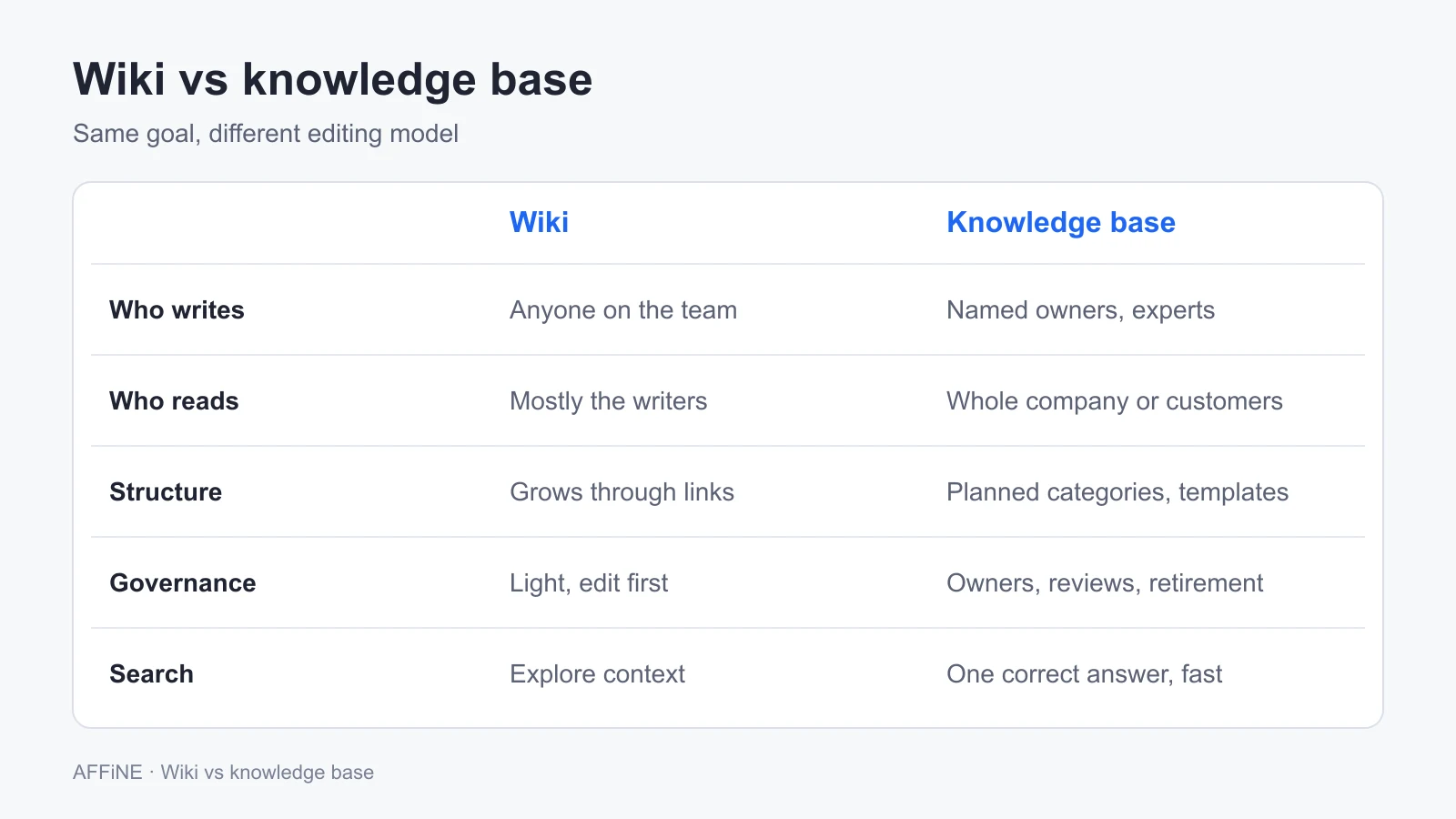
Wiki vs knowledge base at a glance
| Wiki | Knowledge base | |
|---|---|---|
| Main job | Capture and share knowledge while work happens | Give readers a trusted, current answer |
| Who writes | Anyone on the team | Named owners or subject experts |
| Who reads | Mostly the same team that writes | Employees across the company, or customers |
| Structure | Grows organically through links between pages | Planned categories, templates, and fixed article types |
| Editing model | Edit first, fix later | Draft, review, publish |
| Governance | Light: page owners if any, occasional cleanup | Explicit: owners, review dates, retirement rules |
| Search expectation | Find related pages and context | Find one correct answer fast |
| Typical failure | Sprawl, duplicate pages, stale content nobody owns | Bottleneck: slow to update, so people stop using it |
| Example tools | Confluence, MediaWiki, Notion, Wiki.js, BookStack, AFFiNE | Zendesk, Document360, Guru, or a wiki tool run with stricter rules |
What is a wiki?
A wiki is a collection of linked pages that a group edits together. The format goes back to WikiWikiWeb, the first wiki, which Ward Cunningham launched in March 1995 and described as "the simplest online database that could possibly work." Wikipedia is the best-known public example. Inside companies, the same idea shows up as the corporate wiki or team wiki: a place where engineers document a service, a marketing team keeps its campaign notes, or a new hire finds the onboarding checklist.
Three traits define a wiki:
- Low barrier to editing. Anyone with access can fix a typo or add a section without asking permission.
- Links over hierarchy. Pages connect to each other, so the structure emerges from use rather than from a plan.
- History instead of approval. Mistakes are corrected after the fact. Version history makes that safe.
That openness is the point. A wiki captures knowledge that would otherwise live in chat threads and people's heads. It also explains the usual decline: without owners, pages go stale, duplicates multiply, and search returns five versions of the same process. Our corporate wiki playbook covers how to set up and maintain one.
What is a knowledge base?
A knowledge base is a structured library of answers that readers can rely on without asking someone. Content is written to a template, reviewed by someone accountable, and organized so a reader can find the right article in a few clicks or one search.
Knowledge bases come in two forms:
- Internal knowledge base. For employees. HR policies, IT setup guides, sales playbooks, support macros, and runbooks. Access is usually restricted, and articles may contain confidential details.
- External knowledge base. For customers. Help center articles, product documentation, troubleshooting guides, and FAQs. It is public, often branded, and usually connected to a support tool so agents can link articles in replies.
The defining trait is accountability. Every article has an owner and a "last reviewed" date, and outdated articles are updated or removed on a schedule. That makes a knowledge base slower to change than a wiki, which is acceptable because readers act on what it says. For a deeper definition, see what a knowledge base is.
The difference between a wiki and a knowledge base, in detail
Who writes and who reads
In a wiki, writers and readers are mostly the same people. The engineering team writes about its own systems and reads its own notes. In a knowledge base, a small group writes for a larger group: an IT team writes for every employee, or a support team writes for every customer. That asymmetry is why a knowledge base needs stricter quality control. The reader cannot ask the writer what a step means.
Structure
A wiki's structure comes from links. A page about a deployment process links to the service it deploys, the on-call rotation, and last quarter's incident review. That web is useful for context, but it is hard to browse if you do not already know what you are looking for.
A knowledge base is organized by the questions readers ask. A common pattern is three levels: category (for example "Billing"), section ("Invoices"), and article ("How to download an invoice"). Articles follow a fixed type, such as how-to, troubleshooting, reference, or policy, so readers learn where to find the steps and the caveats.
Governance
Governance is where the two really split. A healthy wiki needs only light rules: a named owner per space, an archive for dead pages, and a quarterly cleanup. A knowledge base needs explicit rules:
- One owner per article, named on the page.
- A review interval, such as every 90 days for policies and every release for product docs.
- A draft and review step before publishing.
- A rule for retiring or redirecting outdated articles.
If you cannot name who will own these rules, start with a wiki and add knowledge base discipline later for the few pages that need it.
Search
People search a wiki to explore: "What do we know about the billing migration?" They are happy to open several pages. People search a knowledge base to act: "How do I reset two-step login for a customer?" They want one correct article at the top. That is why knowledge base tools invest in titles, synonyms, article analytics, and "no result" reports, while wiki tools invest in linking, backlinks, and page trees.
Internal vs external
A wiki is almost always internal. A knowledge base can be either. If customers will read it, you also need branding, a public URL, search engine visibility, and usually an integration with your support inbox. Those needs often point to a dedicated help center tool, even if your internal docs live elsewhere.
When to use a wiki, a knowledge base, or both
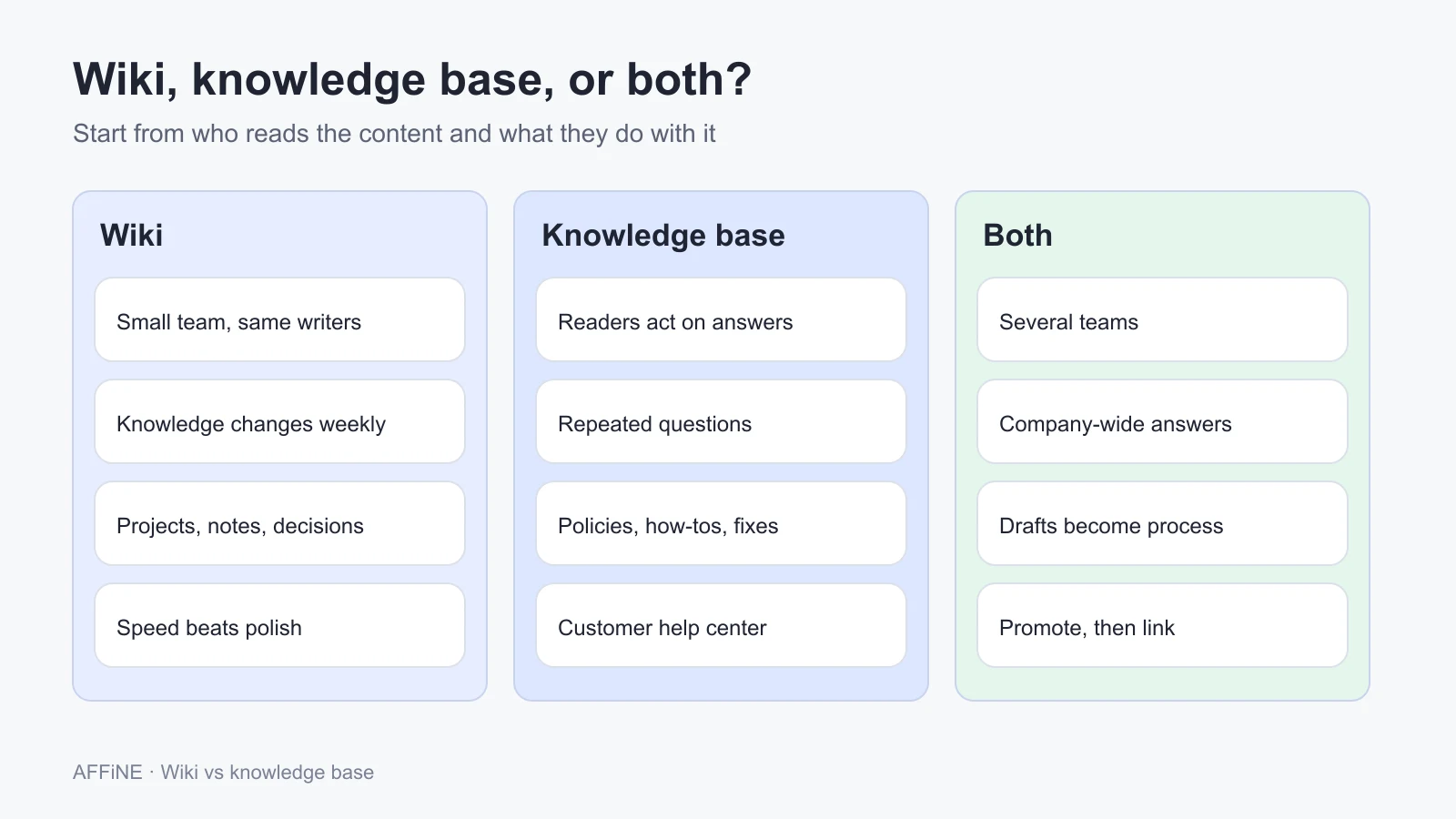
Choose a wiki when:
- The team is small, and most content is written and read by the same people.
- Knowledge changes weekly: projects, experiments, meeting notes, and design decisions.
- You want people to write things down at all, and any approval step would stop them.
Choose a knowledge base when:
- Readers act on the content and mistakes have a cost: payroll, security steps, customer instructions.
- Many people ask the same questions, and support or IT answers them repeatedly.
- The content is for customers.
Run both when:
- You have more than one team and also a set of company-wide answers.
- Support agents need a trusted answer set but also keep working notes.
- Drafts and decisions in the wiki regularly turn into official process.
A useful test: open your current docs and pick ten random pages. If you cannot tell which ones are official, you need a knowledge base layer. If people say "it's not worth documenting," you need a lighter wiki layer.
Example structures
Team wiki
Engineering wiki
├── Team home (owners, rituals, how we work)
├── Projects
│   ├── Billing migration (notes, decisions, open questions)
│   └── Mobile release 4.2
├── Meeting notes (by date)
├── Architecture decisions
└── Archive
Internal knowledge base
Company knowledge base
├── People and HR
│   ├── Policy: Paid time off            owner: HR, review every 6 months
│   └── How to: Submit expenses          owner: Finance, review every 6 months
├── IT and security
│   ├── How to: Set up a new laptop      owner: IT, review each OS release
│   └── Troubleshooting: VPN will not connect
└── Customer support
    ├── Reference: Refund rules
    └── How to: Escalate a bug to engineering
External knowledge base (help center)
Help center
├── Getting started
├── Account and billing
├── Using the product (by feature)
├── Troubleshooting
└── Contact support
The internal and external trees look similar, but the external one leaves out internal details such as escalation paths and refund exceptions. Keep those in the internal knowledge base and link to them from the support team's articles.
Worked example: promoting one wiki page
Here is what promotion looks like for a single page. This is an illustrative example, not a customer case.
A support team keeps a wiki page called "Refund notes." Over three months it collects agent comments, a Slack screenshot, two exceptions, and a line that says "ask Dana if unsure." Agents link to it from tickets every week, so it has become the de facto policy, but nobody owns it and two of the exceptions contradict each other.
Promoting it means rewriting, not moving:
Reference: Refund rules
Owner: Support lead        Last reviewed: 2026-10-01   Review every: 90 days
Applies to: Monthly and annual plans
Rule: Full refund within 14 days of the first charge.
Exceptions: (1) Annual plans after 14 days: prorated, approved by the support lead.
Not covered here: Chargebacks (see "How to: Handle a chargeback").
The old "Refund notes" page stays in the wiki with one line at the top, "Superseded by Reference: Refund rules," and a link. The discussion history is kept, and the answer has a single source. The contradiction between the two exceptions had to be resolved before publishing, which is the real value of the review step.
How to run a wiki and a knowledge base in one workspace
Running two separate tools works, but it doubles logins, search boxes, and the chance that people copy content between them. For internal knowledge, many teams keep both layers in one workspace and separate them with structure and rules instead of software. If you are building the knowledge base layer from scratch, our guide to building a team knowledge base covers structure, ownership, and a reader pilot.
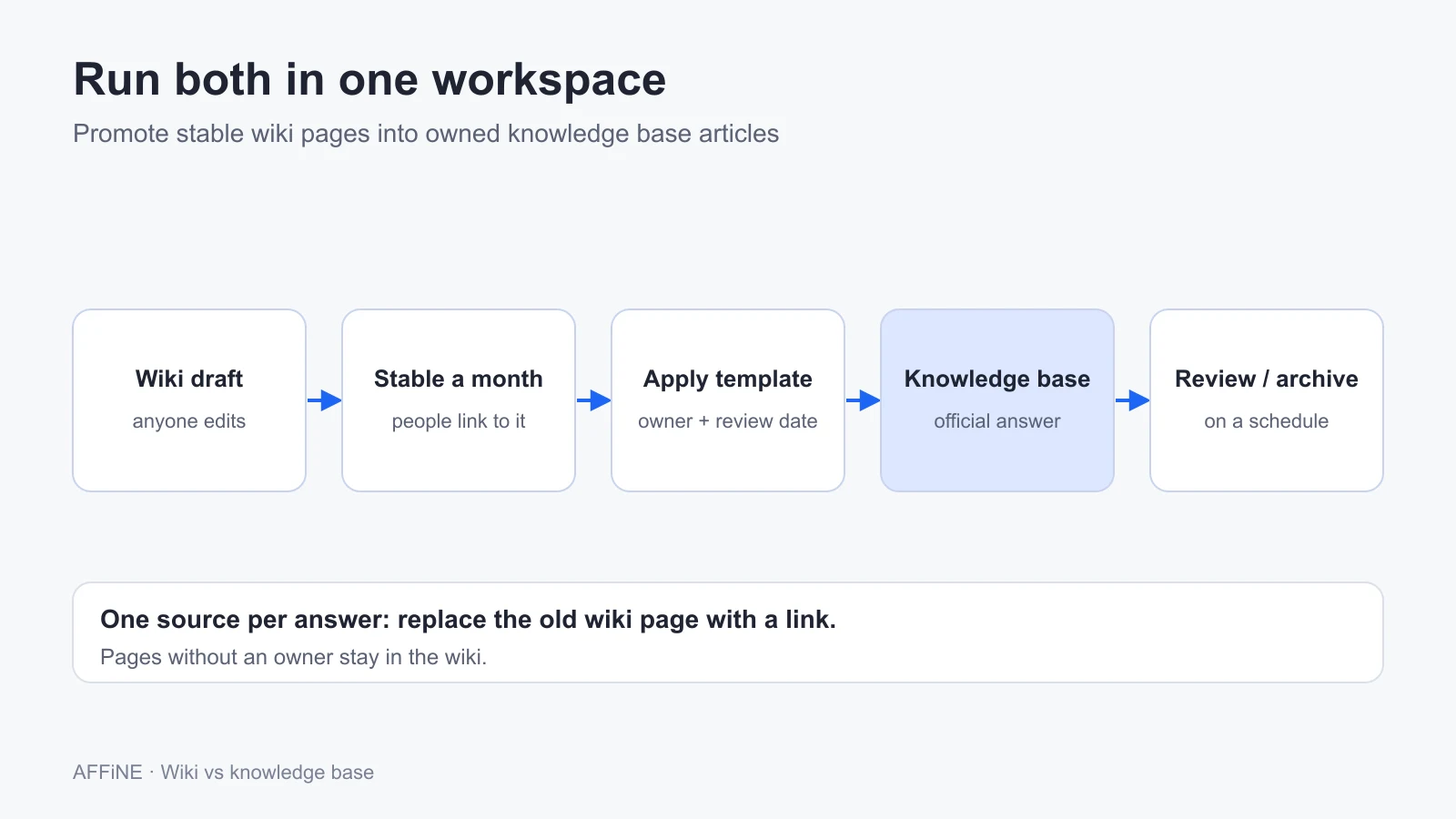
1. Split the workspace into two clearly labeled areas
Create a "Wiki" area for team spaces, projects, and notes, and a "Knowledge base" area for official answers. Use names that make status obvious. Readers should know which area they are in without reading the page.
2. Define article types and templates for the knowledge base
Pick three to five types, such as how-to, troubleshooting, reference, and policy. Give each a template with fixed headings: purpose, steps, owner, last reviewed, and related articles. Wiki pages do not need templates.
3. Name an owner and a review date on every knowledge base article
Put the owner and the review date at the top of the page, or as page properties if your tool supports them. Pages without an owner stay in the wiki.
4. Promote stable wiki content instead of copying it
When a wiki page has been stable for a month and people keep linking to it, rewrite it as a knowledge base article and replace the wiki page with a link. One source per answer.
5. Review on a schedule and archive aggressively
Once a month, list knowledge base articles past their review date and send them to their owners. Move dead wiki pages to an archive instead of deleting them, so links still resolve.
6. Decide where customer-facing articles live
If customers will read the knowledge base, decide early whether you will publish from the same workspace or use a help center tool connected to your support inbox. Keep the internal-only details in the internal area either way.
Where AFFiNE fits
AFFiNE is a workspace for docs, whiteboards, and databases, so it can hold both layers for internal use. Pages link to each other, and backlinks show where a page is referenced, which suits the wiki side (how page linking works). Tags, doc properties, and collections (rule-based "smart folders") let you mark knowledge base articles with an owner, a type, and a review date, and list everything due for review. Database blocks with table and Kanban views work as a simple review tracker. Every doc also has an Edgeless whiteboard mode, which helps when a process is easier to draw than to write. AFFiNE's September 2024 release notes describe public share links for a page, which can work for a few external answers, but AFFiNE is not a customer help center.
AFFiNE runs as a cloud service or self-hosted. Self-hosting is free for up to 10 seats per workspace; larger teams need a paid plan or license. The editor is MIT-licensed and the server backend is source-available under the AFFiNE Enterprise Edition license, which makes AFFiNE open core rather than a purely MIT project. See self-hosting and pricing for current terms.
Who should not choose AFFiNE for this:
- Support teams that need a branded customer help center tied to ticketing, with article analytics and search reports. A dedicated help center tool such as Zendesk or Document360 fits better.
- Organizations that need formal multi-step approval workflows or built-in content verification badges before an article goes live. Check that requirement against dedicated knowledge base software.
- Teams that mainly need a large structured documentation site with a strict page hierarchy. BookStack or Confluence may be simpler.
To compare tools in more depth, see the best internal knowledge base software and our guide to knowledge base software for teams, which includes a pilot plan.
Common mistakes
- Treating every page as official. If the wiki and the knowledge base look identical, readers trust stale drafts.
- Approval for everything. Putting review steps on meeting notes kills contribution. Keep the wiki light.
- No owner, no review date. A knowledge base article without an owner becomes a wiki page that people wrongly trust.
- Copying instead of linking. Two copies of a process will drift. Promote and link.
- Buying a tool before deciding the rules. Software does not create governance. Decide owners and review intervals first, then pick a tool.
FAQ
What is the difference between a wiki and a knowledge base?
A wiki is a shared set of pages that anyone on the team can edit, built for capturing knowledge while work happens. A knowledge base is a curated set of articles with named owners, templates, and review dates, built so readers can trust each answer. The core difference is control: easy contribution versus reliable answers.
Is a wiki a type of knowledge base?
Loosely, yes. Both store organizational knowledge, and some people call any internal docs a knowledge base. In practice, the terms describe different editing models: a wiki lets anyone edit, while a knowledge base has owners and a review process.
Can a wiki replace a knowledge base?
For a small team whose writers and readers are the same people, often yes. Once many people act on the content, or customers read it, you need owners and review dates. You can add that discipline to part of a wiki, which effectively creates a knowledge base inside it.
Should a customer-facing knowledge base be a wiki?
Usually not. Customers cannot ask the author what a step means, and an open-edit model risks wrong or confidential content going public. External knowledge bases are normally written by support or documentation teams and published through a help center tool.
Can I run a wiki and a knowledge base in one tool?
Yes, for internal use. Split the workspace into a clearly labeled wiki area and a knowledge base area, use templates, owners, and review dates for knowledge base articles, and promote stable wiki pages instead of copying them. Customer-facing help centers often still need a dedicated tool.
Is Confluence a wiki or a knowledge base?
Confluence is mainly a team wiki, organized into spaces and pages. Many companies also use it as an internal knowledge base by adding templates, owners, and review rules to selected spaces.
Sources and editorial notes
- Wikipedia, Wiki and WikiWikiWeb, for the launch date (March 25, 1995) and the Ward Cunningham quote. Accessed October 27, 2026.
- Document360, home page, Zendesk, help center, and Guru, home page, to confirm each sells knowledge base software. Accessed October 27, 2026.
- Atlassian, Confluence pricing. Free plan for up to 10 users. Accessed October 27, 2026.
- Notion, Pricing. Accessed October 27, 2026.
- AFFiNE, Collections and Doc info, plus self-host documentation. Accessed October 27, 2026.
- SERP review of the top results for "wiki vs knowledge base" (HubSpot, Plane, Slite, Bloomfire, Guru, and others) on October 27, 2026, used to identify gaps rather than as factual sources.
How this guide was prepared: AFFiNE wrote this article in October 2026. The definitions, governance rules, page trees, and the refund example reflect common documentation practice and how we suggest structuring an AFFiNE workspace; they are not results of a study or a customer case. Vendor facts come from the official pages listed above, and tools named in the comparison table are examples of each category, not ranked recommendations. Pricing and plans change, so confirm them before you buy. AI tools assisted with research and drafting, and the AFFiNE team reviewed and edited the content.