Best AI Productivity Tools 2026: Assistants & Agents
Updated October 2026 by Allen. This guide replaces our 2024 list of ten writing and chatbot tools. Tools, plans, and features were checked against official sites, docs, and GitHub repositories in October 2026; see How we chose and the Sources list.
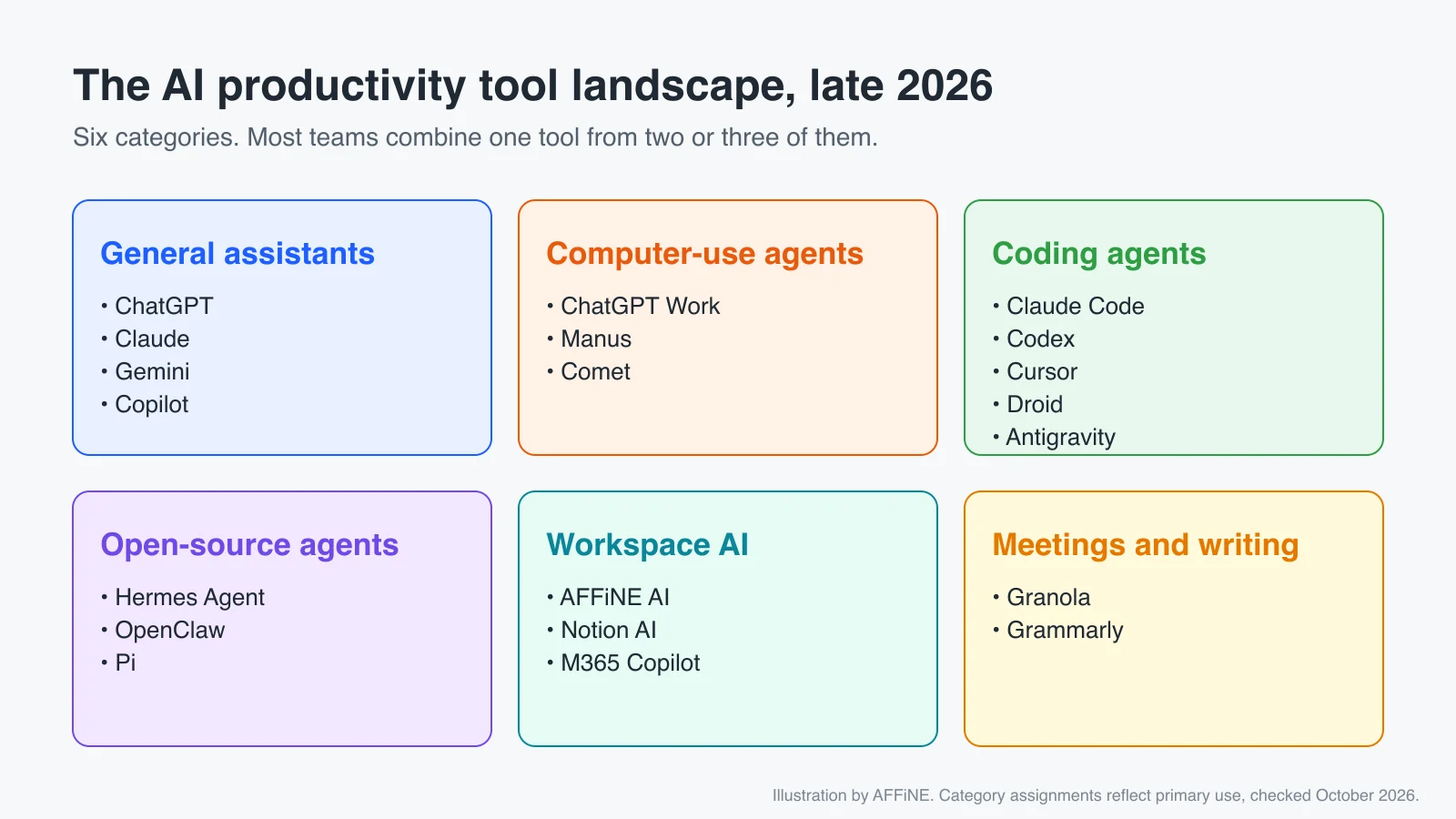
Quick answer: In late 2026 the most useful AI productivity tools are no longer just chatbots. For everyday answers and drafts, start with a general assistant such as ChatGPT, Claude, or Gemini. For multi-step tasks that need a browser or files, use an agent such as ChatGPT Work or Manus. For code, use a coding agent such as Claude Code, OpenAI Codex, Cursor, or Factory Droid. If you need control over models and data, look at open-source agents like Hermes Agent, OpenClaw, and Pi. Whatever you pick, keep the context and results in one shared knowledge workspace so the work outlasts the chat session.
Comparison table
| Tool | Category | Best for | Pricing | Open source |
|---|---|---|---|---|
| ChatGPT (incl. Work) | Assistant + agent | Research, drafts, files | Free + paid | No |
| Claude | Assistant | Long documents, writing | Free + paid | No |
| Google Gemini | Assistant | Google Workspace users | Free + paid | No |
| Microsoft 365 Copilot | Workspace AI | Microsoft 365 teams | Business add-on | No |
| Manus | Cloud agent | Research, slides, sites | Credits, free tier | No |
| Perplexity Comet | AI browser | Research while browsing | Free, with limits | No |
| Claude Code | Coding agent | Repository work | Claude plans or API | No |
| OpenAI Codex | Coding agent | Terminal, IDE, cloud | ChatGPT plans or API | CLI only |
| Cursor | AI code editor | IDE-first developers | Free + paid | No |
| Factory Droid | Coding agent | Teams shipping with agents | Paid | No |
| Hermes Agent | Open-source agent | Personal agent with memory | Free + model costs | Yes |
| OpenClaw | Open-source agent | Self-hosted assistant | Free + model costs | Yes |
| Pi | Open-source agent | Hackable coding harness | Free + model costs | Yes |
| AFFiNE AI | Workspace AI | Docs agents can read | Free + paid AI | Yes |
| Notion AI | Workspace AI | Teams on Notion | Paid plans, credits | No |
| Granola | Meeting notes | Bot-free meeting notes | Free + paid | No |
Pricing and plan names change often. Treat this table as a starting point and confirm on each vendor's pricing page before buying.
General AI assistants
ChatGPT
ChatGPT remains the default starting point for most people. In 2026 OpenAI retired the separate "agent mode" and moved long, multi-step work into ChatGPT Work, which pulls together your files, tools, and context to produce finished deliverables such as reports, presentations, and analyses. OpenAI's help center confirms the earlier ChatGPT agent is no longer available and points to ChatGPT Work and the cloud browser instead.
Best for: drafting, research, and turning a brief into a finished file. Watch out for: agents act with the access you connect, so start with narrow permissions.
Claude
Claude from Anthropic is strong at long documents, careful writing, and analysis. The pricing page lists a free plan, Pro, and Max, and Claude Code is included with Pro and Max. Paid plans add features such as Projects and Claude in Chrome.
Best for: long-form reading and writing, and teams that also want Claude Code.
Google Gemini
Gemini is the natural choice if your team lives in Gmail, Docs, and Drive. For developers, note that Google moved Gemini CLI users to Antigravity CLI in 2026, so older tutorials that recommend Gemini CLI are out of date.
Microsoft 365 Copilot
Microsoft 365 Copilot works across Word, Excel, Outlook, and Teams, and Copilot Studio lets organizations build agents grounded in Microsoft 365 data. It replaces the "Bing AI" entry from our previous list. If you are mainly choosing a chatbot, see our best AI chatbots guide.
Autonomous and computer-use agents
ChatGPT Work
ChatGPT Work is OpenAI's agent for knowledge work. It plans the task, works in the background, and hands back a file or app. OpenAI's page says it is available on macOS and Windows desktop for all plans, and on web and mobile for paid plans.
Manus
Manus is a general-purpose agent that runs tasks in the cloud: research, slide decks, websites, and scheduled jobs. It uses a credit-based pricing model with free and paid tiers. Meta announced a plan to acquire Manus, and in August 2026 CNBC reported that Manus would return to operating independently after Chinese regulators required the deal to be unwound. If vendor stability matters to you, keep an eye on that.
Perplexity Comet
Comet is Perplexity's AI browser. It summarizes pages, gathers details across tabs, and can take actions on websites. Perplexity made Comet free for everyone, with usage limits. Perplexity's answer engine is still a good fit for cited research.
Coding agents
Coding agents are the most mature agent category, and some teams also use them for non-code work such as editing documents and data in a folder.
- Claude Code: Anthropic's coding agent for the terminal and IDE. It reads a repository, edits files, runs commands, and connects to tools over MCP. Included in Claude Pro and Max. Our Claude Code MCP setup guide shows how to connect it to other tools.
- OpenAI Codex: OpenAI's coding agent, available as an open-source CLI, IDE extension, desktop app, and cloud agent at chatgpt.com/codex.
- Cursor: an AI code editor with agent mode, cloud agents, and code review. It has free and paid plans.
- Factory Droid: an agent for planning, building, reviewing, and shipping software. It runs in the terminal, IDE, browser, Slack, and CI.
- Google Antigravity: Google's agent-first development platform, which now includes the Antigravity CLI that replaced Gemini CLI.
Open-source and self-hosted agents
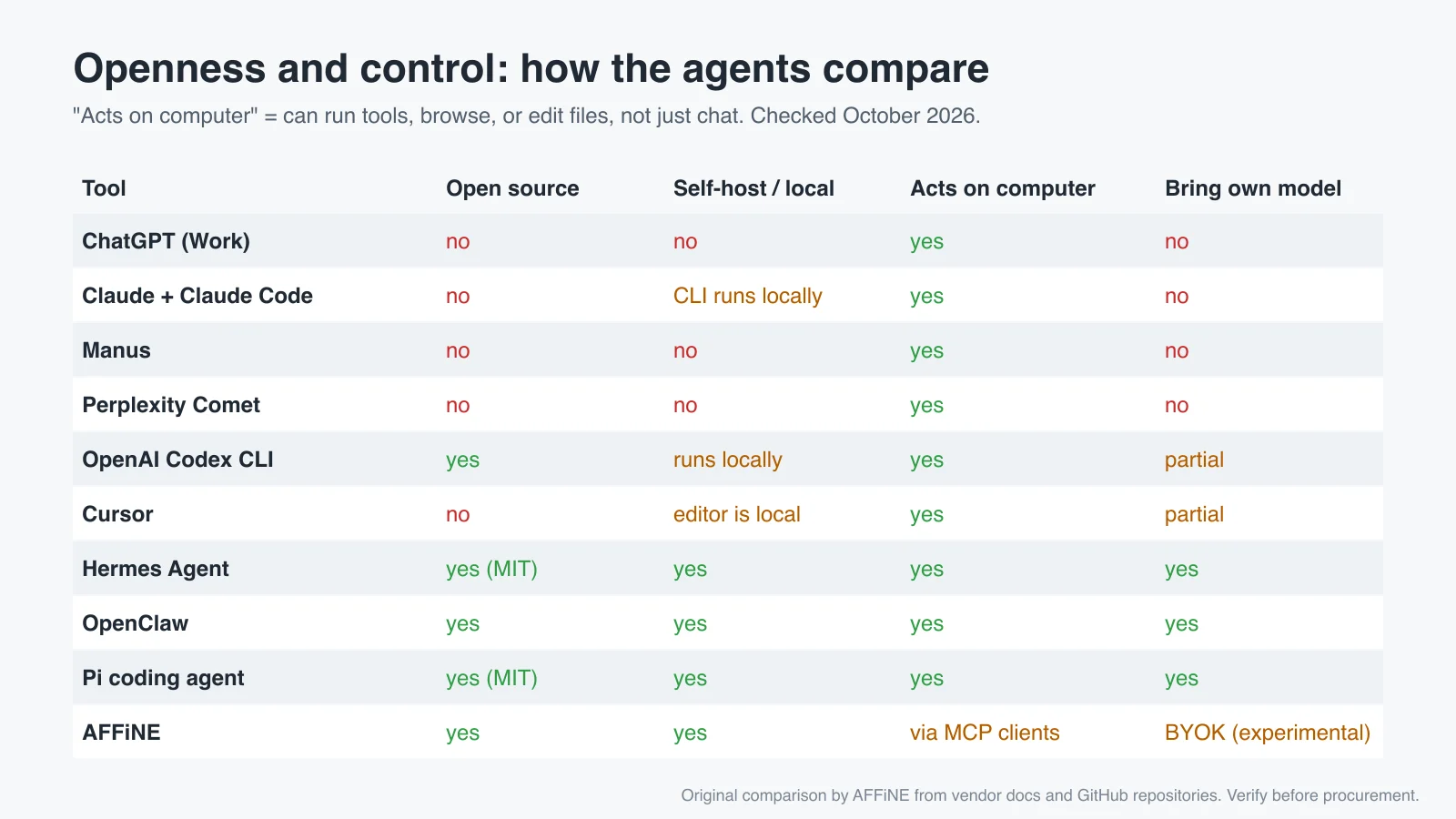
This is the fastest-moving category of 2026. These tools are free to install, let you pick the model provider (including local models), and keep more of your data on your own machines. You still pay for whatever model API you connect.
Hermes Agent (Nous Research)
Hermes Agent is an open-source agent from Nous Research, released under the MIT license. It runs as a terminal app and as desktop apps for macOS, Windows, and Linux. It keeps persistent memory, creates reusable skills from past work, and can be reached from Telegram, Discord, Slack, WhatsApp, Signal, email, and the CLI. The GitHub repository says you can use any model via Nous Portal, OpenRouter, OpenAI, or your own endpoint. Do not confuse it with Nous Research's Hermes language models, which are a separate product.
Best for: a personal agent you can run yourself, across the chat apps you already use.
OpenClaw
OpenClaw is an open-source personal AI assistant that "really does things" on any operating system. Its GitHub README describes models and agent harnesses (Claude, Codex, local models) as swappable plugins, and says OpenClaw itself sends nothing home except a daily version check unless you enable more. You may see the project under older names such as Moltbot.
Best for: technical users who want a self-hosted assistant connected to chat platforms. Expect setup work.
Pi (coding agent)
Pi is a minimal agent harness created by Mario Zechner, the author of libGDX. It is not Inflection AI's "Pi" chatbot, which is a different product. The Pi coding agent ships with a small set of tools (read, bash, edit, write), a short system prompt, and support for 15+ model providers. It skips features like sub-agents and plan mode on purpose: you add them through extensions, skills, and packages. Pi is MIT-licensed, and its repository also offers an SDK and RPC mode; OpenClaw uses it as a real-world integration. Mario Zechner explains the design in his post What I learned building an opinionated and minimal coding agent.
Best for: developers who want to shape their own agent. Watch out for: Pi has no permission prompts by default, so run it in a container for unattended work.
Workspace and knowledge AI
Agents are only as good as the context they can reach. Workspace AI tools put AI next to your documents and give agents a place to read from and write to.
AFFiNE AI
Disclosure: AFFiNE is our product. AFFiNE combines docs, whiteboards, and databases in one open-source workspace that you can use in the cloud or self-host. AFFiNE AI works inside docs and the whiteboard to draft, summarize, translate, and turn notes into mind maps or slides.
For agents, the most useful part is AFFiNE's built-in MCP server. A compatible MCP client such as Claude Code, Cursor, or Cline can search your workspace (whiteboard text included) and read documents using a workspace-scoped credential that you can revoke at any time. Read-only access is the default. At the time of writing, write tools are limited to development and canary builds, so check your instance before relying on them. To learn more about the protocol, see What is an MCP server?.
Best for: teams that want one open-source source of truth that both people and agents can use.
Notion AI
Notion AI now includes Notion Agent and Custom Agents that run on triggers and can use Notion, Slack, mail, calendar, and MCP integrations. Custom Agents consume Notion credits. If you want an open-source alternative, read our open-source Notion alternative guide.
Meeting and writing tools
- Granola: takes meeting notes from your device audio without adding a bot to the call, and turns them into summaries. It has a free plan and paid plans.
- Grammarly: still a solid choice for grammar, tone, and clarity across apps.
We removed WordAi, Rytr, the Freepik text generator, and Tidio Lyro from this list. They still exist, but general assistants now cover most of what they did, and they are not productivity tools for most readers.
How to choose an AI productivity tool
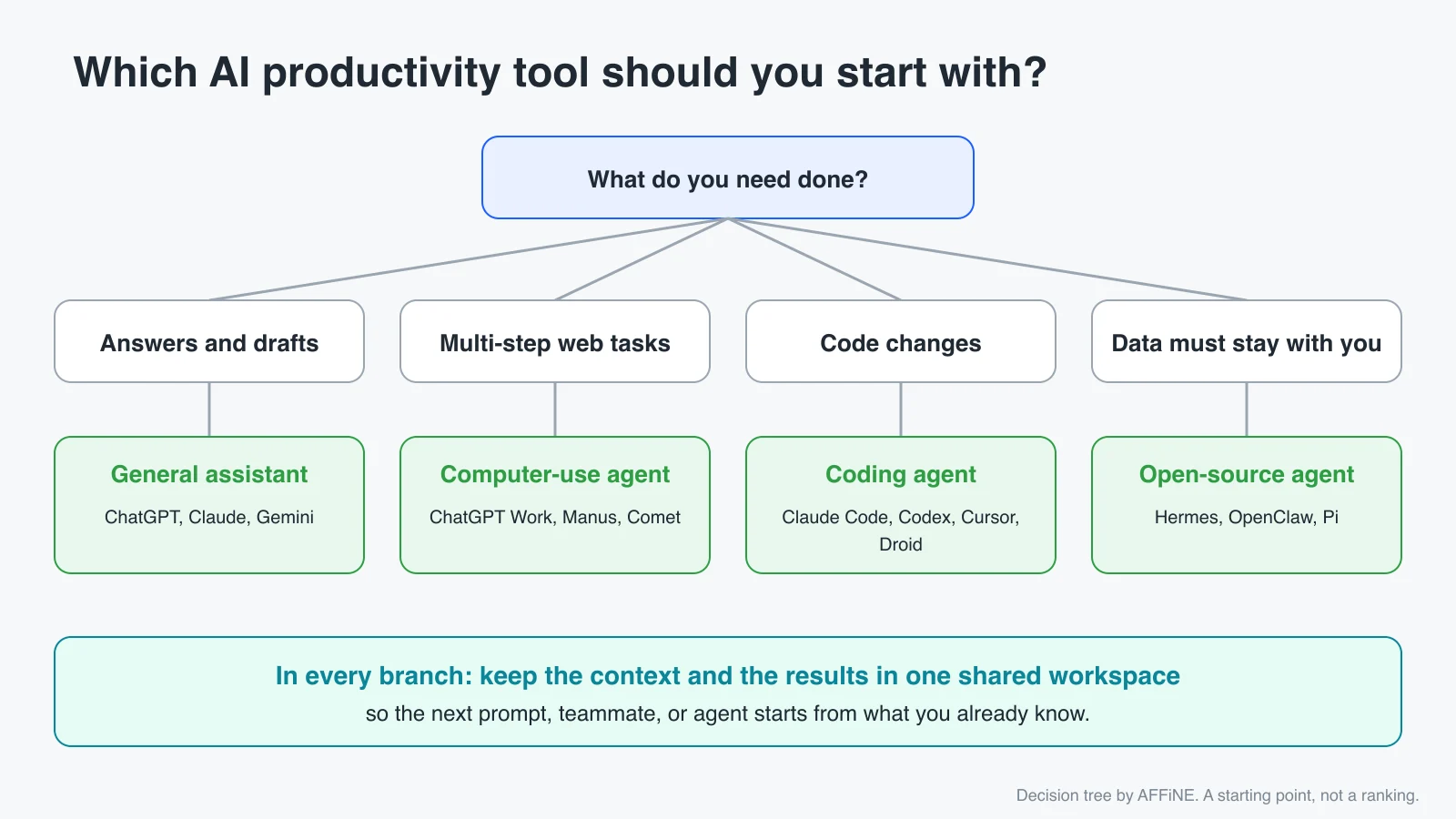
Use these criteria before you add another subscription:
- The job, not the brand. Write down one task you repeat every week. Pick the category that fits it.
- Where your context lives. An agent that cannot see your docs will guess. Check connectors and MCP support.
- Data control. Check whether the vendor trains on your data, where data is stored, and whether you can self-host or bring your own model.
- Permissions and review. Prefer tools with scoped, revocable access and approval steps for risky actions.
- Cost model. Seat prices, credits, and model API usage behave very differently. Agents that run for hours can use a lot of credits.
- Exit path. Make sure you can export your data in open formats.
How to combine an AI agent with a knowledge workspace
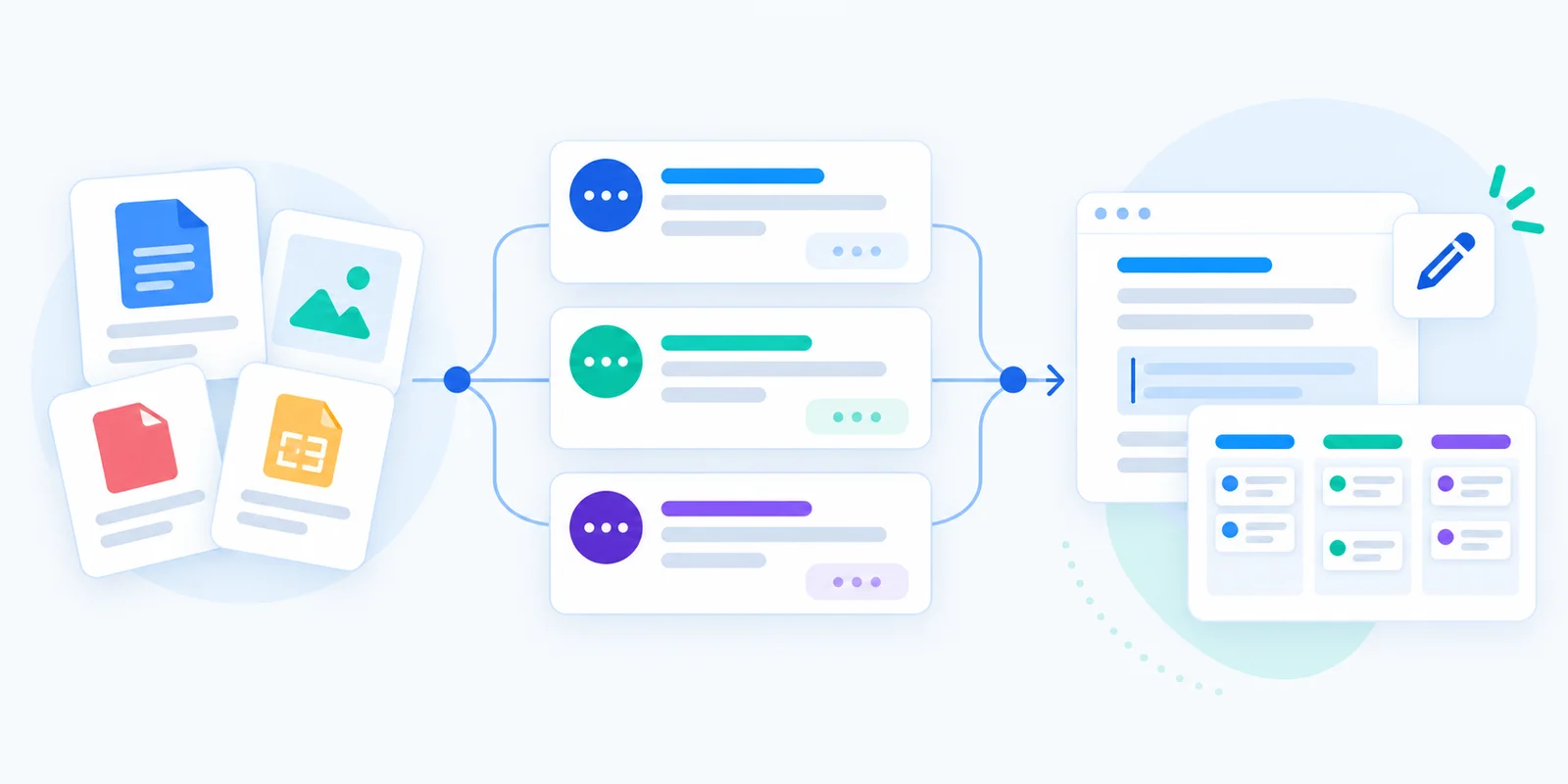
The most productive setup we see is simple: an agent does the work, and a shared workspace holds the context and the record.
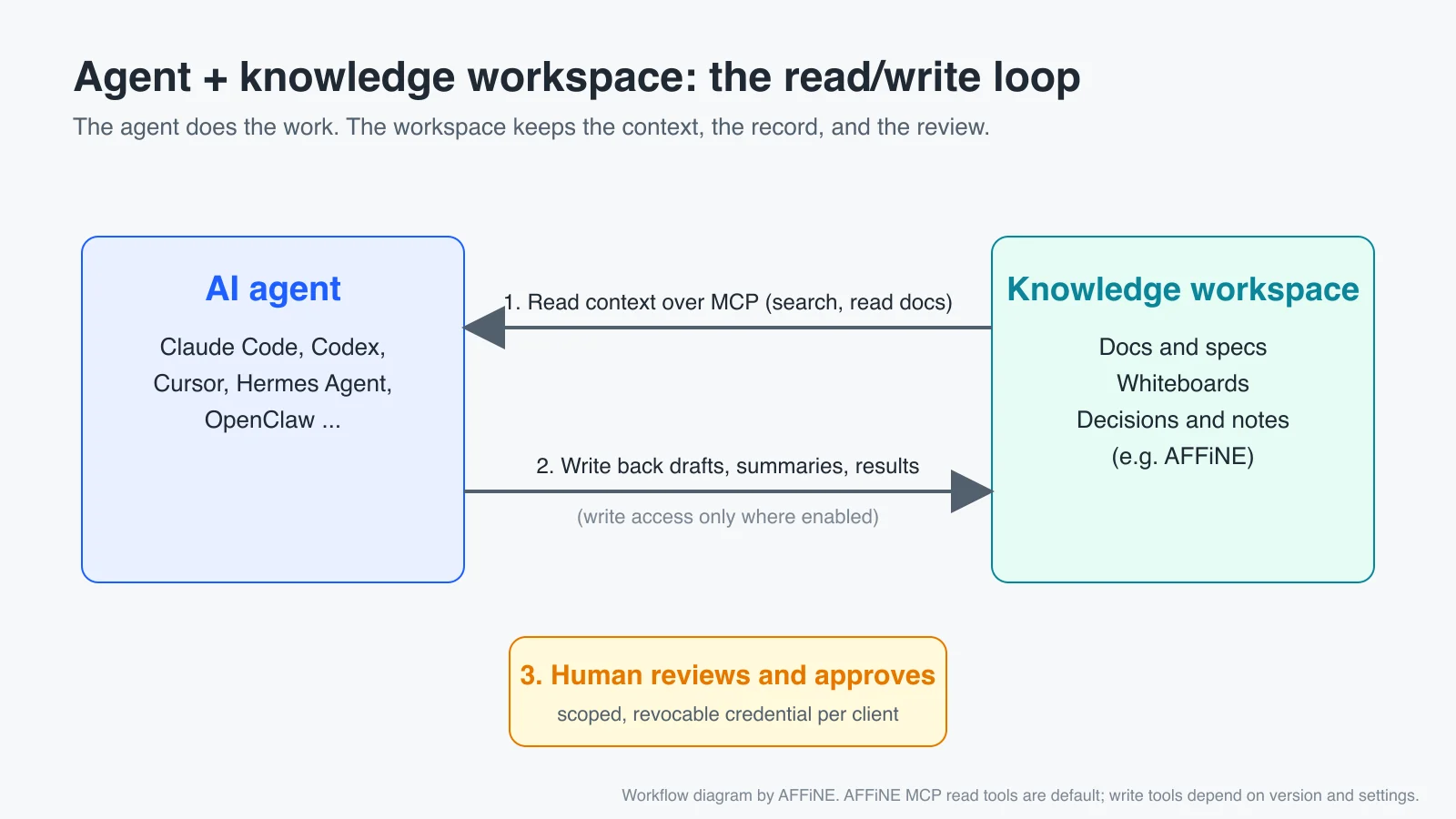
- Put the source material in one place. Specs, meeting notes, decisions, and diagrams go in your workspace, for example AFFiNE docs and whiteboards. Templates such as a weekly team meeting agenda template help keep notes consistent.
- Connect the agent over MCP. Create one credential per client (Claude Code, Cursor, and so on) and start with read-only access. See the AFFiNE MCP setup page for client-specific configuration.
- Ask the agent to cite the docs it used. This makes review faster and shows when context is missing.
- Write results back, then review. Save drafts, summaries, and decisions back in the workspace so the next person or agent starts from them. A person approves anything that goes to a customer or into production.
- Rotate or revoke credentials when a project ends or a tool is no longer used.
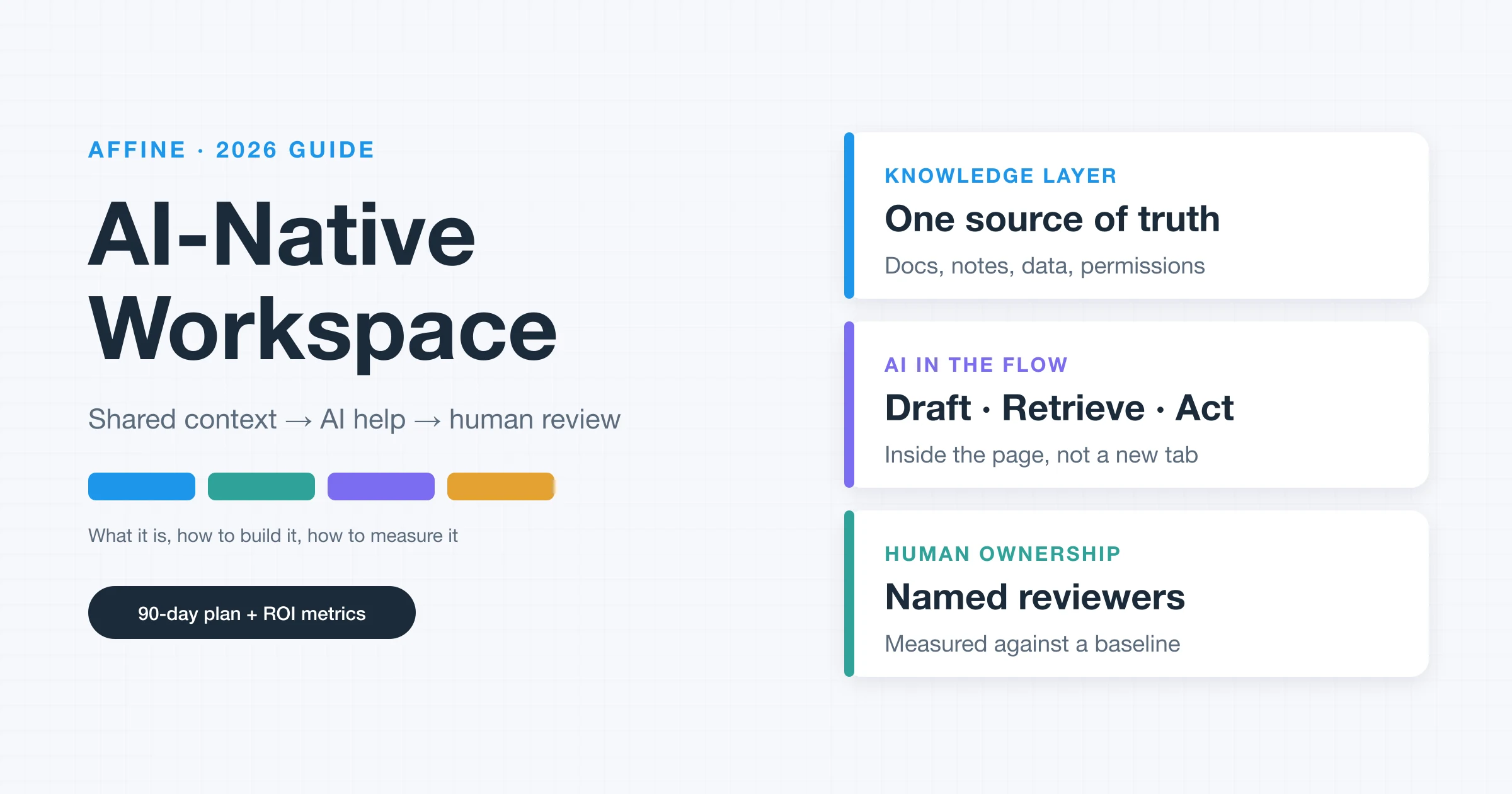
For a deeper look at why context is the bottleneck, read why context management is the infrastructure layer and our AI-native workspace guide.
Risks: privacy and security of AI agents
Agents can read, click, and run commands, so mistakes cost more than with a chatbot.
- Prompt injection. A web page, email, or document can contain instructions that hijack an agent. Be careful with agents that browse and also have access to your accounts.
- Over-broad permissions. Give each agent the smallest scope it needs, and prefer read-only access to start. Our MCP security best practices guide covers this in detail.
- Unattended execution. Coding and open-source agents can run shell commands. Use sandboxes or containers, and review changes before merging.
- Data retention. Check each vendor's data and training policy, especially for meeting audio and customer data. For sensitive work, consider private AI options or self-hosting.
- Untrusted extensions. Skills, plugins, and packages for agents are code. Install them like any other dependency.
- Cost overruns. Credit-based agents can burn through credits on long tasks. Set limits.
FAQ
What is the best AI productivity tool in 2026?
There is no single best tool. For most people, a general assistant such as ChatGPT or Claude covers daily writing and research. Add a coding agent if you write software, and a workspace such as AFFiNE or Notion to keep context in one place.
What is the difference between an AI assistant and an AI agent?
An assistant answers in a chat. An agent plans and carries out multi-step tasks: it can browse, edit files, run commands, or use connected apps, and then reports back.
Are there free AI productivity tools?
Yes. ChatGPT, Claude, Gemini, Comet, and Cursor have free tiers with limits. Hermes Agent, OpenClaw, Pi, and the Codex CLI are free and open source, but you pay for the model API you connect unless you run a local model. AFFiNE has a free plan and can be self-hosted.
What is Hermes Agent?
Hermes Agent is an MIT-licensed, open-source AI agent from Nous Research. It runs in your terminal or as a desktop app, remembers your projects, creates reusable skills, and works across messaging apps with the model provider you choose.
Is Pi the same as Inflection's Pi chatbot?
No. In this guide, Pi means the open-source Pi coding agent at pi.dev, created by Mario Zechner. Inflection AI's Pi is an unrelated consumer chatbot.
Is it safe to give an AI agent access to my files and accounts?
It can be, with limits. Use scoped, revocable credentials, start with read-only access, run code agents in a sandbox, and require human approval for actions that send, buy, delete, or deploy.
How do I connect an AI agent to my notes?
Use the Model Context Protocol (MCP). In AFFiNE, create a workspace credential under Settings, Integrations, MCP Server, then add the endpoint to your MCP client, such as Claude Code or Cursor.
How we chose these tools
We started from our 2024 list and checked every tool against its official site in October 2026. We compared the current top search results for "AI productivity tools" and "best AI productivity tools 2026" to see which categories readers expect, then added the agent products our team and readers actually use: general assistants, computer-use agents, coding agents, and open-source agents. We only included products that are publicly available and actively maintained, and we used vendor pages, documentation, and GitHub repositories as sources. We did not run formal benchmarks, and we do not list exact prices because they change often. AFFiNE is our product, and we have marked it as such. We have no affiliate relationships with the other tools listed.
Sources
- OpenAI: ChatGPT Work, ChatGPT agent help article, Codex on GitHub
- Anthropic: Claude plans and pricing
- Google: Transitioning Gemini CLI to Antigravity CLI, Antigravity 2.0
- Microsoft: Microsoft 365 Copilot agents, What's new in Copilot Studio
- Manus: Pricing; CNBC: Manus to return as independent company
- Perplexity: Comet is now available to everyone
- Nous Research: Hermes Agent, GitHub
- OpenClaw: Website, GitHub
- Pi: pi.dev, GitHub, Mario Zechner's design post
- Cursor: Pricing; Factory: Droids
- Notion: Agents, Introducing Custom Agents; Granola: Pricing
- AFFiNE: MCP server, AFFiNE AI