The Importance of Building a Centralized Knowledge Base for Teams
Every business depends on information to operate effectively. Employees need access to project updates, company policies, customer records, training materials, and internal procedures to complete their work. However, as organizations grow, keeping that information organized becomes increasingly difficult.
Important documents often end up scattered across emails, shared drives, messaging platforms, and individual computers. Employees may spend valuable time searching for files, asking colleagues the same questions, or working with outdated information. These everyday problems can gradually affect productivity, communication, and decision-making.
Building a centralized knowledge base helps businesses overcome these challenges by bringing important information into one organized, accessible environment. Instead of relying on disconnected systems, teams can find the resources they need, share knowledge, and maintain consistent workflows.
A well-managed knowledge base does more than store documents. It helps organizations preserve valuable knowledge, improve collaboration, and create a more efficient working environment.
What Is a Centralized Knowledge Base?
A centralized knowledge base is a digital system where businesses store, organize, and manage information that employees need to perform their responsibilities.
It acts as a shared reference point for company knowledge, making it easier for team members to access accurate information without repeatedly requesting assistance from colleagues.
Unlike a traditional document folder, a well-designed knowledge base connects information through categories, internal links, search features, and structured pages.
Organizations can use it to manage several types of information, including:
- Company policies: Workplace guidelines, security procedures, and internal regulations.
- Training resources: Employee onboarding materials, tutorials, and instructional documents.
- Project documentation: Timelines, responsibilities, meeting notes, and project requirements.
- Standard operating procedures: Step-by-step instructions for recurring business activities.
- Customer service resources: Frequently asked questions, troubleshooting guides, and support instructions.
- Technical documentation: Software instructions, system configurations, and internal IT procedures.
The purpose is not simply to collect documents. It is to create a reliable source of information that employees can easily understand, update, and use.
Why Businesses Struggle With Scattered Information
Many organizations introduce new tools whenever a particular business need arises. One department might use spreadsheets for project tracking, another may rely on shared documents, while others communicate primarily through email or messaging applications.
Although these tools serve individual purposes, problems arise when information becomes disconnected.
Employees Waste Time Searching for Answers
Consider an employee preparing a client presentation. They may need the latest pricing information, product specifications, previous meeting notes, and brand guidelines.
If these resources are stored in different locations, the employee must search multiple platforms before beginning the actual work.
A centralized knowledge base simplifies this process by making relevant information easier to locate through search functions and organized categories.
Different Departments Work With Different Information
When teams maintain separate copies of important documents, inconsistencies become more likely.
For example, a sales team might use an outdated pricing document while the finance department works with the latest version. Even a small information gap can create misunderstandings and unnecessary corrections.
Centralized documentation reduces these issues by giving employees a common reference point and clearly identifying the current approved information.
Valuable Knowledge Leaves With Employees
Experienced employees often develop practical knowledge that never appears in formal documentation. They understand unusual customer requests, internal processes, and solutions to recurring problems.
When these employees leave, businesses may lose important knowledge unless someone has documented it.
A shared knowledge base allows teams to preserve this experience and make it available to future employees.
Key Benefits of Building a Centralized Knowledge Base
1. Improving Employee Productivity
Employees are more productive when they can find answers without interrupting colleagues or searching through several systems.
A centralized knowledge base provides direct access to procedures, instructions, and resources that support everyday work.
One of its biggest advantages is reducing the need for employees to repeatedly ask colleagues for information that should already be available. Chuck Schaeffer, Co-Founder and CEO at AVTEC, highlights this common workplace challenge:
"Employees shouldn't have to ask the same questions every week. When information is easy to find, teams spend less time searching for answers and more time getting their work done."
For example, an employee handling a customer complaint can quickly check the company's approved response procedures instead of contacting a manager for routine guidance.
This independence allows employees to complete repetitive tasks more efficiently while reducing unnecessary interruptions for other team members.
A knowledge base can also support productivity by:
- Reducing time spent searching for internal documents.
- Making frequently used templates easier to access.
- Providing clear instructions for recurring tasks.
- Minimizing repeated questions between departments.
- Helping employees resolve common problems independently.
2. Strengthening Communication and Team Collaboration
Effective collaboration requires employees to have access to the same information, particularly when several departments contribute to a single project.
A centralized knowledge base creates a shared environment where teams can document decisions, explain responsibilities, and maintain project-related resources.
For example, a product development team may need input from designers, engineers, marketing professionals, and customer support employees.
Keeping product requirements, design decisions, technical notes, and launch plans connected helps everyone understand how their work contributes to the larger project.
Rather than searching through lengthy email conversations, employees can review the latest documented information and identify what needs attention.
This becomes particularly valuable for remote and hybrid teams, where employees may work in different locations or time zones.
3. Making Employee Onboarding Easier
Training new employees requires time, coordination, and access to reliable information.
Without an organized system, new hires may depend heavily on managers and colleagues to explain everyday processes. This can create delays and inconsistent training experiences.
A centralized knowledge base provides a structured collection of resources that employees can explore throughout their onboarding period.
Useful onboarding content includes company introductions, department responsibilities, software instructions, security requirements, and explanations of common workflows.
This becomes particularly important in healthcare settings, where employees need to understand established procedures, patient communication standards, and their individual responsibilities. Ayham Al-Ayoubi, Founder and Medical Director of London Medical & Aesthetic Clinic, offers a relevant perspective on the importance of consistent staff training:
"In a medical clinic, staff need clear guidance on procedures, patient communication, and daily responsibilities. Having that information organized helps new employees learn their roles and supports consistency in patient care."
A centralized knowledge base can make the onboarding process more consistent by giving employees access to the same approved information, regardless of when they join the organization.
| Onboarding activity | Without a knowledge base | With a knowledge base |
|---|---|---|
| Learning company policies | Request documents from HR | Access organized policy pages |
| Understanding job responsibilities | Depend on verbal explanations | Review role-specific guides |
| Learning internal software | Ask colleagues for instructions | Follow documented tutorials |
| Finding project information | Search emails and shared folders | Browse a central project space |
| Reviewing common procedures | Repeat questions to managers | Consult approved process guides |
This approach does not replace personal training or mentorship. Instead, it gives new employees reliable material they can revisit whenever necessary.
How Centralized Knowledge Management Improves Decision-Making
Business decisions depend on access to accurate and relevant information.
When records are scattered across departments, managers may struggle to understand what happened during previous projects or why certain decisions were made.
A centralized knowledge base provides historical context by preserving meeting records, project outcomes, internal research, and approved procedures.
Learning From Previous Projects
Suppose a marketing team plans a campaign similar to one completed several months earlier.
If the previous campaign's objectives, results, challenges, and lessons are documented, employees can use that information to improve their new strategy.
Without those records, teams may repeat unsuccessful approaches or overlook valuable lessons.
Reducing Confusion Over Responsibilities
Documenting responsibilities and decision-making processes also improves accountability.
Employees can identify who owns a particular process, when a decision was approved, and which resources support that decision.
This creates greater transparency, particularly when projects involve several departments.
Supporting Consistent Business Practices
Organizations often struggle to maintain consistency as they expand.
A centralized knowledge base helps ensure that employees in different locations follow the same approved procedures, reducing the likelihood of conflicting instructions and unnecessary variation.

The Role of Modern Technology in Knowledge Management
Knowledge management has evolved beyond traditional document storage. Modern platforms can combine written information, visual planning, project organization, and collaboration within a connected workspace.
This gives businesses more flexibility when managing different types of knowledge.
For example, written instructions may be suitable for company policies, while a visual diagram might better explain a complex approval process. Project databases can help teams organize structured information, and linked documents can provide additional context.
Platforms such as AFFiNE bring documents, whiteboards, databases, and AI-supported features together in a single workspace. This type of connected environment can help teams organize internal resources, document processes, and visualize ideas without maintaining entirely separate systems for every activity.
However, choosing a knowledge management platform should involve more than reviewing its available features.
Businesses should consider how easily employees can use the system, whether it supports their existing workflows, and how information will be protected and maintained.
Features Worth Considering
| Feature | Why it matters for teams |
|---|---|
| Search functionality | Helps employees locate relevant information quickly |
| Document linking | Connects related resources and project details |
| Access permissions | Restricts sensitive information to authorized users |
| Collaboration tools | Supports shared knowledge creation and maintenance |
| Visual planning | Helps explain complex processes and relationships |
| Version history | Helps employees identify and recover previous changes |
| AI assistance | Can support summarization and information discovery |
| Data portability | Makes it easier to export or migrate organizational knowledge |
The right solution depends on the organization's size, industry, technical requirements, and existing software environment.
How Artificial Intelligence Can Support a Team Knowledge Base
Artificial intelligence is creating new opportunities for businesses to organize and retrieve information.
Instead of relying entirely on manual searches, AI-assisted systems may help users summarize lengthy documents, draft internal instructions, or locate relevant information through natural-language questions.
For instance, an employee preparing for a project meeting could use an approved AI feature to summarize previous discussions and identify outstanding tasks.
Similarly, a support employee could use AI-assisted search to locate relevant troubleshooting documentation.
However, the usefulness of these tools depends on how well businesses organize and maintain their existing information. As Gavin Yi, Founder and CEO at Yijin Solution, explains:
"AI can help employees find information faster, but it cannot fix poor documentation. Businesses need accurate, organized information before expecting these tools to deliver reliable answers."
These capabilities can improve convenience, but they also introduce important considerations.
AI-generated summaries may omit context or contain incorrect details. Businesses should establish clear review procedures, particularly when the information involves customers, finances, legal obligations, or internal security.
Employees should also understand which information can be processed through external AI services and how their company's privacy requirements apply.
Practical Steps to Build a Centralized Knowledge Base
Creating a useful knowledge base requires more than choosing software and uploading existing documents. Businesses need a clear structure, consistent documentation practices, and defined responsibilities. For a fuller walkthrough with an article template and review rules, see this step-by-step team knowledge base guide.
Step 1: Identify the Information Employees Need Most
Begin by reviewing the questions employees frequently ask and the documents they use most often.
Speak with representatives from different departments to understand where information is difficult to find.
Common starting points include:
- Frequently requested HR policies.
- Internal software instructions.
- Customer service procedures.
- Project templates and checklists.
- Product information and technical guides.
- Department-specific training resources.
Prioritizing frequently used content helps create immediate practical value.
Step 2: Organize Information Into Clear Categories
A logical structure makes the knowledge base easier to navigate.
For example, an organization might create separate sections for HR, operations, finance, marketing, IT, and customer support.
Within each section, documents can be grouped by topic, department, project, or process.
Avoid creating unnecessarily complex folder structures. Employees should be able to understand where information belongs without needing detailed instructions.
Step 3: Establish Documentation Standards
Consistent formatting makes information easier to read and maintain.
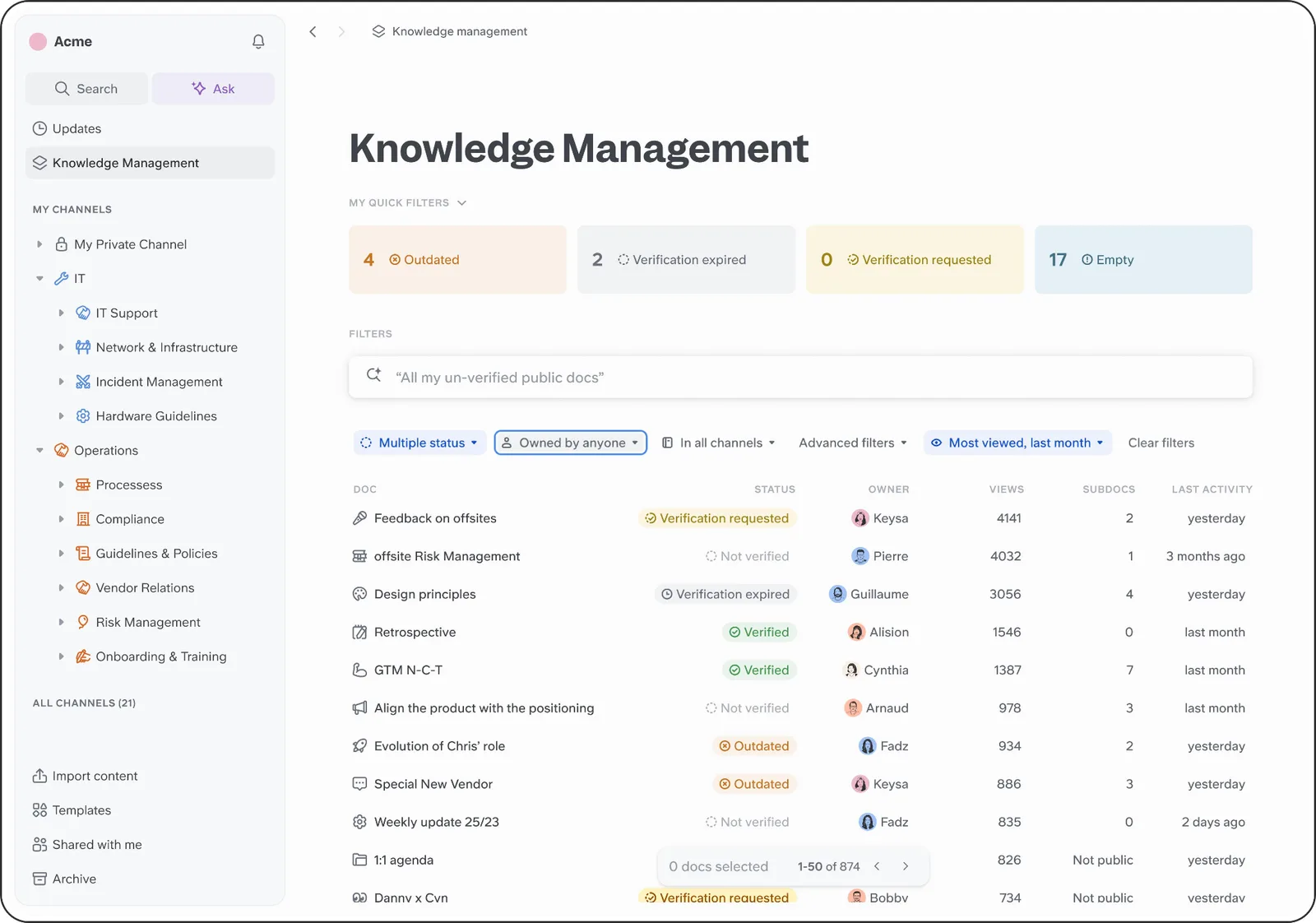
Each important document should include a clear title, a description of its purpose, relevant instructions, an owner, and a review date when appropriate.
For procedural documents, numbered instructions and screenshots can be particularly useful.
Teams should also use consistent terminology so that employees can find information even when different departments contribute content.
Step 4: Assign Responsibility for Content Updates
Knowledge bases become less useful when information is allowed to become outdated.
Assign content owners who are responsible for reviewing important documents and updating them when procedures change.
For example, HR can maintain employee policies, IT can manage technical instructions, and department managers can oversee operational procedures.
A practical maintenance process should explain how employees report outdated content, who approves changes, and how previous versions are handled.
Step 5: Introduce the Knowledge Base Gradually
Launching an entire knowledge management system at once may overwhelm employees.
A smaller pilot allows organizations to test the structure, identify confusing areas, and collect feedback before expanding access.
Start with one department or a limited set of high-value processes.
Once employees become familiar with the system, additional resources can be introduced.
Step 6: Measure Usage and Improve
The knowledge base should evolve alongside the organization.
Businesses can monitor several indicators to understand whether the system is useful.
| Measurement | What it helps evaluate |
|---|---|
| Frequently viewed documents | Which resources employees rely on |
| Unsuccessful searches | Information that may be missing |
| Repeated employee questions | Gaps in existing documentation |
| Content review completion | Whether documents remain current |
| Onboarding feedback | How well resources support new employees |
| Time to locate information | Whether information retrieval is improving |
These measurements help teams improve content rather than simply adding more documents.
Common Mistakes to Avoid When Creating a Knowledge Base
Even well-intentioned projects can fail when businesses focus on technology without considering how employees actually work.
One common mistake is transferring every existing document into a new platform without reviewing its relevance. This can create a large collection of outdated files that remains difficult to navigate.
Another problem is allowing individual departments to use inconsistent naming conventions. Employees may struggle to locate documents when similar information appears under different titles.
Organizations should also avoid making documentation overly complicated.
Long pages filled with unnecessary details can discourage employees from using the system. Clear headings, short explanations, tables, and practical examples make information easier to understand.
Why Knowledge Management Becomes More Important as Businesses Grow
Small teams can often manage information through informal conversations because employees work closely together and understand each other's responsibilities.
As the business grows, this approach becomes harder to maintain.
New departments introduce additional processes, employees join at different times, and managers may no longer have direct visibility into every project.
Without a structured approach, organizations risk creating information gaps that affect efficiency and service quality.
"As companies grow, relying on a few experienced employees to remember every process becomes risky. Documenting that knowledge helps new team members settle in and keeps operations consistent," explains Sharon Amos, Director at Air Ambulance 1.
A centralized knowledge base supports growth by preserving important information and reducing reliance on individual employees.
It also helps distributed teams maintain consistent working practices, even when they operate from different offices or countries.

Conclusion
Building a centralized knowledge base is an important step toward creating a more organized, productive, and collaborative workplace.
When employees can easily access reliable information, they spend less time searching for answers and more time completing meaningful work. Clear documentation also helps businesses improve onboarding, preserve institutional knowledge, maintain consistent processes, and make better-informed decisions.
Technology plays an important role, but successful knowledge management also depends on employee participation, clear ownership, and regular maintenance.
Businesses that treat their knowledge base as a shared organizational resource rather than a static document library are better positioned to support their teams as responsibilities, projects, and operations become more complex.
Frequently Asked Questions (FAQs)
1. What is the main purpose of a centralized knowledge base?
A centralized knowledge base provides employees with one organized place to access company information, procedures, training materials, and project documentation. Its primary purpose is to make knowledge easier to find, share, and maintain.
2. How does a knowledge base improve team productivity?
It reduces the time employees spend searching for information, requesting routine instructions, and locating important documents. Employees can work more independently when reliable resources are easy to access.
3. What information should a company include in its knowledge base?
A company can include employee policies, onboarding guides, standard operating procedures, technical instructions, project documentation, frequently asked questions, and other resources that support everyday work.
4. Can small businesses benefit from centralized knowledge management?
Yes. Small businesses can use a knowledge base to organize important procedures, train new employees, and preserve information as the company grows. Starting early can help prevent information management problems later.
5. How often should knowledge base content be updated?
Content should be reviewed whenever an important process changes. Businesses can also establish scheduled reviews based on the importance of each document, with higher-risk information checked more frequently.
6. Can AI improve the effectiveness of a knowledge base?
AI tools can help employees summarize documents, draft content, and retrieve relevant information more conveniently. However, their accuracy depends on the quality of the underlying information, and important outputs should still be verified.
7. What should businesses consider when choosing knowledge base software?
Important considerations include usability, search functionality, collaboration features, access controls, integration options, data security, content organization, and the ability to update information without unnecessary complexity.