Note-Taking Tablets 2026: 24 Current Models Compared
The best note-taking tablet is the one that fits your main job. For one device that does everything, choose an iPad Air 11-inch (M4) with Apple Pencil Pro, or a Galaxy Tab S11 with its S Pen in the box. For paper-like handwriting, choose an E-ink tablet such as reMarkable Paper Pure or Kindle Scribe (2025). For full-page PDFs, go to 13 inches.
How this guide was made: We did not test these tablets hands-on, and nothing here is a "hands-on" verdict. Every model name, spec, and price below was copied from the manufacturer's official US page on September 30, 2026. Prices are list prices for the base model, without promotions, trade-ins, or education discounts. What we did test ourselves is the software side: moving a handwritten page into a knowledge base. That test and its files are below.
Quick Picks by Use Case
| If you mainly want to… | Consider | Why (from official pages) | Minimum cost to start writing* |
|---|---|---|---|
| Use one device for apps, typing, and handwriting | iPad Air 11-inch (M4) (2026) + Apple Pencil Pro | Full app store; Apple Pencil Pro adds pressure sensitivity, squeeze, and barrel roll | $878 ($749 + $129) |
| Get an all-rounder with the pen included | Galaxy Tab S11 (2025) | 11-inch 120 Hz AMOLED; S Pen in the box; tablet and pen rated IP68 | $899.99 |
| Write on a paper-like screen for the lowest entry price | reMarkable Paper Pure (2026) | 10.3-inch black-and-white Canvas display; Marker included; handwriting conversion without a subscription | $399 |
| Read books and write notes on one screen | Kindle Scribe (2025) | 11-inch, 300 ppi with front light; Premium Pen included; convert notebooks to text | $499.99 |
| Annotate PDFs and still run Android apps | BOOX Note Air5 C (2025) or Note Air6 C (2026) | 10.3-inch color E Ink; Google Play; BOOX Pen3 included | $529.99 / $579.99 |
| Avoid subscriptions and keep recognition offline | Supernote Manta (2024) | Offline handwriting recognition; exports PNG, PDF, TXT, DOCX; Supernote says "no subscription" | $570 ($505 + $65 pen) |
| Spend as little as possible on an LCD tablet with a pen | Galaxy Tab S10 Lite (2025) | S Pen in the box; 10.9-inch 90 Hz screen; only IP42 | $399.99 |
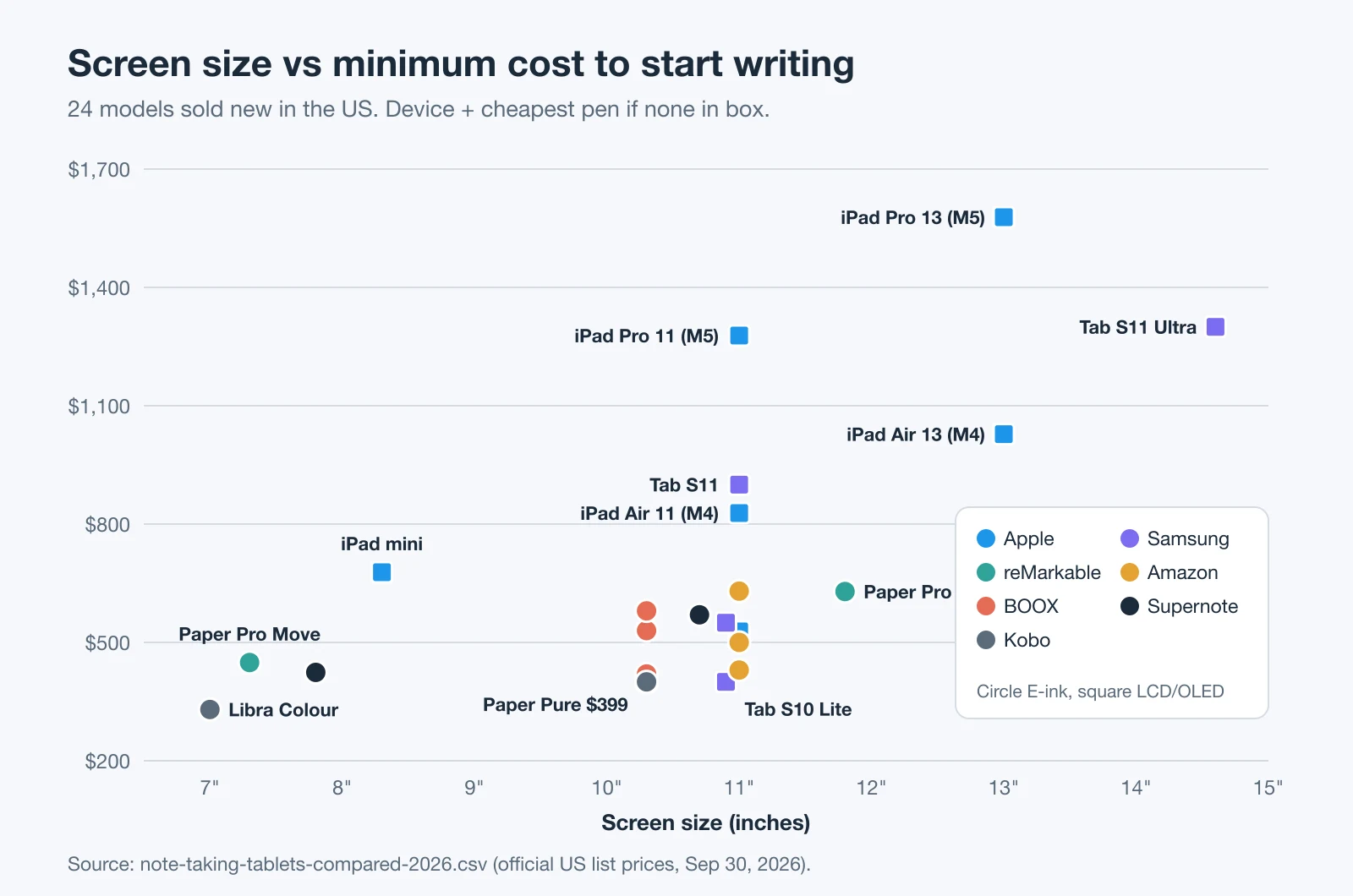
*Minimum cost = US list price of the base model + the cheapest compatible pen when none is in the box. Checked September 30, 2026.
Download the Comparison Sheet and Buying Checklist
- Note-taking tablets compared, 2026 (XLSX, 16 KB) — 24 current models with screen, pen, handwriting-to-text, PDF, export, sync, battery claim, price, and a formula for minimum cost. Includes a cost calculator tab for ownership periods and a Sources tab with the official page for every row.
- Same data as CSV (14 KB) — for Google Sheets, Numbers, Airtable, or your own database.
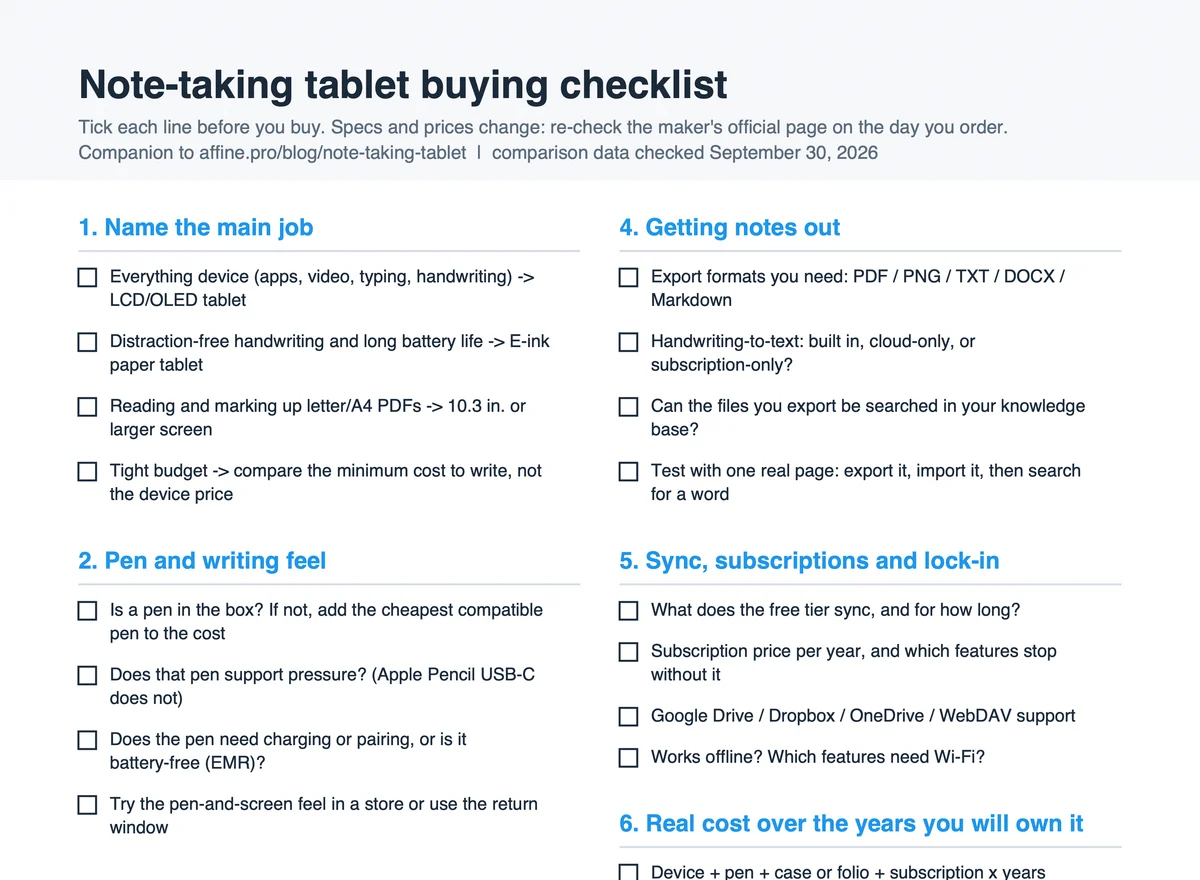
- Note-taking tablet buying checklist (PDF, 1 page, 4 KB) — 24 checkboxes in six groups, plus a shortlist table for total cost.
- Handwriting-to-knowledge-base test kit — the four files used in our import test: PNG page (209 KB), image-only PDF (265 KB), PDF with a text layer (265 KB), and converted text in Markdown (1 KB).
The workbook was recalculated in LibreOffice before publishing: every minimum-cost formula returned a number and no sheet contained an error value.
LCD and OLED Tablets for Note-Taking: Current Models
These are general-purpose tablets. They run full app stores, so you choose the note app — Apple Notes, Samsung Notes, Goodnotes, Notability, OneNote, or a web app. If you are still choosing the app, see our comparison of iPad note-taking apps and the Goodnotes vs Notability test.
| Model (year announced) | Screen | Pen | Base price | Minimum cost to write |
|---|---|---|---|---|
| iPad (A16) (2025) | 11" Liquid Retina LCD, 264 ppi | Not included; Apple Pencil (USB-C) $79 | $449 (128 GB) | $528 |
| iPad mini (A17 Pro) (2024) | 8.3" Liquid Retina LCD, 326 ppi | Not included; Pencil Pro $129 or USB-C $79 | $599 (128 GB) | $678 |
| iPad Air 11-inch (M4) (2026) | 11" Liquid Retina LCD, 264 ppi | Not included; Pencil Pro $129 or USB-C $79 | $749 (128 GB) | $828 |
| iPad Air 13-inch (M4) (2026) | 13" Liquid Retina LCD, 264 ppi | Not included; Pencil Pro $129 or USB-C $79 | $949 (128 GB) | $1,028 |
| iPad Pro 11-inch (M5) (2025) | 11" tandem OLED, ProMotion 10–120 Hz | Not included; Pencil Pro $129 or USB-C $79 | $1,199 (256 GB) | $1,278 |
| iPad Pro 13-inch (M5) (2025) | 13" tandem OLED, ProMotion 10–120 Hz | Not included; Pencil Pro $129 or USB-C $79 | $1,499 (256 GB) | $1,578 |
| Galaxy Tab S10 Lite (2025) | 10.9" TFT LCD, 90 Hz | S Pen included | $399.99 (128 GB) | $399.99 |
| Galaxy Tab S10 FE (2025) | 10.9" LCD, 90 Hz | S Pen included (no Bluetooth) | $549.99 (128 GB) | $549.99 |
| Galaxy Tab S10 FE+ (2025) | 13.1" LCD, 90 Hz | S Pen included (no Bluetooth) | $699.99 (128 GB) | $699.99 |
| Galaxy Tab S11 (2025) | 11" Dynamic AMOLED 2X, 120 Hz | S Pen included (S11 series only) | $899.99 (128 GB) | $899.99 |
| Galaxy Tab S11 Ultra (2025) | 14.6" Dynamic AMOLED 2X, 120 Hz | S Pen included (S11 series only) | $1,299.99 (256 GB) | $1,299.99 |
Prices from apple.com and samsung.com/us on September 30, 2026. Wi-Fi models. Apple's battery claim is the same for every current iPad: up to 10 hours of web or video. Samsung lists 16–23 hours of video playback depending on the model.
Price note: on the day we checked, every current iPad was $100–$200 above its launch price in Apple's own press releases, and the Galaxy Tab S-series models with a published launch price were $50–$100 above theirs. Neither company explains the change on the product pages. If you see an older article quote "$599" for an iPad Air, it is quoting a launch price, not the current one.
What to know about the pens:
- Apple Pencil (USB-C), $79, works with all current iPads but has no pressure sensitivity, according to Apple's comparison page. For shading or line-weight control, budget for Apple Pencil Pro ($129) on the iPad mini, Air, or Pro.
- No current iPad supports Apple Pencil (2nd generation), even though Apple still sells it. The base iPad (A16) also works with Apple Pencil (1st generation) through an adapter.
- The Galaxy Tab S11 S Pen is a new hexagonal design that works only with the S11 and S11 Ultra, and it does not support Bluetooth features. The S10 FE and FE+ pens also lack Bluetooth; Samsung says Air actions and other Bluetooth features need the S Pen Pro, sold separately.
Built-in handwriting features: On iPad, Scribble converts handwriting to typed text in any text field, and handwritten notes in Apple Notes are searchable; Smart Script (iPadOS 18 and later) straightens and spell-checks your handwriting. In Samsung Notes, you can convert handwriting to text, annotate imported PDFs, and share a note as a PDF, Word, PowerPoint, image, or text file.
E-ink Paper Tablets: Current Models
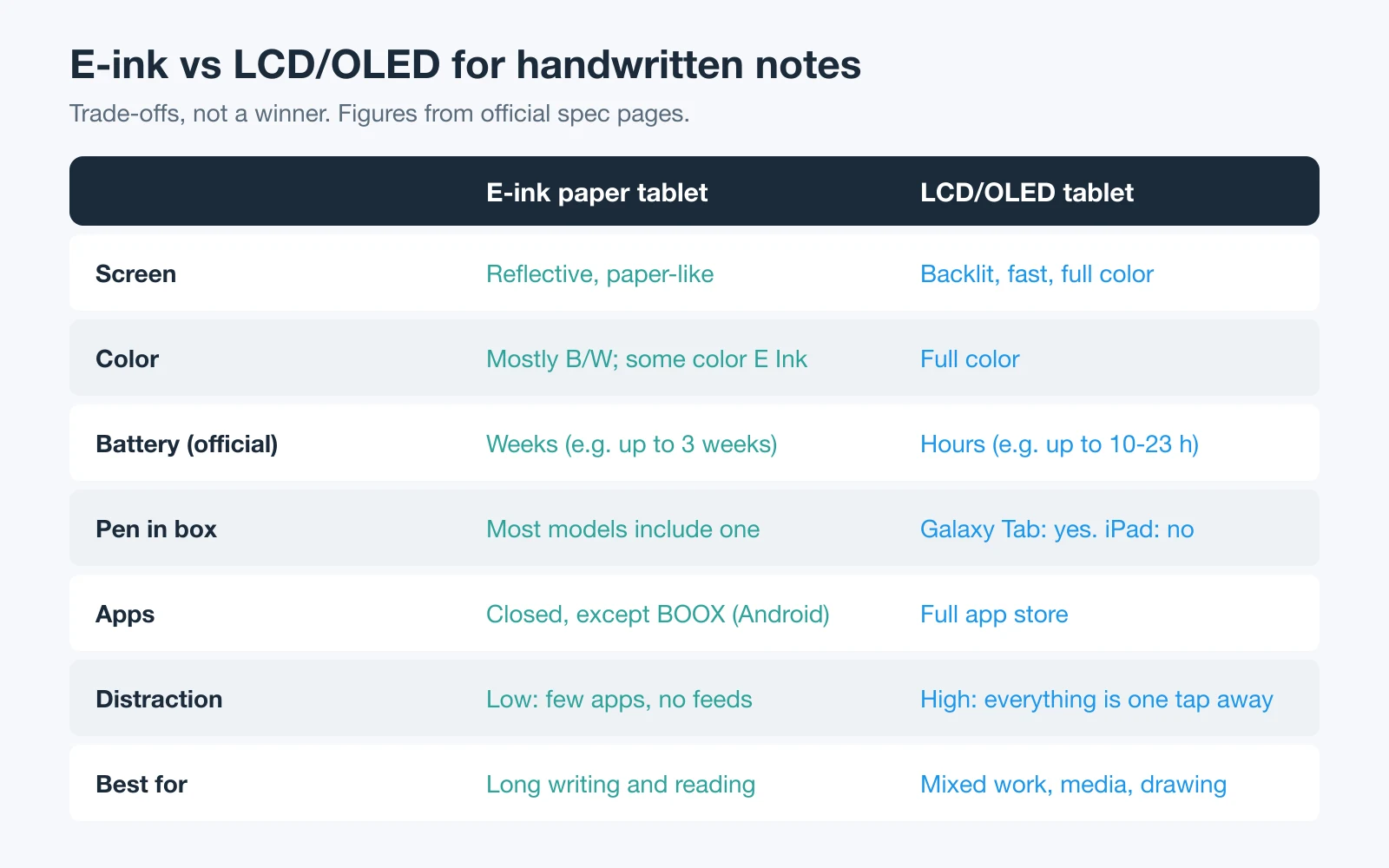
E-ink tablets, often sold as digital notebooks or digital writing pads, are pen-first devices with reflective screens and battery life measured in weeks. Most are closed systems: you write in the maker's notebook app and move files out through export or cloud sync.
| Model (year announced) | Screen | Pen | Handwriting to text | Base price | Minimum cost to write |
|---|---|---|---|---|---|
| Kobo Libra Colour (2024) | 7" Kaleido 3 color, front light | Not included; Kobo Stylus 2 $69.99 | Not stated for this model | $259.99 | $329.98 |
| Supernote Nomad (2023) | 7.8" black and white, 300 ppi, no light | Not included; from $65 | Yes, offline | $359 | $424 |
| reMarkable Paper Pure (2026) | 10.3" black and white, 226 ppi, no light | Marker included | Yes, free (needs Wi-Fi) | $399 | $399 |
| Kobo Elipsa 2E (2023) | 10.3" Carta 1200, 227 ppi, front light | Kobo Stylus 2 included | Yes, in Advanced notebooks | $399.99 | $399.99 |
| BOOX Go 10.3 (Gen II) (2026) | 10.3" black and white, 300 ppi, no light | InkSense Plus included | Yes | $419.99 | $419.99 |
| Kindle Scribe without Front Light (2025) | 11" black and white, 300 ppi, no light | Premium Pen included | Yes | $429.99 (16 GB) | $429.99 |
| reMarkable Paper Pro Move (2025) | 7.3" Canvas Color, reading light | Marker included | Yes, free (needs Wi-Fi) | $449 | $449 |
| Kindle Scribe (2025) | 11" black and white, 300 ppi, front light | Premium Pen included | Yes | $499.99 (32 GB) | $499.99 |
| Supernote Manta (2024) | 10.7" black and white, 300 ppi, no light | Not included; from $65 | Yes, offline | $505 | $570 |
| BOOX Note Air5 C (2025) | 10.3" Kaleido 3 color, front light | BOOX Pen3 included | Yes | $529.99 | $529.99 |
| BOOX Note Air6 C (2026) | 10.3" Kaleido 3 color, front light | BOOX Pen3 included | Yes | $579.99 | $579.99 |
| reMarkable Paper Pro (2024) | 11.8" Canvas Color, reading light | Marker included | Yes, free (needs Wi-Fi) | $629 | $629 |
| Kindle Scribe Colorsoft (2025) | 11" color, 300 ppi B/W / 150 ppi color, front light | Premium Pen included | Yes | $629.99 (32 GB) | $629.99 |
Prices from remarkable.com, amazon.com, shop.boox.com (US-warehouse variant), supernote.com, and kobo.com on September 30, 2026. None of these tablets showed a strikethrough sale price that day; only some accessory bundles were discounted.
Details that change the real price:
- reMarkable's webshop always includes a Marker with the tablet. Paper Pro and Paper Pro Move cost $50 more with the Marker Plus, which adds an eraser.
- Supernote does not include a pen. Its product pages label the pen "Essential For Handwriting," from $65 (Push-Up Standard) to $99.
- BOOX lists two warehouse prices. Some page text shows a lower Hong Kong-warehouse price; the prices above are the US-warehouse variants.
- Kindle Scribe AI tools (summarize, refine, Ask Notebooks) need an internet connection. Amazon's pages do not say a subscription is required, but they also do not promise the tools will stay free.
Older Models You Will Still See — and What Changed
Search results and older reviews still compare models that are no longer the current version. Check the year before you trust a spec.
- iPad Air 10.9-inch (5th generation, M1, 2022): replaced in May 2024 by 11-inch and 13-inch models. It used Apple Pencil (2nd generation); no current iPad Air does. The current model is the iPad Air (M4), from $749.
- reMarkable 2: discontinued. reMarkable now sells it only refurbished. Paper Pure, announced May 6, 2026, replaced it as the black-and-white model.
- Kindle Scribe (2024 release, 10.2-inch): still sold new by Amazon at $399.99 (16 GB). Amazon's help pages say Google Drive, OneDrive, and OneNote export and Ask Notebooks require a Kindle Scribe released in 2025 or later.
- Galaxy Tab S10+ (2024): still listed at $1,099.99, above the newer Galaxy Tab S11.
- BOOX Note Air4 C and Kobo Sage: product pages still exist, but every variant showed as unavailable or sold out on September 30, 2026.
E-ink vs LCD/OLED: The Trade-offs That Matter
Screen and eye comfort
E-ink screens are reflective and look like paper; you read them by room light or a front light. LCD and OLED screens are backlit, refresh fast, and show full color, which matters for diagrams, video, and drawing. Many people prefer E-ink for long reading and writing sessions, but we did not find a manufacturer claim about eye strain that we could verify, so treat comfort as personal. Use the return window: reMarkable offers 50 days.
Also check whether the E-ink model you are considering has a light at all. reMarkable Paper Pure, Kindle Scribe without Front Light, BOOX Go 10.3 (Gen II), Supernote Manta, and Supernote Nomad have none.
The pen: what is included and what it needs
A tablet is only half of a note-taking setup. Before you compare screens, check four pen facts:
- Is it in the box? All current Galaxy Tab S-series models, all reMarkable tablets, all Kindle Scribes, the Kobo Elipsa 2E, and the BOOX models above include one. iPads, Supernote, and the Kobo Libra Colour do not.
- Does it need charging? Amazon says the Kindle Scribe Premium Pen "never needs charging." reMarkable Markers charge wirelessly when attached. BOOX InkSense Plus charges over USB-C. Apple Pencil Pro pairs and charges when attached magnetically.
- Does it sense pressure? Apple Pencil (USB-C) does not. reMarkable lists 4,096 pressure levels for Paper Pure, and BOOX lists 4,096 levels for Pen3 and InkSense Plus.
- Is it locked to one model? The Galaxy Tab S11 S Pen works only with the S11 series, and reMarkable 2 Markers do not work with the current reMarkable tablets.
Where makers publish writing latency, it is a useful comparison point: reMarkable lists 12 ms for Paper Pro and Paper Pro Move, and 21 ms for Paper Pure. Most other makers do not publish a number, so we have not ranked "lowest latency."
Getting notes out: export formats and lock-in
This is the part most tablet reviews skip, and the one that decides whether your notes stay useful after the semester or project ends.
| Brand | Handwriting to text | Note export formats | Cloud and third-party sync |
|---|---|---|---|
| Apple (iPad) | Scribble in text fields; searchable handwriting in Apple Notes | Depends on the note app you choose | iCloud for Apple Notes; third-party apps use their own sync |
| Samsung (Galaxy Tab) | Convert to text in Samsung Notes | PDF, Word, PowerPoint, image, text, Samsung Notes file | Samsung account |
| reMarkable | Free handwriting conversion (Wi-Fi and account needed) | PDF, PNG, SVG; converted text by email | Free: Google Drive, Dropbox, OneDrive; cloud sync for files used in the last 50 days |
| Amazon (Kindle Scribe) | Convert to text; emailed as .txt plus a searchable PDF | PDF, text, searchable PDF; OneNote as text or PNG (2025 models) | Google Drive and OneDrive export (2025 models) |
| BOOX | Convert handwriting to text | TXT or .note for text notes; PNG or PDF for annotated documents | 10 GB free Onyx Cloud, BOOXDrop, Google Drive and others |
| Supernote | Offline real-time recognition, 60+ languages | PNG, PDF, TXT, DOCX | Supernote Cloud, Dropbox, Google Drive, OneDrive, or a self-hosted private cloud |
| Kobo (Elipsa 2E) | Convert to text in Advanced notebooks | Advanced: DOCX, TXT, HTML; Basic: PNG, JPEG, PDF | Kobo Cloud backup; Dropbox and Google Drive |
The practical question is simple: can you get your notes out as text, not only as pictures? A PDF of your handwriting preserves what the page looked like. A text or DOCX export is what makes the content searchable elsewhere — as our test below shows.
Subscriptions and total cost
Only one brand in this list sells a note-taking subscription:
- reMarkable Connect costs $3.99 a month or $39.90 a year, with a 50-day free trial. Without it, you still get handwriting conversion, Google Drive, Dropbox, and OneDrive, but only files used and synced in the last 50 days stay in reMarkable's cloud. Connect adds handwriting search, unlimited cloud storage, note-taking in the mobile and desktop apps, and AI features.
- Samsung says basic Galaxy AI features are free, while "enhanced" and third-party AI features may be subject to fees.
- Supernote states there is no subscription; Supernote Cloud is free with an account.
- Apple, Amazon, BOOX, and Kobo do not list a subscription for their built-in note features. Third-party apps on iPad and Android set their own prices.
Example: a reMarkable Paper Pure with three years of Connect costs $399 + $119.70 = $518.70. Enter your own period in the workbook's Cost calculator tab.
From Tablet to Knowledge Base: What We Tested
Handwritten notes usually end up in a knowledge base: next to the course syllabus, the project brief, or the meeting agenda. We tested that last step in AFFiNE, our own workspace app, because we can verify what it does.
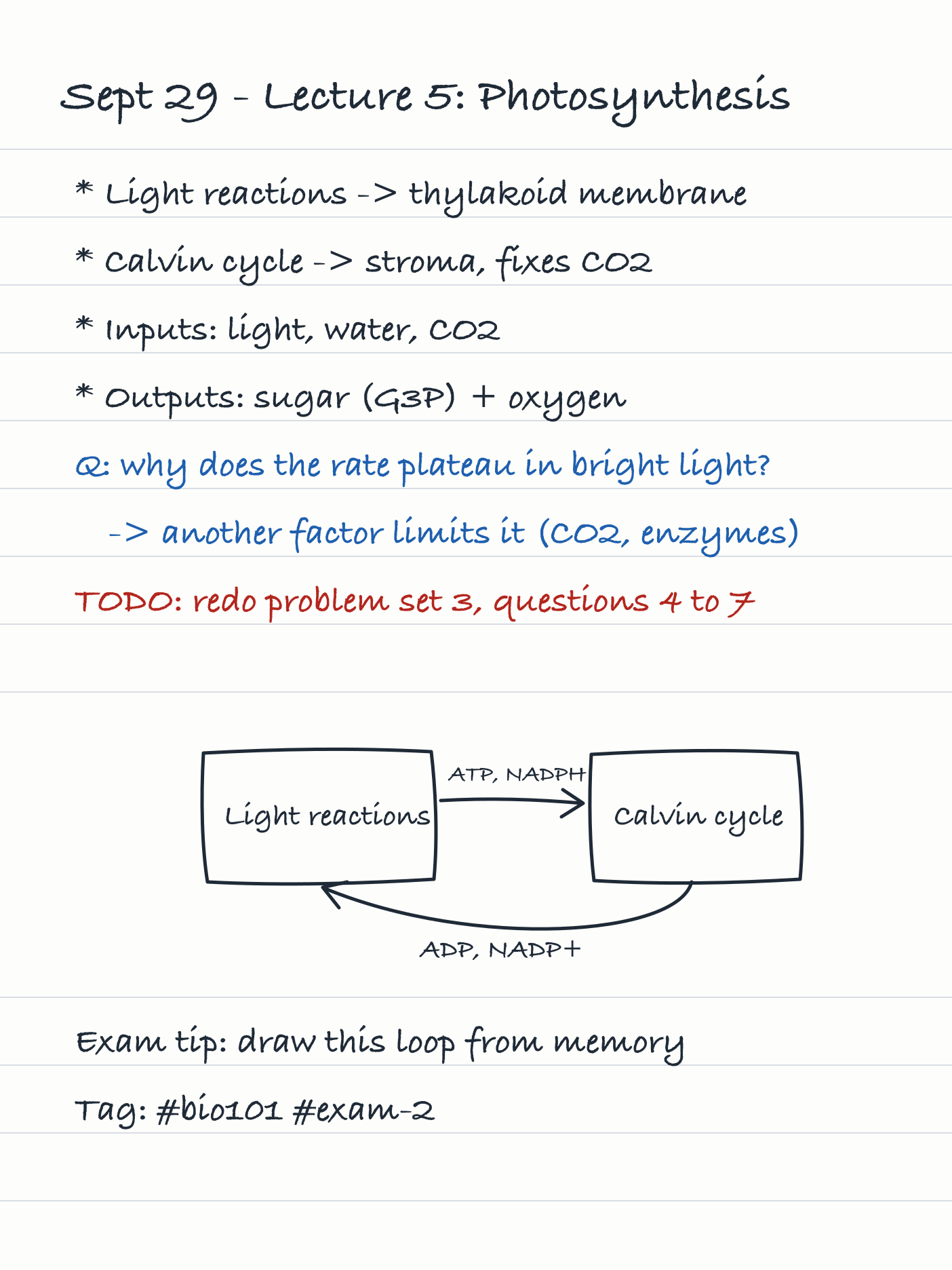
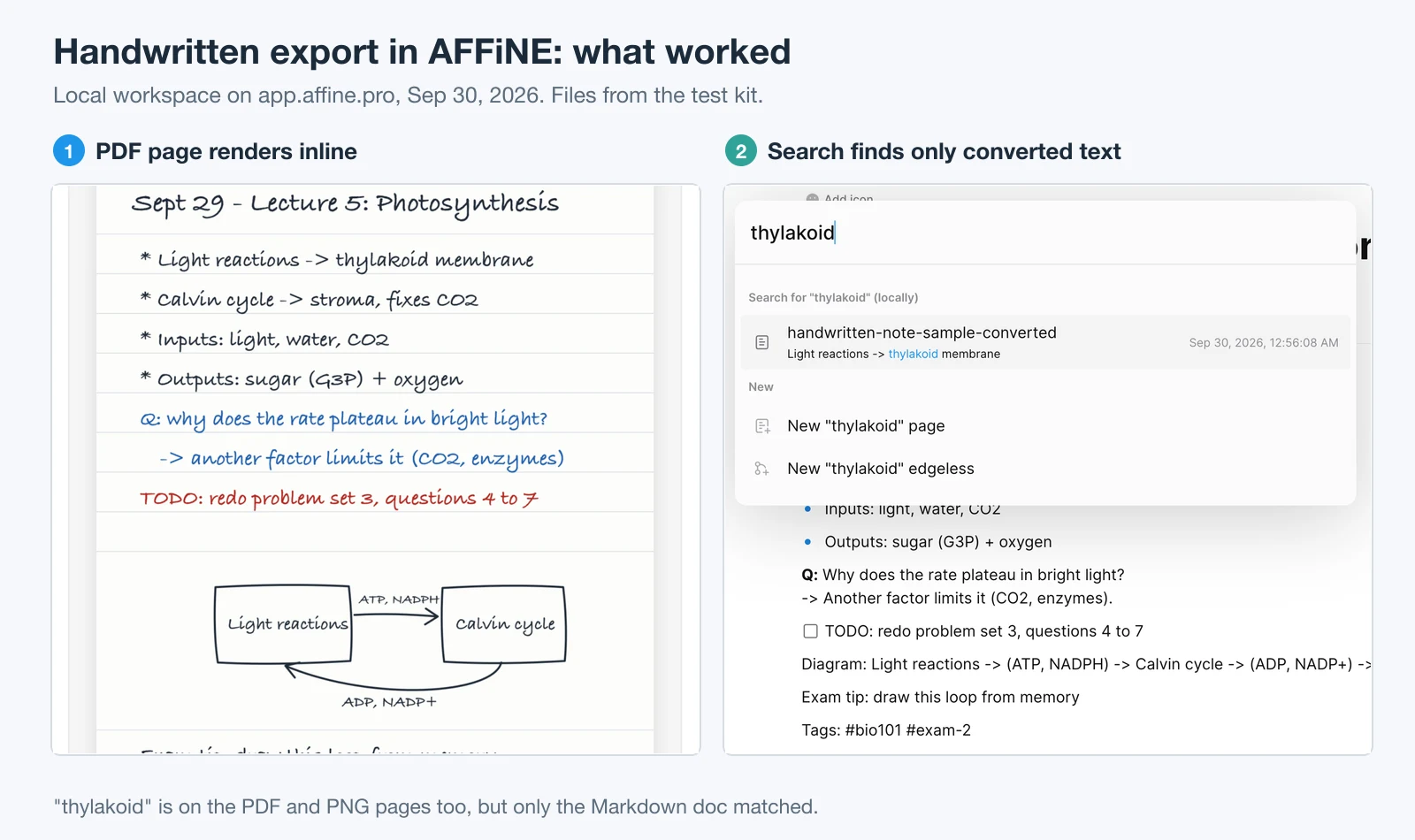
Method. We created one lecture page in a handwriting-style font and saved it four ways, matching the export types the tablets above officially list: a PNG image, an image-only PDF, the same PDF with an invisible text layer (what a "searchable PDF" export adds), and the converted text as Markdown. These files were generated for the test; they were not exported from a tablet. On September 30, 2026, we opened app.affine.pro in a fresh browser profile, used the local workspace without signing in, and added all four files. Then we searched for "thylakoid," a word that appears on every version of the page.
| File from the test kit | How it went into AFFiNE | Displayed? | Found by searching "thylakoid"? |
|---|---|---|---|
| PNG page | Image block | Yes | No |
| Image-only PDF | Attachment, switched to Embed view | Yes, the page renders inline | No |
| PDF with a text layer | Attachment | Yes | No |
| Converted text (.md) | Import → Markdown files (.md) | Yes: heading, bullets, bold, and checkbox kept | Yes |
What this means for your setup:
- In this local test, AFFiNE did not recognize text inside images or PDF attachments, even when the PDF had a text layer. Search did match the attachments' file names.
- Hashtags such as
#bio101stayed as plain text after the Markdown import; they did not become AFFiNE tags. - We did not test AFFiNE AI features, which require signing in.
- AFFiNE's Import menu also lists Docx, HTML, Notion, Obsidian, OneNote, and other formats. We tested only Markdown.
So the reliable workflow is: convert handwriting to text on the tablet, import the text, and attach the PDF next to it as the visual record. For example, a Kindle Scribe can email a converted .txt file, a Supernote exports TXT or DOCX, and Samsung Notes shares Word or text files. If your tablet cannot convert, see how AI transcription of handwritten notes works and check its accuracy before you rely on it.
Structured pages make this easier. A Cornell notes template gives each page a cue column and a summary, which survive conversion to text better than free-form sketches. For other formats, compare note-taking methods before you set up your notebooks.
How to Choose a Note-Taking Tablet in Five Steps
1. Name the main job
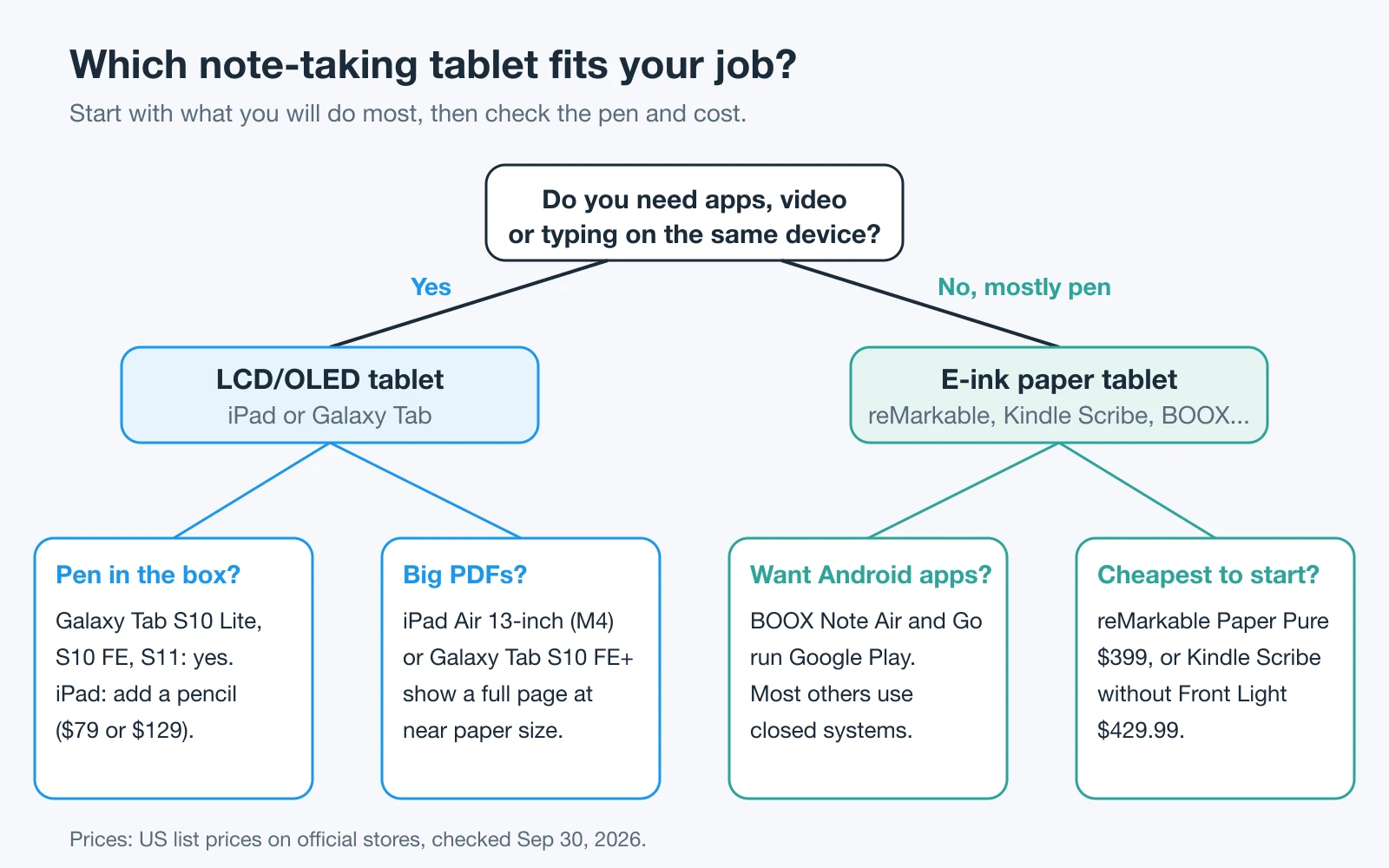
Decide whether the tablet must also handle apps, video, and typing. If yes, compare LCD and OLED tablets; if you mostly write and read, compare E-ink paper tablets.
2. Check the pen, not just the tablet
Confirm whether a pen is in the box, whether it senses pressure, and whether it needs charging. Add the cheapest compatible pen to the price when none is included.
3. Match the screen size to your pages
Use 7 to 8 inches for pocket notes, 10 to 11 inches for notebook pages, and 13 inches or more when you annotate full letter or A4 PDFs.
4. Test the export path before the return window closes
Write one real page, export it as text and as PDF, import both into the app where you keep notes, and search for a word from that page.
5. Add up the cost for the years you will own it
Total the device, the pen, a case or folio, and any subscription multiplied by the years you expect to keep the tablet. Use list prices checked on the day you buy.
Frequently Asked Questions About Note Taking Tablets
Is an iPad or a reMarkable better for taking notes?
It depends on the job. An iPad runs any note app and handles typing, video, and color, but the pencil costs extra and battery life is rated at up to 10 hours. A reMarkable is a pen-first E-ink tablet with a Marker included and battery life rated in weeks, but it runs only reMarkable's own software.
Which tablets can convert handwriting to text?
All current iPads (Scribble and Apple Notes), Galaxy Tabs (Samsung Notes), reMarkable tablets, Kindle Scribes, BOOX tablets, Supernote Manta and Nomad, and the Kobo Elipsa 2E convert handwriting to text in some form. reMarkable needs Wi-Fi for conversion, Kobo converts only in Advanced notebooks, and Supernote recognizes handwriting offline.
Do note-taking tablets need a subscription?
Most do not. reMarkable Connect ($39.90 a year) is optional but adds handwriting search, unlimited cloud sync, and AI tools. Samsung says basic Galaxy AI features are free, while enhanced features may carry fees. Supernote states there is no subscription.
What is the cheapest tablet for handwritten notes?
Among models sold new in the US on September 30, 2026, the lowest minimum costs were the Kobo Libra Colour at $329.98 with its stylus, a 7-inch color reader, and reMarkable Paper Pure at $399 with the Marker included. The cheapest LCD tablet with a pen in the box was the Galaxy Tab S10 Lite at $399.99.
Are E-ink tablets better for your eyes?
E-ink screens are reflective rather than backlit, and many people find them more comfortable for long sessions. We did not find a manufacturer health claim we could verify, so treat comfort as personal and use the return window to test it.
What replaced the reMarkable 2?
reMarkable Paper Pure, announced May 6, 2026. It has a 10.3-inch black-and-white Canvas display, comes with a Marker, and starts at $399. reMarkable 2 is now sold only refurbished.
Can I annotate PDFs on an E-ink tablet?
Yes. reMarkable, Kindle Scribe, BOOX, Supernote, and Kobo all support writing on PDFs, with limits: Kobo cannot mark up DRM-protected PDFs, and Kindle Scribe imports files from Google Drive or OneDrive as copies rather than syncing them.
Sources and Editorial Notes
Checked: September 30, 2026. Author: Allen. Method: every model, spec, and US price was read from the manufacturer's official product, spec, store, or support page, listed below. Where two official pages disagreed (for example, Samsung's pages list two different resolutions for the Galaxy Tab S10 FE), the sheet notes the conflict. Battery figures are manufacturer claims measured under different conditions and are not comparable across brands.
Limitations: no tablet in this guide was tested hands-on. The software test used generated sample files, not files exported from a tablet, in one AFFiNE local workspace without sign-in. Prices change often; Amazon's Prime Big Deal Days on October 6–7 and reMarkable's bundle promotions may change them.
What changed in this update: the previous version compared older models and prices without dates, including a 10.9-inch iPad Air with Apple Pencil (2nd generation). This version lists only models sold new on the check date, names each model with its year, and adds downloadable data and a reproducible import test.
Apple: iPad (A16) specs · iPad Air specs · iPad Pro specs · iPad mini specs · Buy iPad (US store) · Apple Pencil comparison · Apple Pencil compatibility · Identify your iPad model · iPad Air (M4) announcement · Enter text with Scribble
Samsung: Galaxy Tab S11 series · Galaxy Tab S10 FE series · Galaxy Tab S10 Lite · Tab S11 announcement · Samsung Notes: import and export PDFs · Samsung Notes features
reMarkable: Shop and comparison · Paper Pure specs · Paper Pro specs · Paper Pro Move specs · Connect pricing · Using reMarkable without a subscription · Paper Pure announcement
Amazon: Kindle Scribe (2025) · Kindle Scribe without Front Light · Kindle Scribe Colorsoft · Kindle Scribe lineup announcement · Export notebooks to Google Drive, OneDrive, and OneNote
BOOX, Supernote, Kobo: BOOX Note Air6 C · BOOX Note Air5 C · BOOX Go 10.3 (Gen II) · Supernote Manta · Supernote Nomad · Kobo eReaders (US) · Kobo Elipsa 2E help · Use your Kobo as a notebook
AFFiNE is not affiliated with any tablet maker, and this page contains no affiliate links.