Private LLM for Teams: Deploy Options, Costs & RAG
How to run a large language model where your company controls the data: four deployment patterns, a cost method without invented prices, and why RAG usually comes before fine-tuning.

A private LLM is a large language model deployment in which your organization controls where prompts, documents, and outputs go, who can access them, and whether they are retained or used for training. It can run on your own GPUs or as a managed model in your cloud account under contractual data terms.
Key takeaways
- A private LLM is a deployment where your organization controls data flow, retention, access, and training use, by contract, by infrastructure, or both.
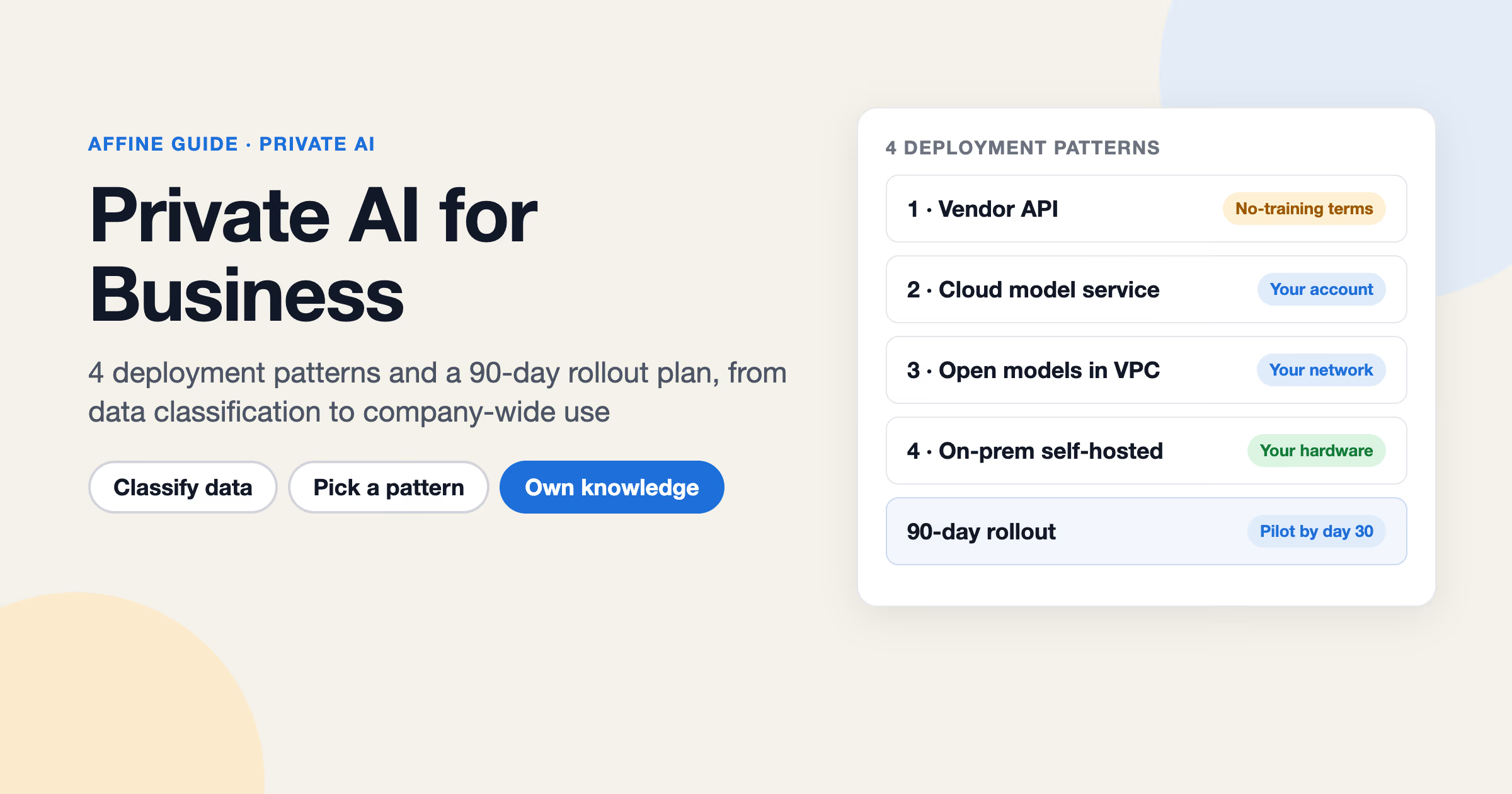
- There are four common patterns: hosted API under business terms, dedicated cloud (Azure, Amazon Bedrock, Google Cloud), self-hosted serving (vLLM, TGI), and single-machine runners (Ollama, LM Studio, llama.cpp).
- Hugging Face's memory estimator says inference can need up to about 20% more memory than the model weights alone.
- As of October 2026, Hugging Face lists Text Generation Inference (TGI) as in maintenance mode and points new deployments to engines such as vLLM and SGLang.
- Start with RAG over a well-structured, permissioned knowledge base; fine-tune later for style, format, or narrow tasks.
Either way, the model does not "know your company" on its own. Your knowledge base does, and the decisions that matter most are the deployment pattern and whether you use retrieval-augmented generation (RAG) or fine-tuning.
A quick note on naming: Private LLM is also the name of an iPhone, iPad, and Mac app that runs models on-device. This guide is about private LLMs for teams and companies.
| Question | Short answer |
|---|---|
| What makes an LLM "private"? | You control data flow, retention, access, and training use, by contract, by infrastructure, or both. |
| Do I need my own GPUs? | No. Dedicated cloud services can meet many requirements. Self-hosting is for stricter isolation or specific model control. |
| Should I fine-tune on company data? | Usually not first. Start with RAG over a well-structured knowledge base. |
| What is the hard part? | Keeping the knowledge current, well organized, and correctly permissioned. |
What is a private LLM? Private vs local vs fine-tuned vs open-weight
These terms get mixed up in vendor pages and security reviews. They describe different things and can be combined.
| Term | What it means | What it does not mean |
|---|---|---|
| Private LLM | A deployment where your organization controls data flow, retention, and access | That the model was trained on your data |
| Local LLM | A model running on a machine you physically control (laptop, workstation, on-prem server) | That it is suitable for a whole team |
| Self-hosted LLM | A model served on infrastructure you operate, on-prem or in your own cloud account | That you trained the model |
| Fine-tuned LLM | A base model whose weights were further trained on your examples | That it stays up to date with your documents |
| Open-weight model | A model whose weights you can download and run, under the publisher's license | That it is unrestricted "open source" software; licenses vary |
A private LLM for a team is usually an open-weight or managed model, served privately, connected to company knowledge through retrieval. For the broader policy picture, see our guide to private AI.
Private LLM vs public LLM: what changes?
A public LLM service, such as a consumer chatbot, runs under the vendor's default terms for that product. A private LLM puts the controls that matter in a security review under your decision: data path, retention, training use, identity, and logging.
| Aspect | Public LLM service (consumer default) | Private LLM deployment |
|---|---|---|
| Data terms | Vendor's product terms; check training and retention settings | Business contract, your cloud account, or your own infrastructure |
| Network path | Public internet to the vendor | Private connectivity or your own network, depending on pattern |
| Identity | Individual accounts | Your SSO and access policies |
| Model choice | What the vendor offers | Vendor models or open-weight models you choose |
| Operations | None for you | From light (managed) to heavy (self-hosted) |
Private LLM deployment: the four patterns
There are four common ways to deploy a private LLM. They trade control against operational effort.
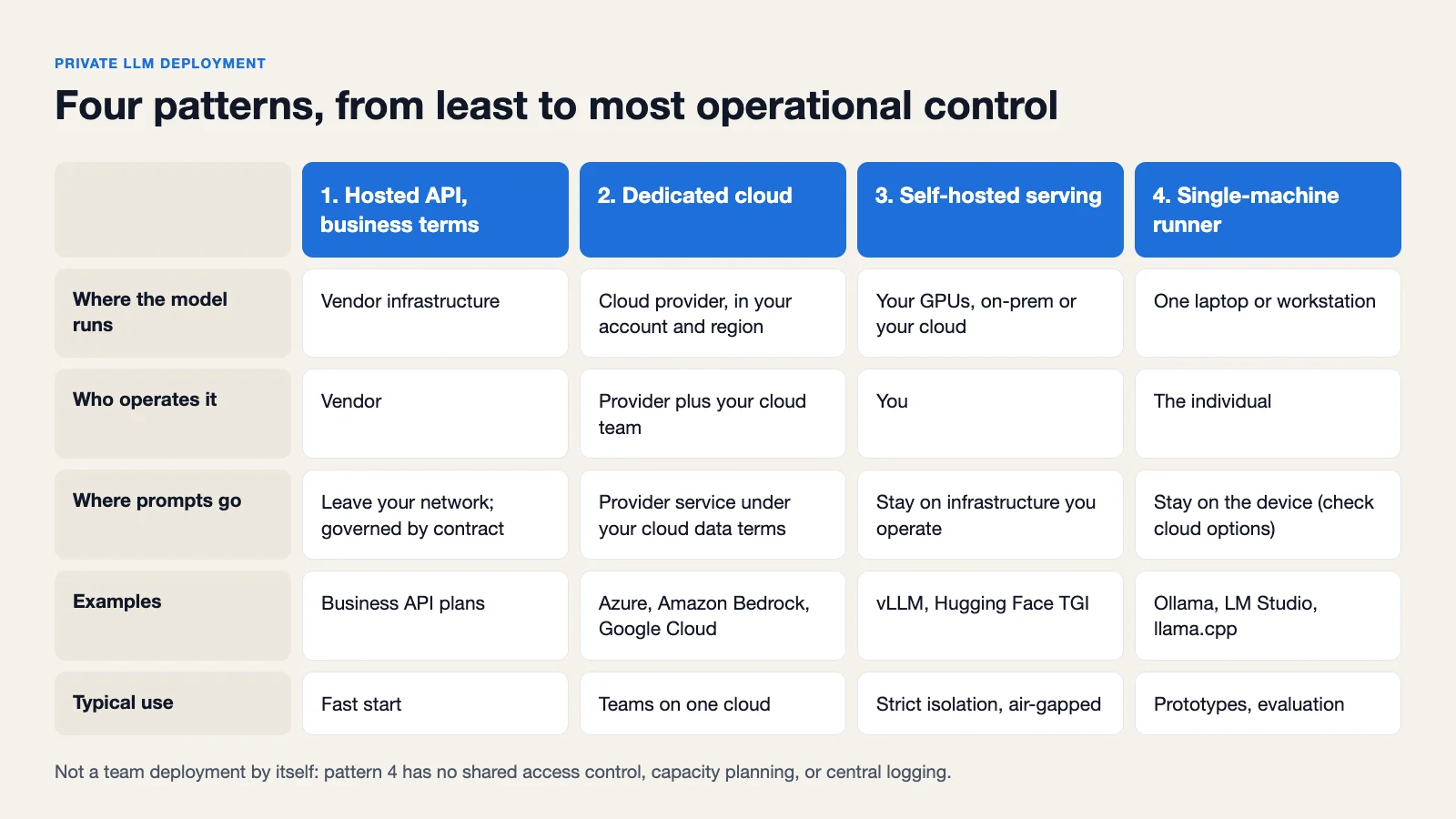 The four patterns side by side: where the model runs, who operates it, and where prompts go.
| Pattern | Where the model runs | Who operates it | Best for |
|---|---|---|---|
| 1. Hosted API under business terms | Vendor's infrastructure | Vendor | Fast start where contractual data terms are enough |
| 2. Dedicated cloud (Azure, AWS, Google Cloud) | Cloud provider, inside your account and region | Cloud provider plus your cloud team | Teams already standardized on one cloud |
| 3. Self-hosted serving (vLLM, TGI) | Your GPUs, on-prem or in your cloud | You | Strict isolation, model choice, air-gapped networks |
| 4. Single-machine runners (Ollama, LM Studio, llama.cpp) | One laptop or workstation | The individual | Prototypes, evaluation, personal use |
1. Hosted API with business data terms
The simplest option is a commercial API under enterprise or API terms. For example, OpenAI's enterprise privacy page states that it does not train its models on business data from its API Platform and business ChatGPT plans by default. This is "private by contract": your data still leaves your network, so you rely on the vendor's terms, retention settings, and controls. Read the current terms for the specific product and plan you buy, because they differ.
2. Dedicated cloud: Azure, Amazon Bedrock, Google Cloud
The major clouds offer managed models inside your cloud account, with the provider's data terms and your existing network and identity controls.
- Microsoft Azure. Microsoft's data, privacy, and security page for models sold by Azure states that prompts, completions, embeddings, and training data are not available to other customers or to OpenAI, and are not used to train generative AI foundation models without your permission or instruction.
- Amazon Bedrock. AWS's Bedrock data protection documentation describes model deployment accounts operated by the Bedrock service team, and states that model providers do not have access to Bedrock logs or to customer prompts and completions. It also documents VPC and AWS PrivateLink options.
- Google Cloud. Google's zero data retention page states that Google won't use your data to train or fine-tune AI/ML models without prior permission or instruction, and lists the specific steps needed to reach zero data retention, such as handling abuse-monitoring logging and caching.
The pattern to notice: "not used for training" is often the default, while "not retained at all" usually needs extra configuration or approval. Ask for both in your review.
3. Self-hosted serving with vLLM or Hugging Face TGI
If prompts must never leave infrastructure you operate, you serve an open-weight model yourself.
- vLLM is an open-source library for LLM inference and serving. It ships an OpenAI-compatible HTTP server with Completions and Chat Completions APIs, which makes it easy to point existing tools at your own endpoint.
- Hugging Face Text Generation Inference (TGI) is a toolkit for deploying and serving LLMs. As of October 2026, its documentation says TGI is in maintenance mode, and Hugging Face recommends engines such as vLLM and SGLang going forward. Factor that into a new deployment.
Self-hosting gives you the most control and the most work: GPU capacity, driver and runtime upgrades, model updates, scaling, and monitoring are your responsibility. For a wider view of self-hosted AI stacks, see self-hosted AI.
4. Single-machine runners: Ollama, LM Studio, llama.cpp
Ollama, LM Studio, and llama.cpp make it easy to run open models on a single laptop or workstation. They are good for evaluating models, building prototypes, and personal use where data must stay on one device. Be aware that some of these projects also offer cloud options, so check what a given setup actually does with prompts.
They are not a team deployment by themselves. A runner on one engineer's laptop has no shared access control, no capacity planning, and no central logging. When a prototype works, move it to pattern 2 or 3.
How to choose an open-weight model
If you self-host, you pick the model. Check these four things before benchmarks.
License terms. Open-weight licenses differ a lot. Some families publish under permissive licenses; others use custom terms with use restrictions or conditions. Read the license for the exact model version you plan to run:
- Llama: the Llama 3.1 Community License is a custom license; for example, it requires a separate license from Meta if your products had more than 700 million monthly active users on the release date. Each Llama version has its own license file.
- Mistral: the Mistral models overview lists the license per model; several are Apache 2.0, others are not
- Qwen: the Qwen3 repository states its open-weight models are licensed under Apache 2.0
- Gemma: the Gemma Terms of Use
Have legal review the license in the same way you would review any third-party software dependency.
Parameter size vs hardware. Larger models need more GPU memory and cost more per request. A smaller model with good retrieval often answers internal questions well, because the facts come from your documents rather than the model's memory.
Context length. RAG puts retrieved passages into the prompt. The model's supported context window, and the memory cost of using it, limits how much context you can send per question.
Language support. If your documents are in more than one language, test retrieval and answers in each one. Do not assume parity.
Avoid choosing from leaderboard rankings alone. Build a small evaluation set from your real questions and documents, and compare candidates on it.
Private LLM cost: how to estimate hardware and spend
There is no honest single price for a private LLM. What you can do is estimate it with a repeatable method.
Step 1: Estimate GPU memory for the weights. Memory for weights is roughly parameter count times bytes per parameter (about 2 bytes per parameter at 16-bit precision, less with quantization). Hugging Face's model memory estimator calculates this for models on the Hub and notes that inference can need up to about 20% more, citing EleutherAI. Use the tool rather than a mental shortcut.
Step 2: Add memory for context and concurrency. Each concurrent request holds its own key-value cache, which grows with context length. Long RAG prompts and many simultaneous users both raise memory needs beyond the weights.
Step 3: Estimate demand and utilization. Count expected users, requests per user per day, and average prompt and output length. Peak load matters more than averages. A GPU sized for peak sits idle much of the day; that idle time is part of your cost per request.
Step 4: Add operations time. Include engineer time for setup, upgrades, monitoring, on-call, model evaluation, and security patching. For small teams this is often larger than hardware cost.
Step 5: Compare against managed options. Price the same workload on a dedicated cloud service using the provider's current pricing page. If both meet your data requirements, the comparison is usually about utilization and staff time.
RAG vs fine-tuning: which should you use?
Retrieval-augmented generation finds relevant passages from your documents at question time and sends them to the model with the question. Fine-tuning changes the model's weights using your training examples.
| Factor | RAG | Fine-tuning |
|---|---|---|
| Freshness | Updates when documents change | Frozen until you retrain |
| Citations | Can point to the source passage | Cannot reliably cite sources |
| Access control | Can filter by user permissions at retrieval time | Knowledge in weights is visible to every user of the model |
| Upfront cost | Indexing and retrieval setup | Data preparation, training runs, evaluation |
| Data needed | Your existing documents | Curated, labeled examples |
| Maintenance | Keep documents organized and current | Retrain and re-evaluate for each change |
| Good at | Answering from company facts | Style, format, narrow task behavior |
The default recommendation: start with RAG over a well-structured knowledge base. It keeps answers current, lets you show sources, and respects permissions. Fine-tuning makes sense when you need consistent output formats, domain-specific behavior, or a smaller model doing one narrow task well. Our guide to custom LLM training covers when that investment is justified.
The quality of RAG depends on the quality of the documents. Duplicate, stale, and contradictory pages produce duplicate, stale, and contradictory answers. That is why the knowledge layer deserves as much design attention as the model.
How to build a private LLM that knows your team's knowledge
A practical build has three layers:
- A model endpoint from one of the four patterns above.
- A knowledge layer where documents are written, structured, and permissioned.
- An access layer that handles identity, routing, logging, and retrieval filtering.
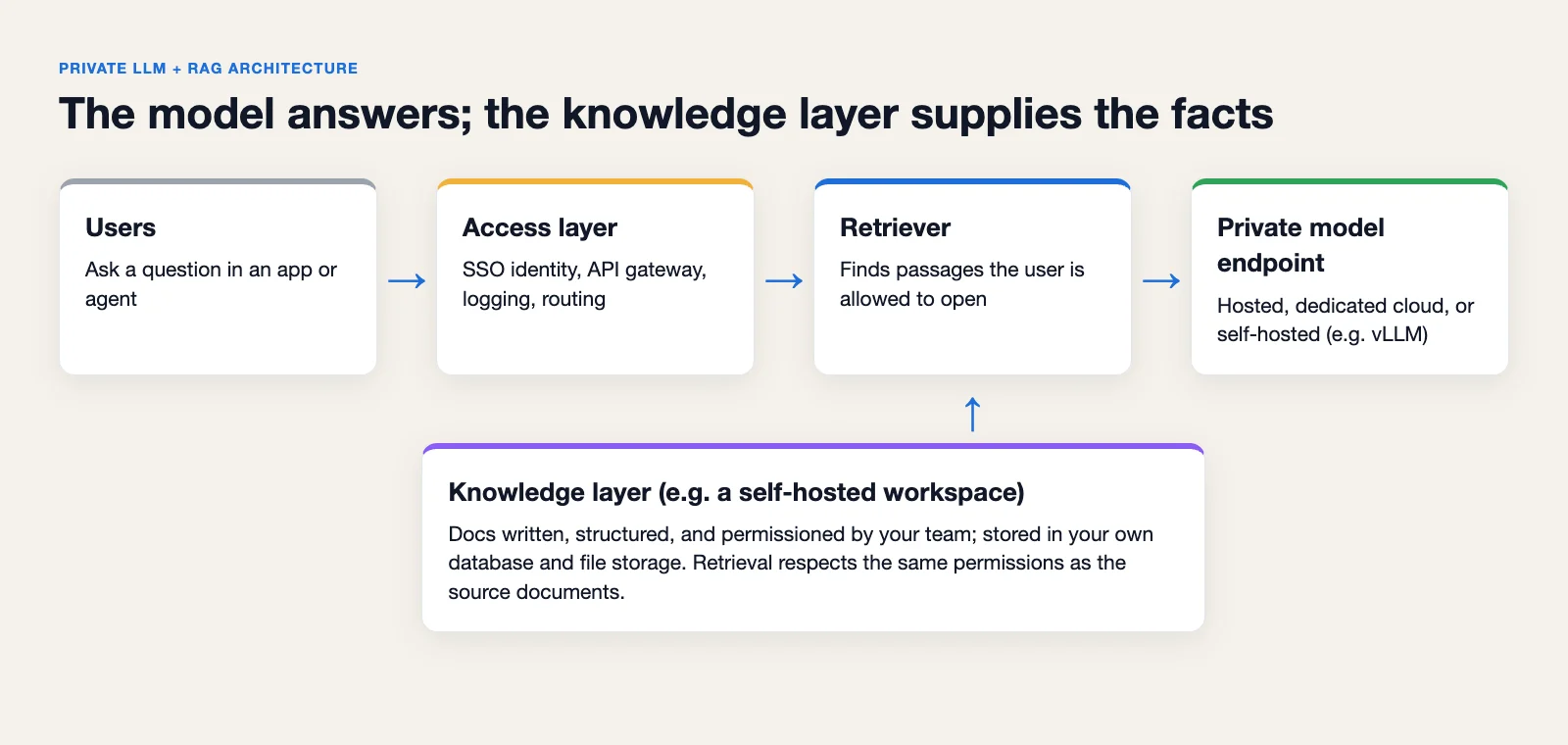 A private LLM with RAG: the retriever only passes the model passages the user is allowed to open.
The idea of an LLM wiki, a knowledge base written and maintained so both people and models can use it, describes the second layer well.
Where AFFiNE fits
AFFiNE is an open-source, local-first workspace that combines docs, whiteboards, and databases. Here is how it can serve as the knowledge layer for a private LLM, and where its limits are.
Your docs stay in your infrastructure. A self-hosted AFFiNE workspace runs with Docker Compose, and data stays in your own PostgreSQL, Redis, and file storage (local disk, S3-compatible storage, or Cloudflare R2). Self-hosting is free up to 10 seats per workspace; larger teams need a paid Team License. Sign-in supports OIDC SSO plus Google and GitHub OAuth, with MFA enforced at your identity provider, and workspaces have roles and per-document access levels.
AI is optional and uses your provider. AFFiNE's AI features can be disabled server-wide or per workspace. When enabled on a self-hosted server, workspace owners add their own provider keys (BYOK) for OpenAI, Anthropic, Gemini, or FAL under Workspace Settings → Integrations → AI BYOK, as described in the AFFiNE AI administration guide.
A custom OpenAI-compatible endpoint is possible, with conditions. A server admin can explicitly allow OpenAI-compatible custom endpoints with copilot.byok.allowCustomEndpoint, and separately allow endpoints on private-network addresses with allowPrivateEndpoint. The docs recommend keeping allowPrivateEndpoint off unless every workspace administrator is trusted to send provider requests to services on your private network. To be plain about the limits: AFFiNE does not run models itself. Whether a given model and serving stack works with each AFFiNE AI feature must be tested; compatibility is not guaranteed.
Agents can work with workspace content. The AFFiNE MCP server lets AI clients search and read workspace content with a revocable, workspace-scoped credential (read-only by default), so an agent connected to your private model can use the same docs your team maintains.
When AFFiNE is not the right fit
AFFiNE is not a model server, a vector database, or a full RAG pipeline. If you need guaranteed AI features on a specific self-hosted model without testing, or your security review requires controls beyond OIDC SSO, workspace roles, and per-document access, evaluate whether AFFiNE meets those requirements before committing. If your knowledge already lives in another system that your team is happy with, the knowledge layer may already be solved.
Private LLM security checklist
Use this checklist in your security review, whatever deployment pattern you pick.
- Network isolation. Keep the model endpoint on a private network or behind private connectivity. Do not expose self-hosted inference servers to the internet.
- Key and credential management. Store provider keys and endpoint tokens in a secrets manager. Rotate them, and scope each key to one application or workspace.
- Logging at your gateway. Put an API gateway or proxy in front of the model. Log who called which model and when, and decide deliberately whether prompts and outputs are logged, for how long, and who can read those logs.
- Prompt injection from documents. Retrieved documents can contain instructions that try to change the model's behavior. Treat document content as untrusted input, limit what tools an agent can call, and require confirmation for writes.
- Access scoping. Retrieval must respect the same permissions as the source documents. A user should never get an answer built from a document they cannot open.
- Vendor terms review. For hosted and cloud patterns, record retention, training use, and abuse-monitoring settings for the exact service and region.
- Model and license inventory. Track which model versions run where, under which license.
FAQ
What is a private LLM?
A private LLM is a language model deployment where your organization controls data flow, retention, access, and training use. It can be self-hosted on your own GPUs or run as a managed model under data terms in your cloud account. It is not necessarily trained on your data.
How do I build a private LLM?
Pick a deployment pattern (hosted API, dedicated cloud, self-hosted serving, or a single-machine runner for prototypes), choose a model, then connect it to your documents with RAG through an access layer that enforces identity and permissions. Most of the long-term work is keeping the knowledge base accurate and well organized.
Is a private LLM better than ChatGPT Enterprise?
It depends on your requirements. Business plans from major vendors offer contractual data commitments, as described on OpenAI's enterprise privacy page. A self-hosted LLM gives you infrastructure-level control and model choice but requires you to run it. If contractual terms satisfy your review, a managed service is usually less work.
How much does a private LLM cost?
Estimate it from GPU memory for the model, extra memory for context and concurrent users, expected demand and utilization, and engineering time for operations. Compare that against a managed cloud service priced from the provider's current pricing page. No single number applies across workloads.
Can a private LLM run offline?
Yes, a self-hosted model on your own hardware can run without internet access once the weights are downloaded. Single-machine runners make this easy for individuals. For more on offline setups and their trade-offs, see offline AI.
Should I use RAG or fine-tuning?
Start with RAG. It keeps answers current, can cite sources, and respects document permissions. Consider fine-tuning later for output style, format, or narrow tasks where RAG alone falls short.
Evaluating AFFiNE for a team?
Self-host free up to 10 seats; Team $10/seat/month billed annually; offline Installable License via sales.