How to Build a Second Brain: Methods, a 30-Day Plan, and AI
What changed (Nov 15, 2026): Rewrote the guide: definition-first answer, history of the idea, what the research does and does not support, six methods compared, a 30-day plan, a worked example, failure modes, AI use, app choice, nine FAQs, sources, original diagrams, and dated AFFiNE product screenshots. Removed the unsupported "7-second brain trick" section and statistics we could not trace to a primary source.
A second brain is an external system of notes, files, and links that you trust enough to stop holding everything in your head. You save what might be useful, organize it around your projects, condense it so it is quick to reread, and use it to produce real work. The idea is old. The name was popularized by Tiago Forte's Building a Second Brain (2022), which teaches four steps: Capture, Organize, Distill, Express (CODE).
Short on time? Start in 15 minutes. Pick one app or notebook. Create one inbox and four places for finished notes: Projects, Areas, Resources, Archive. This week, save ten things that relate to a current project, and next week use at least two of them in something you make. That is a working second brain. Everything else in this guide helps it last.
Key takeaways
- A second brain exists to help you finish work, not to store everything you read. If notes never reach an output, the system is an archive.
- The research supports narrow claims: working memory is small, writing things down reduces mental load, and planning an unfinished task helps you stop thinking about it. It does not show that a second brain makes you smarter.
- Methods solve different problems. PARA sorts by actionability, Zettelkasten builds connected ideas, Johnny.Decimal gives files a fixed address, and Maps of Content give a growing collection an entry point.
- Most systems fail from collecting too much, building too much structure up front, or switching tools. A weekly review and one real output per week prevent most of this.
- AI can summarize, find, and connect notes, but it works best on a system you already maintain, and every AI claim still needs checking against the source.
What is a second brain?
A second brain is a personal knowledge system with a job: keep the information you may need again, in a form you can find and use when a project calls for it. It usually lives in a notes app, but it can be a folder of text files or a paper notebook. What makes it a second brain is not the tool. It is the habit of moving information from "saved" to "used."
Three jobs define a working second brain:
- Remember for you. It holds ideas, references, and decisions so you do not have to keep them in your head.
- Connect for you. It puts related notes near each other, so an idea saved in March shows up when you need it in October.
- Help you create. It feeds drafts, plans, and decisions with material you already gathered, so you rarely start from a blank page.
A second brain is not a replacement for thinking, and it is not a goal in itself. Forte describes it as a tool for creative output, and that framing is the most useful test of any setup: what did my notes help me make this month?
Second brain vs. personal knowledge management vs. a notes app
The three terms overlap, so it helps to separate them.
| Term | What it means | Example |
|---|---|---|
| Personal knowledge management (PKM) | The broad practice of capturing, understanding, and reusing information for your own work. | Keeping source-backed notes for a thesis. |
| Second brain | A specific kind of PKM system aimed at output, most often built with Forte's CODE steps and PARA folders. | Turning reading notes into a client proposal. |
| Notes app | The software that holds the system. | Notion, Obsidian, AFFiNE, Apple Notes, or plain Markdown files. |
You can practice PKM without using the term "second brain," and you can own a notes app without having either. Our guide to building a PKM system in 14 days covers the wider practice; this guide focuses on building a second brain that lasts.
Where the second brain idea came from
People have been building external memories for a long time. Knowing the history helps you see which parts of the idea are fundamental and which are fashion.
- Commonplace books (Renaissance onward). Scholars and writers copied quotations, facts, and ideas into notebooks organized by topic. Erasmus recommended the practice, and in 1685 John Locke wrote a method for indexing a commonplace book, published in English in 1706. The core habit, saving what strikes you and organizing it so you can reuse it, is the same one a second brain uses today.
- The memex (1945). In "As We May Think," published in The Atlantic, Vannevar Bush imagined a desk-sized machine that stored a person's books and records and let them link any item to any other, building named "trails" of associations. The essay anticipated hypertext and the idea that knowledge is easier to find by association than through a strict hierarchy.
- Luhmann's slip box (1950s to 1990s). The sociologist Niklas Luhmann built a Zettelkasten of about 90,000 index cards, each holding one idea and pointing to related cards. He described the box as a conversation partner and published more than 70 books and nearly 400 articles. Bielefeld University has digitized the collection in the Niklas Luhmann-Archiv.
- Digital notes and wikis (1990s to 2010s). Personal wikis, Evernote, and later networked-note apps such as Roam Research and Obsidian made linking cheap and search instant.
- Building a Second Brain (2010s to 2022). Forte taught the method as an online course before publishing the book in 2022. He packaged the ideas into CODE and PARA and gave the practice its popular name.
- AI-maintained knowledge (2024 onward). Large language models can now summarize, search, and even maintain notes. Andrej Karpathy's LLM wiki pattern, in which an AI agent keeps a linked wiki up to date from your sources, is the latest version of the memex idea.
The constant across 500 years: save selectively, organize for reuse, and link related ideas. Tools change; these habits do not.
What the research says (and what it doesn't)
Second brain content often promises big gains in productivity or creativity. The evidence supports smaller, more specific claims. Here is what holds up.
Working memory is small. Most adults can hold only about three to five meaningful chunks of information in mind at once, according to a widely cited review by Nelson Cowan (2001). Anything beyond that has to be rehearsed, remembered later, or written down. This is the strongest argument for capturing ideas outside your head.
Offloading helps, with a trade-off. People routinely move memory work into the world, from writing a shopping list to saving a reminder. A review of this "cognitive offloading" research by Risko and Gilbert (2016) found that it often improves performance on the task at hand. It also means you may remember less of what you offloaded. A second brain trades memorization for retrieval, so it only pays off if you can find things again.
Making a plan quiets unfinished tasks. In experiments by Masicampo and Baumeister (2011), an unfinished goal kept intruding on people's thinking during an unrelated task. Writing a specific plan for the goal reduced that interference, even though the goal was still unfinished. This supports a core second brain habit: capture an open loop together with its next step.
The "Google effect" is less certain than it sounds. A much-cited 2011 study by Sparrow, Liu, and Wegner reported that people who expect information to stay available remember the information less and where to find it more. It was one of 21 studies retested in a large 2018 replication project, which did not reproduce its main effect. Treat it as an interesting idea, not settled science.
"The extended mind" is philosophy, not data. Philosophers Andy Clark and David Chalmers (1998) argued that a notebook a person relies on, consults, and trusts can count as part of their thinking. The argument is a useful way to see a second brain, but it is a philosophical claim rather than an experimental result.
What no study shows. We found no controlled study showing that building a second brain makes people more productive, more creative, or smarter. Claims of "25% more productive" or "40% less stress" that circulate online usually have no traceable source. The honest pitch is narrower: a trusted external system can reduce what you have to keep in mind and make past work easier to reuse, if you maintain it.
Second brain methods compared
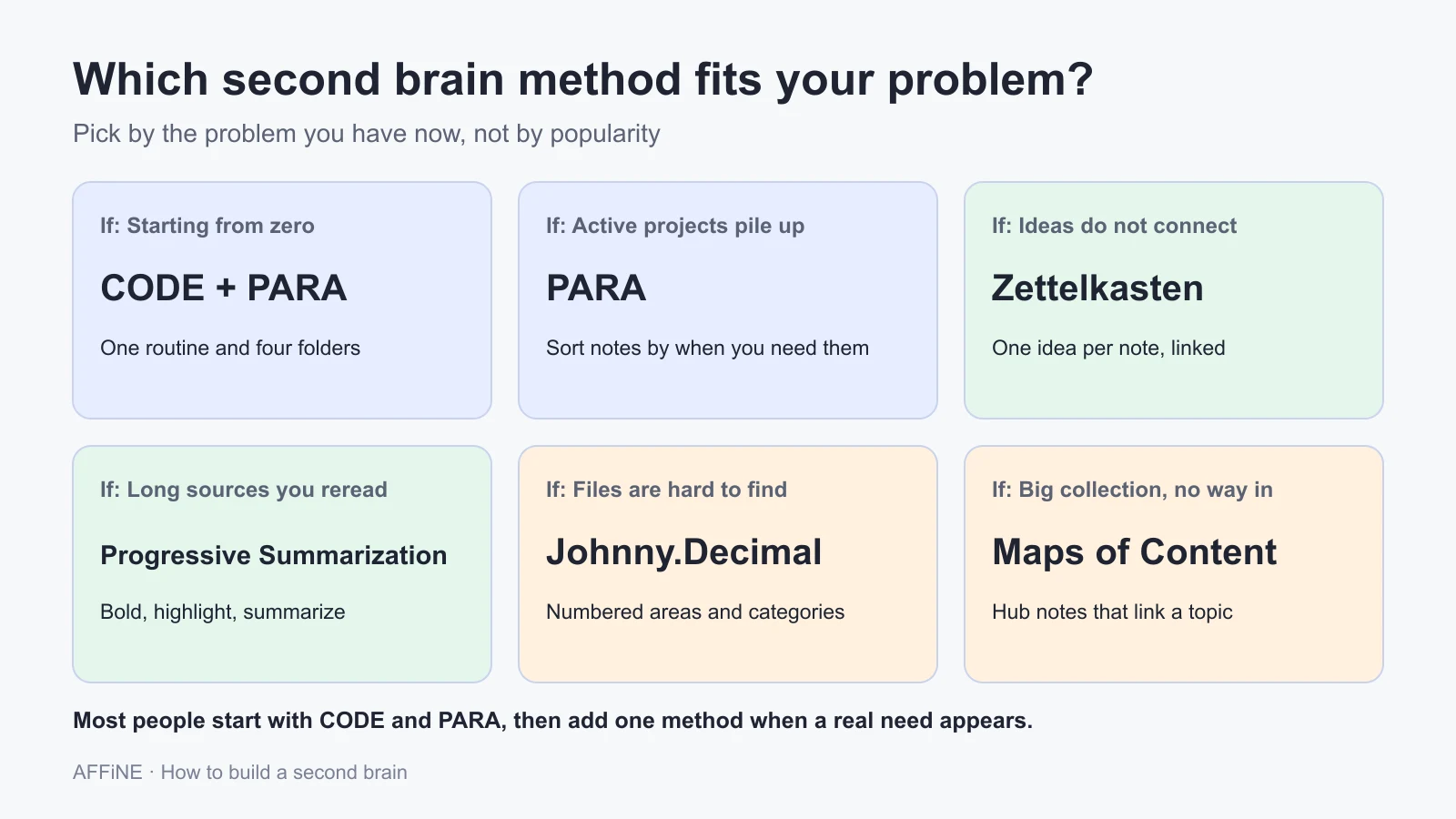
You do not need every method. Each one solves a different problem, and most working systems combine two.
| Method | What it organizes | Best for | Watch out for |
|---|---|---|---|
| CODE (Forte) | The workflow: Capture, Organize, Distill, Express | Anyone who wants a simple end-to-end routine | Stopping after Capture and Organize |
| PARA (Forte) | Notes by actionability: Projects, Areas, Resources, Archive | Busy professionals with many active projects | Weak at developing long-term ideas |
| Progressive Summarization (Forte) | Each note in layers of bold, highlight, and summary | Long sources you will reread | Summarizing notes you never need |
| Zettelkasten (Luhmann) | Ideas as atomic, linked notes in your own words | Writers, researchers, and students building arguments | Slow to start; needs regular writing |
| Johnny.Decimal | Files and folders by numbered areas and categories | Admin, documents, and shared drives | Not designed for idea development |
| Maps of Content (Milo, LYT) | Hub notes that link to related notes | Large, link-heavy collections | Hubs that go stale if not updated |
CODE: the workflow
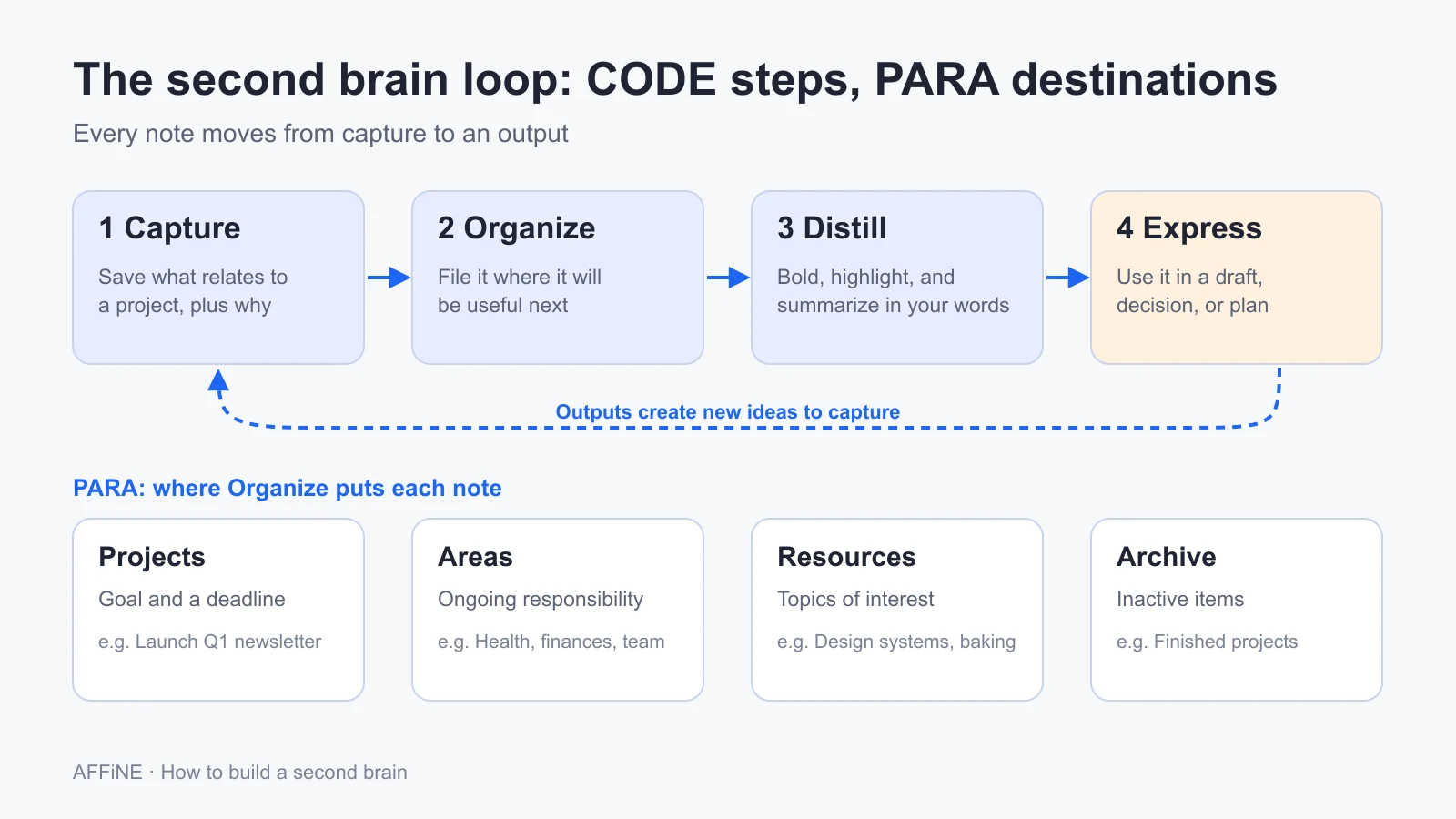
CODE describes what happens to information, not where it lives. Capture saves what resonates. Organize puts it where it will be useful. Distill reduces it to the essential points. Express uses it in your work. In Forte's overview, the last step is the point of the system: knowledge becomes valuable when it is shared or used. If you remember only one thing from CODE, remember that the loop ends in an output.
PARA: organize by actionability
PARA sorts every note and file into four groups:
- Projects: short-term efforts with a goal and an end, such as "Launch Q1 newsletter."
- Areas: ongoing responsibilities with a standard to maintain, such as health, finances, or a team you manage.
- Resources: topics you are interested in, such as design systems or sourdough baking.
- Archive: anything inactive from the other three.
The key question when you file a note is "In which project will this be most useful?" rather than "What is this about?" That keeps active work in front of you. PARA works the same way across apps, so you can use the same four folders in your notes app, cloud drive, and downloads folder.
Progressive Summarization: make notes quick to reread
Progressive Summarization condenses a note in layers, and only when you are already revisiting it. Layer 1 is the passage you saved. Layer 2 bolds the best parts. Layer 3 highlights the best of the bold. Layer 4 adds a short summary in your own words at the top. A few notes reach Layer 5, where you remix them into something new. Because earlier layers stay in place, you can skim the summary today and still check the full context later.
Zettelkasten: build a network of ideas
A Zettelkasten ("slip box") stores one idea per note, written in your own words and linked to related notes. The value comes from links, not folders: as connections build up, the collection starts to suggest arguments you had not planned. The Zettelkasten Method overview stresses that search alone is not enough; deliberate links are what make old notes resurface. Our Zettelkasten method guide walks through the steps with a worked example.
Johnny.Decimal: give everything an address
Johnny.Decimal organizes files into at most ten areas, each with at most ten categories, and gives every item a numbered ID such as 15.52 Trip to NYC. The "no more than ten" rule keeps the structure shallow enough to remember. It is excellent for documents, admin, and shared drives, and it pairs well with a second brain whose notes live elsewhere.
Maps of Content: entry points for big collections
Nick Milo's Linking Your Thinking approach uses Maps of Content (MOCs): hub notes that gather links to related notes on one topic, with a few lines on how they fit together. When a collection grows past a few hundred notes, a MOC gives you a front door that folders and search alone do not.
How to combine methods
A practical combination for most people:
- Use CODE as the weekly routine.
- Use PARA for top-level folders, so active projects stay visible.
- Add Zettelkasten-style links inside Resources for ideas you want to develop over years.
- Add a Map of Content once any topic has more than 20 or 30 linked notes.
- Use Johnny.Decimal for documents outside the notes app if your files are a mess.
How to build a second brain in 30 days
This plan keeps setup small and puts real use first. The day ranges are suggestions, not research-based targets; stretch them if your schedule needs it.
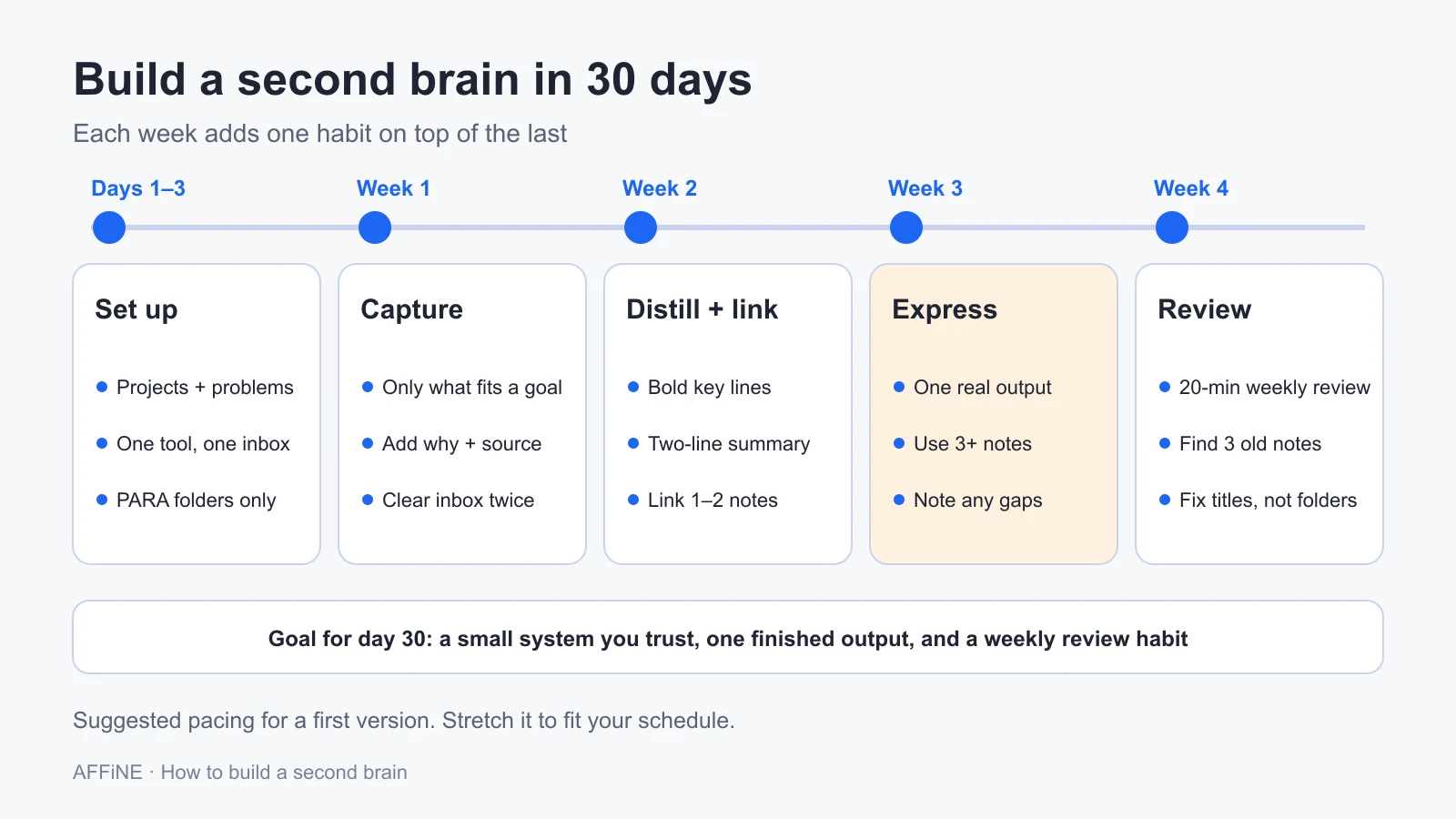
Step 1 (Day 1): Write down what the system is for
List your current projects and three to five questions you keep coming back to, such as "How do I make our onboarding faster?" or "What makes a good research question?" Forte calls these favorite problems, an idea he credits to physicist Richard Feynman. They act as a filter: you capture what relates to them and skip the rest.
Step 2 (Day 1): Choose one tool and one inbox
Pick the tool you already open every day, unless it fails a basic need such as search or mobile capture. Create a single inbox where everything new lands first. Two rules prevent most early failures: one main tool for notes, and no migration of your old archive yet. Bring in old material only when a current project needs it.
Step 3 (Days 2–3): Set up PARA, and nothing more
Create four top-level folders or tags: Projects, Areas, Resources, Archive. Add a folder for each active project. Resist building a deep hierarchy, a tag taxonomy, or templates for every note type. You will learn what structure you need from real use.
Step 4 (Week 1): Capture with a filter
Save things that relate to a project or a favorite problem. Forte suggests keeping items that are inspiring, useful, personal, or surprising. When you capture, add one line on why you saved it and record the source. A note that says "Useful for the onboarding project: 3 of 5 new hires missed the setup doc" is far more valuable later than an untitled link.
Good capture sources: highlights from articles and books, meeting notes, your own ideas, screenshots of good examples, and lessons from finished work. Clear the inbox every few days by moving each item to a PARA folder or deleting it.
Step 5 (Week 2): Distill and link
When you open a note for a project, bold the key lines and write a two-sentence summary at the top in your own words. Link it to one or two related notes, and say why they are related. Do this only for notes you are already using; there is no need to process the backlog.
Step 6 (Week 3): Make one thing
Create one real output from your notes: a draft, a plan, a slide outline, a decision memo, or a study guide. Pull in at least three notes. This step tests whether the system works. If you cannot find what you need, note what got in the way; that tells you what to fix.
Step 7 (Week 4): Review and test retrieval
Set a 20-minute weekly review: clear the inbox, update project folders, move finished projects to Archive, and choose next week's output. Then test retrieval. Search for three notes you saved weeks ago using the words you remember, without browsing folders. If you find them, the system works. If not, improve titles and summaries, not structure.
What changes after 30 days
By the end of the month you should have a small system you trust, one finished output, and a weekly review habit. From here, add complexity only when a real problem appears: a Map of Content when a topic gets crowded, a template when you notice you write the same kind of note every week, or AI help when finding things by search gets slow.
A worked example: from saved article to finished draft
Here is how one idea moves through the system. The scenario is fictional and simplified to show the steps.
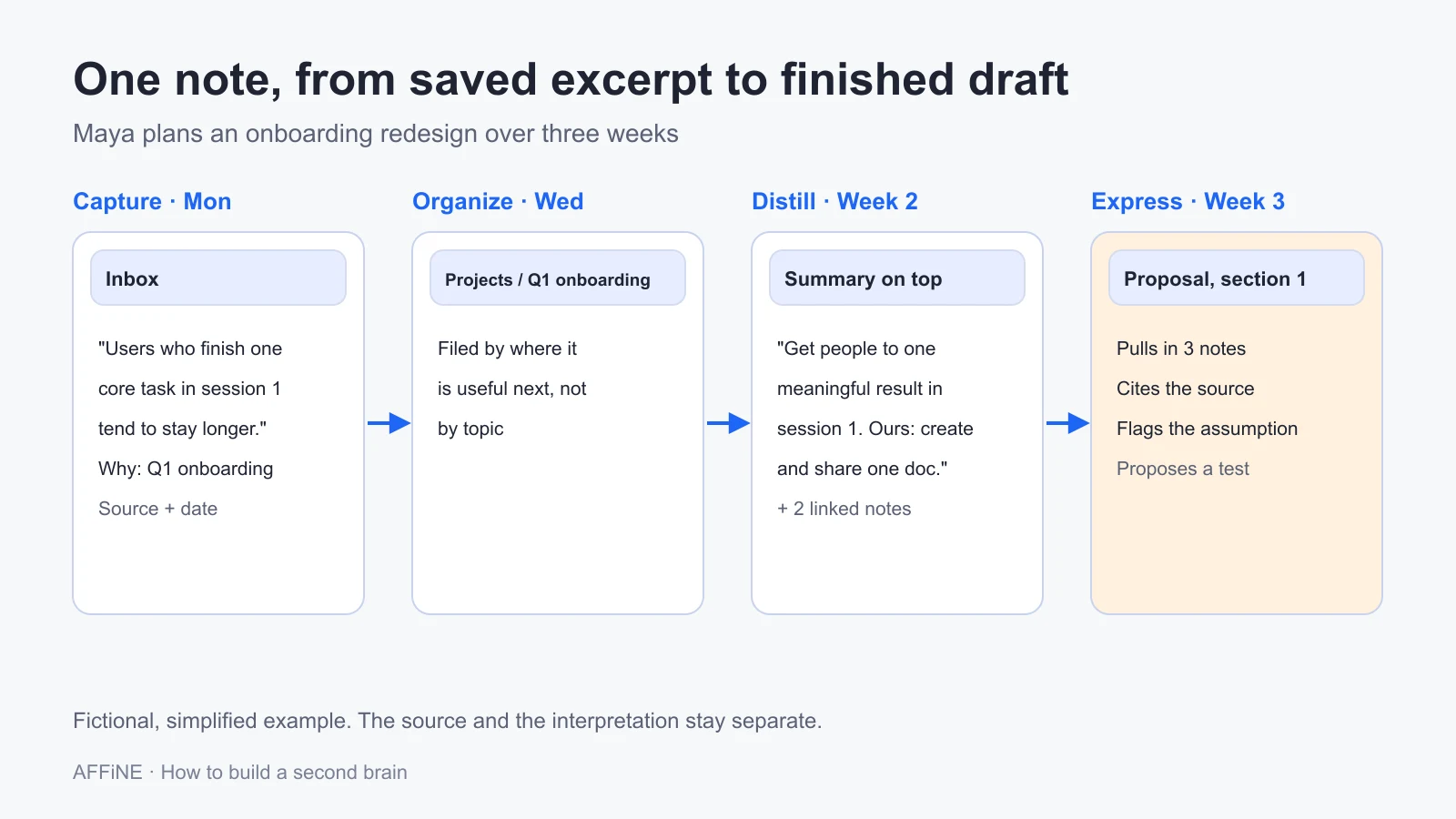
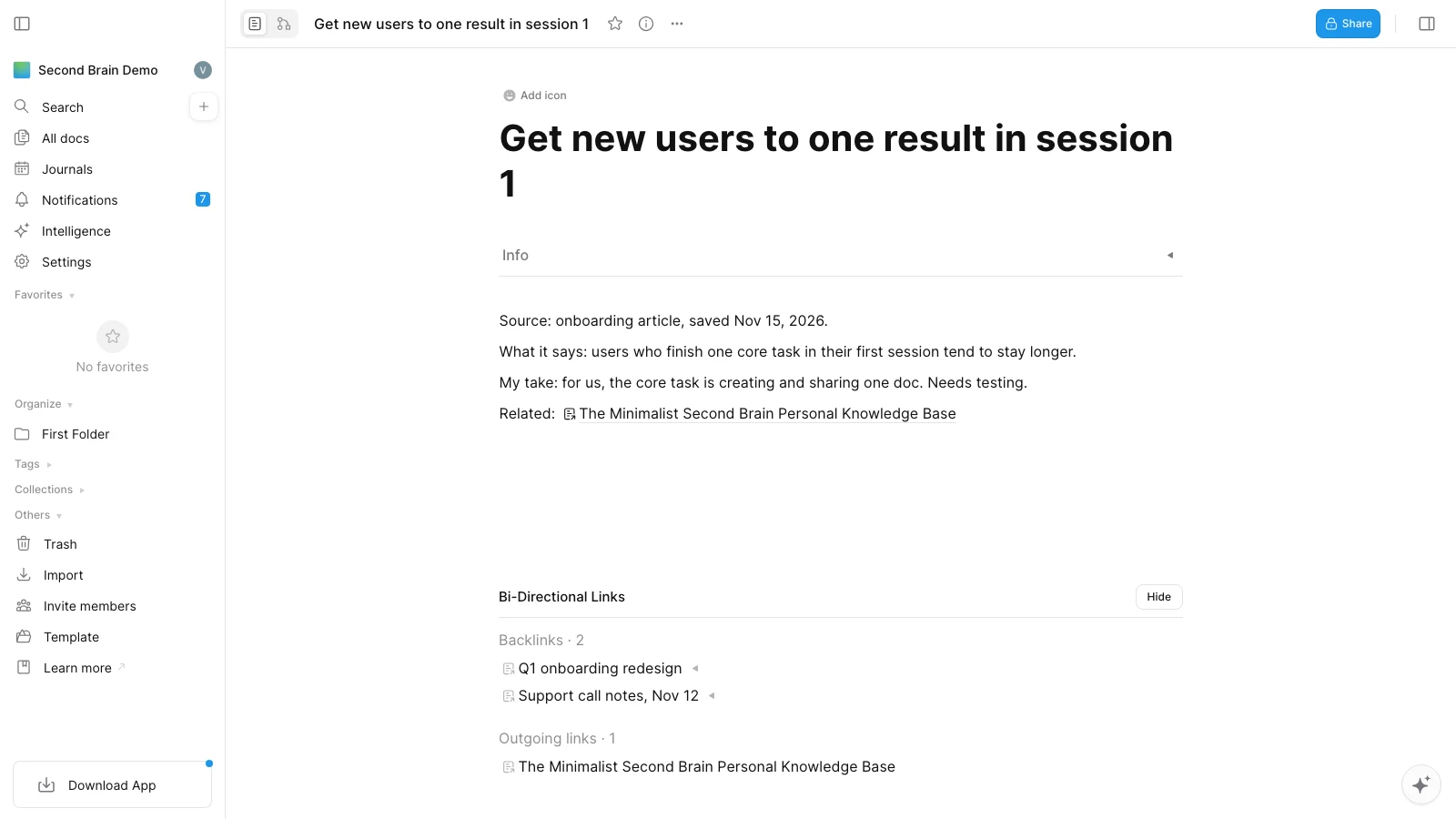
Capture (Monday). Maya, a product manager, reads an article about onboarding and saves one paragraph about how new users who complete a single core task in their first session tend to stay longer. She adds: "Relevant to the Q1 onboarding project. Check whether this holds for our users." She includes the source link and date.
Organize (Wednesday). During her inbox review, she moves the note into Projects / Q1 onboarding redesign. The note is about user behavior in general, but the question that matters is where it will be useful next, and that is this project.
Distill (the following week). When she starts planning, she rereads the note, bolds one sentence, and writes a summary on top: "Get people to one meaningful result in the first session. Our version: create and share one doc." She links it to her notes from a support call and to an older idea in Resources about "time to first value."
Express (week three). She writes the first section of her proposal by pulling those three notes into the draft. Because each note has its source and her own interpretation clearly separated, she can cite the article, flag her assumption, and propose a test.
The system saved her from rereading the article, re-finding the support quote, and remembering an idea from six months earlier. That is the practical payoff of a second brain.
A note template you can copy
Title: [the idea or question, not just the source name]
Source: [author, link, or meeting, plus date]
What it says: [short quote or faithful summary]
My take: [your interpretation, marked as yours]
Use it for: [project or favorite problem]
Related: [1–3 links, with one line on why]
Why most second brains fail, and how to fix yours
Abandoned systems tend to fail in a few predictable ways. Each one has a simple fix.
| Problem | What it looks like | Fix |
|---|---|---|
| Collecting instead of using | Thousands of saved links, few notes you have reread | Capture only what relates to a project or favorite problem; make one output a week |
| Building structure before content | Hours spent on tags, dashboards, and templates | Start with PARA only; add structure when a real need appears |
| Tool hopping | A new app every few months, notes scattered across all of them | Commit to one tool for 90 days; test export before moving |
| No review habit | An inbox with hundreds of items; stale project folders | A 20-minute weekly review on a fixed day |
| Notes you cannot understand later | Untitled links and highlights without context | One line on why you saved it, plus the source |
| Retrieval fails | You know you saved it, but cannot find it | Better titles and short summaries; test search monthly |
| Outsourcing thinking to AI | AI summaries pile up that you never read or checked | Use AI on notes you already work with; check claims against sources |
The first problem has a name. Christian Tietze of zettelkasten.de calls it the Collector's Fallacy: the feeling that saving something means you know it. Saving is easy, so the rewards come quickly; understanding takes work. The fix is to make saving a little more demanding: write one sentence about why the item matters, or do not save it.
Fair criticisms of the Building a Second Brain method
The method is popular, and it has real limits:
- PARA is built for projects, not ideas. Sorting by actionability keeps work moving but does little for ideas you want to develop over years. That is where Zettelkasten-style linking helps.
- The system can become the hobby. Setup videos and templates make it easy to spend more time on structure than on work. If your setup takes more than an hour a week, simplify.
- Capturing feels like progress. Without the Express step, a second brain is a well-organized pile. Judge it by output.
- Not everyone needs one. If your work is mostly execution and your notes rarely matter after a week, a task list and a calendar may be enough.
AI and the second brain in 2026
AI changes the most tedious parts of a second brain: summarizing, finding, and connecting notes. It does not change the need to decide what matters.
Where AI helps
- Summaries and first drafts. Condensing a long source or turning notes into a rough outline.
- Search by meaning. Finding a note by describing it, not by remembering its exact words.
- Suggested connections. Surfacing related notes you forgot you had.
- Answers across notes. Asking a question and getting an answer drawn from your own material, with links back to it.
- Maintenance. In Karpathy's LLM wiki pattern, an agent reads new sources and updates a linked set of summary pages, while the original sources stay untouched. Our LLM wiki guide explains when that approach works and when it breaks down.
AI agents can now read a workspace directly through the Model Context Protocol (MCP). For example, AFFiNE's MCP server lets an assistant search and read docs in one workspace through a revocable credential that is read-only by default.
Where AI hurts
- Confident errors. Summaries can drop qualifiers or invent details. Check any claim you plan to use against the original.
- Less learning. If AI does all the distilling, you skip the step where understanding forms. Write the summary for notes that matter most, and use AI for the rest.
- Privacy. Sending notes to an AI model usually means sending them to a provider. Know which provider processes your content, and keep sensitive material out unless your settings and your organization's policy allow it.
Simple rules for an AI-assisted second brain
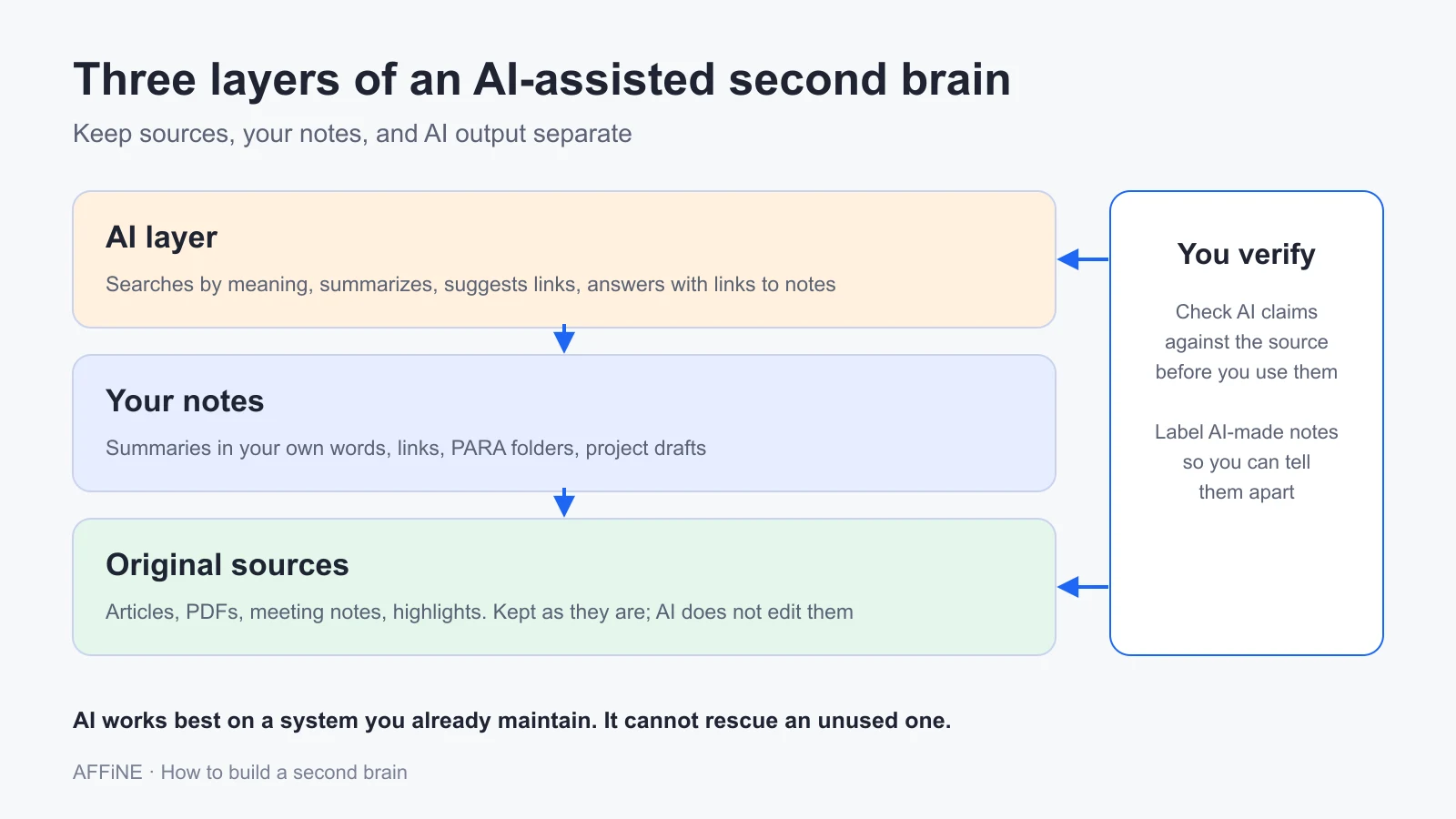
- Keep original sources separate and do not let AI edit them.
- Label AI-generated notes so you can tell them apart from your own.
- Ask for answers with links to the notes they came from.
- Use AI on a system you already maintain. It finds things in a tidy collection; it cannot rescue an unused one.
For a full setup, see our step-by-step guide to building an AI second brain, or see how AFFiNE AI works as a second brain. In AFFiNE, AI features run through AFFiNE Cloud, or with your own API keys (BYOK) on a self-hosted server, as described in the self-hosting AI docs. In both cases, the content you send to AI is processed by a model provider.
How to choose a second brain app
The best app is the one you will open every day and can leave if you need to. Start from how you work, not from a feature list.
| If you mostly... | Look for | Common choices |
|---|---|---|
| Manage projects and structured information | Databases, templates, sharing | Notion, AFFiNE |
| Develop ideas through links | Backlinks, fast linking, local files | Obsidian, Logseq, AFFiNE |
| Think visually | A canvas next to your notes | AFFiNE, Obsidian Canvas, Miro alongside a notes app |
| Capture quickly on the go | Fast mobile capture, sync | Apple Notes, Google Keep, then process elsewhere |
| Want full control of your files | Plain text, local storage | Obsidian, Markdown folders, paper |
Before you commit, run a five-minute portability check. Create one note with a heading, an image, a link to another note, and a table. Export it and open the result in another app. Check what survived. A tool you cannot leave is a risk for a system you plan to use for years.
For detailed comparisons, see our roundup of the best second brain apps, a wider comparison of PKM software, and our Obsidian vs. Notion comparison.
Building a second brain in AFFiNE
AFFiNE is our product, so read this section with that in mind. It combines docs, an Edgeless whiteboard, and databases in one workspace, which suits people who want written notes and visual maps side by side. Here is how the 30-day plan maps onto it, using documented features:
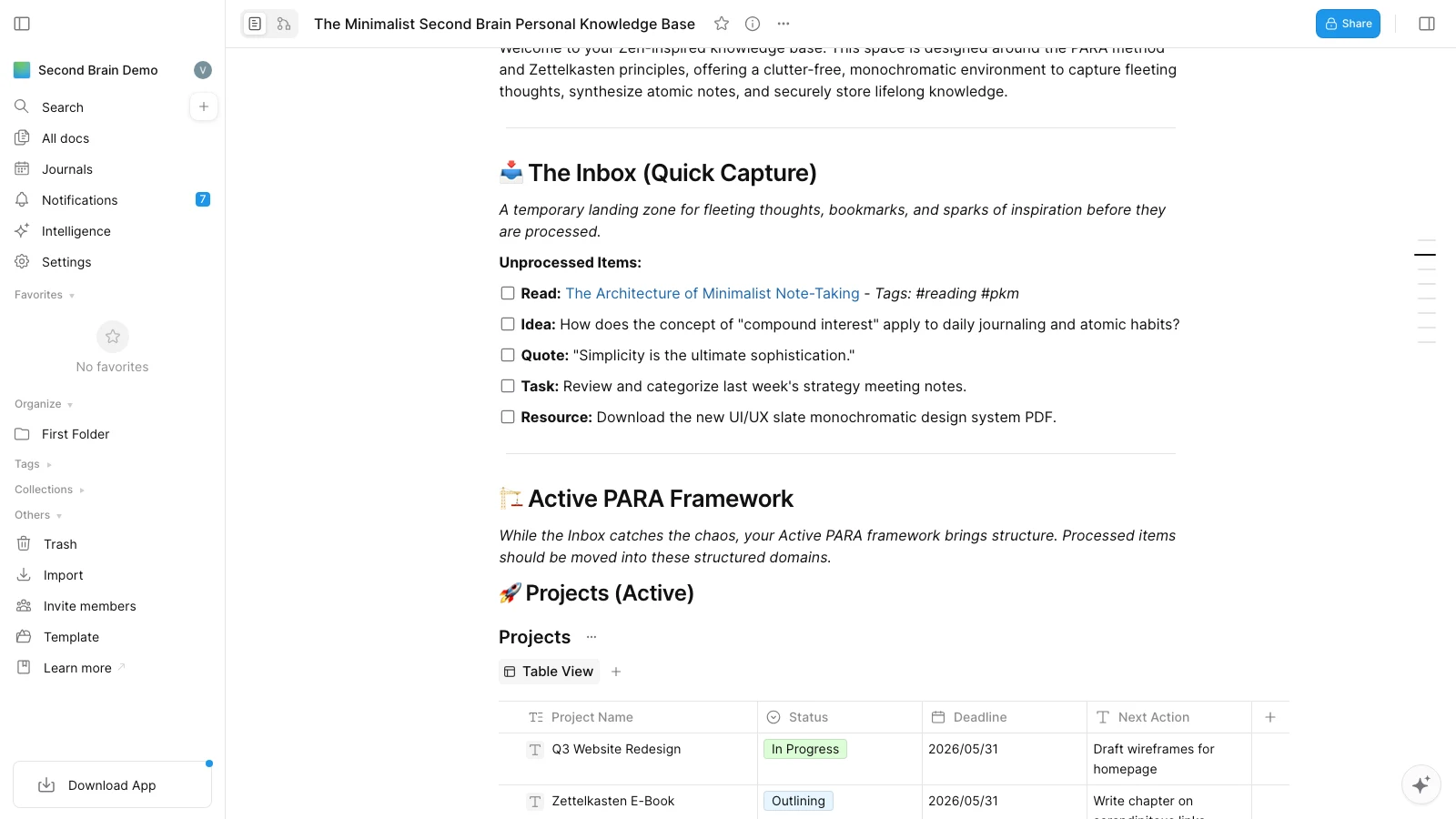
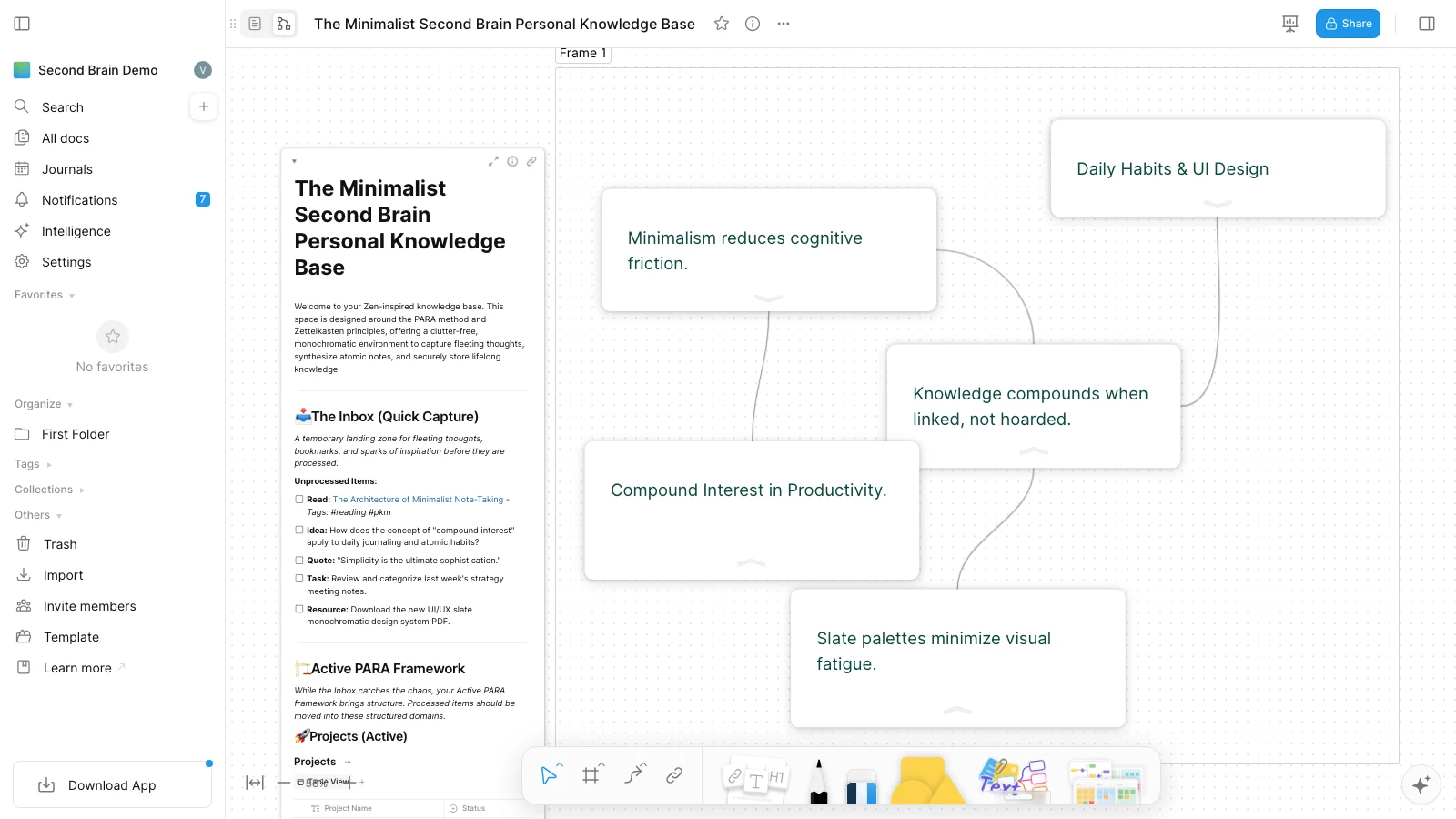
- Inbox and PARA. Start from the Minimalist Second Brain template, or create an Inbox doc plus Projects, Areas, Resources, and Archive. Tags and Collections, which work like smart folders with rules, can stand in for PARA folders.
- Links and backlinks. Link one doc from another, and the target's Backlinks property lists every page that mentions it.
- Zettelkasten notes. The Digital Zettelkasten template gives you atomic notes and links to start from.
- Visual thinking. Every doc has a Page mode and an Edgeless mode, so you can lay out notes on a canvas to see how they connect, then return to a linear draft.
- AI. AFFiNE AI can summarize and draft from your notes, and the MCP server lets outside AI assistants search and read the workspace.
Where AFFiNE may not fit: if you need your notes as plain Markdown files on disk at all times, a file-based tool such as Obsidian is a closer match. Test your own export and sync workflow before moving a large archive.
Second brains for different kinds of work
The method stays the same, but the emphasis shifts:
- Students should organize by course and assignment, and spend most effort on distilling lecture and reading notes into their own words. See our second brain guide for students.
- Writers and researchers benefit most from Zettelkasten-style links and Maps of Content, because their output depends on connecting ideas across sources.
- Managers and consultants benefit most from PARA and meeting notes, because their output depends on finding decisions and context quickly.
- Teams need shared rules, owners, and permissions; that is closer to a team knowledge base than a personal second brain. Our guide to organizing a personal knowledge base covers retrieval in more depth.
Frequently asked questions about building a second brain
What is a second brain?
A second brain is an external system of notes, files, and links that stores information you may need again, so you can find and use it when a project calls for it. The term was popularized by Tiago Forte, whose method follows four steps: Capture, Organize, Distill, and Express.
Do I need to read Building a Second Brain to build one?
No. The core ideas fit in a few pages: capture what relates to your projects, sort notes by when you will need them, condense notes as you use them, and turn them into outputs. The book adds examples and detail, and Forte's free articles on CODE and PARA cover the basics.
What is the difference between PARA and Zettelkasten?
PARA sorts notes into Projects, Areas, Resources, and Archive based on when you will use them, which keeps active work in view. Zettelkasten stores one idea per note in your own words and links related notes, which helps ideas develop over years. Many people use PARA for top-level structure and Zettelkasten-style links inside it.
What is the best app for a second brain?
The best app is one you will use daily and can export from. Notion suits structured projects and databases, Obsidian suits local Markdown files and dense linking, and AFFiNE combines docs, a whiteboard, and databases in one workspace. Test capture, search, and export with real notes before you commit.
How long does it take to build a second brain?
You can set up a basic system in an afternoon and have a working version in about a month of regular use. A second brain is never finished, because it grows with your projects. Plan on a 20-minute weekly review to keep it useful.
Can I build a second brain on paper?
Yes. Commonplace books and Luhmann's slip box were paper systems. Paper is slower to search and harder to back up, but it works well for people who think better by hand. Many people combine a paper notebook for capture with a digital system for storage and search.
Does a second brain make your memory worse?
Research on cognitive offloading suggests you may remember less of what you write down, while doing better on the task that needed it. A second brain trades memorizing for finding. For things you need to know by heart, such as core skills or exam material, practice recall in addition to taking notes.
Can AI build a second brain for me?
AI can summarize sources, search by meaning, suggest links, and answer questions from your notes. It cannot decide what matters to you, and it can make confident mistakes. Use it to maintain and query a system you already use, keep original sources unchanged, and check important claims.
How do I stop my second brain from becoming a junk drawer?
Save only what relates to a current project or a question you care about, and add one line on why you saved it. Clear the inbox weekly and move finished projects to the archive. If a note has not helped you make anything in a year, archive it without guilt.
Sources and editorial notes
This guide was rewritten on November 14, 2026. Method descriptions were checked against the original authors' published material, and research claims link to the original papers.
- Cowan, N. (2001). The magical number 4 in short-term memory. Behavioral and Brain Sciences, 24(1).
- Risko, E. F., & Gilbert, S. J. (2016). Cognitive offloading. Trends in Cognitive Sciences, 20(9).
- Masicampo, E. J., & Baumeister, R. F. (2011). Consider it done! Plan making can eliminate the cognitive effects of unfulfilled goals. Journal of Personality and Social Psychology, 101(4).
- Sparrow, B., Liu, J., & Wegner, D. M. (2011). Google effects on memory. Science, 333. Retested in Camerer, C. F., et al. (2018), Evaluating the replicability of social science experiments in Nature and Science between 2010 and 2015. Nature Human Behaviour, 2.
- Clark, A., & Chalmers, D. (1998). The extended mind. Analysis, 58(1).
- Forte, T. Building a Second Brain (book site); CODE overview; The PARA Method; Progressive Summarization. Forte Labs.
- Niklas Luhmann-Archiv, Bielefeld University; Zettelkasten Method overview and The Collector's Fallacy, zettelkasten.de.
- Johnny.Decimal; Linking Your Thinking, Nick Milo.
- Karpathy, A. LLM Wiki (GitHub gist).
- AFFiNE documentation: Collections, Doc info, Page mode, Self-hosted AI. Checked November 14, 2026.
Editorial notes. The worked example and the 30-day schedule are illustrations, not research findings or results of a product test. We did not measure productivity or compare apps hands-on for this article; tool descriptions reflect vendor documentation and change over time. Earlier versions of this page included statistics we could not trace to a primary source; those were removed. AFFiNE is our product, and the app section says where it may not fit. All diagrams were made for this article. The three AFFiNE screenshots were taken on November 15, 2026, in the AFFiNE web app, in a demo workspace set up with the Minimalist Second Brain template and three sample notes.