Hosted vs Self-Hosted Knowledge Base: How to Choose
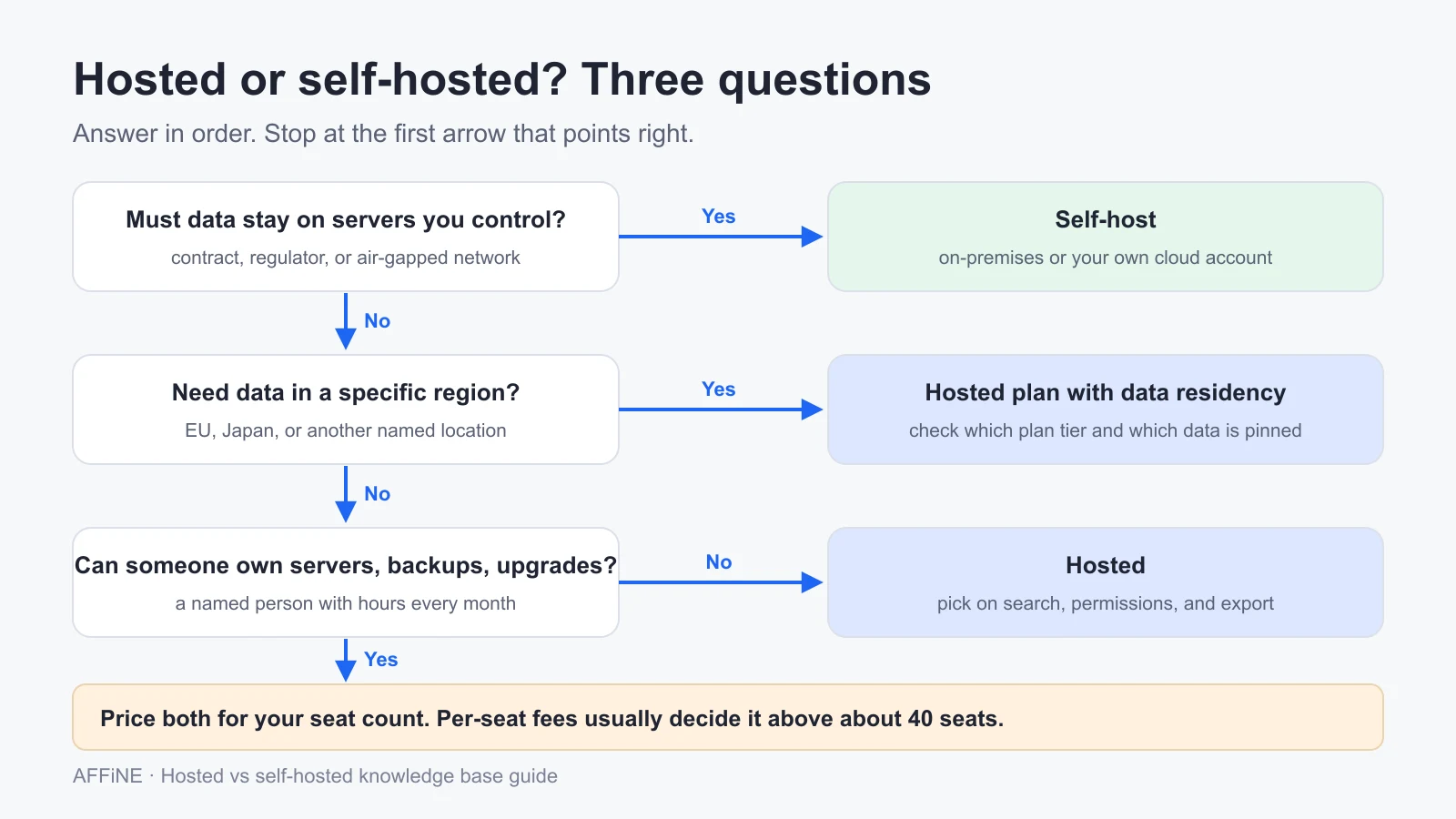
Short answer: A hosted knowledge base is a knowledge base the vendor runs for you: servers, upgrades, backups, and uptime are their job, and writing and organizing content is yours. Choose hosted when nobody on your team can own a server every month, or when a hosted plan already stores data in the region you need. Choose self-hosted when a contract, regulator, or air-gapped network requires the data to stay on infrastructure you control, or when you have more than about 40 seats and someone who already runs databases.
At a glance
- Small team, no one to run servers: hosted. At 25 seats, staff time usually makes self-hosting cost more.
- Data must stay in the EU or another named region: a hosted plan with data residency may be enough. Check which plan tier offers it and which data it covers.
- Data must stay on servers you control: self-host, on-premises or in your own cloud account.
- Large team on per-seat pricing: price both. In our worked example, self-hosting costs less from roughly 40 seats if the software itself has no per-seat license.
- Whatever you pick: test an export of real pages before you sign.
Written by Allen for AFFiNE. AFFiNE sells both a hosted plan (AFFiNE Cloud) and a self-hosted edition, so we have a stake in both answers and no reason to push one. Prices, requirements, and data residency terms were checked on vendor pages on October 31, 2026. The cost model below is an illustration with stated assumptions, not a quote.
What a hosted knowledge base is
A knowledge base is a structured, searchable library of answers, procedures, and reference pages. If you are new to the idea, start with what a knowledge base is and how it differs from a wiki.
"Hosted" describes who runs it. In a hosted knowledge base, the vendor operates the application, the database, file storage, TLS certificates, monitoring, and backups. You sign in through a browser or app and start writing.
Hosting does not move every responsibility to the vendor. Your team still owns:
- The content: who writes, who reviews, and when pages expire.
- Access: who can read and edit each space, and removing people when they leave.
- Your exit: being able to export everything if you switch tools.
- Your own compliance decisions: the vendor's certifications cover the vendor's controls, not how you use the product.
The alternative is a self-hosted knowledge base: you install the software on a server you control and take on the upgrades, backups, and uptime yourself.
Four ways to host a knowledge base
Most teams describe the choice as "cloud or self-hosted." In practice there are four models, and the middle two are where most of the trade-offs sit.
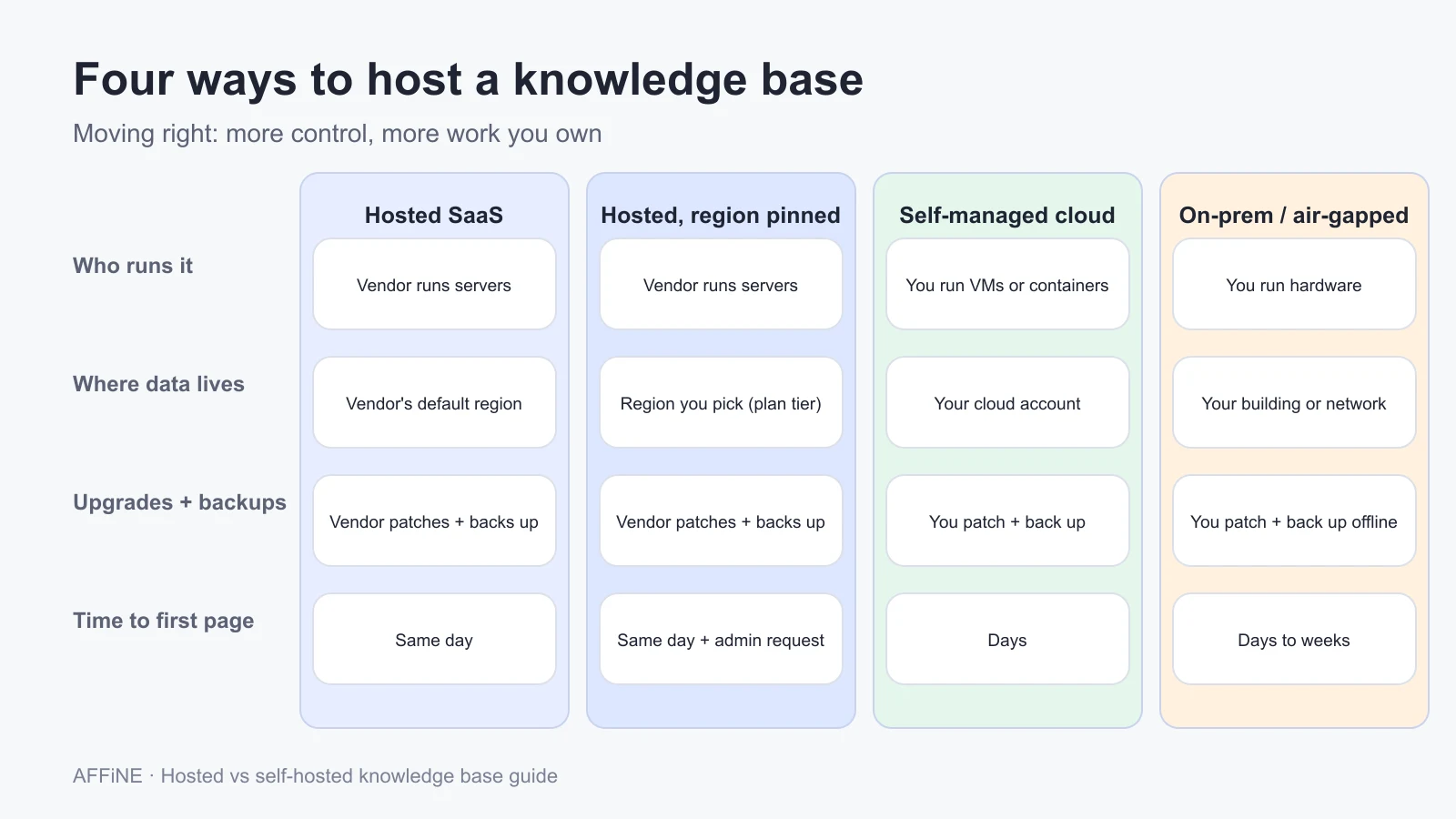
| Model | Who runs the servers | Where data lives | Upgrades and backups | Fits |
|---|---|---|---|---|
| Hosted SaaS | Vendor | Vendor's default region | Vendor | Teams that want to start today with no operations work |
| Hosted with data residency | Vendor | A region you choose, on eligible plans | Vendor | Teams with a location requirement but no server staff |
| Self-managed in your cloud | You, on AWS, Azure, Google Cloud, or a VPS | Your cloud account | You | Teams that need control and already run cloud services |
| On-premises or air-gapped | You, on your own hardware | Your building or private network | You, often offline | Regulated or disconnected environments |
Data residency on a hosted plan is narrower than it sounds. Notion offers it on its Enterprise plan and pins page content, uploaded files, and the search index to the chosen region, while account information and usage data can be stored elsewhere. Atlassian offers data residency for Confluence on Standard, Premium, and Enterprise plans, and sets it per app, not per space. Read the vendor's list of in-scope data before you treat residency as a yes.
When a hosted knowledge base is the better choice
Hosted is the right default when one or more of these is true:
- No one can own the server. Self-hosting needs a named person with time every month for upgrades, backups, and restore tests. If that person does not exist, the server will drift out of date.
- Your team is small. At 25 seats, a hosted plan at $10 per seat per month costs $3,000 a year. Running your own server for the same team costs more once you count staff time (see the cost example below).
- You need to be live this week. A hosted workspace takes minutes to create. A self-hosted deployment needs a server, a domain, TLS, sign-in, and a backup plan first.
- You publish to customers. Hosted help-center tools include public sites, search, and analytics that take real effort to build and run yourself.
- The vendor already offers your region. If the only requirement is "data stays in the EU," a hosted plan with data residency may meet it with far less work.
When self-hosting is worth the work
Self-hosting pays off in narrower cases, but in those cases it is often the only option:
- The data must stay on infrastructure you control. Some contracts, public-sector rules, and internal policies rule out multi-tenant SaaS entirely. Region pinning does not satisfy a requirement about who controls the machine.
- The network is air-gapped or private. If the knowledge base must work with no internet connection, a hosted service cannot reach it.
- You have many seats and the software has no per-seat license. Per-seat fees grow with headcount; a server does not.
- You already run databases. If your team operates Postgres, Redis, and backups for other services, adding one more application is a smaller step.
Self-hosting is not automatically more private or more secure. A self-hosted server in a hyperscaler's region still sits under that provider's legal exposure, and a missed security patch is now your incident. Our guide to data sovereignty covers where those lines fall. For the deployment itself, see self-hosting an enterprise knowledge base and the comparison of open source knowledge base software.
What each option costs per year
Subscription price is the number vendors show, but staff time is usually the bigger cost of self-hosting. Use these two formulas with your own numbers:
- Hosted per year = seats × price per seat per month × 12, plus paid add-ons such as AI or extra storage.
- Self-hosted per year = software license + server + off-server backup storage + (setup hours in year one + admin hours per month × 12) × hourly staff cost.
The worked example below uses round numbers. It is an illustration, not a quote, and it leaves out software license fees. If the self-hosted product charges per seat at a price close to the hosted plan, hosted usually wins.
| Line item | 25 seats | 200 seats |
|---|---|---|
| Hosted plan at $10 per seat per month | $3,000 | $24,000 |
| Server (assumed $40 and $120 per month) | $480 | $1,440 |
| Off-server backup storage (assumed $10 and $30 per month) | $120 | $360 |
| Setup, year one only (16 and 40 hours at $75) | $1,200 | $3,000 |
| Ongoing admin (4 and 10 hours a month at $75) | $3,600 | $9,000 |
| Self-hosted, year one | $5,400 | $13,800 |
| Self-hosted, year two onward | $4,200 | $10,800 |
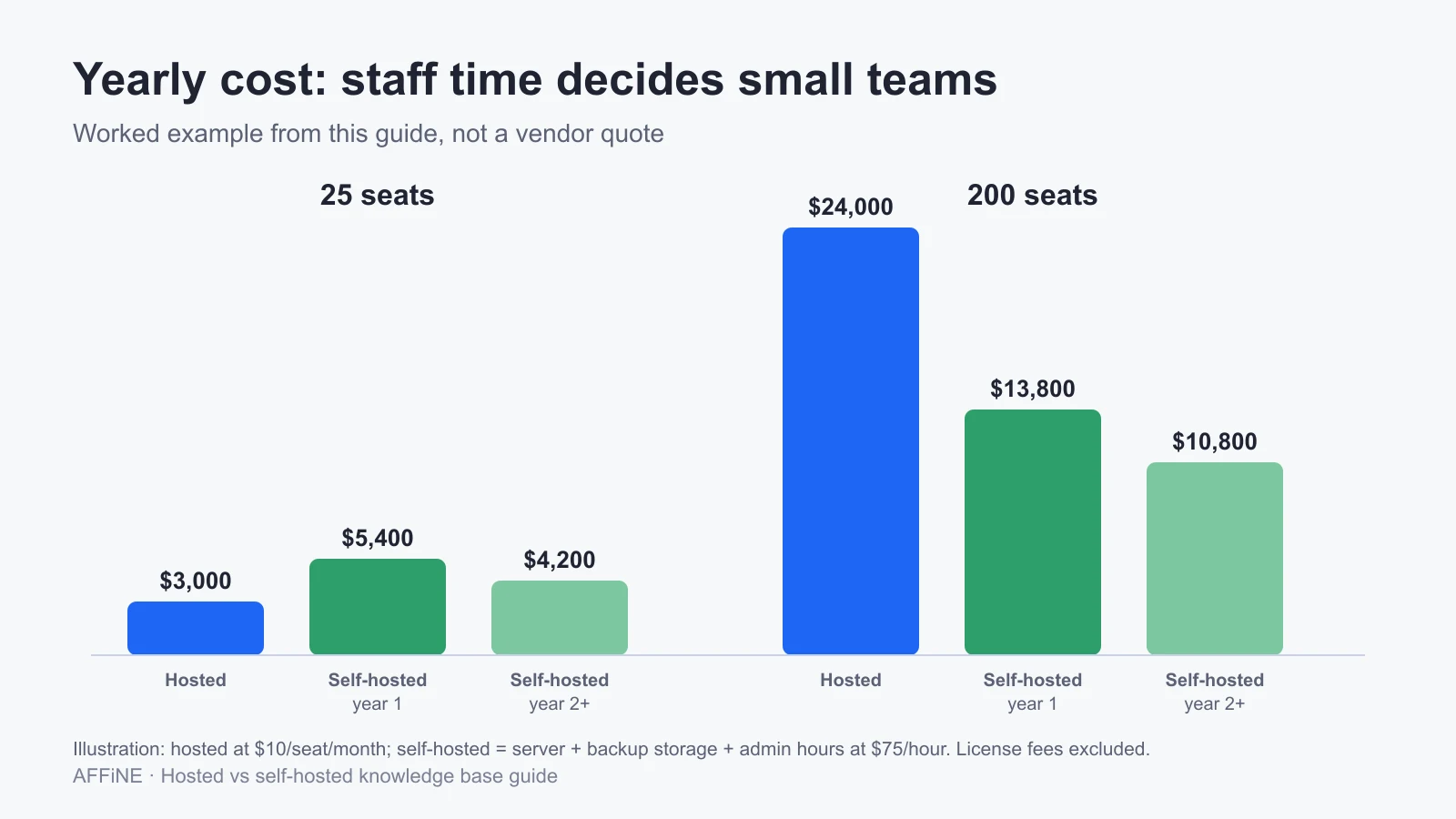
With these assumptions, the self-hosted fixed cost after year one is about $4,200, and each hosted seat costs $120 a year, so the break-even point is roughly 35 to 45 seats. Change the hourly rate or admin hours and the point moves a long way, so run the formula with your own numbers.
For reference, these are list prices we checked on October 31, 2026. Prices change often and depend on billing cycle and team size, so confirm them on the vendor's page:
| Product | Listed price | Notes |
|---|---|---|
| Confluence Cloud | Free for up to 10 users; Standard listed at $5.78 per user per month | Atlassian's per-user price depends on user tier and billing cycle |
| Notion | Plus $10 and Business $20 per seat per month | Data residency is on the Enterprise plan |
| AFFiNE Cloud Team | $10 per seat per month billed annually, $12 monthly | 100 GB initial storage plus 20 GB per seat |
| AFFiNE self-hosted | Free for up to 10 seats per workspace; Self-Hosted Team $10 per seat per month billed annually | You run the servers and backups |
Security and data residency questions to ask a hosted vendor
A security page full of badges does not answer the questions that matter. Ask for these in writing:
- Current attestation reports. Ask for the latest SOC 2 Type II report or ISO 27001 certificate, the date it covers, and which products are in scope. A logo on the website is not a report.
- Which data the region covers. Get the vendor's list of in-scope data. Page content may be pinned while account data, usage data, search, or AI processing are not.
- Sign-in and offboarding. Check whether SSO and automatic deprovisioning are on your plan or only on the top tier, and how fast a removed user loses access.
- Logs. Ask which admin and content events are logged, who can export the logs, and how long they are kept.
- Backups and restore. Ask whether you can restore one deleted page yourself, how far back backups go, and how a full restore is requested.
- Subprocessors and AI. Get the subprocessor list, and ask where AI features send your text and whether that data is used for training. If the answer must be "nowhere outside our network", see how teams run self-hosted AI next to a self-hosted knowledge base.
- Breach notification. Find the notification window in the contract, not just in the marketing page.
If you self-host, the same list becomes your job: you write the access policy, keep the logs, run the backups, and patch the server. Our knowledge base security guide covers those controls.
Plan your exit before you sign
Switching tools gets harder with every page your team publishes and every link people bookmark. Check the way out before you commit:
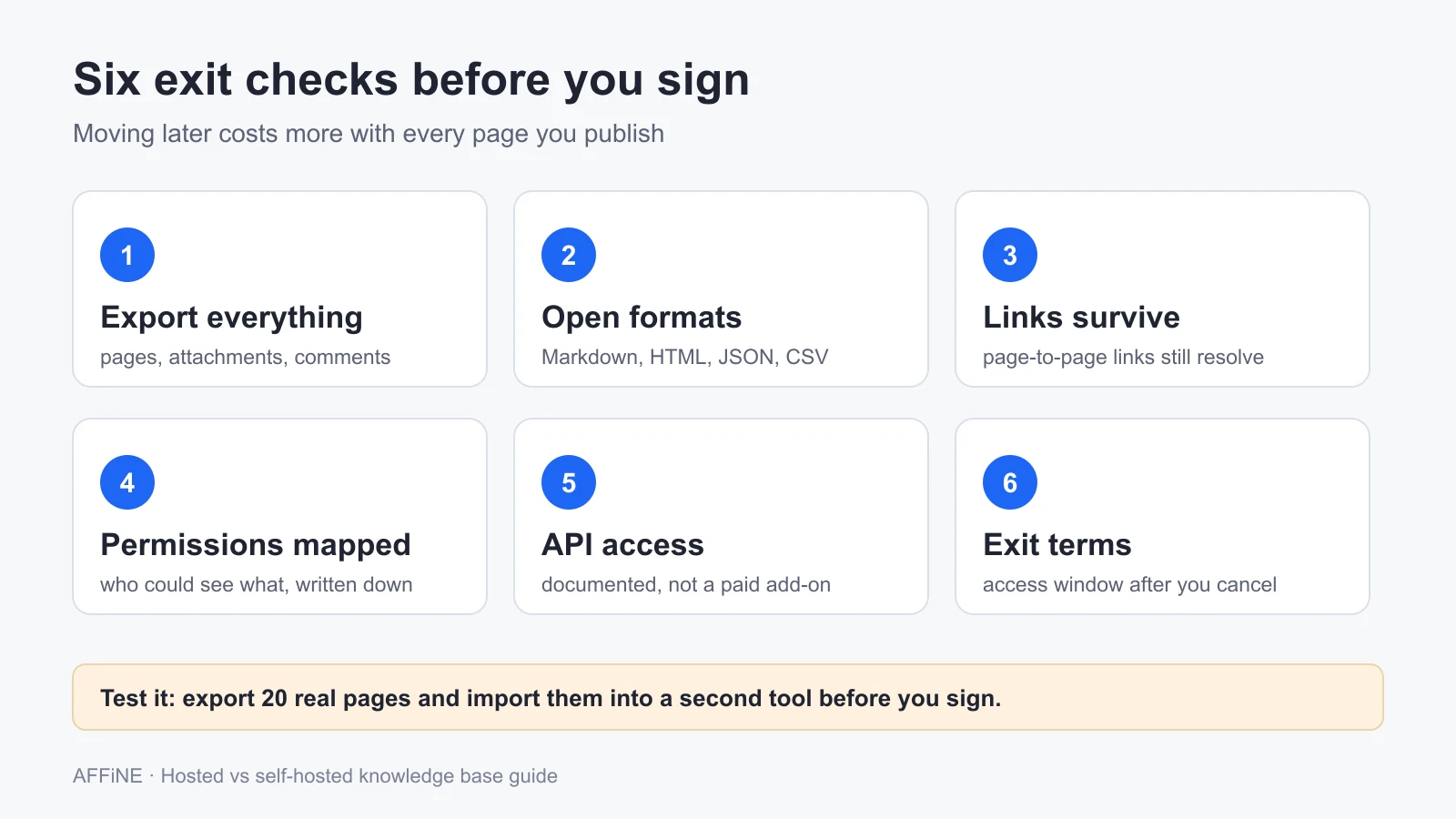
- Export everything. Pages, attachments, comments, and page history if you need it.
- Use open formats. Markdown, HTML, JSON, or CSV that another tool can import without custom work.
- Keep links working. Page-to-page links should still resolve after import.
- Map permissions. Exports rarely include who could see what, so write it down.
- Check the API. It should be documented and available on your plan, not sold as an add-on.
- Read the exit terms. Look for how long you can still access and export data after you cancel.
The fastest test is practical: export 20 real pages with images and tables, import them into a second tool, and count what broke. Choosing knowledge base software covers the wider evaluation, and knowledge base platforms compared lists hosted options side by side.
Where AFFiNE fits, and where it does not
AFFiNE is a workspace for docs, whiteboards, and databases that runs in both models, which is why we wrote this guide.
- Hosted: AFFiNE Cloud runs on AFFiNE's infrastructure with no setup. The Team plan is $10 per seat per month billed annually and includes 100 GB of storage plus 20 GB per seat.
- Self-hosted: the official Docker Compose setup runs AFFiNE with Postgres and Redis. The documentation recommends at least 4 CPU cores and 2 GB of RAM, or 4 GB if some docs exceed 10,000 words, plus about 1.5 GB of disk for installation. Self-hosting is free for up to 10 seats per workspace; larger teams need the Self-Hosted Team plan. See the self-hosted AFFiNE page for the operating model.
- Backups when self-hosted: a complete backup is the Postgres database, uploaded files, and the configuration files. The AFFiNE backup guide recommends restoring into a new, empty database and checking users, workspaces, documents, and uploads before removing old data.
- Sign-in: Google, GitHub, and OIDC, so an identity provider can enforce MFA.
- License: the editor and most client code are MIT-licensed; the server backend is source-available under the AFFiNE EE license.
Because the hosted and self-hosted editions share the same editor, docs, and whiteboard, moving from AFFiNE Cloud to your own server later takes setup work but not a new tool to learn. Test the move with a copy of a real workspace before you depend on it.
Skip AFFiNE today if you need SAML or SCIM provisioning or an official Kubernetes deployment.
It is also the wrong pick if your auditors expect a built-in admin activity log exported from the knowledge base itself, or if you need a public, customer-facing help center with ticket deflection analytics. A dedicated help-center tool fits that job better. For private deployments, see enterprise deployment options.
Run a one-week hosted vs self-hosted test
A week of testing with real content answers more than a month of demos. Shortlist one hosted plan and one self-hosted option, then work through these steps.
Write down the hard requirements
List anything that rules an option out: data location, who must control the servers, sign-in method, offline access, and budget. Mark each one as required or nice to have, and get the required list signed off by whoever owns security or compliance.
Price both options for your seat count
Use the two formulas in this guide with your own seat count, staff hourly cost, and server prices. Include license fees for the self-hosted software and any paid add-ons for the hosted plan, and calculate year one and year two separately.
Load 30 real pages into the hosted trial
Move about 30 real pages with tables, images, attachments, and links between pages. Invite three people with different roles, restrict one page, and confirm that search does not show it to someone without access.
Stand up a self-hosted test server
Deploy the self-hosted option from its official guide on a server that meets the documented requirements. Set up HTTPS and sign-in, import the same 30 pages, and record how many hours the setup took.
Export, restore, and decide
Export everything from the hosted trial and import it into the self-hosted server. Back up the self-hosted server, restore it on a second machine, and open a page with an image. Choose the option that met every hard requirement at the lowest yearly cost.
Frequently asked questions
What is a hosted knowledge base?
A hosted knowledge base is a knowledge base the vendor runs for you on its own servers. The vendor handles infrastructure, upgrades, backups, and uptime, and your team writes, organizes, and controls access to the content through a browser or app.
What is the difference between a hosted and a self-hosted knowledge base?
The difference is who runs the servers. With a hosted knowledge base, the vendor does. With a self-hosted knowledge base, you install the software on servers you control and take on upgrades, backups, security patches, and restore tests yourself.
Is a hosted knowledge base cheaper than self-hosting?
For small teams, usually yes. In our worked example, 25 seats cost $3,000 a year hosted and about $5,400 in year one self-hosted, because staff time dominates. At 200 seats the order flips if the self-hosted software has no per-seat license.
Can a hosted knowledge base keep data in the EU?
Often, but check the plan and the scope. Notion offers data residency on its Enterprise plan, and Atlassian offers it for Confluence on Standard, Premium, and Enterprise plans. Both pin some data categories, not all, so read the vendor's list of in-scope data.
Can I start hosted and move to self-hosted later?
Yes, if the tool exports cleanly. Test an export of real pages with images and links before you commit. Some products, including AFFiNE, offer hosted and self-hosted editions of the same app, which makes a later move easier.
Sources and editorial notes
- Notion, Data residency and Pricing. Accessed October 31, 2026.
- Atlassian, Understand data residency and Confluence pricing. Accessed October 31, 2026.
- AFFiNE, Requirements, OAuth 2.0, Docker Compose, Backup and restore, and Pricing. Accessed October 31, 2026.
How this guide was prepared: Allen wrote and updated this guide for AFFiNE in October 2026 from vendor documentation, pricing pages, and AFFiNE's own product documentation. The cost example uses stated round-number assumptions rather than measured costs, and we did not benchmark any product for it. Prices and plan features change, so confirm them before you buy. AI tools assisted with research and drafting, and the AFFiNE team reviewed and edited the content.
Related Articles
Self-Hosting Your Enterprise Knowledge Base: How Developers Can Deploy Secure SaaS Alternatives on Virtual Servers
Open Source Knowledge Base Software: Tradeoffs Nobody Explains
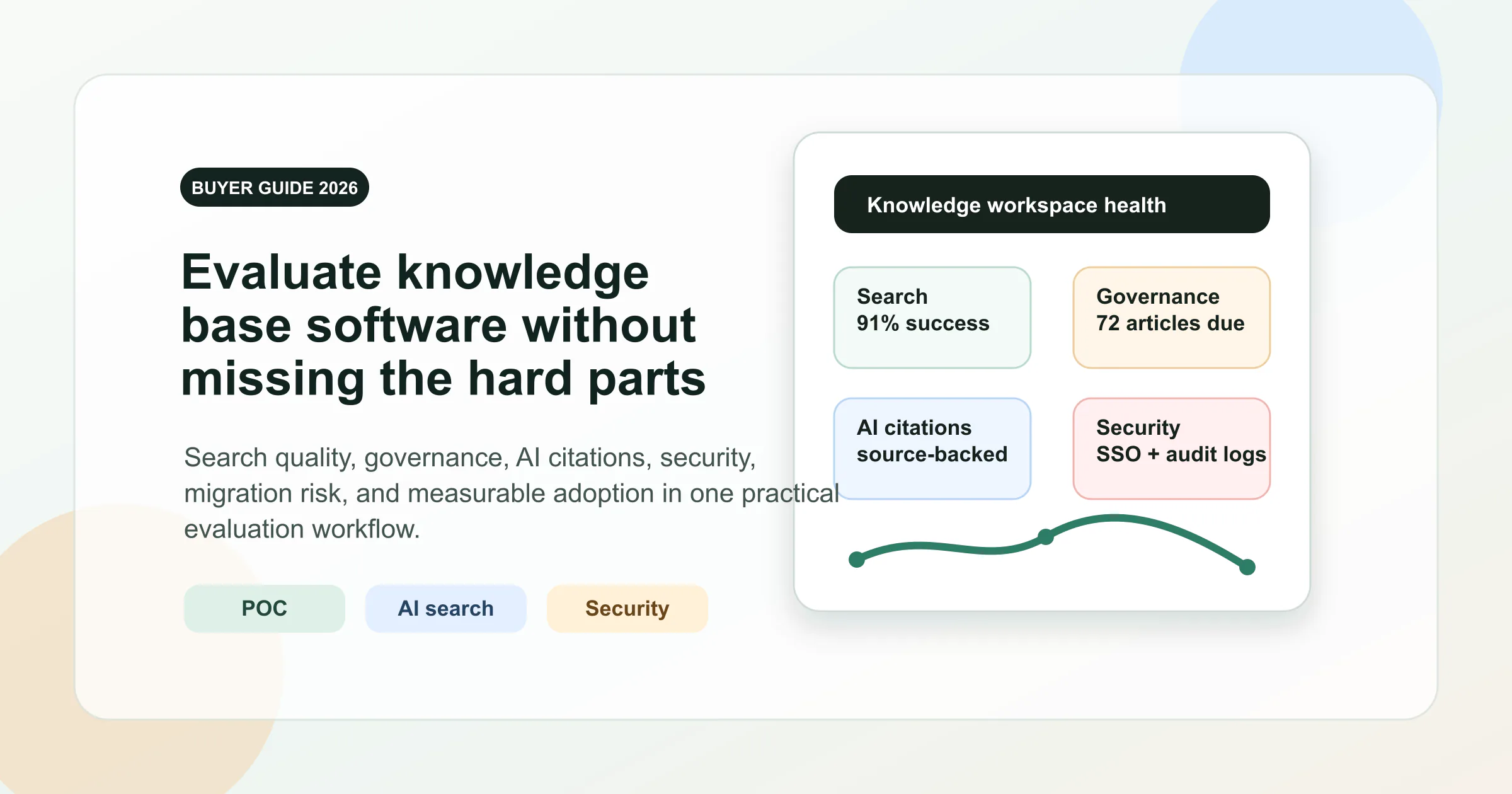
Knowledge Base Software Buyer’s Guide: Evaluate Tools in 2026