Miro vs Lucidchart (2026): Whiteboard or Diagram Tool?
What changed (Nov 14, 2026): Rewrote the comparison: rechecked Miro and Lucidchart prices and free-plan limits on the official pricing pages (yearly and monthly), corrected the user-experience verdict, added Lucidspark, a comparison table, AI, Visio, offline and security sections, a worked example, a 10-person cost table, eight FAQs and sources. Replaced off-topic links and blob images with first-party diagrams and dated pricing screenshots. Retitled the guide.
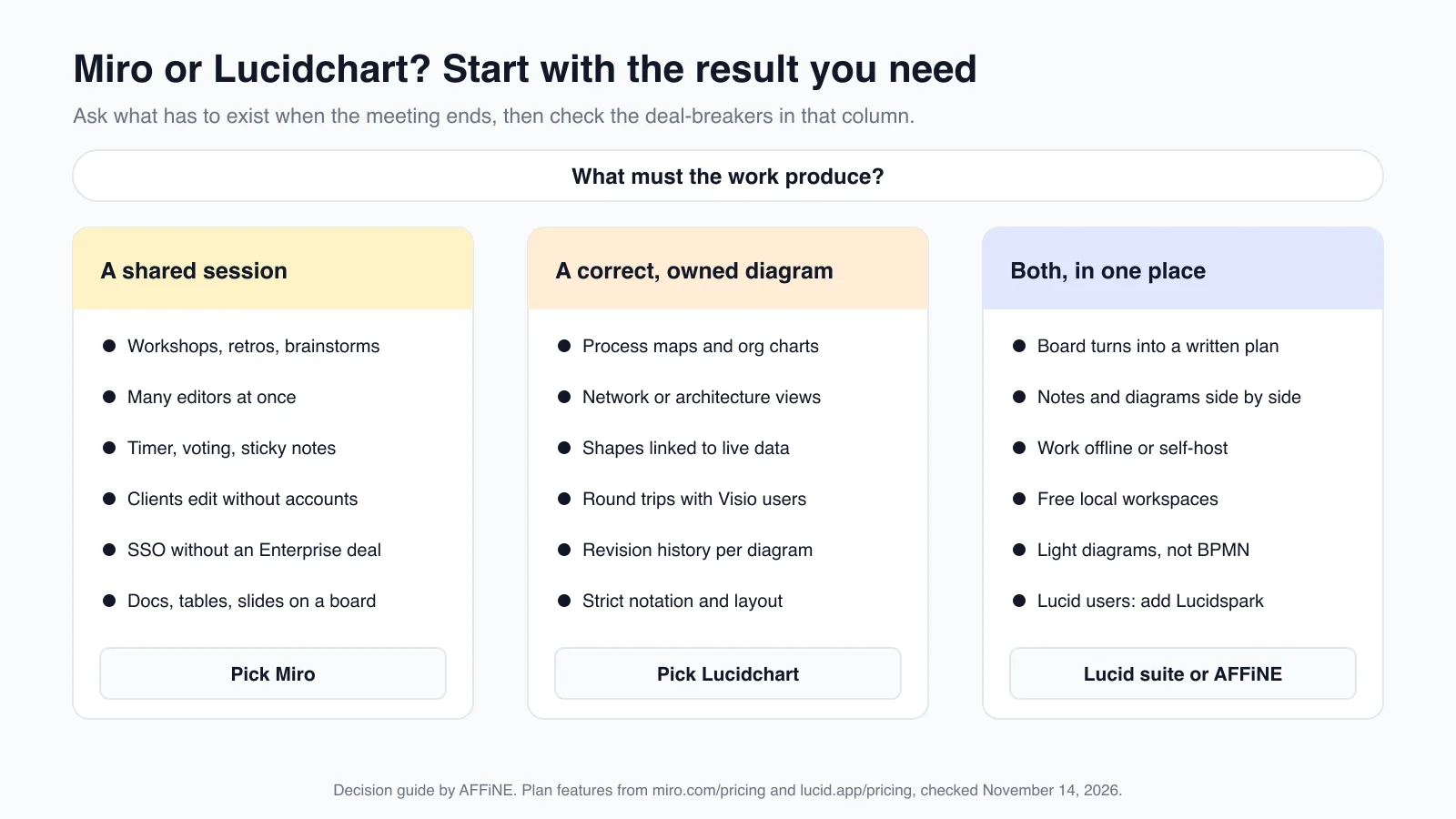
Short answer: pick Miro when the work is a live session: workshops, brainstorms, retros and planning boards where many people add ideas at once. Pick Lucidchart when the result is a diagram that someone has to get right and keep up to date, such as a process map, an org chart, a network diagram or a file you swap with Visio users. Lucid's own whiteboard is a separate product called Lucidspark, so "Lucidchart vs Miro" is really a diagramming app against a whiteboard.
Updated November 14, 2026. We read every price and plan limit below on the official Miro and Lucid pricing and help pages on that date, in both yearly and monthly views where the page offered them. AFFiNE publishes this article and makes a docs-and-whiteboard app that competes with both tools. It gets one short section near the end, including where it falls short.
Miro vs Lucidchart at a glance
| Miro | Lucidchart | |
|---|---|---|
| Built for | Online whiteboard for workshops and team planning, with diagramming added | Diagramming app for precise diagrams that teams maintain |
| Free plan | Unlimited boards, but only the 3 most recent stay editable | 3 editable documents, 75 shapes per document, 100 templates |
| Cheapest paid plan | Starter: $8 per member/month billed yearly, $10 billed monthly | Individual: $9/month billed yearly, for one person |
| Team plan | Business: $20 per member/month billed yearly, $25 billed monthly | Team: $10 per user/month billed yearly |
| Whiteboarding | The core product | Separate product (Lucidspark); bundled on Enterprise |
| Technical diagrams | Basic shapes on Free and Starter; 4,700+ shapes (Mermaid, UML, AWS, BPMN) and custom shapes on Business | Premium shape libraries and unlimited objects on paid plans |
| Data | Data tables on Business | Basic data linking on Free; advanced data and automation on Enterprise |
| Visio files | Import from Starter; VSDX export only on Enterprise | Import and export on Individual and above |
| Workshop tools | Timer, voting and private mode from Starter | Basic Visual Activities on Free, premium on paid plans |
| AI | 25 AI credits per member/month on Starter, 50 on Business; MCP connections to tools like Claude, Cursor and Copilot | Lucid AI on every plan, including Free |
| SSO | SSO on Business; enforced SSO on Enterprise | SAML only on Enterprise |
| Offline | No offline mode | Offline editing of recently opened documents in a desktop browser |
| Trial | 14-day Business trial | 7-day trial; card required, then bills automatically |
US dollars before tax, from miro.com/pricing and lucid.app/pricing on November 14, 2026. Prices change often, so check the linked pages before you buy.
The real difference: one room or one diagram
Miro is an infinite board where a team thinks out loud. Its Free plan includes more than 7,000 templates, Docs, Tables, Timelines, Kanban and Slides on the canvas, and 250+ integrations. Paid plans add the tools a facilitator needs: timers, voting, private mode and visitors who can edit a shared board without signing in. The output of a good Miro session is a shared understanding, plus a board that holds the conversation that produced it.
Lucidchart is a diagramming app where a person or a small team builds one diagram carefully. It gives you shape libraries for specific notations, layout and alignment tools, shapes linked to data, revision history on Team, and Visio import and export. The output is a single diagram that stays correct after the meeting, such as the approved refund process or the current network map, and that someone owns.
Both products have grown toward each other. Miro Business now includes technical shape packs and custom shapes, and Lucid sells Lucidspark for brainstorming, with both apps bundled on Enterprise. Still, each tool is best at its original job, and most teams that use both split the work this way.
Where Miro is stronger
- Running a workshop. Timer, voting, private mode and facilitation controls come with Starter. Business adds Engage activities such as polls and 2x2 matrices for up to 50 participants.
- Working with people outside the company. On Starter, visitors can edit a shared board without signing in. Business adds signed-in guests and unlimited workspaces for separate clients.
- Starting fast. More than 7,000 Miro and community templates cover retros, journey maps, story maps and planning boards.
- Everything on one canvas. Docs, Tables, Timelines, Kanban and Slides sit next to sticky notes, so a plan does not have to leave the board.
- SSO without an Enterprise contract. Miro includes SSO on Business. Lucidchart keeps SAML for Enterprise.
- AI that connects outward. Miro AI generates diagrams, tables and summaries from board content, and every plan includes a daily allowance of MCP calls (100 on Free, 500 on Starter, 2,000 on Business) for connecting AI tools.
The weak spot is the opposite of its strength: big shared boards collect old ideas and side discussions, and nobody owns the diagram in the corner. If that diagram matters, someone has to move it somewhere it will be maintained.
Where Lucidchart is stronger
- Precision and notation. Paid plans unlock premium shape libraries and unlimited objects per document. The Free plan stops at 75 shapes per document, which is enough to test the editor but not for a real process map.
- Diagrams that use data. Lucid says you can link process steps to real data, use formulas with custom data fields, and import and refresh org charts from BambooHR, Google Sheets or CSV files. Basic data linking is on Free; advanced data and automation is on Enterprise.
- Visio round trips. Lucidchart's paid plans import .vsdx, .vsd and .vdx files and export VSDX or VDX. Miro imports Visio from Starter, but VSDX export is Enterprise only.
- Technical integrations. Lucid lists ERD import and export from SQL, plus LeanIX, Salesforce and ServiceNow integrations. Team adds Microsoft 365, Confluence, Jira, LeanIX and Ardoq; Salesforce is an Enterprise feature.
- Change tracking. Team includes revision history with versioning, which matters when a diagram is the documented process.
- Offline work. Lucid's offline editing works on every plan for documents you opened before you went offline, in Chrome, Firefox or Edge. Miro's system requirements say it has no offline mode.
One caution when you read vendor comparisons: Lucid's Miro comparison page says Miro does not support custom shapes, but Miro's pricing page now lists custom shapes on Business. Each vendor's page argues for its own product, so check claims against the other vendor's pricing and help pages.
Worked example: one refund process, two jobs
Here is a typical case, made up for illustration. A support team wants to change how refunds are approved. Agents say approvals are slow, nobody knows who signs off, and requests get lost in email.
Step 1: agree on the change (Miro's job). Eight people from support, finance and product join a 45-minute call. The facilitator opens a board with two frames, Pain points and Ideas, starts a timer, and gives everyone three votes. Ideas such as "auto-approve small refunds" and "finance owns the rule" collect the most dots. Miro handles this well: everyone edits at once, the votes are visible, and the board keeps the reasons behind the decision.
Step 2: document the approved process (Lucidchart's job). Finance draws the new process as a swimlane diagram with three lanes: customer, support and finance. Refunds over $200 go to finance; smaller ones are issued by the agent. The $200 threshold comes from a linked sheet, so the diagram stays correct when finance changes the number. Revision history shows who changed what, and the diagram can be exported for auditors who use Visio.
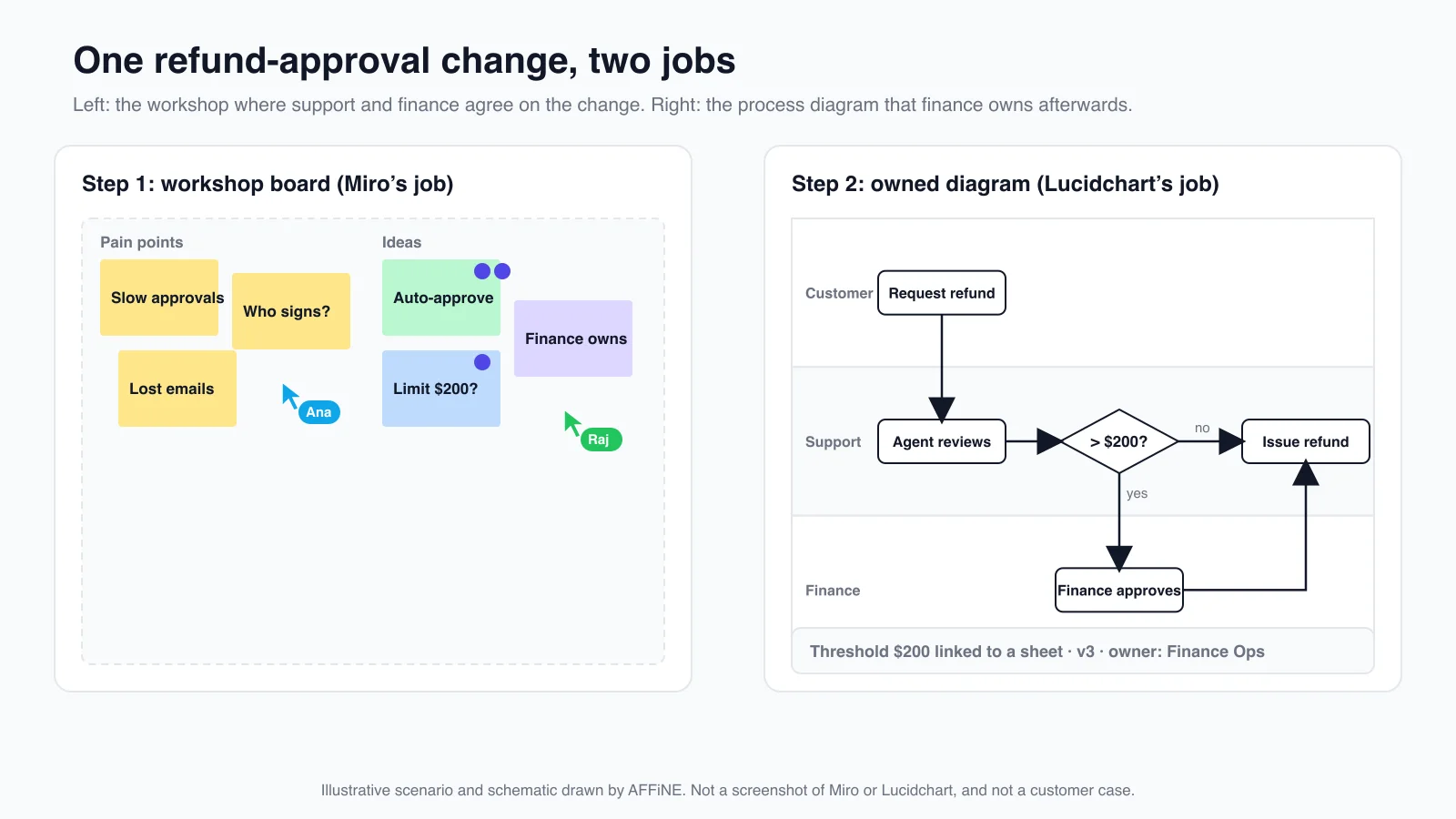
You can do both steps in either tool. Miro Business can draw the swimlane, and Lucidspark can run the workshop. The question is where each artifact will live and who maintains it. If you buy only one tool, buy the one that matches the artifact your team has to keep.
Miro vs Lucidchart pricing in 2026
| Plan | Miro | Lucidchart |
|---|---|---|
| Free | $0: unlimited boards, 3 most recent editable | $0: 3 editable documents, 75 shapes each, 100 templates |
| Entry plan | Starter: $8 per member/month yearly ($10 monthly) | Individual: $9/month yearly, one user |
| Team plan | Business: $20 per member/month yearly ($25 monthly) | Team: $10 per user/month yearly |
| Enterprise | Custom, from 30 members | Contact sales; includes Lucidspark |
| Trial | 14 days of Business | 7 days; card required, then bills automatically |
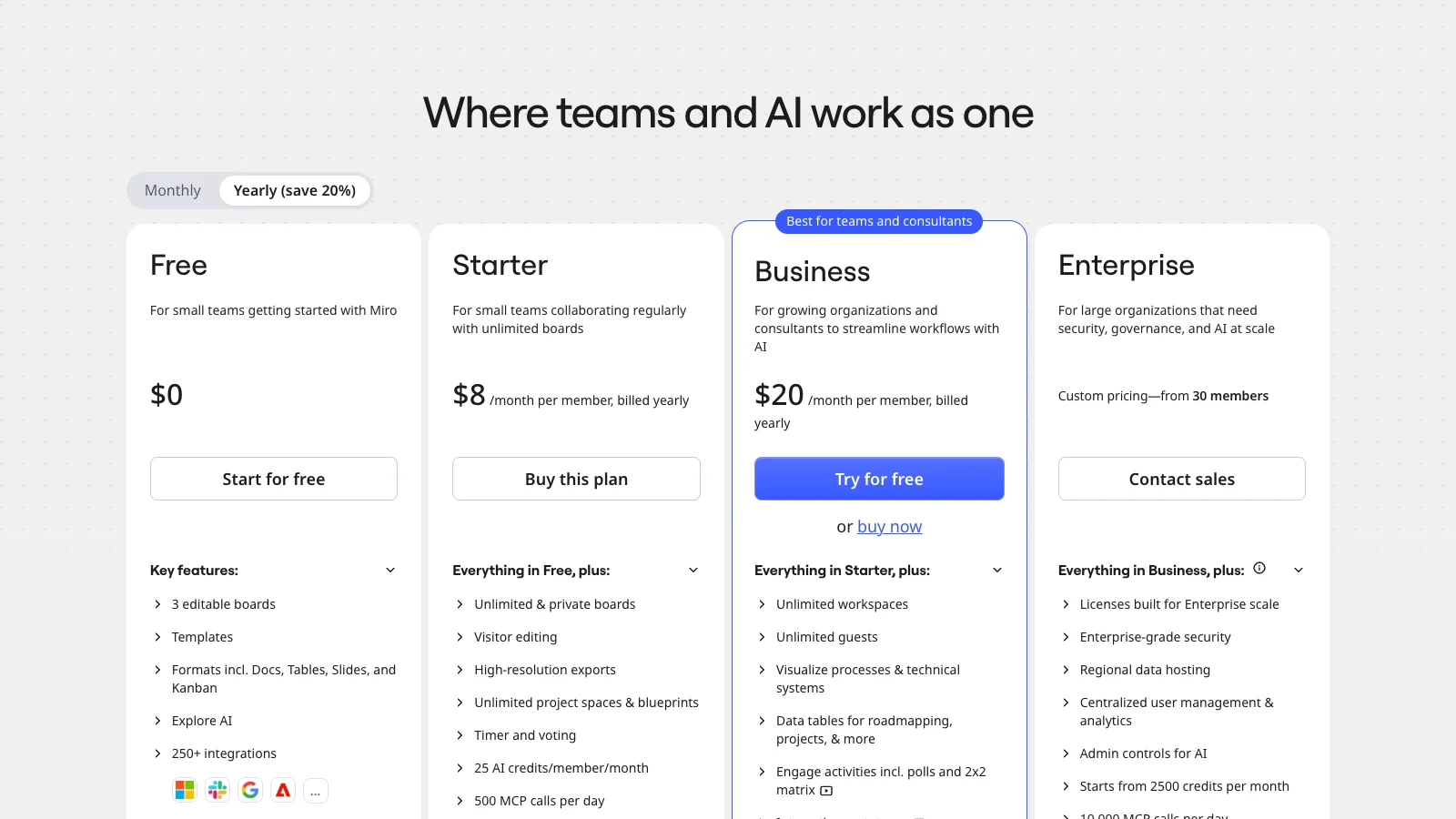
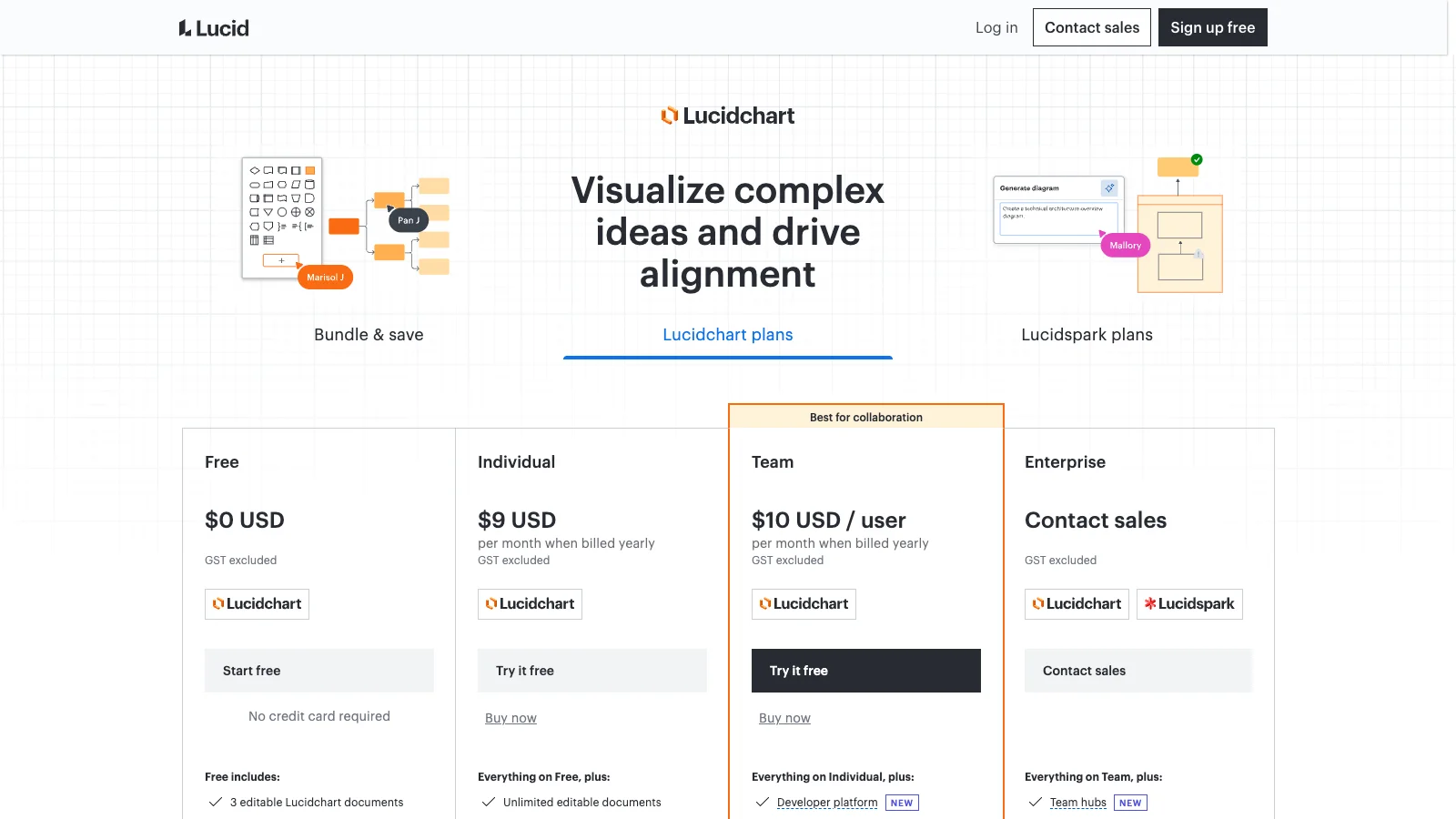
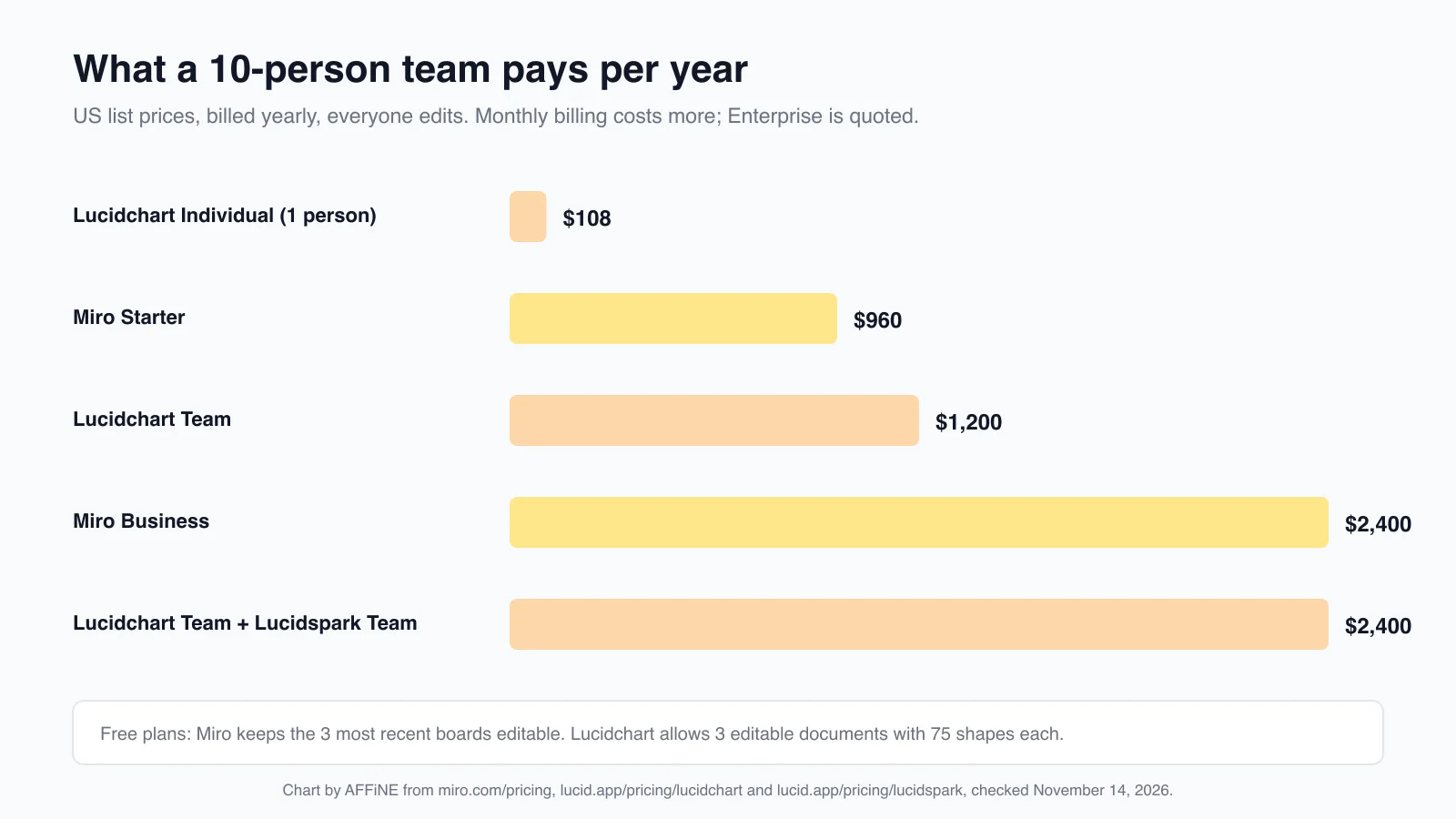
For a 10-person team where everyone edits, list prices billed yearly work out as follows:
| Option | Calculation | Per year |
|---|---|---|
| Miro Starter | $8 × 10 members × 12 months | $960 |
| Lucidchart Team | $10 × 10 users × 12 months | $1,200 |
| Miro Business | $20 × 10 members × 12 months | $2,400 |
| Lucidchart Team + Lucidspark Team | ($10 + $10) × 10 users × 12 months | $2,400 |
Three things change the real cost:
- Who counts as a member. Miro charges for every member added to a Starter or Business workspace. If many people only view or comment, check how Miro counts visitors and guests before you size the plan.
- What you need from IT. If your company requires SSO, Miro Business is the cheaper route. On Lucid, SAML needs an Enterprise quote.
- Whether you need both jobs. If your team needs a whiteboard and a diagramming tool, compare Miro Business with Lucidchart plus Lucidspark, or ask Lucid for an Enterprise quote, which bundles both.
AI features compared
Miro AI generates diagrams, tables and summaries, removes image backgrounds, and on Business runs AI workflows and agents. It uses monthly credits: 25 per member on Starter and 50 per member on Business, which Miro says is about 12 document summaries or 5 diagrams a month on Starter. Credits pool across the organization. MCP connections let tools such as Claude, Cursor or Copilot read and write board content, including Mermaid diagrams.
Lucid AI is on every Lucidchart plan, including Free. You type a prompt to generate a diagram, and Lucid can auto-generate a sequence diagram from text that you can then edit. Lucid's pricing page notes that its AI features are available to all users today but may move to a paid model later.
If AI is a deciding factor, run the same prompt in both free plans with a process you know well. The useful test is how much cleanup the generated diagram needs, not how fast it appears.
Security and admin
Miro's pricing page lists ISO/IEC 27001, SOC 2 Type II, SOC 3 and GDPR. SSO comes with Business. Enterprise adds SSO enforcement, audit trails, domain control, user provisioning and data residency in the EU, US, Australia or Japan.
Lucid puts SAML authentication, enforceable sharing restrictions and Enterprise Shield (extra data protection and access controls) on Enterprise. If you need SSO for a small team, compare Miro Business with a Lucid Enterprise quote before you decide on features alone.
Which should you choose? By team
- Engineering and IT: Lucidchart for network, architecture and ER diagrams that need notation, SQL import or Visio exchange. If your team keeps diagrams as code in a repository, see our software architecture diagram guide first.
- Product and design: Miro for discovery, story mapping and workshops. If your designers already live in Figma, compare Miro vs FigJam.
- Consultants and facilitators: Miro, because visitors can edit on Starter and Business adds guests and separate workspaces per client.
- Operations, HR and finance: Lucidchart for process maps and org charts that should follow a spreadsheet or HR system.
- Solo users: Lucidchart Individual ($9 a month, billed yearly) if you mainly draw diagrams; Miro Starter ($8 a month, billed yearly) if you mainly run boards with clients.
- Teams that need both: many companies keep Miro for workshops and Lucidchart for documented processes. That works if each diagram has a clear home.
Other options worth a look
- Lucidspark: if you already pay for Lucidchart and want a whiteboard that hands off to it. Its Free plan has 3 editable boards.
- FigJam: for product teams that work in Figma. See our Miro vs FigJam comparison.
- draw.io: free diagramming without an account that also opens .vsdx files. Our Microsoft Visio alternatives guide covers it with other Visio-compatible tools.
- More whiteboards: our Miro alternatives guide compares ten options by free plan, offline use and self-hosting. For diagramming tools, see the flowchart software comparison.
Where AFFiNE fits. AFFiNE puts docs and an Edgeless whiteboard in the same workspace, so the workshop board and the written plan sit side by side. Local workspaces are free and work offline in the desktop app. AFFiNE Cloud Free allows up to 3 members per workspace, Pro costs $6.75 a month billed yearly, and self-hosting is free for up to 10 seats per workspace. It is not a Lucidchart replacement if you depend on .vsdx files, data-linked shapes, BPMN validation or large cloud icon libraries; AFFiNE has none of those.
For specific diagram types, see our guides to the free online flowchart maker, ER diagram tools, UML sequence diagrams and data flow diagram makers. If you are new to Miro, start with what a Miro board is and how to set one up.
Frequently Asked Questions About Miro vs Lucidchart
Is Miro or Lucidchart better?
Miro is better for live collaboration such as workshops, brainstorming and planning boards. Lucidchart is better for precise diagrams that someone maintains, such as process maps, org charts and technical diagrams. Choose by the artifact your team has to keep after the meeting.
Can Miro replace Lucidchart?
For simple flowcharts and occasional diagrams, yes. Miro Business adds 4,700+ technical shapes and custom shapes. Lucidchart is still stronger for data-linked diagrams, revision history and two-way Visio files, because Miro exports VSDX only on Enterprise.
Does Lucidchart include Lucidspark?
Not on Free, Individual or Team. Lucidspark is a separate whiteboard product with its own plans. Lucidchart Enterprise includes Lucidspark.
Which is cheaper, Miro or Lucidchart?
For one person, Miro Starter costs $8 a month and Lucidchart Individual $9 a month, both billed yearly. For a 10-person team, Miro Starter costs $960 a year and Lucidchart Team $1,200 a year. Miro Business costs $2,400 a year, the same as Lucidchart Team plus Lucidspark Team.
Which free plan is more generous?
It depends on the work. Miro Free lets you create unlimited boards, but only the 3 most recent stay editable. Lucidchart Free allows 3 editable documents with up to 75 shapes each, which is tight for real process maps.
Can Miro open Lucidchart or Visio files?
Miro imports Visio files from Starter, and its pricing page lists Visio and Lucidchart import on Starter. Exporting to VSDX requires Miro Enterprise. Lucidchart imports and exports Visio files on Individual and above.
Do Miro and Lucidchart work offline?
Lucidchart lets you keep editing documents you opened before you went offline, in Chrome, Firefox or Edge, on every plan. Miro has no offline mode.
Do I need both Miro and Lucidchart?
Many teams use both: Miro for workshops and Lucidchart for documented processes. If you can only buy one, pick Miro when most of your work is collaborative sessions and Lucidchart when most of it is diagrams that must stay accurate.
Sources and how we compared
All pages were checked on November 14, 2026:
- Miro: Pricing (yearly and monthly views), AI credits, System requirements, Import Visio diagrams, Export diagrams to Visio, Miro vs Lucidchart
- Lucid: Lucidchart pricing, Lucidspark pricing, Edit offline in Lucid, Import files into Lucidchart, Export a Lucid document, Lucidchart vs Miro, Lucidchart product page
- AFFiNE: Pricing, Self-hosting
How we compared: we read both vendors' pricing pages in yearly and monthly views and their help centers, and took the pricing screenshots in a browser without signing in. We did not buy paid plans, so plan features come from the vendors' own pages rather than our own testing. Where the two vendors' comparison pages disagree, we say so and rely on the vendor's own pricing page for its own product. The refund example is illustrative, not a customer case, and the diagrams in this article are schematics drawn by AFFiNE, not screenshots of either product.