Free To-Do List & Task List Templates (PDF + Word)
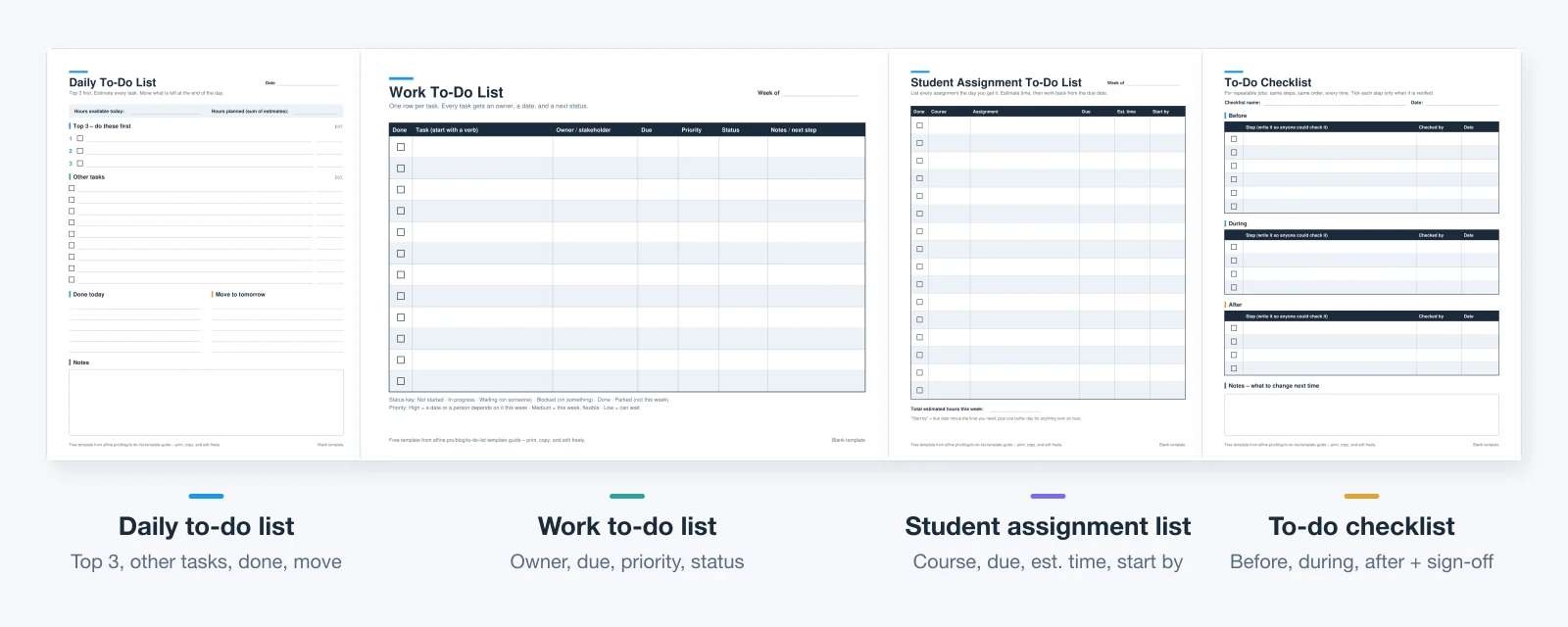
A to-do list template is a ready-made page of checkboxes and columns for the tasks you plan to finish. Download four free ones below: daily, work, student assignment, and checklist. Each comes as a printable PDF (US Letter and A4) and an editable Word file that also opens in Google Docs, with a filled example beside the blank.
Start here: download all four templates as one ZIP (13 files, about 170 KB), or pick a single file from the table below. You do not need an account, and none of the files contain macros.
Updated September 30, 2026. The person, tasks, and dates in the filled examples are fictional. Every file was generated for this guide and read back before publishing; see the notes at the end.
Jump to: downloads · which template · the four templates · PDF, Word, Excel, or app · six steps · copy-paste examples · when a list is not enough · FAQs
Download the free to-do list templates
| Template | Best for | Printable PDF | Editable Word |
|---|---|---|---|
| Daily to-do list | One person's day: Top 3, other tasks, done, move | Letter · A4 | DOCX |
| Work to-do list | Tasks with an owner, due date, priority, and status | Letter · A4 | DOCX |
| Student assignment list | Course, assignment, due date, estimated time | Letter · A4 | DOCX |
| To-do checklist | Repeatable jobs checked step by step | Letter · A4 | DOCX |
Each PDF is one page: the blank template, ready to print at 100% or Actual size. The work list is landscape; the other three are portrait. Each DOCX has two pages: the editable blank on page 1 and a filled example on page 2, which you can delete. If you want to see all four examples before choosing, open the filled examples PDF.
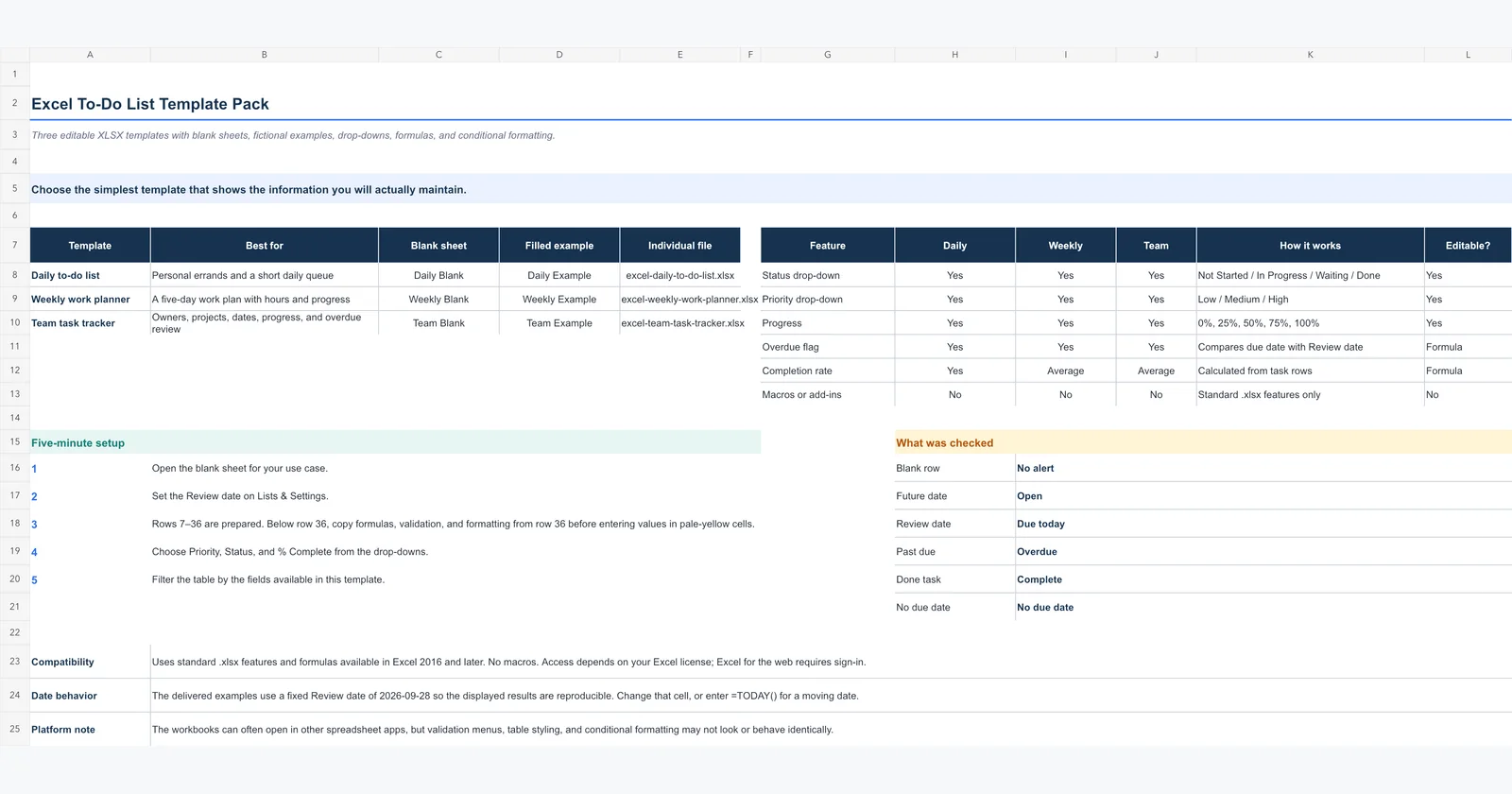
Need a spreadsheet instead? This page covers printable and Word templates. For sortable columns, drop-downs, progress bars, and overdue flags, use the three XLSX workbooks in our Excel to-do list templates guide. They open in Excel and Google Sheets, and we did not duplicate them here.
Which to-do list template should you use?
Choose by who else touches the list and whether the steps repeat. A template with more columns only helps if you keep those columns current.
| Your situation | Use this template | Why it fits |
|---|---|---|
| You plan one day at a time for yourself | Daily to-do list | Forces a Top 3 and a time budget, and gives unfinished tasks a place to go |
| Your tasks depend on colleagues, clients, or reviewers | Work to-do list | Owner, due date, and status show who is waiting on whom |
| You juggle classes, readings, and exams | Student assignment list | The "start by" column turns due dates into start dates |
| You repeat the same job: a launch, a send, a move-out | To-do checklist | Same steps in the same order, ticked only when verified |
| You want to sort, filter, or total hours | An Excel or Google Sheets file | Spreadsheets do the arithmetic; see the Excel guide above |
Personal and work tasks: one list or two?
Keep one daily list if your work tasks and errands compete for the same hours, which they usually do. Keep a separate work list when other people need to see it, or when work items carry fields that personal tasks do not need, such as owner and status. A common split is a shared work list for the week plus a private daily sheet you copy the day's work tasks onto.
Students: why the start date matters more than the due date
A due date tells you when an assignment stops being possible, not when to begin it. The student template asks for an estimated time and then a "start by" date: the due date, minus the time you need, minus one buffer day for anything over an hour. Readings, problem sets, and papers then sit on one list, so you can see a heavy week coming before Sunday night.
The four templates, field by field
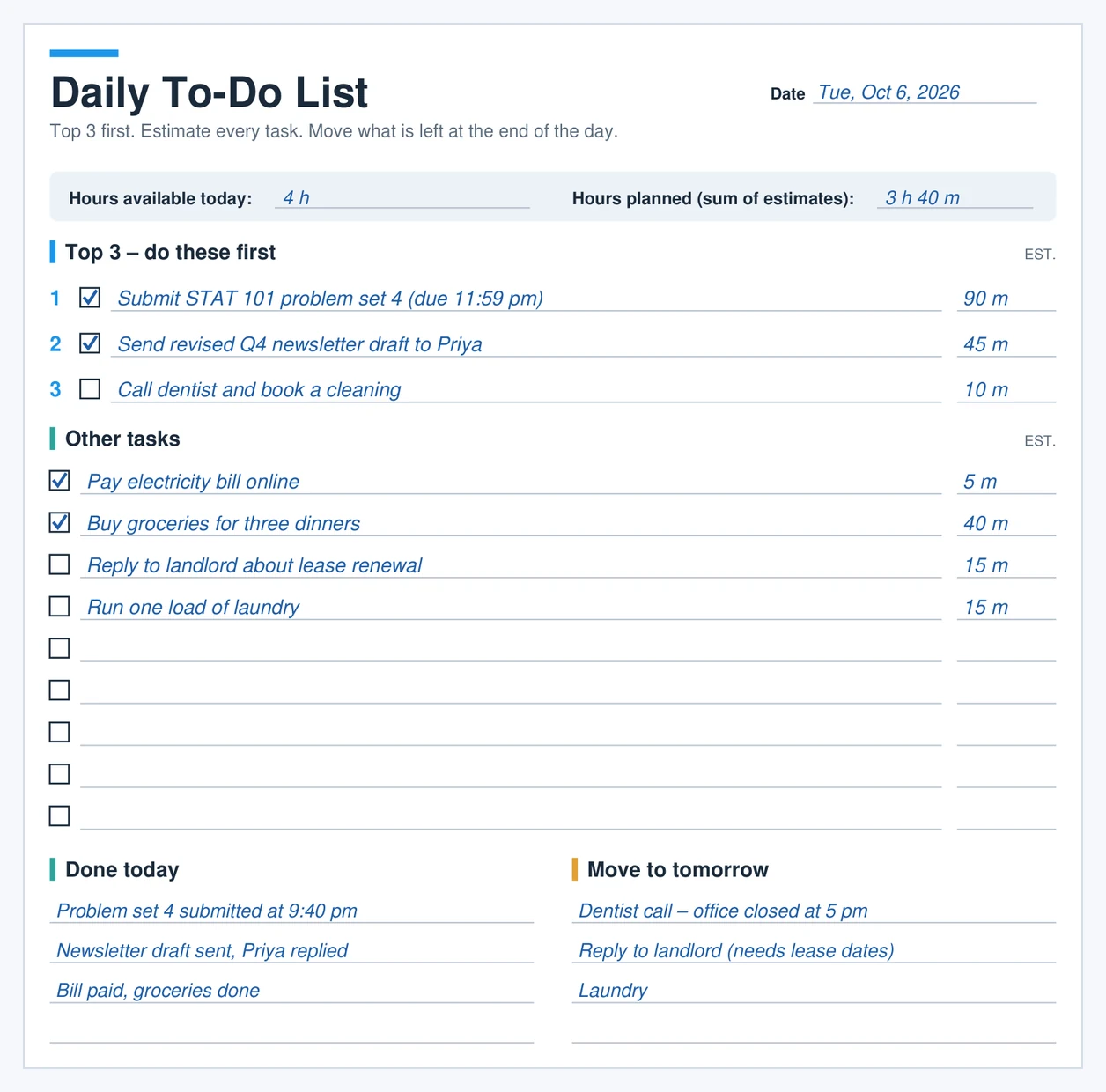
All four filled examples follow one fictional person, Jordan Rivera. Jordan is a marketing coordinator who also takes two evening classes, and the examples cover the week of October 5, 2026. The same tasks appear across the templates, so the numbers agree: the problem set on the daily list is the first row on the student list, and the newsletter on the work list gets its own checklist.
1. Daily to-do list template
The daily template has four blocks, and each one exists to stop a specific failure:
- Hours available and hours planned. You write the time you actually have, then add up the estimates. If the plan is longer than the day, you cut before you start, not at 9 pm.
- Top 3. These are the three tasks that would make the day count even if nothing else got done. They go first, in order.
- Other tasks. Nine lines, each with an estimate. The cap is deliberate: if a task does not fit here, it belongs on a weekly or master list.
- Done today and Move to tomorrow. The closing ritual. Anything unfinished is moved on purpose, with a reason, instead of silently carried forward.
2. Work to-do list template
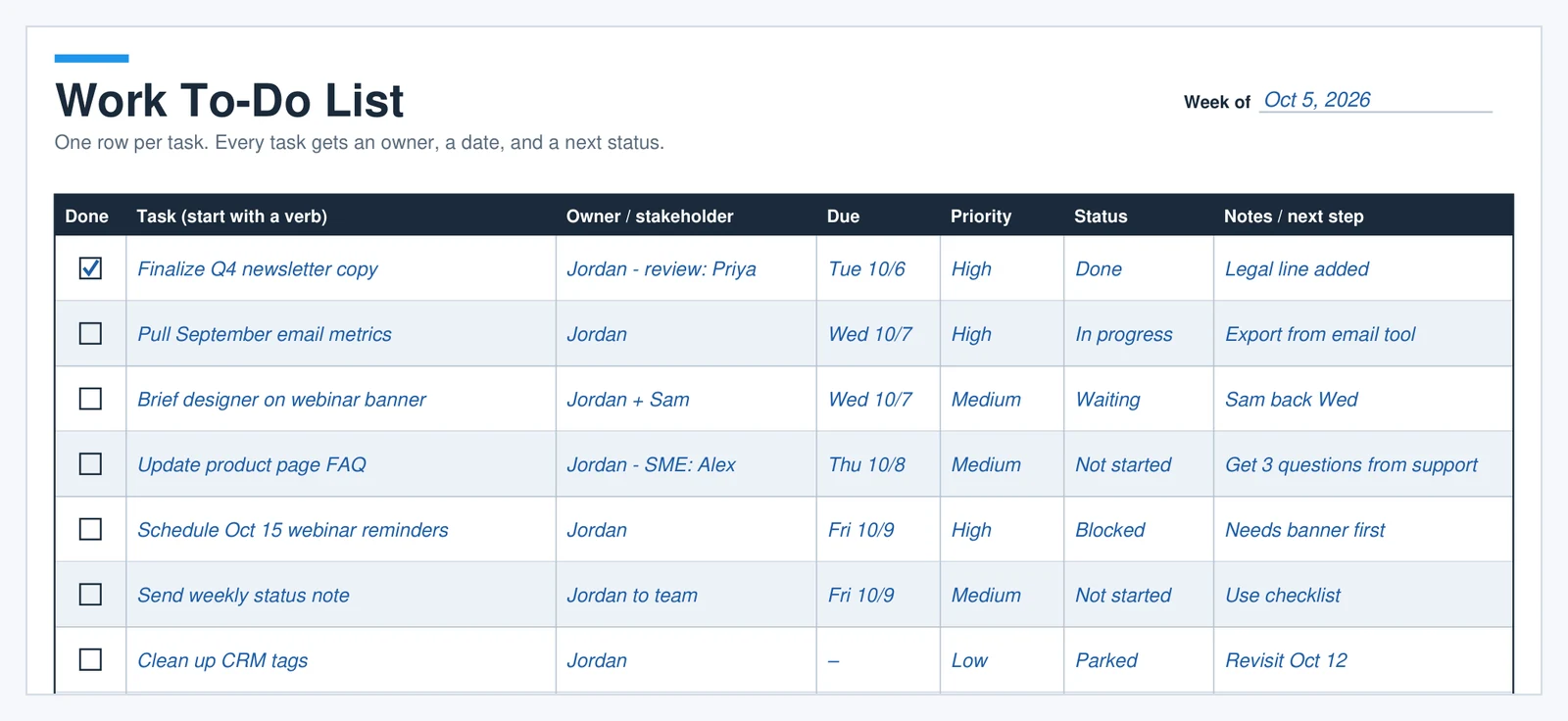
This is the template for the "work to-do list" search: one row per task, with seven columns. Task starts with a verb. Owner / stakeholder names who does it and who reviews it. Due, Priority, and Status follow, then Notes / next step, which is where most of the value is. Status uses six fixed words, printed at the bottom of the page, so a glance tells you where each item stands:
- Not started and In progress describe your own work.
- Waiting means a person owes you something; Blocked means a thing (a file, an approval, another task) is missing.
- Done is finished, and Parked is deliberately not this week.
3. Student assignment to-do list
The student template lists course, assignment, due date, estimated time, and start-by date for up to 16 items, with a weekly total at the bottom. In Jordan's example, five assignments across two courses add up to 6 h 15 m for the week. That number is the useful one: if the total is more than your free evenings, you know on Monday, not on Thursday.
4. To-do checklist template
A to-do list collects different tasks; a checklist repeats the same steps. The checklist template splits a job into Before, During, and After, with a "checked by" and date column for each step and a notes box for what to change next time. Jordan's example is a monthly newsletter send: six checks before sending, the scheduling step, and three follow-ups the next day. Write each step so that someone else could verify it. "Every link clicked and working" is checkable; "review links" is not.
Printable, Word, Excel, or an app?
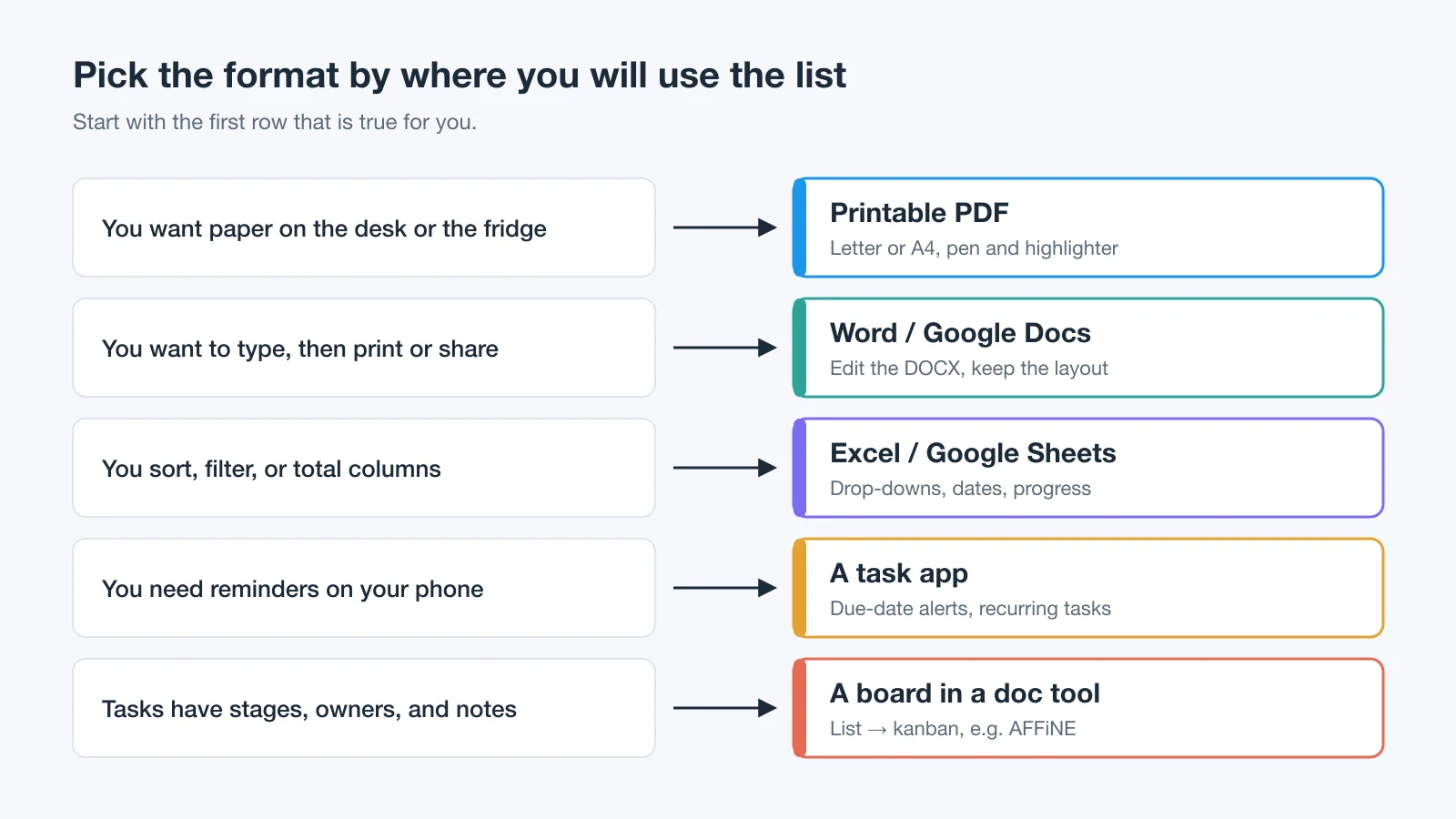
The best format is the one you will actually look at when you decide what to do next. Many people use two: a master list in a digital tool and a printed daily sheet on the desk.
| Format | Good for | Weak at |
|---|---|---|
| Printable PDF | Focus, handwriting, and seeing the whole day at once on the desk | Changes, sharing, and reminders |
| Word or Google Docs (DOCX) | Typing, then printing or sharing a clean copy | Sorting, totals, and status tracking |
| Excel or Google Sheets | Filtering, sorting, totals, and overdue flags | Quick capture on a phone |
| A task app | Reminders, recurring tasks, and capture from anywhere | Seeing context, notes, and the bigger plan |
| A doc tool with boards (for example AFFiNE) | Tasks with notes, stages, and more than one view | Printing a one-page daily sheet |
To use the Word files in Google Docs, upload the DOCX to Google Drive and open it with Google Docs; Google's help page on working with Office files describes the options. We built the tables with fixed column widths so the layout holds when another editor opens the file. On A4 paper, use the A4 PDFs; the DOCX files are set to US Letter, so choose Fit to page or change the paper size before printing.
How to make a to-do list you actually finish
A template gives you the boxes. These six steps are how the templates above are meant to be filled in, and each one is visible in Jordan's examples.
1. Capture everything on one master list
Write every open task in one place before you plan the day, including the vague ones. A daily list is a selection from the master list, not the master list itself. There is a research reason for this step: in Masicampo and Baumeister (2011), unfinished goals kept intruding on participants' attention in unrelated tasks, and making a specific plan for those goals removed the interference.
2. Pick a Top 3 before anything else
Choose the three tasks that would make today worthwhile, and do them first. If everything feels urgent, sort the master list with an Eisenhower matrix before you pick.
3. Start every task with a verb
Rewrite each item as the next physical action, starting with a verb. "Newsletter" becomes "Send revised Q4 newsletter draft to Priya". A task you can picture yourself starting is easier to start than a topic.
4. Estimate time and compare it with the hours you have
Put a time estimate beside each task, add them up, and compare the total with the hours you actually have today. Leave slack: in the planning fallacy research by Buehler, Griffin, and Ross (1994), people underestimated how long their own tasks would take. Jordan planned 3 h 40 m against 4 h and still moved three tasks. If a day is regularly over budget, block the time on a calendar with a time-blocking template.
5. Give hard tasks a when and a where
For the task you are most likely to avoid, write down when and where you will do it. For example: "After dinner at 8 pm, at the kitchen table, I will finish problem set 4." This kind of if-then plan is called an implementation intention. A meta-analysis of 94 independent tests by Gollwitzer and Sheeran (2006) found a medium-to-large positive effect on goal attainment (d = .65).
6. Close the day: move, drop, or schedule what is left
At the end of the day, give every unfinished task a decision: move it to tomorrow, put a date on it, or cross it out. Doing this in writing can also help at bedtime. In a small sleep-lab study, Scullin and colleagues (2018) randomly assigned 57 young adults to write for five minutes before bed. Those who wrote a to-do list fell asleep significantly faster than those who wrote about tasks they had already completed, and more specific lists went with faster sleep onset.
Copy-and-paste to-do list examples
Paste these into any template, notes app, or doc and replace the details. The - [ ] lines are Markdown checkboxes. When we pasted the work example into a new AFFiNE doc, each line became a checkbox item; other Markdown-aware editors may convert them too, and plain-text editors will simply show the brackets.
Personal daily list
Date: ________   Hours available: ____   Planned: ____
Top 3
- [ ] (Most important task, starts with a verb)   __ m
- [ ] (Second)                                     __ m
- [ ] (Third)                                      __ m
Other
- [ ] Pay one bill online                          5 m
- [ ] Buy groceries for three dinners              40 m
- [ ] Reply to one message you have been avoiding  15 m
Move to tomorrow:
Work to-do list for the week
Week of ________
- [ ] Finalize (deliverable) - owner: me, reviewer: ____ - due ____ - High
- [ ] Pull (report or metric) - due ____ - In progress
- [ ] Brief (person) on (request) - due ____ - Waiting on ____
- [ ] Schedule (follow-up) - due ____ - Blocked by ____
- [ ] Send weekly status note - due Fri
- [ ] (Nice-to-have) - Parked until ____
Student assignment list
Week of ________   Total estimated hours: ____
- [ ] COURSE - Problem set (chapter __) - due ____ - 1 h 30 m - start by ____
- [ ] COURSE - Essay outline + thesis - due ____ - 1 h - start by ____
- [ ] COURSE - Read chapter __, pp. __ - due ____ - 1 h - start by ____
- [ ] COURSE - Study for quiz __ - due ____ - 2 h - start by ____
Household weekly checklist
Before the weekend
- [ ] Check the fridge and write the grocery list
- [ ] Put bills due this week on the calendar
Saturday
- [ ] Laundry: wash, dry, and put away
- [ ] Clean the bathroom and the kitchen counters
- [ ] Take out recycling
Sunday evening
- [ ] Plan three dinners
- [ ] Write next week's Top 3 on the daily sheet
For recurring household jobs such as chores and cleaning, a checklist beats a to-do list: the steps rarely change, so you reprint the same page instead of rewriting it. Our free chore chart templates include five printable charts sized by age for exactly this.
When a to-do list is not enough
A flat list works while one person owns the tasks and each task has one step. Switch to a board or a tracker when you see these signs:
- Tasks wait on other people. "Waiting" and "Blocked" start filling the status column.
- Tasks have stages. Drafted, reviewed, and scheduled are different states, not one checkbox.
- More than one person updates the list. Paper and a private doc stop being the source of truth.
- You need history. You want to see when something moved, not only that it is done.
For a visual board, start with our kanban board templates or compare free Kanban board tools. For milestones, risks, and weekly updates across a project, use the project tracker template. If your problem is that the list itself is a jumble of errands and deep work, try grouping it first with daily to-do list categories.
Turning a to-do list into a board in AFFiNE
Disclosure: AFFiNE publishes this blog. We tested this path on September 30, 2026 in a local AFFiNE workspace at app.affine.pro, without signing in. The browser warns that a local workspace is stored only in that browser. We pasted Jordan's seven work tasks as Markdown checkboxes, and each became a to-do block. We then selected the blocks and used the toolbar's convert-to-database action, which turned the list into a table with one row per task. Adding a Kanban View created a status field with Todo, In Progress, and Done groups; we typed Waiting and Parked as new options and set each card's status. The add-view menu also offered a Calendar View.
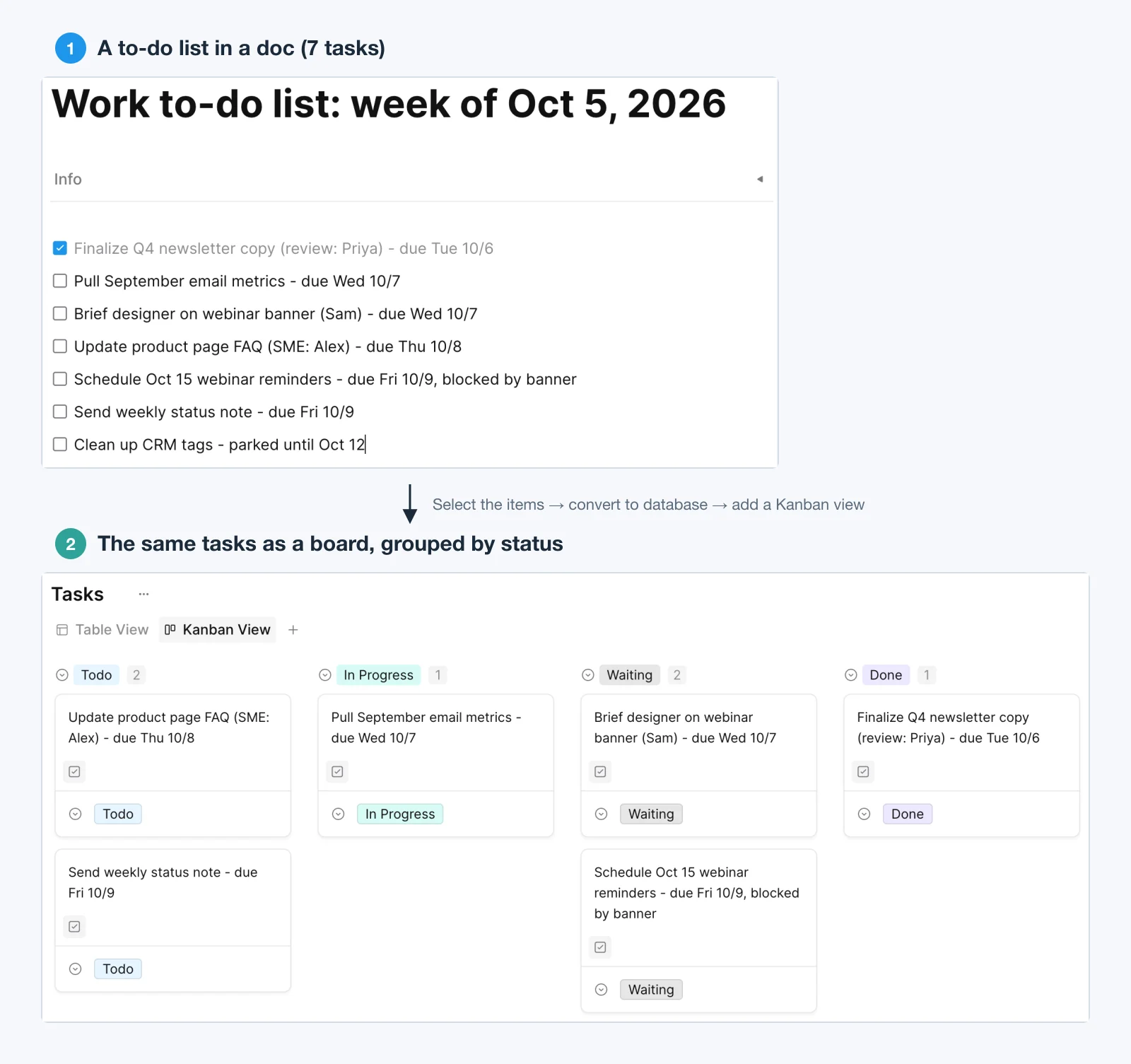
That makes AFFiNE a fit for the last row of the format table: tasks with notes, stages, and more than one view. It is not a replacement for a printed daily sheet or for a task app's phone reminders. If you want a starting point, use the AFFiNE checklist template or the weekly schedule and to-do list template.
To-do list template FAQs
Does Google have a to-do list template?
Yes, in Google Sheets. When we checked the template gallery on September 30, 2026, Google Sheets listed a "To-do list" template under Personal. The Google Docs gallery had no to-do list template, but Docs can add a checklist from the toolbar or from Format, then Bullets and numbering. For reminders, Google Tasks works inside Gmail, Calendar, and Drive. You can also upload the Word templates on this page to Google Drive and open them in Google Docs.
How do I create a simple to-do list in Excel?
Make a table with columns for task, priority, status, and due date, add drop-down lists for priority and status, and sort by due date. Our Excel to-do list templates guide includes three ready-made XLSX workbooks (daily, weekly work, and team) with a blank sheet and a filled example in each.
What should a to-do list template include?
At minimum: a date, a checkbox and a line for each task, and somewhere to put unfinished tasks. Good templates add a short priority section such as a Top 3, a time estimate per task, and, for work lists, an owner, a due date, and a status. Skip columns you will not keep up to date.
What is the difference between a to-do list and a checklist?
A to-do list holds different tasks that change every day or week. A checklist holds the same steps for a job you repeat, such as sending a newsletter or packing for a trip, and it is used to verify that nothing was skipped. Use the to-do checklist template for repeatable jobs and the daily or work template for everything else.
Can I print these templates on A4 paper?
Yes. Every template has a separate A4 PDF as well as a US Letter PDF. Print at 100% or Actual size. The Word files are set to US Letter, so change the paper size to A4 or choose Fit to page before printing them.
How many tasks should a daily to-do list have?
There is no magic number. Pick three tasks that must happen, then add other tasks only until their estimated times fill the hours you actually have. The daily template has space for three priority tasks and nine others, which is a ceiling, not a target.
Is it better to use a paper or a digital to-do list?
Paper is better for focus and for seeing the whole day at a glance; digital is better for reminders, sharing, and lists that change often. Many people keep a digital master list and print a daily sheet each morning. Try both for a week and keep the one you actually check.
Sources and editorial notes
This page was substantially rewritten on September 30, 2026. The earlier version compared five apps and offered no template files. It was rebuilt around the downloadable templates people search for, and it now absorbs the still-useful sections of our older to-do list template articles (personal versus work lists, student lists, and printable versus digital).
How the files were made and checked. The PDFs were generated with ReportLab using the built-in Helvetica font, so they embed no third-party fonts. The DOCX files were generated with python-docx, with fixed table layouts. We read every file back: each PDF was checked for page count, paper size, and orientation, and each blank was checked to contain no example text. The DOCX files were converted back to PDF with LibreOffice (two pages each: blank, then example) and previewed with macOS Quick Look. We did not test them in Microsoft Word for this update. The filled examples were checked for internal consistency: the daily estimates sum to 3 h 40 m, and the student estimates sum to 6 h 15 m.
Images. The hero and the template previews are rendered from the PDFs in the download pack. The format chart is an original diagram. The AFFiNE images are unedited crops of screenshots taken during the test described above.
Sources, accessed September 30, 2026:
- Google Sheets and Google Docs template galleries, checked while signed in to a Google Workspace account (gallery contents can vary by account type and region).
- Google Docs Editors Help: Add a numbered list, bulleted list, or checklist.
- Google Tasks Help: Learn about Google Tasks.
- Google Docs Editors Help: Work with Office files.
- Masicampo, E. J., and Baumeister, R. F. (2011). Consider it done! Plan making can eliminate the cognitive effects of unfulfilled goals. Journal of Personality and Social Psychology, 101(4), 667–683. doi:10.1037/a0024192
- Buehler, R., Griffin, D., and Ross, M. (1994). Exploring the "planning fallacy": Why people underestimate their task completion times. Journal of Personality and Social Psychology, 67(3), 366–381. doi:10.1037/0022-3514.67.3.366
- Gollwitzer, P. M., and Sheeran, P. (2006). Implementation intentions and goal achievement: A meta-analysis of effects and processes. Advances in Experimental Social Psychology, 38, 69–119. doi:10.1016/S0065-2601(06)38002-1
- Scullin, M. K., Krueger, M. L., Ballard, H. K., Pruett, N., and Bliwise, D. L. (2018). The effects of bedtime writing on difficulty falling asleep: A polysomnographic study comparing to-do lists and completed activity lists. Journal of Experimental Psychology: General, 147(1), 139–146. doi:10.1037/xge0000374
All DOIs were checked against Crossref. The research findings are summarized from the published abstracts. They show average effects in specific study groups, and they do not guarantee that any single template will work for you.
Limits. These are general-purpose templates. They do not replace a project management tool for teams that need dependencies, workloads, or permissions, and the AFFiNE test covers only the steps described above.